
Business school laptops live a different life from dorm-room machines. Between case-study PDFs, Excel models with dozens of tabs, video calls with study groups, and a recruiting season full of presentations, a laptop here is a daily work tool rather than a media player. The decision is less about raw power and more about memory, storage, and comfort over long sessions, because a spreadsheet-heavy workload punishes small RAM faster than anything else.
This guide is for MBA and undergraduate business students who want one portable machine for lectures, group projects, and interview prep. The listings below range from entry-level Windows machines to better-equipped ones, and the spec sheet shows clear differences in memory and storage. Judgments are based on the listed specs only, so treat these as shortlists and double-check the configuration before checkout.
Our Top Picks
 ASUS Vivobook 14" FHD Laptop for Student Businessi5|16GB RAM|512GB SSD20 x 10.8 x 0.96 Inches7 PoundsCheck on Amazon


Top 3 picks at a glance
Quick Picks
As an Amazon Associate we earn from qualifying purchases at no extra cost to you.



| Product | Best for | Key spec from the title |
|---|---|---|
| HP 17 Business Laptop | Spreadsheet-heavy work on a big screen | Ryzen 5, 16GB RAM, 512GB SSD, 17.3″ FHD |
| HP 15.6 Laptop (N200) | Light note-taking | Intel N200, 4GB RAM, 128GB SSD |
| NAIKLULU 15.6 Laptop | Memory on a lean setup | 16GB RAM, 256GB SSD, Win 11 Pro |
| HP 14 Student Business Laptop | Portable Office tasks | Win 11 Pro, 4GB DDR5 RAM |
| Phatom 15.6 FHD Laptop | Upgrade-friendly entry | Upgradeable RAM and SSD, 4GB/128GB |
| ASUS Vivobook 14 | All-round study machine | i5-1334U, 16GB RAM, 512GB SSD |
| Lenovo Business 15.6 | Connectivity and glare control | 8GB DDR5, WiFi 6, USB-C, anti-glare |
| HP Stream 14 | Cloud-first note taking | N150, 4GB RAM, 1TB cloud storage |
How to Choose
Memory comes before processor
For Excel models, browser tabs, and video calls running together, 16GB of RAM is a comfortable target in 2026. 8GB is workable for lighter coursework, and 4GB is a real constraint once a few apps and a dozen tabs are open. Several listings here pair modest processors with 4GB, so the memory figure is the first place a budget model cuts corners.
Storage and cloud tradeoffs
A 256GB SSD is the practical floor for course files, software, and the operating system, while 512GB leaves room for a semester of PDFs and recordings. Cloud storage bundled with a laptop can help, but it is not a replacement for local space if you work offline on flights or in a library with weak wireless coverage.
Screen size and portability
A 14-inch screen is easier to carry between classes, while a 15.6-inch or 17.3-inch panel gives more room for side-by-side spreadsheets. Full HD at 1920 by 1080 is the resolution to look for; the lower HD panels on some listings leave less space for documents. Anti-glare coatings help in bright lecture halls.
Ports, connectivity, and software
USB-C, HDMI, and modern wireless standards matter for projectors and docking at group study rooms. WiFi 6 is better than WiFi 5 in crowded campus buildings. Check the operating system edition too: a Windows S mode setup can block some software, so confirm that your required programs will install before choosing it.
The 8 Best Options
HP 17 Business Laptop
This is the heaviest-duty option on paper. The listing names an AMD Ryzen 5 processor, 16GB of RAM, a 512GB SSD, a 17.3-inch Full HD display, and a numeric keypad. It suits students who build financial models and want the screen space, and who mostly work at a desk or library table rather than carrying the machine across campus all day.
- Strength: 16GB RAM and 512GB SSD handle spreadsheet-heavy study.
- Strength: the numeric keypad speeds up data entry for finance work.
- Trade-off: a 17.3-inch chassis is less pocket-friendly than a 14-inch laptop.
Skip it if you commute by bus or bike and carry the laptop in a small bag every day. Students who move between several buildings between classes will feel the size and weight of a large-screen machine long before they appreciate the extra desktop space.
HP 15.6 Laptop (N200)
An entry-level machine with an Intel four-core N200, 4GB of RAM, and a 128GB SSD, running Windows 11 Home in S mode. The listing emphasizes long battery life and portability for business basics. It suits students who mainly type notes and browse, and who want a low-effort laptop for the lecture hall.
- Strength: long battery life is part of the listing.
- Strength: a simple, light-duty setup for notes and browsing.
- Trade-off: 4GB of RAM and S mode limit heavy spreadsheet work and software choice.
Skip it if you plan to run large Excel models or install software beyond the Microsoft Store. Finance and analytics tracks that rely on add-ins and statistical packages will hit the S mode and memory limits within the first term.
NAIKLULU 15.6 Laptop
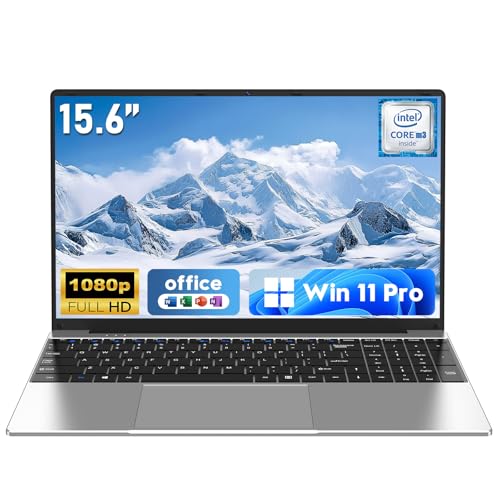
This listing leads with 16GB of RAM, a 256GB SSD, Windows 11 Pro, and a Full HD 1920 by 1080 display, with WiFi 5 and Bluetooth 4.2. The memory is generous for the category, which suits a student who wants multitasking headroom. The processor named in the title is an M3-6Y30, an older low-power part, so buyers should weigh that.
- Strength: 16GB of RAM supports many tabs and documents at once.
- Strength: Windows 11 Pro and a Full HD screen are listed.
- Trade-off: the older processor and WiFi 5 and Bluetooth 4.2 are dated.
Skip it if you need modern wireless standards or sustained processing power. Students who lean on crowded campus networks or run heavier analysis tools may find the older platform frustrating despite the generous memory.
HP 14 Student Business Laptop
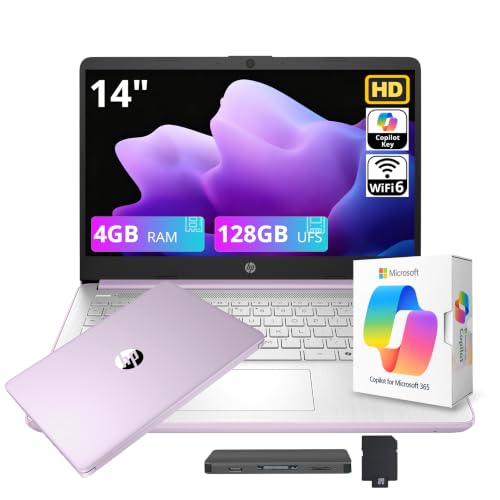
A 14-inch laptop with an Intel four-core CPU, 4GB of DDR5 RAM, Windows 11 Pro, and Microsoft Office listed, with Copilot features and a storage figure that includes a 128GB portion. It targets students who want a compact machine already set up for documents. The smaller screen makes it easy to carry between lectures and study rooms.
- Strength: 14-inch size is portable and light on a desk.
- Strength: Office and Windows 11 Pro are named in the title.
- Trade-off: 4GB of RAM is a limit for heavy multitasking.
Skip it if you run large spreadsheets or keep dozens of browser tabs open during class. The memory ceiling is the main limit on this listing, so heavier multitaskers should look at the 16GB models above.
Phatom 15.6 FHD Laptop
This one is aimed at buyers who like to upgrade. The listing says RAM and SSD are upgradeable, with support up to 2TB, and mentions a Pentium processor, a 1080P screen, HDMI output, and a 128GB SSD with 4GB of RAM. It fits students who want to start small and add memory later rather than pay for it now.
- Strength: upgradeable RAM and SSD extend its useful life.
- Strength: Full HD display and HDMI output for presentations.
- Trade-off: it starts at 4GB of RAM and 128GB, so upgrades may be needed quickly.
Skip it if you do not want to open the laptop or buy extra parts. Buyers who want a finished machine on day one are better served by a listing that already includes 16GB of memory.
ASUS Vivobook 14
The most balanced listing here on spec. It combines a 14-inch Full HD display, a 10-core Intel Core i5-1334U, 16GB of RAM, a 512GB SSD, a numeric keypad, a private webcam feature, and Windows 11. It suits students who want one machine for lectures, Excel, and video interviews without carrying a large screen.
- Strength: 16GB RAM and 512GB SSD in a 14-inch body.
- Strength: the private webcam feature suits video interviews and calls.
- Trade-off: the title lists few connectivity details beyond the numeric keypad.
Skip it if you need a 17-inch screen or a bundled cloud plan. Students who want a larger display for side-by-side models, or who rely on included online storage, will find other listings better matched to that preference.
Lenovo Business 15.6
This Lenovo lists a 15.6-inch Full HD anti-glare screen, 8GB of DDR5 memory, 128GB of storage, WiFi 6, USB-C, and Office 365 with Copilot features. The connectivity set is the strongest among the budget models here, so it suits students who use projectors, docks, and campus wireless daily.
- Strength: WiFi 6 and USB-C cover modern connections.
- Strength: an anti-glare screen helps in bright rooms.
- Trade-off: 128GB of storage fills quickly with course files.
Skip it if you store large video files or need more than 8GB of memory. Case-competition teams that record presentations and keep large project folders locally will outgrow 128GB quickly.
HP Stream 14
The Stream is a light HD laptop with an Intel N150 processor, 4GB of RAM, 128GB of UFS storage, 1TB of cloud storage, and one year of Office 365. It fits a student whose coursework lives online and who wants a basic machine for notes and web apps.
- Strength: 1TB of cloud storage and Office 365 are included.
- Strength: a 14-inch body that is easy to carry.
- Trade-off: HD display and 4GB of RAM restrict demanding work.
Skip it if you work offline often or run heavy Excel files. Cloud storage depends on a connection, and 4GB of memory leaves little headroom once several applications are open at the same time.
Which One Fits Your Situation
You live in Excel and need power
The HP 17 Business Laptop or the ASUS Vivobook 14 give you 16GB of RAM and a 512GB SSD. Pick the HP for screen space and the ASUS for portability.
You watch your spending but want memory
The NAIKLULU 15.6 Laptop offers 16GB of RAM on a lean listing, though its older processor means you should keep expectations modest.
You want upgrades later
The Phatom 15.6 FHD Laptop lists upgradeable RAM and SSD, so start with the base configuration and add parts as coursework grows.
You carry the laptop everywhere
The HP Stream 14 or HP 14 Student Business Laptop fit a bag easily, while the Lenovo adds WiFi 6 and USB-C for campus use. Students who also plan to present in class should keep an HDMI or USB-C connection in mind, since a projector in a lecture hall rarely cooperates with wireless casting on the first try.
Common Mistakes
- Choosing by processor name while ignoring 4GB of RAM.
- Assuming cloud storage replaces local storage for offline work.
- Overlooking Windows S mode when a required program will not install.
- Buying a 17-inch laptop and then carrying it across campus daily.
- Ignoring the numeric keypad if you enter a lot of data.
Related guides
- Windows Macos Linux Gaming Performance Comparison Strengths Weaknesses
- Desktop Operating Systems Gaming Performance Strengths Weaknesses
- 5G Home Internet Wifi Modem Settings Low Latency Gaming
Frequently Asked Questions
How much RAM does a business student need?
16GB is a comfortable target for Excel models and many browser tabs. 8GB works for lighter use, while 4GB is a real constraint.
Is 128GB of storage enough?
It can work with cloud storage, but it fills quickly. A 256GB or 512GB SSD gives more breathing room.
Do I need a numeric keypad?
Not required, but finance and accounting coursework involves lots of number entry, so the keypad on the HP 17 and ASUS Vivobook 14 is useful.
Should I buy a laptop with Windows S mode?
Only if every program you need is available in the Microsoft Store. Otherwise switching out of S mode or choosing a different edition avoids frustration.









