
Graduate school changes what a laptop has to do. Undergraduate coursework is mostly browsing, slides, and short papers; a graduate workload adds reference managers with thousands of PDFs, statistical software, long literature reviews in many tabs, video conferences with advisors, and a thesis file that must never be lost. That shifts the buying question from “does it turn on and run Word” to “does it stay responsive with forty tabs, a citation tool, and a video call at once, and will it survive a five-year program.”
This guide is for master’s, doctoral, and professional-program students shopping on a limited budget who still want something that will not stall mid-semester. The honest reality for the 2026 academic year is that the budget-tier listings below lean on entry-level processors and modest memory, so the main skill is knowing which spec compromises hurt graduate work and which ones you can live with. Every entry is judged only from what its title states, and where a title leaves a detail out, the review says so rather than guessing.
Our Top Picks
 HP 14" Laptop 2025 Business Student Slim Computer16GB RAM + 628GB Storage12.76 x 8.86 x 0.71 inches3.24 PoundsCheck on Amazon
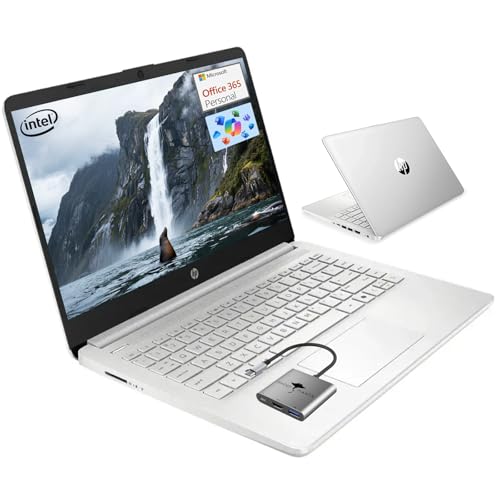 HP 14 Student-Laptop Back to School4GB RAM | 128GB Storage12.76 x 8.86 x 0.71 inches3.24 PoundsCheck on Amazon

Top 3 picks at a glance
Quick Picks
As an Amazon Associate we earn from qualifying purchases at no extra cost to you.


| Product | Best for | Key spec from the title |
|---|---|---|
| HP 14″ Student Laptop (16GB) | Heavy tab and PDF work | Quad-core Intel CPU, 16GB RAM, 628GB total storage |
| HP 14″ Intel N150 Laptop | Lightweight daily carry | Intel N150, Wi-Fi 6, 1TB cloud storage, Office 365 |
| HP 14 Student Laptop (4GB) | Basic writing and email | Quad-core processor, 4GB RAM, 128GB SSD |
| WISESWAN 15.6″ Windows 11 Laptop | Bigger screen for reading | Intel i3, 12GB RAM, backlit keyboard, Wi-Fi 6 |
| HP 15.6″ Student Laptop (8GB) | Balanced memory on a budget | Quad-core, 8GB RAM, 256GB storage (128GB UFS + 128GB SD card) |
How to Choose
Prioritize memory above everything else
For graduate work, 16GB of RAM is the comfortable target, 8GB is the working minimum, and 4GB is a trap that will stutter once a browser, a reference manager, and a video call overlap. If a listing shows 4GB, treat it as a secondary device only. Memory is also usually soldered in budget laptops, so you cannot upgrade it later. Buy the amount you will need in year three of the program, not the amount that looks adequate on day one.
Understand what “storage” means in these titles
Several listings count cloud storage or external cards toward the total. A title with “628GB” built from a 128GB UFS drive plus a 500GB external component, or “1TB cloud storage,” does not equal an internal 1TB SSD. For a thesis, look for at least 256GB of fast internal storage, and keep cloud and external backups as a second copy rather than your main drive.
Match the processor to the software you run
Entry-level chips like the Intel N150 and quad-core parts described as comparable to older Core i3 models handle documents, browsers, and video calls. They struggle with large datasets, simulations, and heavy statistical packages. If your field relies on those, plan on running them on a campus machine or a remote server. Ignore phrases like “Beat i3” unless a model number follows, because the comparison is a marketing claim rather than a measured result. Also remember that thermal limits in thin budget laptops keep speed lower under sustained load, which affects long exports and data runs.
Think about screen size, battery, and software
A 14-inch laptop is easier to carry between a lab, a library, and a seminar room; 15.6 inches is better for reading side-by-side PDFs. Look for Wi-Fi 6, a backlit keyboard for late-night work, and listed battery life. Office subscriptions mentioned in the title are often limited-term, so confirm whether yours covers the whole program or just a year. Budget models cut corners on displays and keyboards first, so a panel that looks dim or a keyboard with shallow travel can wear on you during long writing sessions. If possible, choose a model that mentions a backlit keyboard, and plan to add a separate mouse for comfort.
The 5 Best Options
HP 14″ Student Laptop (16GB)
This is the strongest match for graduate workloads in the group because it is the only one that lists 16GB of RAM. The title describes a slim 14-inch machine with a quad-core Intel CPU, Copilot AI, a lifetime Office claim, and 628GB of total storage made from a 128GB UFS drive and 500GB of external capacity. In graduate terms, that combination is a reasonable compromise: the memory is where the real work happens, while the external half can hold the archive of papers, scans, and old coursework that you open occasionally rather than daily. The main caution is to keep your active thesis files on the internal drive and your backups elsewhere.
- Strength: 16GB of RAM supports many tabs and a reference manager at once.
- Strength: the 14-inch slim body is easy to carry between buildings.
- Trade-off: only 128GB is described as the main drive, so the rest relies on external storage.
Skip it if you want one large internal SSD for local datasets or if you dislike depending on external storage for everyday files.
HP 14″ Intel N150 Laptop
The N150 listing aims at mobility. It mentions a lightweight, portable design, long battery life, Wi-Fi 6, Office 365, Copilot AI, and 1TB of cloud storage. It is a good fit for a student who spends the day in libraries and cafes and does most work in a browser or cloud apps. Many graduate students fall into this pattern, drafting in a browser-based editor, storing papers in the cloud, and joining seminars over video, so a machine that favors lightness can make sense even with a lower-powered chip. It is less convincing for anyone who juggles several heavy desktop programs.
- Strength: Wi-Fi 6 and a stated focus on battery life suit all-day carry.
- Strength: bundled cloud storage helps with backups.
- Trade-off: the title gives no RAM figure, so memory is unconfirmed.
Skip it if your thesis work depends on local, memory-hungry software, or if you cannot confirm the RAM before buying.
HP 14 Student Laptop (4GB)
This 14-inch model lists a quad-core processor compared with an i3, 4GB of RAM, a 128GB SSD, Windows 11, Copilot AI, and a one-year Office 365 subscription. It is the entry-level pick, best viewed as a writing and email machine rather than a main research computer. If you already own a stronger desktop and need something cheap for note-taking in lectures or conference travel, the low cost can make sense, but as a sole machine for a multi-year program it would likely feel cramped by the second semester.
- Strength: an actual 128GB SSD is quicker than eMMC-style storage.
- Strength: it is the simplest, most affordable tier in the list.
- Trade-off: 4GB of RAM will limit multitasking.
Skip it if you plan to run a reference manager, many tabs, and video calls together.
WISESWAN 15.6″ Windows 11 Laptop
This one offers a larger screen and a spec sheet aimed at college students: an Intel i3 with two cores and four threads up to 3.4GHz, 12GB of RAM, a backlit keyboard, and Wi-Fi 6. The 15.6-inch display is more comfortable for reading papers and handling two windows at once. The Windows 11 and backlit keyboard details line up with a student who studies late, and the 12GB figure leaves more room than the typical 8GB entry laptop. The brand is less established than the HP options, so buyers should read the warranty terms before committing.
- Strength: 12GB of RAM sits between the budget tier and the comfortable 16GB.
- Strength: a backlit keyboard helps with late library sessions.
- Trade-off: a two-core processor limits sustained heavy work.
Skip it if you want a lighter 14-inch body to carry all day, or if a long processor spec sheet matters to you more than memory.
HP 15.6″ Student Laptop (8GB)
The 15.6-inch HP offers 8GB of RAM, a quad-core processor described as beating an i3-1115G4, Office 365, and 256GB of storage built from a 128GB UFS drive plus a 128GB SD card. It targets business and study at home. The 15.6-inch body is bulkier than the 14-inch models, but the screen real estate helps when you are comparing a paper with your own draft. Keep in mind that an SD card is slower and easier to lose than a built-in drive, so treat it as an archive.
- Strength: 8GB of RAM is the practical minimum for graduate work.
- Strength: the larger screen suits reading and spreadsheets.
- Trade-off: half the listed storage is a removable SD card.
Skip it if you prefer a single fast internal drive for all files.
Which One Fits Your Situation
A PhD student with a huge reference library
Choose the HP 14″ Student Laptop (16GB). The extra memory matters more than anything else, and the cloud or external storage can hold the PDF archive. Add a monthly habit of copying the thesis folder to a second location.
A part-time master’s student who works in cafes
The HP 14″ Intel N150 Laptop emphasizes light weight and battery life, which matter more than raw speed for browser-based coursework.
A student who reads long PDFs and journals
The WISESWAN 15.6″ gives a bigger display and 12GB of RAM, a middle path for side-by-side reading. Pair it with a backup drive, since the title says nothing about the storage type, and check the return window soon after unboxing.
A shopper who needs the lowest-tier backup machine
The HP 14 Student Laptop (4GB) works as a travel or secondary computer, while a more capable machine handles heavy projects. Used this way, it is also a low-risk laptop to take into labs or field sites.
Common Mistakes
- Counting cloud or SD card space as if it were an internal drive.
- Accepting 4GB of RAM for a program that involves large documents.
- Assuming a bundled Office license lasts the entire degree.
- Choosing a screen size without thinking about daily carry weight.
- Skipping a backup plan for a thesis stored on a single device.
Related guides
- Windows Macos Linux Gaming Performance Comparison Strengths Weaknesses
- Desktop Operating Systems Gaming Performance Strengths Weaknesses
- 5G Home Internet Wifi Modem Settings Low Latency Gaming
Frequently Asked Questions
How much RAM does a graduate student need?
Sixteen gigabytes is the comfortable target for heavy research tabs, reference tools, and video meetings, particularly if the machine has to last through a multi-year program. Eight gigabytes works with discipline, and four is only suitable for light tasks.
Are cheap laptops enough for statistics software?
Basic analysis may run, but large datasets and simulations need more power than entry-level chips offer. Many programs provide campus computing resources for heavy jobs. Ask your department before spending extra on power you may never need locally.
Is cloud storage a substitute for a bigger drive?
It is a good backup and sharing tool, but it needs a connection and often a subscription after the included term ends. Keep working files local.
Should I get a 14-inch or 15.6-inch model?
Fourteen inches is easier to carry between a lab, a library, and home. Fifteen point six inches is better for reading and multitasking, and it usually adds room for a number pad. Choose based on whether you commute or work mostly at a desk.









