Disclosure: As an Amazon Associate, I earn from qualifying purchases. If you buy through links in this article, I may earn a commission at no extra cost to you.
Our top pick: TP-Link Archer TX3000E. Runner-up: TP-Link Archer TX55E.
A desktop PC tucked under a desk is the worst possible place to pick up a wireless signal, yet plenty of gaming rigs still rely on a cheap USB dongle or an aging WiFi 5 card. A PCIe WiFi adapter fixes that properly: it draws power from the motherboard, runs a modern radio at full speed over a fast internal bus, drives two proper external antennas, and adds Bluetooth for controllers and headsets in the same slot. The five cards below cover every current generation, from affordable WiFi 6 upgrades to a WiFi 7 flagship.
Top 3 picks at a glance

How to Choose a PCIe WiFi Adapter
Start with an honest point: for competitive gaming, a wired Ethernet cable still wins. It has lower and, more importantly, more consistent latency than any wireless link, and it never cares about walls, neighbors, or a microwave oven. A good PCIe WiFi card is the next best thing when running a cable is impossible, and the gap is smaller than it used to be, but no adapter on this page will beat a cable in a ranked match. Buy one of these because your router is two rooms away, not because you expect it to outrun Ethernet.
Match the card to your router’s generation. A WiFi 7 card talking to a WiFi 5 router behaves like a WiFi 5 card. WiFi 6 (802.11ax) is the sensible baseline today: its OFDMA and MU-MIMO keep latency steadier when several devices share the network. WiFi 6E adds the 6 GHz band, a wide, quiet stretch of spectrum that suits a gaming PC in the same room as the router, or the next one over. WiFi 7 adds wider 320 MHz channels and Multi-Link Operation, but only makes sense alongside a WiFi 7 router.
Antenna design matters more than headline speed. A magnetized antenna base on a cable lets you lift the antennas out from behind the metal case and onto the desk, which can transform a weak connection. Fixed antennas that screw onto the back of the card are cheaper and fine when the router is close.
Two practical details catch people out. First, Bluetooth on every card here runs over an internal USB header cable, so your motherboard needs a free 9-pin USB 2.0 header or the Bluetooth side will not appear. Second, check operating system limits: 6 GHz support requires Windows 11, and the WiFi 7 card below drops Windows 10 entirely. Finally, the big numbers on the box are combined theoretical rates across bands; your PC connects on one band at a time, so judge a card by its per-band speeds.
1. TP-Link Archer TX3000E

The Archer TX3000E is the card that proved a PCIe adapter could be a genuine gaming upgrade rather than a compromise. It is a WiFi 6 card built on Intel silicon, with per-band speeds of 2,402 Mbps on 5 GHz and 574 Mbps on 2.4 GHz, plus OFDMA and MU-MIMO to keep response times steady on busy networks. The standout feature is the magnetized antenna base: the two high-gain antennas sit on a puck you can park on top of the case or on the desk, well clear of the metal box that blocks signal at the back of most PCs. Bluetooth is listed at version 5.3 in the current listing, which is plenty for a controller, headset, and mouse running at once. A custom heatsink keeps the card stable during long sessions. If your router is WiFi 6 and you want the proven option, this is it.
Specs
– Brand: TP-Link
– WiFi standard: Wi-Fi 6 (802.11ax)
– Max speed as stated: 2,402 Mbps (5 GHz) + 574 Mbps (2.4 GHz)
– Bands: Dual-band (2.4 GHz, 5 GHz)
– Bluetooth version as stated: 5.3
– Antenna type: 2 high-gain antennas on a magnetized base
– Chipset as stated: Intel (AX200 class)
– ASIN: B07ZV2CJL2
2. TP-Link Archer TX55E
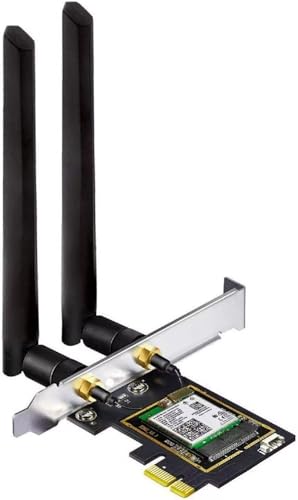
The Archer TX55E delivers the same AX3000 WiFi 6 speeds as its sibling above, 2,402 Mbps on 5 GHz and 574 Mbps on 2.4 GHz, at a simpler spec. Its two 5 dBi high-gain antennas screw directly onto the back of the card instead of sitting on a separate magnetic base, which suits a PC with clear line of sight to the router and keeps the desk tidy. Bluetooth is version 5.2, and TP-Link includes a customized heatsink, gold-plated contacts, WPA3 support, and both full-height and low-profile brackets in the box. You lose the flexible antenna placement of the TX3000E, and TP-Link does not state the chipset, but for a straightforward WiFi 6 and Bluetooth upgrade for Windows 10 or 11, the TX55E covers the essentials without paying for extras you may not use.
Specs
– Brand: TP-Link
– WiFi standard: Wi-Fi 6 (802.11ax)
– Max speed as stated: 2,402 Mbps (5 GHz) + 574 Mbps (2.4 GHz)
– Bands: Dual-band (2.4 GHz, 5 GHz)
– Bluetooth version as stated: 5.2
– Antenna type: 2 x 5 dBi high-gain antennas, direct-mount
– Chipset as stated: Not stated
– ASIN: B0B1NRGDQ4
3. OKN WiFi 6E AX5400 (Intel AX210)
OKN builds its card around Intel’s AX210 module, the chipset behind most good WiFi 6E adapters, and keeps the package focused. You get tri-band WiFi 6E at 574 Mbps on 2.4 GHz, 2,400 Mbps on 5 GHz, and 2,400 Mbps on 6 GHz, an AX5400 class total. The 6 GHz band is the real prize: wide, largely empty spectrum, so a gaming PC in the same room as a 6E router gets a link that feels close to wired for everyday play. Bluetooth 5.3, WPA3, a low-profile bracket, and two 5 dBi external antennas round out the box. The antennas mount directly on the card, limiting placement flexibility, and you will want the latest drivers from Intel rather than the included disc. As a route into 6 GHz without paying for a big brand badge, it is hard to argue with.
Specs
– Brand: OKN
– WiFi standard: Wi-Fi 6E (802.11ax)
– Max speed as stated: 2,400 Mbps (6 GHz) + 2,400 Mbps (5 GHz) + 574 Mbps (2.4 GHz)
– Bands: Tri-band (2.4 GHz, 5 GHz, 6 GHz)
– Bluetooth version as stated: 5.3
– Antenna type: 2 x 5 dBi external antennas, direct-mount
– Chipset as stated: Intel AX210
– ASIN: B07X462KRK
4. GIGABYTE GC-WBAX210
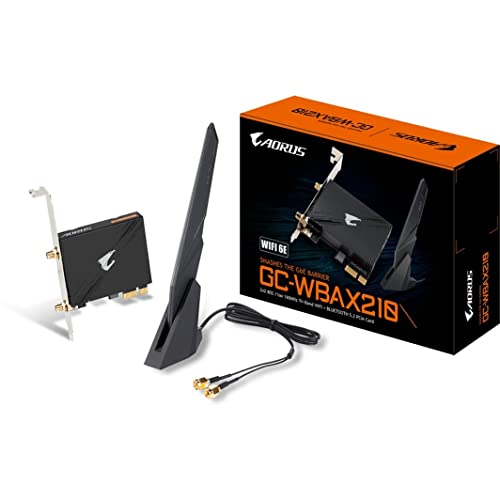
Gigabyte’s GC-WBAX210 uses the same Intel AX210 foundation as the OKN card but wraps it in a more polished package aimed at gaming builds. WiFi 6E tri-band speeds match the AX210’s capabilities, up to 2,400 Mbps on the 5 GHz and 6 GHz bands and 574 Mbps on 2.4 GHz, with Bluetooth 5.2 on board. The difference is the AORUS antenna: a 2Tx2R unit on a magnetic base, connected by cables, so you can position it on top of the case for a cleaner path to the router instead of leaving antennas trapped behind the PC. That placement freedom is worth real signal strength in a typical bedroom or office setup. Gigabyte also backs the card with its usual motherboard-grade support and driver pages, which some buyers will prefer over a lesser-known brand. Pick this one if you want AX210 performance with the better antenna system.
Specs
– Brand: GIGABYTE
– WiFi standard: Wi-Fi 6E (802.11ax)
– Max speed as stated: Up to 2,400 Mbps (5 GHz and 6 GHz) + 574 Mbps (2.4 GHz)
– Bands: Tri-band (2.4 GHz, 5 GHz, 6 GHz)
– Bluetooth version as stated: 5.2
– Antenna type: AORUS 2Tx2R antenna with magnetic base
– Chipset as stated: Intel Wi-Fi 6E AX210
– ASIN: B091HTG6DQ
5. TP-Link Archer TBE550E

The Archer TBE550E is the flagship option, a WiFi 7 card for anyone who has already upgraded, or plans to upgrade, to a WiFi 7 router. Its BE9300 class speeds break down as 5,760 Mbps on 6 GHz, 2,880 Mbps on 5 GHz, and 688 Mbps on 2.4 GHz, with 320 MHz channels, 4K-QAM, and Multi-Link Operation all supported. The two high-performance antennas sit on a magnetized base with a multicolor status LED that shows the connection state at a glance. Bluetooth is version 5.4, the newest here. The catches are real: the card requires Windows 11, and without a WiFi 7 router most of its headline features stay dormant. Buy it as a long-term upgrade, not a quick fix.
Specs
– Brand: TP-Link
– WiFi standard: Wi-Fi 7 (802.11be)
– Max speed as stated: 5,760 Mbps (6 GHz) + 2,880 Mbps (5 GHz) + 688 Mbps (2.4 GHz)
– Bands: Tri-band (2.4 GHz, 5 GHz, 6 GHz)
– Bluetooth version as stated: 5.4
– Antenna type: 2 high-performance antennas on a magnetized base with status LED
– Chipset as stated: Not stated
– ASIN: B0D4PDLX6L
Quick Comparison
| Product | WiFi standard | Max speed as stated | Bluetooth | Antenna type |
|---|---|---|---|---|
| TP-Link Archer TX3000E | Wi-Fi 6 | 2,402 + 574 Mbps | 5.3 | Magnetic base, 2 antennas |
| TP-Link Archer TX55E | Wi-Fi 6 | 2,402 + 574 Mbps | 5.2 | Direct-mount, 2 x 5 dBi |
| OKN WiFi 6E AX5400 | Wi-Fi 6E | 2,400 + 2,400 + 574 Mbps | 5.3 | Direct-mount, 2 x 5 dBi |
| GIGABYTE GC-WBAX210 | Wi-Fi 6E | 2,400 + 2,400 + 574 Mbps | 5.2 | Magnetic base, AORUS 2Tx2R |
| TP-Link Archer TBE550E | Wi-Fi 7 | 5,760 + 2,880 + 688 Mbps | 5.4 | Magnetic base with LED, 2 antennas |
FAQ
Is a PCIe WiFi card better than a USB adapter for gaming?
Almost always, yes. A PCIe card gets a full-power internal connection, a proper heatsink, and two real external antennas, while most USB adapters are limited by the USB bus, run hotter, and use small internal aerials. The difference shows up as a more stable connection and fewer lag spikes rather than a higher speed-test number.
Why does Bluetooth need a separate cable inside the PC?
On these cards the WiFi radio runs over the PCIe slot, but the Bluetooth radio talks to the system over USB. The included header cable connects the card to a 9-pin USB 2.0 header on the motherboard. Skip that cable and WiFi works fine while Bluetooth never appears in Windows.
Do I need Windows 11 for WiFi 6E or WiFi 7?
For the 6 GHz band, effectively yes. Microsoft only enables 6 GHz support in Windows 11, so a 6E or WiFi 7 card in a Windows 10 PC falls back to the 2.4 GHz and 5 GHz bands. The TBE550E goes further and does not support Windows 10 at all.
Can one of these cards replace Ethernet for competitive gaming?
It can get close on a clean 5 GHz or 6 GHz link in the same room as the router, and for most players it feels fine. But a cable still delivers lower, steadier latency with no interference risk, so if your setup allows a wired run, that remains the better choice for ranked play.
Will these cards work in any PCIe slot?
Yes. All five are PCIe x1 cards, and a x1 card fits and works in x4, x8, and x16 slots too. Most also include a low-profile bracket for small form factor cases.
Conclusion
For most gaming PCs, the Archer TX3000E remains the balanced pick: mature WiFi 6, an Intel radio, and a magnetic antenna base that solves the signal problem behind the desk. The TX55E trims the cost for simpler setups. If your router supports 6 GHz, the OKN AX5400 is the value route in, while the Gigabyte GC-WBAX210 adds the better antenna system and brand support. And if you are building around WiFi 7 for the long term, the Archer TBE550E is the card that unlocks it. Whichever you choose, position the antennas well, connect the Bluetooth header cable, and keep a cable in mind for the matches that matter most.
Related guides
More from Amazon
Programs that pair well with the guide above. Offers and eligibility are set by Amazon and may change.
Free shipping on eligible items, Prime Video and more. Eligible new members can start with a free trial.
Start a Prime free trialAd-free music streaming. Eligible new subscribers can start with a free trial.
Try Music Unlimited freeA Prime membership for ages 18-24 with a trial period. Eligibility is set by Amazon.
See Prime for Young AdultsAudiobooks and podcasts to listen to on the go. Eligible new members can start with a free trial.
Try Audible freeAs an Amazon Associate we earn from qualifying purchases.