
When a student laptop has to land under 600 dollars, the shopping problem changes. The goal is no longer to find the fastest machine; it is to avoid the traps that cheap listings hide, such as a hard drive too small to hold a semester of coursework, memory too tight for a browser with a dozen tabs, or a storage total padded with cloud space that does not exist on the device. A good budget choice gets through lectures, research, writing, and video calls reliably for four years.
This guide is written for high school and college students, and for the parents funding the purchase. As the 2026 school year gets underway, the market is crowded with 14-inch laptops carrying very similar processors, so the differences that matter are RAM, storage type, battery claims, and software included. The six models below are compared strictly on what each listing states. Specs that are not printed, such as weight or exact battery life under load, are left out rather than guessed.
Our Top Picks
 HP 14" HD Chromebook Laptop for StudentsN4120|64GB eMMC12.85 x 8.94 x 0.72 inches3.35 poundsCheck on Amazon
 HP 14" Laptop Computer for 2026 Student Business4GB RAM + 628GB Storage12.76 x 8.86 x 0.71 inches3.24 poundsCheck on Amazon
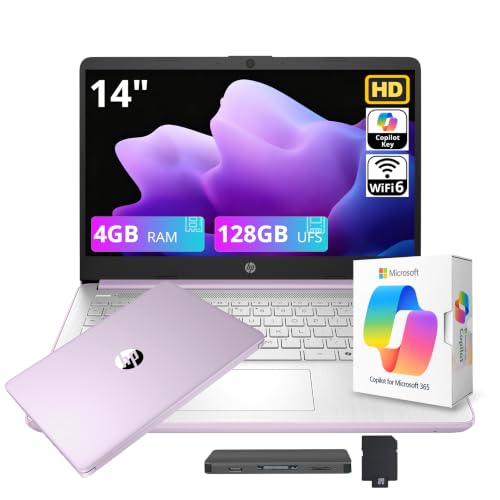
 HP 14" Ultra-Light Laptop for Student & Home4GB|128GB Storage12.76 x 8.86 x 0.71 inches3.24 PoundsCheck on Amazon


Top 3 picks at a glance
Quick Picks
As an Amazon Associate we earn from qualifying purchases at no extra cost to you.




| Product | Best for | Key spec from the listing |
|---|---|---|
| Generic 15.6-inch N4020 laptop | Larger screen, lowest cost | Celeron-class N4020, 4GB DDR4, 128GB eMMC, 1TB TF card support |
| HP 14 Chromebook | Web-based coursework | Intel quad-core N4120, 4GB RAM, 64GB eMMC, 14 hours battery |
| HP 14 Windows 11 Pro | Windows apps with Office | Intel 4-core, 4GB DDR5, 128GB UFS, Windows 11 Pro |
| HP Stream 14 | Light note taking | Intel N150, 4GB RAM, 128GB UFS, 1 year Office 365 |
| HP 14 Ultra-Light Celeron N4500 | Carrying between classes | Celeron N4500, 4GB RAM, 64GB eMMC plus 64GB SD, 12-hour battery |
| HP 14 with 16GB RAM | Heavier multitasking | Quad-core Intel, 16GB RAM, 128GB UFS plus external drive |
How to Choose
RAM decides how long the laptop stays usable
Four gigabytes of RAM technically runs Windows 11 or ChromeOS, but it leaves little room once a browser, a video call, and a word processor are open together. If you can find 8GB inside the budget, take it. The model here with 16GB is notable because memory is the one specification a student cannot upgrade later. Memory type matters slightly too, as DDR5 offers higher bandwidth than DDR4 at the same capacity. Parents shopping for a middle schooler can accept 4GB if the laptop will mostly run a browser, while a college freshman should aim higher.
Storage type and real capacity
eMMC and UFS are soldered flash storage options that are slower than a full NVMe SSD but acceptable for light use. Capacities of 64GB are very small once Windows updates arrive, while 128GB is workable. Watch the totals in the title: numbers like 628GB are made by adding an external drive or cloud allowance, and those add-ons do not travel inside the laptop. Treat only the internal figure as dependable capacity.
Operating system and software included
A Chromebook runs web apps and Android apps and needs little maintenance, which suits schools that use Google tools. Windows laptops run desktop programs such as full Office, and Windows 11 Pro adds management features some schools or employers expect. Office subscriptions in a listing usually cover a single year or a certain account, so confirm the terms before assuming the software is permanently free.
Battery, screen, and where budget laptops cut corners
Claims of 12 to 14 hours should be read as best-case figures with the screen dimmed. For a student, a 1920×1080 panel is nicer than 1366×768, but many 14-inch budget models ship with HD displays, so look closely. Budget machines typically cut storage speed, screen resolution, and keyboard feel first. Skip listings that promise huge bundles of accessories and focus on core specifications. A keyboard that feels cramped will cost you more in daily frustration than a slightly slower processor, so favor established brands with clear parts and support pages when the budget is this tight.
The 6 Best Options
Generic 15.6-inch N4020 laptop
This unbranded notebook gives you the biggest screen in the group, a 15.6-inch FHD display, with an N4020 processor, 4GB of DDR4 RAM, and 128GB of eMMC storage. The listing also says it supports a 1TB TF card, which is a cheap way to add file space for papers and media.
- Strength: larger FHD screen at the lowest tier, with Windows 11 installed.
- Strength: TF card expansion supports extra space for files.
- Trade-off: the N4020 and 4GB of RAM are the weakest pairing in the group.
Skip it if you want a recognized brand for support and warranty, or if you need any real multitasking speed. An unbranded seller also makes repairs and driver updates harder to predict, so keep the return window in mind.
HP 14 Chromebook
The HP 14-inch Chromebook uses an Intel N4120 quad-core processor, 4GB of RAM, and 64GB of eMMC storage, and the listing highlights a 14-hour battery, a webcam, HDMI, and both USB-A and USB-C ports. A Chromebook suits students who live in Google Docs, learning portals, and browser-based tools.
- Strength: 14-hour stated battery life suits long school days.
- Strength: USB-A, USB-C, and HDMI cover flash drives, chargers, and projectors.
- Trade-off: ChromeOS cannot run full Windows programs, and 64GB of storage is small.
Skip it if your course requires Windows-only software such as specialized engineering or design tools. Check with the school before buying, since some programs insist on Windows or macOS. Online exam software is another common catch, so ask the teacher whether a Chromebook is accepted for exams.
HP 14 Windows 11 Pro
This HP 14-inch laptop pairs an Intel four-core processor with 4GB of DDR5 RAM and 128GB of UFS storage, runs Windows 11 Pro, and lists Copilot AI plus Microsoft Office. The combined 628GB storage total in the title includes an external drive, so the internal capacity is the 128GB part.
- Strength: Windows 11 Pro with Office listed makes it useful for typical coursework.
- Strength: DDR5 memory and 128GB of UFS storage are a small step above the eMMC models.
- Trade-off: 4GB of RAM is a limitation even with faster memory.
Skip it if you plan to keep it for several years of heavier coursework. Students in programming or media classes will outgrow four gigabytes quickly, and the extra storage in the title is not part of the laptop itself.
HP Stream 14
The HP Stream 14 has an Intel N150 processor, 4GB of RAM, 128GB of UFS storage, and a one-year Office 365 subscription, with a cloud storage allowance listed on top. It is the type of laptop that handles essays, reading, and streaming lectures without fuss.
- Strength: newer N150 processor with 128GB of UFS storage.
- Strength: one year of Office 365 is bundled, per the listing.
- Trade-off: the 1TB cloud storage is not on-device space, and RAM is only 4GB.
Skip it if you dislike subscriptions that expire after a year, or if you need a lot of local storage for video or photo projects. Because the Stream line is a simple, light-duty design, it fits a first laptop for middle or high school better than a college engineering major.
HP 14 Ultra-Light Celeron N4500
This ultra-light HP 14-inch uses a Celeron N4500 processor, 4GB of RAM, 64GB of eMMC storage with a 64GB SD card, a one-year Office 365 subscription, and a 12-hour battery claim. It targets students who carry the laptop all day and mostly write and browse.
- Strength: described as ultra-light, with a stated 12-hour battery life.
- Strength: an included 64GB SD card adds a little extra file space.
- Trade-off: 64GB of internal eMMC storage will fill quickly with Windows updates.
Skip it if you need a lot of local storage or expect to run many applications at once. The SD card is helpful for documents, but it does not behave like fast internal storage, and the processor is the older Celeron generation.
HP 14 with 16GB RAM
The most memory-rich listing here is an HP 14-inch laptop with a quad-core Intel processor, 16GB of RAM, 128GB of UFS storage, Copilot AI, and lifetime Microsoft Office according to the title, plus a 500GB external drive. Sixteen gigabytes of RAM gives the best chance of staying useful through the whole degree.
- Strength: 16GB of RAM is rare in this budget tier.
- Strength: bundled external drive adds backup space for coursework.
- Trade-off: internal storage is still only 128GB, and the exact processor model is not named.
Skip it if you want the processor model spelled out before buying. Verify what the lifetime software claim covers in writing, since terms vary between sellers, and keep the receipt for any later warranty claim.
Which One Fits Your Situation
You want the laptop to last four years
Choose the HP 14 with 16GB of RAM. Memory cannot be upgraded later, and this is the only listing that gives you real breathing room for growing software demands.
Your school runs on Google tools
The HP 14 Chromebook is the simplest answer. It offers long battery life, quick startup, and little maintenance, and ports for a projector or flash drive.
You need Windows and Office for classes
Pick the HP 14 Windows 11 Pro for desktop programs, or the HP Stream 14 if the one-year Office subscription and a newer processor suit you better.
You carry it everywhere
The HP 14 Ultra-Light with its 12-hour battery claim is built around portability, so long as you accept the small internal drive.
A short checklist helps when listings blur together: confirm the internal storage size, confirm the RAM, confirm the operating system, and confirm what software is included and for how long. If any one of those four items is unclear, move on to a listing that states it plainly. Students rarely regret asking for clarity before purchase, but they often regret an unreadable spec sheet afterward.
Common Mistakes
- Reading a 628GB storage total as if all of it were inside the laptop.
- Choosing a Chromebook and then learning a required class program is Windows-only.
- Assuming a one-year Office subscription will last through graduation.
- Buying 64GB of storage and running out after the first round of updates.
- Paying extra for accessories bundled in the listing instead of for more RAM.
Related guides
- Windows Macos Linux Gaming Performance Comparison Strengths Weaknesses
- Desktop Operating Systems Gaming Performance Strengths Weaknesses
- 5G Home Internet Wifi Modem Settings Low Latency Gaming
Frequently Asked Questions
Is 4GB of RAM enough for a student?
It works for basic writing and browsing but gets crowded quickly. If your budget allows 8GB or 16GB, take it, because memory cannot be upgraded later.
Should a student buy a Chromebook or a Windows laptop?
If coursework happens in a browser, a Chromebook is simple and long-lasting. If your program requires specific desktop software, buy Windows.
What does eMMC or UFS storage mean?
Both are soldered flash storage that is slower than a full SSD. They suit light use, and UFS is generally the faster of the two.
Can I add storage later?
Some models accept an SD or TF card, and any laptop can use an external drive. Internal flash storage itself usually cannot be upgraded, so choose the largest internal figure you can afford at the start.









