
The best wireless mechanical keyboard for most people in 2026 is the AULA F75 Pro. It is the board in this roundup that solves the most problems at once: a 75% footprint roughly 12.6 inches wide that leaves genuine mouse room on a small desk, hot-swappable sockets so you can change how it feels without buying a second keyboard, tri-mode connectivity so the same board works on a desktop, a laptop and a phone, and a battery in the 3,000–4,000 mAh class that measures its runtime in weeks rather than days. It suits a mixed gamer-and-typist with one desk and one machine who does not want to own two keyboards. If your day is mostly documents and email and you want the longest possible gap between charges, the Logitech MX Mechanical is the stronger pick. If your budget is the binding constraint, the Redragon K521KS covers the essentials for far less, and if you cannot give up the number pad, the AULA F99 keeps it in a much shorter chassis. The rest of this guide breaks down switches, battery math, latency and desk measurements so you can match one of these twelve to your own setup.
Our Top Picks
 Logitech MX Mechanical Wireless Illuminated Keyboard TactileFull Size17.9 x 5.9 x 2.1 inches2.55 poundsCheck on Amazon

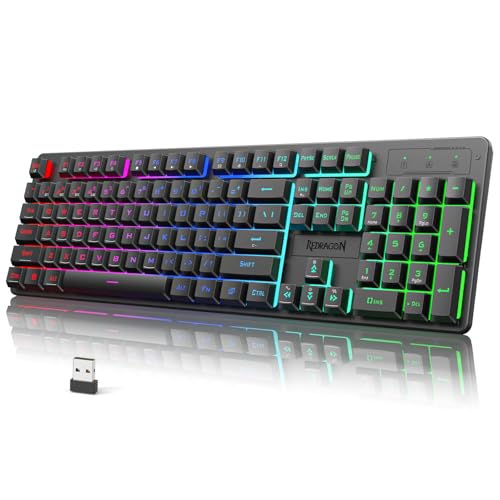
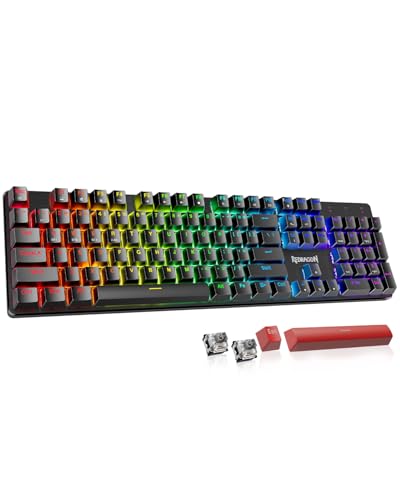

Top 3 picks at a glance
Quick Comparison
Every board below is tri-mode or Bluetooth unless noted, and every size figure is the approximate chassis width you should budget for on your desk. Battery figures are the class this tier typically ships with, not a guaranteed number for every revision — confirm the exact capacity on the listing before you buy.
| Product | Best for | Layout & width | Connection | Switch class | Battery class | Price tier |
|---|---|---|---|---|---|---|
| AULA F75 Pro | Mixed gaming + typing | 75%, ~12.6 in | BT / 2.4 GHz / USB-C | Hot-swap pre-lubed linear | Large, 3,000–4,000 mAh class | Mid-range |
| Redragon K521KS | Budget multimedia desk | Full-size + media keys, ~17.5 in | BT / 2.4 GHz / USB-C | Membrane, “mechanical feel” | Small, 1,500–2,000 mAh class | Budget |
| Logitech MX Mechanical | All-day office typing | Full-size low-profile, ~17.1 in | BT multi-device / Bolt receiver | Low-profile tactile quiet | Published: ~15 days backlit, up to 10 months unlit | Premium |
| Redragon K526 PRO | Cheap RGB gaming look | Full-size, ~17.5 in | 2.4 GHz / BT / USB-C | Membrane with RGB | Small–mid class | Budget |
| Redragon K671KS | Budget hot-swap tinkering | Compact, confirm key count on listing | BT / 2.4 GHz / USB-C | Hot-swap mechanical | Mid class | Budget |
| AULA F99 | Number pad in a short chassis | 99-key compact, ~14.6 in | BT 5.0 / 2.4 GHz / USB-C | Hot-swap pre-lubed linear | Large class | Premium |
| Redragon Typewriter | Retro desk aesthetic | Full-size round-keycap, ~17.5 in | 2.4 GHz / BT | Mechanical, round keycaps | Mid class | Mid-range |
| Redragon K745 PRO | Full-size gasket with hotkeys | 108-key, ~17.5 in | 2.4 GHz / BT / USB-C | Hot-swap mechanical, gasket mount | Mid class | Mid-range |
| Redragon K556 PRO | Aluminium full-size value | 104-key, ~17.4 in | 2.4 GHz / BT | Mechanical, soldered | Mid class | Mid-range |
| Kisnt KN85 | Entry-level 75% hot-swap | 75%, ~12.6 in | BT / 2.4 GHz / USB-C | Hot-swap mechanical | Mid class | Budget |
| AULA S99 | Creamy-sound budget typing | Compact full-size | BT / 2.4 GHz | Creamy-tuned; verify mechanical vs mechanical-feel | Mid class | Budget |
| Logitech G413 SE | Wired gaming baseline | Full-size, ~17.5 in | USB-C wired only | Logitech G mechanical | None — corded | Premium |
How We Chose
This roundup was assembled from published specification sheets, manufacturer battery and compatibility ratings, and established category norms for switch behaviour, layout geometry and wireless protocols. Nothing here is based on lab measurement or personal ownership — where a number is a manufacturer claim it is labelled as one, and where a figure varies by revision we describe the class rather than invent a precise value.
Four criteria decided the inclusions. First, spec completeness: a board earns a place if its listing clearly states layout, switch type, connection modes and battery class, because a keyboard you cannot verify is a keyboard you cannot match to a desk. Second, category fit: every entry has to serve a distinct buyer — a 75% all-rounder, a numpad-in-a-short-chassis option, a low-profile office board, a budget multimedia deck, a retro-look board, an aluminium full-size, and so on. Third, use-case honesty: boards whose listing says “mechanical feel” rather than mechanical are described as membrane, because that distinction changes both the typing experience and the price you should expect to pay. Fourth, upgrade path: hot-swappable sockets, standard keycap spacing and multi-device pairing raise a board’s long-term value, so they are called out where they exist and flagged where they do not.
1. AULA F75 Pro – Best for mixed gaming and typing
As an Amazon Associate we earn from qualifying purchases at no extra cost to you.

The F75 Pro is the board to buy when you have one desk, one computer and two jobs: shooting things in the evening and typing documents during the day. Its 75% layout compresses the function row, arrow cluster and a rotary knob into a chassis roughly 12.6 inches wide, which is about five inches narrower than a full-size board. On a 30-inch-wide desk that is the difference between roughly 9 inches and roughly 14 inches of clear horizontal mouse travel — enough to drop your mouse sensitivity a notch and still finish a full swipe without lifting.
- Layout: 75%, hot-swappable sockets, rotary knob for volume or zoom
- Connection: Bluetooth, 2.4 GHz dongle and USB-C wired, switchable
- Switches: pre-lubed linear switches, factory-lubed stabilisers
- Lighting: per-key RGB, south-facing for wide keycap compatibility
- Battery: large class — boards this size commonly ship with 3,000–4,000 mAh
- Build: gasket-mounted with multi-layer internal damping
The gasket mount is the reason this board punches above its tier. Instead of the plate being screwed hard into the case, it floats on compressible strips, so the whole assembly flexes slightly under a firm keystroke and the sound profile is softer and lower-pitched than a tray-mount board. For typing that is a comfort gain; for gaming it makes bottoming out less harsh on your fingertips during long sessions. The pre-lubed linear switches give a straight, bump-free press with no audible click, which is the right default if you share a room or take calls at the same desk.
Wireless behaviour is the practical advantage. The 2.4 GHz dongle link is the one to use for games: expect roughly 1–5 ms of added latency, which at 144 Hz — a 6.94 ms frame — is well under a single frame. Bluetooth is the mode to use for laptop and tablet work, where 8–20 ms of added latency is invisible in a text editor but can be felt in a fast shooter. Wired USB-C is the fallback for charging while playing.
Pros
- 75% footprint frees real mouse space without losing arrows or function keys
- Hot-swap sockets mean a switch change costs a few switches, not a new keyboard
- Tri-mode connectivity covers desktop, laptop and tablet from one board
- Gasket mount and pre-lubed stabilisers deliver a clean, damped sound out of the box
- Rotary knob is genuinely useful for volume, zoom and timeline scrubbing
Cons
- No number pad — spreadsheet users will miss it immediately
- RGB backlighting is the single biggest battery drain; runtime drops sharply at high brightness
- Bluetooth mode is not the right choice for competitive play
- 75% layouts compress the function row, so some key legends need relearning
Against the Kisnt KN85 — the other 75% hot-swap board here — the F75 Pro is the better-constructed option: gasket mounting, a knob and factory-lubed stabilisers are the upgrades you are paying for. The KN85 wins only on entry price. Against the AULA F99, the choice is purely about the number pad: the F99 keeps it and adds roughly two inches of width. If you never type digits in bulk, the F75 Pro is the tighter, better-balanced desk companion.
2. Redragon K521KS – Best for budget multimedia desks

The K521KS is the board for someone who wants wireless, RGB, a full-size layout and dedicated multimedia keys without spending mid-range money. It is also the clearest example in this roundup of a spec-sheet trap, and understanding that trap will save you a disappointing purchase.
- Layout: full-size with a dedicated multimedia key row, roughly 17.5 inches wide
- Connection: tri-mode — Bluetooth, 2.4 GHz dongle and USB-C wired
- Switch class: membrane domes under “mechanical feeling” keycaps
- Lighting: RGB backlighting
- Battery: small class — this tier commonly ships 1,500–2,000 mAh
- Price tier: budget
“Mechanical feeling” is the phrase to watch. It means the switches are rubber domes with a sculpted stem and a mechanical-style keycap mount, not individual mechanical switches with a metal leaf and a replaceable housing. The practical consequences are concrete: you cannot hot-swap the switches, the actuation is mushy rather than crisp, and the key feel will degrade gradually over a few years of heavy use rather than staying consistent. What you get in return is a much lower price, a quieter press than a clicky mechanical board, and a keyboard that is perfectly adequate for browsing, spreadsheets and casual gaming.
The multimedia row is the genuine differentiator. Play, pause, track skip and volume keys at the top right mean you do not need to reach for the mouse or learn a function-layer shortcut every time you change a track. On a work-from-home desk where music runs all day, that is worth more than switch purity.
Battery life is the weak point. A 1,500–2,000 mAh cell driving full RGB is a short proposition — at a rough 100–150 mA draw with lighting on, you are looking at 10–20 hours of continuous use, which in practice means charging every few days. Drop the backlight to a low static colour and the draw falls to roughly 20–40 mA, stretching the same cell to 40–80 hours. If you buy this board, plan to run it unlit most of the time and treat RGB as an occasional feature.
Pros
- Full-size layout plus a dedicated multimedia key row for very little money
- Tri-mode connectivity at a budget price is unusual and genuinely useful
- Quieter than a clicky mechanical board, so it suits shared rooms
- Light enough to move between desk and sofa without fuss
Cons
- Membrane switches are not hot-swappable and will not feel like mechanical switches
- Small battery means frequent charging if you leave RGB on
- Full-size width of roughly 17.5 inches eats mouse space on a narrow desk
- No upgrade path — when a dome fails, the keyboard is done
Against the Redragon K526 PRO, this is the more useful board for a work-leaning desk because of the multimedia keys, while the K526 PRO leans harder into the gaming look. Against the Kisnt KN85 or the Redragon K671KS — both true mechanical hot-swap boards at budget prices — the K521KS only wins if you specifically want a full-size footprint or the media row. If you want real mechanical feel on a budget, spend the same money on a hot-swap board and skip the membrane compromise.
3. Logitech MX Mechanical – Best for all-day office typing
The MX Mechanical is not a gaming keyboard and it does not pretend to be. It is the board for someone whose day is eight hours of documents, email, chat and spreadsheets, who moves between a work laptop and a personal machine, and who wants to charge it a handful of times a year rather than a handful of times a month.
- Layout: full-size, low-profile chassis roughly 17.1 inches wide and about 0.9 inches tall at the back
- Switches: low-profile tactile quiet — shallow travel, soft bottom-out, very low noise
- Connection: Bluetooth with multi-device switching, plus a Bolt USB receiver
- Battery: published rating of about 15 days with backlighting on, up to 10 months with it off
- Lighting: white smart backlighting that brightens when your hands approach
- Build: aluminium top plate, no hot-swap, no per-key RGB
- Price tier: premium
The published battery figure is the headline and it is worth doing the arithmetic, because it explains the whole design. Logitech rates roughly 15 days with the backlight on and up to 10 months with it off. That ratio is not marketing padding — it is what happens when a backlight is the dominant load. On a board drawing a few milliamps at idle and 100+ mA with LEDs lit, switching the light off removes most of the consumption. So the honest way to read the spec is: if you want the ten-month number, run it unlit in a lit room, and use the smart backlight only when you actually need it.
The low-profile switch is the other defining choice. Shallow travel of roughly 1.2–1.5 mm to actuation and about 3.0–3.2 mm total means your fingers move less per keystroke. For sustained typing that reduces fatigue and speeds up touch typing; for fast-paced gaming it can feel abrupt, and the soft bottom-out gives less tactile confirmation of a deliberate press. It is a deliberate trade toward the office side.
Multi-device pairing is the feature that earns the premium tier. You can pair three devices and switch between them with a keypress, which means one keyboard for a locked-down work laptop, a personal desktop and a tablet. For anyone who works across two machines, that alone justifies the cost. Note that the board is not hot-swappable and does not take standard mechanical switches, so the switch feel you buy is the switch feel you keep.
Pros
- Class-leading battery life, measured in months rather than days
- Low-profile tactile quiet switches are near-silent in an open-plan office
- Multi-device Bluetooth switching covers laptop, desktop and tablet
- Aluminium top plate gives a rigid, premium feel without a heavy chassis
- Smart backlighting saves power automatically instead of relying on you
Cons
- No hot-swap sockets and no standard keycap mount — zero upgrade path
- Low-profile travel is a poor match for fast competitive play
- No per-key RGB, only white backlighting
- Premium tier pricing for a board that is deliberately not a gaming keyboard
Against the AULA F75 Pro, the split is clean: the MX Mechanical wins on battery life, noise and multi-device convenience, while the F75 Pro wins on switch choice, hot-swap flexibility, gaming latency and desk footprint. If you game more than an hour a night, take the F75 Pro. If your keyboard is a work tool first, the MX Mechanical is the more sensible long-term purchase — and the ten-month unlit figure is the reason.
4. Redragon K526 PRO – Best for cheap RGB gaming look

The K526 PRO is the board you buy when the priority is a black full-size gaming deck with vivid RGB, wireless freedom and a budget price, and when the finer points of switch mechanics are not what you care about.
- Layout: full-size, roughly 17.5 inches wide, black chassis
- Switch class: membrane with RGB lighting
- Connection: 2.4 GHz dongle, Bluetooth and USB-C wired
- Lighting: RGB with multiple effects and brightness levels
- Battery: small-to-mid class for this tier
- Price tier: budget
This is a membrane board, and that shapes everything about how it should be used. The press is soft and quiet compared with a clicky mechanical switch, the actuation point is less defined, and there is no hot-swap socket. What it does well is deliver the visual language of a gaming keyboard — full-size layout, RGB wash, a heavy black case — at a price that leaves budget for a mouse or a headset. If your setup is built around lighting and a full-size footprint, this covers it.
The wireless modes are worth thinking about before you buy. The 2.4 GHz dongle is the mode to use for anything timing-sensitive: a dedicated link typically adds only 1–5 ms, which at a 144 Hz refresh (6.94 ms per frame) sits comfortably inside a single frame. Bluetooth is the convenient mode for a laptop, adding roughly 8–20 ms, which is fine for strategy games, browsing and documents but noticeable in a twitch shooter. Wired USB-C is always available if you want to remove the variable entirely while charging.
Battery is the trade you make for RGB at this price. Driving a full-size RGB board means a draw in the region of 100–150 mA with the lighting at moderate brightness, so a small-to-mid cell empties quickly. Turn the backlight to a static low-brightness colour and the draw falls to roughly 20–40 mA, which stretches the same cell several times further. The practical routine is: RGB on for show, RGB off for battery.
Pros
- Full-size RGB gaming layout at a budget price
- Three connection modes including a low-latency 2.4 GHz dongle
- Membrane press is quieter than a clicky mechanical board
- Simple, unfussy black design that fits most setups
Cons
- Membrane switches — no hot-swap, no mechanical feel, no upgrade path
- RGB shortens battery life significantly
- 17.5-inch width crowds a small desk
- Key feel will soften over years of heavy use
Against the Redragon K521KS, the K526 PRO is the more overtly gaming-styled board, while the K521KS is the more practical office companion thanks to its multimedia row. Both are membrane. If you can stretch to a true mechanical board at budget prices, the Redragon K671KS or the Kisnt KN85 will give you hot-swap sockets and a crisper press for similar money — the K526 PRO’s case rests on lighting and layout, not switch quality.
5. Redragon K671KS – Best for budget hot-swap tinkering
The K671KS is the cheapest route in this roundup to a genuinely mechanical, hot-swappable, tri-mode board. It is aimed at the buyer who wants to learn what switch swapping feels like without committing mid-range money, and who would rather spend the savings on a set of switches than on a brand name.
- Layout: compact — check the key count on the specific listing before ordering
- Switch class: mechanical, hot-swappable sockets
- Connection: tri-mode — Bluetooth, 2.4 GHz and USB-C wired
- Lighting: RGB with effects
- Battery: mid class for this tier
- Price tier: budget
Hot-swap is the important word. A hot-swap socket lets you pull a switch with a small extractor tool and push in a replacement without soldering, which turns switch feel from a permanent decision into a cheap experiment. A set of 70–90 replacement switches typically costs a fraction of a new keyboard, and the same board can go from a light 45 gf linear for gaming to a 55–60 gf tactile for typing in under an hour. On a budget board this is the single most valuable feature you can buy, because it makes the keyboard upgradeable long after the novelty of the RGB wears off.
Because compact layouts vary between revisions, the first thing to do is confirm the key count on the exact listing. A 60% board around 11.5 inches wide drops the arrow keys and function row entirely; a 65% at roughly 11.8 inches keeps the arrows; a 75% at about 12.6 inches keeps the function row as well. That two-inch spread matters if you use arrow keys constantly or bind macros to the function row. If the listing does not state the layout, treat it as a risk rather than a bargain.
Tri-mode connectivity at this price is the second win. Use the 2.4 GHz dongle for gaming (roughly 1–5 ms of added latency) and Bluetooth for laptop and tablet work (roughly 8–20 ms). RGB will dominate the battery, as it does on every board in this class: expect a noticeable drop in runtime with the lighting at full brightness and a several-fold improvement with it off or at low static brightness.
Pros
- True mechanical switches at a budget price
- Hot-swap sockets make switch experimentation cheap and reversible
- Tri-mode connectivity across desktop, laptop and tablet
- Compact footprint leaves more desk space for a mouse than a full-size board
Cons
- Layout and key count vary by listing — verify before buying
- Compact layouts may drop keys you rely on
- RGB backlighting cuts battery life substantially
- Build materials and stabiliser tuning will not match mid-range boards
Against the Kisnt KN85, the two are close cousins: both budget, both hot-swap, both tri-mode. The KN85 is the safer pick because its 75% layout is stated plainly and gives you arrows and a function row; the K671KS is worth choosing if the listing confirms a layout you prefer or if it undercuts the KN85 meaningfully. Against the AULA F75 Pro, the F75 Pro is the upgrade you make later — gasket mounting, a knob and factory-lubed stabilisers are what the extra money buys.
6. AULA F99 – Best for number pad users who want a short chassis

The F99 solves the single most common complaint about compact keyboards: the missing number pad. It keeps the digits in a chassis roughly 14.6 inches wide — about three inches narrower than a conventional 104-key board — so you get the numeric block without surrendering your mouse space.
- Layout: 99-key compact with a retained number pad, roughly 14.6 inches wide
- Connection: tri-mode — Bluetooth 5.0, 2.4 GHz and USB-C wired
- Switches: hot-swappable, pre-lubed linear switches
- Lighting: RGB backlighting
- Battery: large class for this footprint
- Build: gasket-style mounting with internal damping
- Price tier: premium
The layout arithmetic is the reason to buy it. A standard full-size board is about 17.4–17.5 inches wide. A 99-key compact squeezes the navigation cluster into the number pad columns, saving roughly 2.8–3 inches of width without removing a single key you use daily. On a 48-inch-wide desk shared with a monitor and speakers, that is the difference between a mouse mat that fits and one that overhangs. If you spend your day in a spreadsheet and your evening in a game, this is the layout that stops you owning two keyboards.
Bluetooth 5.0 is worth noting specifically. The 5.0 revision is primarily about range and power efficiency rather than raw speed, so the latency you should expect is in the same 8–20 ms band as other Bluetooth boards — fine for typing, not the mode for competitive play. Switch to the 2.4 GHz dongle for games and you are back to roughly 1–5 ms of added latency, comfortably inside a 6.94 ms frame at 144 Hz.
Hot-swap sockets plus pre-lubed linear switches give you a board that feels smooth on day one and can be re-tuned later. The factory lubrication on the switches and stabilisers removes the scratchiness that cheap mechanical boards often ship with, and because the sockets are hot-swappable you can move to tactile or clicky switches without soldering. Gasket-style mounting softens the bottom-out and lowers the pitch of the sound.
Pros
- Keeps a full number pad in a chassis roughly three inches narrower than full-size
- Tri-mode connectivity including Bluetooth 5.0 for multi-device work
- Hot-swap sockets and pre-lubed switches — smooth now, re-tunable later
- Gasket-style mounting gives a damped, low-pitched sound
- One keyboard covers spreadsheet work and gaming
Cons
- Premium tier pricing
- Still about two inches wider than a 75% board, so it is not the smallest option
- Bluetooth mode is unsuitable for competitive gaming
- RGB at high brightness shortens battery life as on any wireless board
Against the AULA F75 Pro, the decision is entirely about digits: if you type numbers in bulk, the F99’s number pad is worth the extra width and cost, and if you do not, the F75 Pro is the tighter, cheaper board with the same switch philosophy. Against the Redragon K556 PRO, which also offers a full key set, the F99 wins on hot-swap sockets and connectivity options, while the K556 PRO offers an aluminium case at a mid-range tier. For anyone who wants one wireless board for both work and play, the F99 is the most complete answer here.
7. Redragon Typewriter – Best for a retro-look desk

This one is bought for how it looks as much as how it types. The typewriter-style board pairs round, deeply dished keycaps with a black chassis and a vintage silhouette, which turns the keyboard into a piece of desk furniture rather than a black rectangle. It suits a writer, a streamer with a styled set, or anyone building a desk around a specific aesthetic.
- Layout: full-size with round keycaps, roughly 17.5 inches wide
- Switch class: mechanical switches under round retro keycaps
- Connection: wireless — 2.4 GHz and Bluetooth
- Lighting: backlit, styled to suit the retro theme
- Battery: mid class for this tier
- Price tier: mid-range
Round keycaps change the typing experience in ways a spec sheet will not tell you. Circular caps have a smaller top surface than square ones, so your fingers get less margin for error and the effective target for each key is smaller. Touch typists who already land accurately adapt within a day or two; anyone who types by looking down will notice more mis-hits at first. The deep dish does help — it cups the fingertip and gives a strong positional cue once you are used to it. The trade is real, and it is the main reason to think twice if typing speed is your priority rather than desk appearance.
The second consideration is keycap replacement. Round typewriter caps are a stylistic set, and mixing them with standard square aftermarket caps looks wrong, so this is not a board to buy with a keycap upgrade in mind. Treat the aesthetic as fixed. If you want to change the feel later, you can only do that through the switch — and only if the listing confirms hot-swap sockets, which is worth checking before purchase.
Wireless performance follows the usual rules. The 2.4 GHz link is the mode for games, adding roughly 1–5 ms and keeping you inside a single frame at 144 Hz. Bluetooth adds roughly 8–20 ms and is the right choice for a laptop or a second device. Battery behaviour is standard for a backlit wireless board: full brightness RGB or backlighting draws in the region of 100–150 mA, and a low static setting drops that to roughly 20–40 mA, multiplying runtime several times over.
Pros
- Distinctive retro typewriter look that no other board here matches
- Full-size layout with a number pad
- Wireless 2.4 GHz and Bluetooth connectivity
- Mechanical switches give a proper tactile press, not a dome mush
- Round keycaps and backlighting work together as a coherent design
Cons
- Round keycaps reduce the effective key surface and slow down some typists
- Keycap upgrades are effectively off the table for aesthetic reasons
- Full-size 17.5-inch width eats desk space
- Verify hot-swap support if you want to change switch feel later
Against the Redragon K556 PRO, this board trades the aluminium case and standard keycaps for a look nothing else in this list offers — if the aesthetic is the point, the K556 PRO is the wrong comparison. Against the Redragon K745 PRO, the K745 is the more functional full-size board with hotkeys and a gasket mount, while the Typewriter wins purely on design. Buy this one when the desk has a theme; buy the K745 PRO when the desk has a job to do.
8. Redragon K745 PRO – Best for full-size gasket feel with hotkeys

The K745 PRO is the full-size board for someone who wants the soft, damped feel of a gasket-mounted chassis, a number pad, and a handful of dedicated shortcut keys they can actually use — without moving to a 75% layout.
- Layout: 108-key full-size with four dedicated hotkeys, roughly 17.5 inches wide
- Switch class: mechanical, hot-swappable
- Mounting: gasket, with internal damping
- Connection: 2.4 GHz, Bluetooth and USB-C wired
- Lighting: RGB
- Battery: mid class for this tier
- Price tier: mid-range
Gasket mounting is the reason to pick this over a conventional tray-mount full-size board. The plate sits on compressible material instead of being bolted rigidly to the case, so the assembly gives slightly under a firm press and the sound comes out lower and more even rather than hollow and pinging. On a full-size board this matters more than on a compact one, because the larger case has more empty internal volume to resonate. For long typing sessions the softer bottom-out is also easier on the fingers.
The four hotkeys are the second differentiator, and they are more useful than they sound. Mapping them to mute, calculator, screenshot and a frequently used app removes the need to remember function-layer chords. If you use a keyboard for work, four dedicated keys you press dozens of times a day pay for themselves quickly. Confirm what they are bound to by default on the listing, since macro software varies by revision.
Hot-swap sockets make the switch choice provisional rather than permanent. This is the practical upgrade path on a mid-range board: buy it with the switches it ships with, and if the feel is not right, order a set in a different class — a lighter linear for gaming, a heavier tactile for typing — and change them yourself with an extractor tool. Because the layout is standard full-size, keycap sets are also widely available, which is not true of the typewriter-style board above.
Wireless latency follows the same rules as everything else here: the 2.4 GHz dongle adds roughly 1–5 ms and is the mode for gaming, Bluetooth adds roughly 8–20 ms and suits laptop work. At 144 Hz a frame is 6.94 ms, so the dongle keeps you within a single frame, while Bluetooth can push you past it. RGB remains the dominant battery load.
Pros
- Gasket mount delivers a softer, lower-pitched typing experience at full size
- Four dedicated hotkeys reduce reliance on function-layer shortcuts
- Hot-swap sockets give a real upgrade path
- Tri-mode connectivity across desktop, laptop and tablet
- 108-key layout includes a full number pad
Cons
- 17.5-inch width leaves little room for a mouse on a narrow desk
- RGB backlighting drains the battery quickly
- Mid-range tier pricing for a board with no aluminium case
- Bluetooth mode is not suitable for competitive play
Against the Redragon K556 PRO, the trade is gasket feel and hot-swap sockets versus an aluminium case and a slightly lower price within the same tier. If you want the most comfortable long-session typing feel, the K745 PRO wins; if you want the most rigid, premium-feeling case, the K556 PRO wins. Against the AULA F99, the F99 is the better choice for anyone who can live without a navigation cluster, because it saves roughly three inches of desk width while keeping the number pad.
9. Redragon K556 PRO – Best for aluminium full-size value

The K556 PRO is the full-size board for a buyer who wants a rigid, weighty aluminium-topped chassis with a number pad, RGB and wireless connectivity, and who values the solidity of the case above hot-swap flexibility.
- Layout: 104-key full-size, roughly 17.4 inches wide
- Switch class: mechanical, soldered — not hot-swappable
- Connection: wireless 2.4 GHz and Bluetooth
- Lighting: RGB backlighting
- Build: aluminium top plate over a full-size case
- Battery: mid class for this tier
- Price tier: mid-range
Aluminium is the selling point and it is not cosmetic. A metal top plate resists the flex that plastic cases develop under firm typing, which keeps the plate flat and the key feel consistent across the whole board rather than softer in the middle and stiffer at the edges. It also damps resonance, so the sound is tighter and less hollow. The cost is weight — an aluminium full-size board is noticeably heavier, which is fine on a desk but works against carrying it anywhere.
Soldered switches are the trade-off to understand before buying. Without hot-swap sockets, changing switch feel means desoldering, which is not a realistic home project for most people. Whatever switch class the listing specifies — linear, tactile or clicky — is what you will live with. That makes the buying decision more important upfront: if you are unsure, a lighter linear is the safer all-round default, since it works acceptably for both gaming and typing, while a heavy clicky switch is a committed choice that will annoy anyone sharing the room.
Wireless behaviour is the standard tri-mode story minus the wired mode: the 2.4 GHz link is the low-latency path at roughly 1–5 ms of added delay, and Bluetooth is the convenience path at roughly 8–20 ms. At a 144 Hz refresh rate the frame budget is 6.94 ms, so the dongle keeps input inside one frame while Bluetooth can spill into the next. Plan on using the dongle for anything competitive.
Battery expectations are typical for a full-size RGB wireless board: full-brightness lighting draws on the order of 100–150 mA, while a low static colour drops to roughly 20–40 mA. Turning the backlight off is by far the most effective way to extend runtime, and on a board this size there is enough case volume that running it unlit at night is a reasonable default.
Pros
- Aluminium top plate gives a rigid, consistent key feel and a tighter sound
- Full 104-key layout with a number pad
- Wireless 2.4 GHz and Bluetooth connectivity
- RGB backlighting with the usual effects and brightness control
- Solid, weighty build that stays put during fast typing
Cons
- Soldered switches — no hot-swap upgrade path
- No wired USB-C mode listed for lag-free competitive play
- Heavy chassis is impractical to move around
- RGB shortens battery life considerably
Against the Redragon K745 PRO, the choice comes down to priorities: the K556 PRO offers the aluminium case and the rigidity that comes with it, while the K745 PRO offers gasket mounting and hot-swap sockets. If you already know which switch you like, take the aluminium; if you want to experiment, take the hot-swap board. Against the AULA F99, the F99 is the more modern package overall — hot-swap, gasket mounting and Bluetooth 5.0 — but it costs a tier more.
10. Kisnt KN85 – Best for entry-level 75% hot-swap

The KN85 is the cheapest sensible way into the 75% hot-swap format. It is the board to recommend to someone buying their first compact mechanical keyboard, or to a second-desk setup where a mid-range board would be overkill.
- Layout: 75%, roughly 12.6 inches wide, with arrows and a function row
- Connection: tri-mode — Bluetooth, 2.4 GHz and USB-C wired
- Switch class: mechanical, hot-swappable
- Lighting: customisable RGB backlighting
- Battery: mid class for this tier
- Price tier: budget
The 75% layout is the sweet spot for most desks and it is worth spelling out why. A full-size board is roughly 17.4–17.







