
Choosing a CPU for a 1440p gaming build is less about buying the most expensive processor and more about matching the processor to the graphics card, display refresh rate, and types of games you actually play. At this resolution, the GPU usually carries the heaviest workload—but that does not mean the CPU is unimportant.
The most common mistake is overspending on a flagship CPU while pairing it with a midrange graphics card. Another is assuming every modern 8-core chip delivers the same gaming experience. Cache size, architecture, clock behavior, memory support, cooling, and motherboard compatibility can all affect frame consistency. A balanced 1440p PC should prioritize strong GPU performance first, then select a CPU that can keep minimum frame rates smooth without wasting budget.
As an Amazon Associate we earn from qualifying purchases at no extra cost to you.


For most buyers in 2026, a modern 6-core or 8-core processor is the sensible starting point for 1440p gaming. Higher-end CPUs make the most sense for high-refresh monitors, competitive games, heavy multitasking, streaming, simulation titles, or a powerful GPU such as an RTX 5070-class card and above.
Our Top Picks


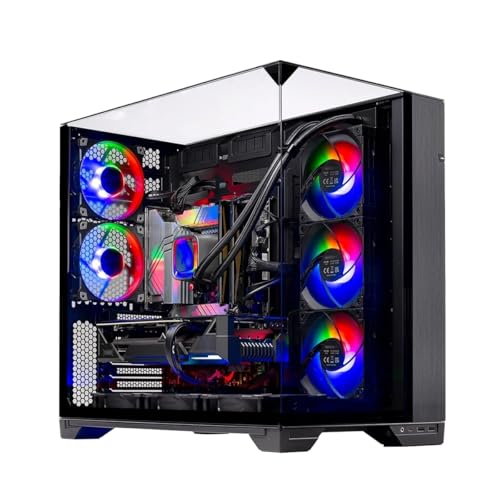
Top 3 picks at a glance
Decide These 3 Things First
1. Your monitor’s resolution and refresh rate. A 2560 x 1440 monitor running at 144Hz or 165Hz places different demands on the CPU than a 60Hz panel. If your goal is 60 to 90 fps in cinematic single-player games, a solid current-generation 6-core CPU is often enough. If you want 180 fps, 240 fps, or more in shooters, racing games, and esports titles, invest more in CPU performance and fast memory.
2. Your graphics card tier. At 1440p, the GPU should generally receive the largest share of the gaming budget. In a $1,400 to $1,700 desktop, it is usually better to choose a capable 6-core or 8-core CPU with a stronger graphics card than to choose an elite CPU with a weaker GPU. For example, a Ryzen 7 8700F and RTX 5060 Ti pairing can be balanced for mainstream 1440p gaming, while an RTX 5070-class system benefits from a stronger CPU if you play at high refresh rates.
3. Whether the PC is only for gaming. Gaming while streaming, editing video, compiling code, running virtual machines, or keeping many applications open calls for more cores and more memory. A gaming-only system can thrive with 6 cores and 16GB to 32GB of RAM. A mixed-use system is better served by 8 cores, 32GB of RAM, and a quality cooler.
CPU Size: Cores, Threads, and Cache
For 1440p gaming, core count matters, but it is not the only measure of CPU quality. Modern game engines benefit from multiple cores, yet gaming performance still depends heavily on per-core speed, architecture, and cache.
A practical baseline is 6 cores and 12 threads. This tier is appropriate for budget-conscious builds targeting roughly 60 to 144 fps in most games, especially when the graphics card is the limiting component. It is also a reasonable fit for systems in the $1,200 to $1,500 range.
An 8-core, 16-thread CPU is the sweet spot for many buyers. It provides more overhead for demanding open-world games, background apps, Discord, browser tabs, recording, and long-term use. A Ryzen 7 7700X-class processor, for example, is a more natural match for a system with an RTX 5070-class GPU and a 144Hz to 240Hz 1440p display.
More than 8 cores can be worthwhile for creators and heavy multitaskers, but 12-core and 16-core processors are not automatically better gaming purchases. If a more expensive CPU forces you to step down from a faster GPU to a slower one, overall 1440p gaming performance may suffer.
Cache deserves attention, particularly in CPU-heavy games. CPUs with larger gaming-focused cache designs can improve frame consistency in simulations, strategy games, large multiplayer matches, and open-world titles. Do not compare cache capacity alone, though; compare CPUs within the same current platform and price class.
Architecture and Platform Construction
A CPU is not a standalone purchase. It dictates the motherboard socket, chipset options, memory generation, cooler mounting hardware, and future upgrade path. That platform “construction” can be more valuable than a small difference in current frame rates.
When comparing prebuilt desktops, identify the exact CPU model rather than relying on marketing phrases such as “Ryzen 7” or “Intel Core i9.” A newer 8-core processor can be a better gaming choice than an older high-end chip with more aggressive branding. For instance, an Intel Core i9-11900KF is still an 8-core processor, but it belongs to an older platform using DDR4 memory. That does not make it unusable, but its $1,499 system price should be judged against newer DDR5-based alternatives.
For a new build, favor a current socket with readily available motherboards and memory. DDR5 is the normal choice for a fresh midrange or premium platform. Look for a motherboard with at least two M.2 SSD slots, four DIMM slots if possible, and enough rear USB ports for your setup. A board with four SATA ports, Wi-Fi 6 or newer, and a 2.5Gb Ethernet port is useful but not mandatory.
For prebuilts, ask whether the listed motherboard is a retail chipset board or a minimally specified OEM design. A system that simply says “X670 board” offers more confidence than one that does not name the chipset at all, but exact model details are still preferable.
Performance: Average FPS Is Not the Whole Story
At 1440p, buyers should care about smoothness as much as peak frame rate. The CPU affects minimum frame rates and frame-time consistency, especially in crowded cities, multiplayer matches, simulation games, and titles with extensive AI or physics activity.
Match the CPU to your desired refresh range:
- 60Hz to 100Hz: A capable current 6-core CPU is typically sufficient when paired with an appropriate GPU.
- 120Hz to 165Hz: A modern 6-core chip can work well, but an 8-core CPU adds useful headroom for newer games and background workloads.
- 180Hz to 240Hz: Choose a strong current-generation 8-core gaming CPU, especially if you play competitive games at reduced settings to maximize frame rate.
- 240Hz and above: CPU selection becomes far more important. Favor processors known for exceptional gaming cache and single-threaded performance.
Upscaling changes this equation. DLSS, FSR, XeSS, and similar modes can reduce GPU load, allowing frame rates to rise. Once the GPU is working less hard, the CPU may become the bottleneck. If you plan to use performance-focused upscaling settings and target 200 fps or more, do not underbuy the processor.
Cooling, Power, and Physical Fit
CPU cooling affects noise, sustained clock speeds, and long-term comfort at the desk. A processor’s wattage behavior matters more than its nameplate tier. Many gaming CPUs can run well on a quality tower air cooler, while higher-wattage chips may benefit from a 240mm or 360mm liquid cooler.
Check three physical measurements when building your own PC:
- Air cooler height: Many dual-tower coolers stand about 155mm to 165mm tall. Your case should support at least 5mm more clearance than the cooler’s listed height.
- Radiator support: A 240mm radiator usually needs space for two 120mm fans; a 360mm model needs three. Verify whether the case supports it at the top, front, or side without interfering with RAM or GPU clearance.
- Case airflow: A mesh-front case with at least two intake fans and one rear exhaust fan is a good baseline. Expect common case fans to measure 120mm or 140mm.
A 360mm AIO can be appropriate in a premium system such as a around $2,000 Ryzen 7 7700X and RTX 5070 desktop, but it is not automatically necessary for gaming. A well-installed $35 to $70 tower air cooler can be quieter, simpler, and fully adequate for many 65W to 125W-class CPUs.
Price Tiers and Budget Allocation
Think about CPU cost as part of the complete system, not in isolation. For a 1440p gaming build, the processor and motherboard together should usually consume less of the budget than the graphics card.
- Budget CPU tier: $150 to $230. Modern 6-core processors fit value-oriented systems. Pair them with a capable GPU, 16GB to 32GB of RAM, and a 1TB NVMe SSD.
- Midrange CPU tier: $230 to $350. This is the best value range for most 1440p buyers. Expect strong 6-core or 8-core options with better performance in high-refresh gaming.
- Premium CPU tier: $350 to $500. Best for enthusiasts with high-end GPUs, 180Hz to 240Hz monitors, CPU-heavy game libraries, or substantial productivity work.
- Flagship tier: $500 and up. Consider only if your workflow benefits from extra cores or you are pursuing extremely high frame rates. It is rarely the first place to spend more money in a standard 1440p build.
Prebuilts illustrate why total configuration matters. A around $1,400 desktop with a Ryzen 7 8700F, RTX 5060 Ti, 16GB DDR5, and 1TB SSD may be suitable for mainstream gaming, but upgrading to 32GB of RAM can be more meaningful than paying extra for a small CPU step. A around $1,650 version of the same general GPU and CPU combination with 32GB DDR5 may offer better everyday headroom if the rest of the components are comparable.
Warranty, Upgradeability, and Assembly
A good CPU choice should not lock you into a difficult-to-service system. For a self-built PC, CPU warranties commonly run three years, though the complete system warranty depends on each component. Keep the CPU box, serial information, purchase receipt, and cooler mounting hardware.
For prebuilts, look for at least a one-year parts and labor warranty. Two years is better, particularly for systems with liquid cooling. Confirm whether return shipping is covered for defects and whether opening the case to add RAM or storage affects coverage.
Assembly quality matters. A prebuilt should arrive with secure internal packaging, properly seated RAM, tidy cabling, and all accessories included. A desktop weighing 25 to 40 pounds should be shipped in a sturdy carton with foam or expandable internal support, particularly if it contains a large graphics card or glass side panel. After delivery, inspect the case, connect the monitor to the graphics card rather than the motherboard, and update drivers before judging performance.
Spec Checklist
| Spec | Budget | Mid | Premium |
|---|---|---|---|
| CPU | Modern 6-core / 12-thread | Modern 8-core / 16-thread or strong 6-core gaming chip | High-end 8-core gaming CPU or more for mixed workloads |
| Recommended GPU pairing | Mainstream 1440p GPU | RTX 5060 Ti to RTX 5070 class | RTX 5070 class and above |
| Memory | 16GB minimum; 32GB preferred | 32GB DDR5 | 32GB to 64GB DDR5 |
| Storage | 1TB NVMe SSD | 1TB to 2TB Gen4 NVMe SSD | 2TB Gen4 or faster NVMe SSD |
| Cooling | 120mm tower air cooler | Quality 120mm to 160mm tower or 240mm AIO | Premium air cooler, 240mm, or 360mm AIO as needed |
| Power supply | 650W to 750W, 80 Plus Bronze or Gold | 750W to 850W, 80 Plus Gold | 850W to 1,000W, 80 Plus Gold or better |
Red Flags
- A prebuilt lists only “i7,” “i9,” “Ryzen 7,” or “gaming CPU” without the full processor model.
- A premium-priced system includes just 16GB of RAM and no clear upgrade information.
- The listing does not name the power supply wattage, efficiency rating, or brand.
- A high-wattage CPU is paired with a small stock cooler or a case with a sealed front panel and limited ventilation.
- The motherboard has only one M.2 slot, two RAM slots, or unclear BIOS update support.
- A seller emphasizes RGB lighting, a 360mm cooler, or an “i9” label while providing vague GPU, motherboard, and PSU specifications.
- The CPU is several platform generations old but priced like a current DDR5-based system.
FAQ
Is a 6-core CPU enough for 1440p gaming?
Yes, a current 6-core, 12-thread CPU is enough for many 1440p builds, particularly when targeting 60Hz to 144Hz gameplay. An 8-core model is the better long-term pick if you use a high-refresh monitor, play CPU-heavy games, stream, or multitask while gaming.
Should I spend more on the CPU or GPU for 1440p?
Usually, spend more on the GPU. At 2560 x 1440, graphics performance has a major effect on image quality and frame rate. Choose a CPU strong enough to avoid obvious bottlenecks, then put the remaining budget toward the graphics card, 32GB of RAM, and a reliable power supply.
Do I need liquid cooling for a 1440p gaming CPU?
No. Many gaming CPUs perform well with a substantial air cooler measuring roughly 120mm to 160mm tall. Liquid cooling is useful for hotter processors, compact cases, or buyers who want a particular appearance, but a 240mm or 360mm AIO is not required simply because a system is built for 1440p gaming.
Is 32GB of RAM necessary for a 1440p build?
It is not mandatory, but it is strongly recommended for a new gaming PC. While 16GB can still run many games, 32GB provides more room for modern game textures, launchers, browsers, voice chat, recording software, and background tasks. For a midrange or premium 1440p system, 32GB is the sensible target.









