
Building a computer for a home office, creative studio, or gaming setup is an exciting project, but it is easy to get lost in the specifications of processors and graphics cards. Many builders make the mistake of treating the power supply unit (PSU) as an afterthought. They either buy the cheapest model available to save a few dollars, or they overcompensate by purchasing a massive, expensive 1200-watt unit for a system that will never draw more than 350 watts.
Both of these approaches are mistakes. Cheaping out on a power supply risks the safety of your entire system, as a poor-quality unit can fail catastrophically and damage your motherboard, CPU, or graphics card. On the flip side, over-buying wattage wastes money that could be better spent on more silent cooling, a faster solid-state drive, or ergonomic desk accessories. Understanding how to choose the right pc power supply wattage is about finding the sweet spot where efficiency, safety, and price intersect.
Our Top Picks


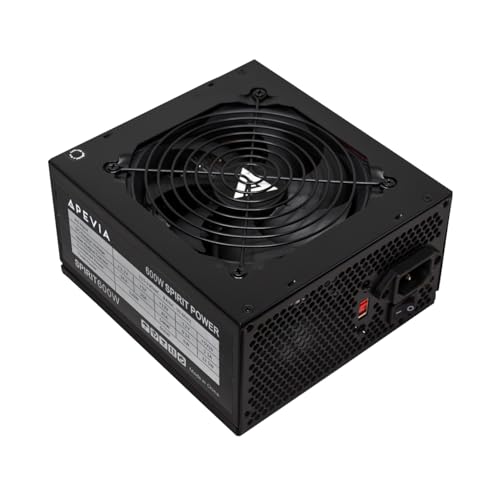
Top 3 picks at a glance
Decide These 3 Things First
Before diving into specific models, dimensions, and efficiency ratings, you must establish three foundational aspects of your computer build. This prevents you from buying a unit that is physically incompatible with your setup or mismatched with your long-term goals.
First, calculate your system’s baseline power draw. You can do this by adding up the Thermal Design Power (TDP) of your main components—primarily your central processing unit (CPU) and graphics processing unit (GPU)—and adding a buffer of 100 to 150 watts for the motherboard, RAM, storage drives, fans, and USB peripherals. For example, if you are running a mid-range CPU rated at 65 watts and a graphics card rated at 220 watts, your baseline draw is 285 watts. Adding a 150-watt buffer brings your target to roughly 435 watts, making a 500-watt or 600-watt power supply a safe baseline.
Second, determine your upgrade path. Are you building a system that you plan to modify over the next few years, or is this a closed-box system that will remain untouched until it is replaced? If you plan to upgrade to a high-end graphics card down the line, investing in a higher-wattage, modern power supply now will save you from having to rip out all your cable management and buy a new PSU later.
Third, define your acoustic and thermal environment. If your PC sits on your desk right next to your monitor in a quiet home office, fan noise matters. Power supplies generate heat under load, and cheaper units use smaller, louder fans that run constantly. Higher-end units often feature a “zero-RPM” mode, where the fan stays completely silent during light office work and only spins up during intensive tasks.
Form Factor and Physical Dimensions
Power supplies are not one-size-fits-all. You must match the physical dimensions of the PSU to the layout of your computer case.
Standard ATX power supplies measure 150 millimeters (5.9 inches) wide and 86 millimeters (3.4 inches) high. However, their depth can vary significantly. Compact or budget ATX power supplies are typically 140 millimeters (5.5 inches) deep, making them easy to fit into tight mid-tower cases. High-end, high-wattage units can stretch to 160 millimeters, 180 millimeters, or even 200 millimeters in depth. Always check your computer case’s manual to ensure there is enough clearance for both the power supply and the bundle of cables exiting the rear of the unit, especially if your case has a hard drive cage located right next to the PSU shroud.
If you are building a small-form-factor (SFF) PC designed to sit neatly on a minimalist desk, you will likely need an SFX power supply. SFX units are much smaller, measuring 125 millimeters wide, 63.5 millimeters high, and 100 millimeters deep. While they are highly space-efficient, they are generally more expensive and require careful cable routing because of their compact internal designs.
Cable Construction and Modular Design
How the cables attach to your power supply affects both the difficulty of your assembly process and the airflow inside your computer case. There are three primary construction styles:
Non-Modular: Every single cable is permanently soldered to the internal circuit board of the power supply. This means you must find a place inside your computer case to hide all the unused cables, such as extra SATA power lines or PCIe connectors. While non-modular units are the most budget-friendly, they make cable management difficult and can block airflow in smaller cases.
Semi-Modular: The essential cables—usually the 24-pin motherboard cable and the 8-pin CPU power cable—are permanently attached. The rest of the cables, such as those for graphics cards and storage drives, are detachable. This offers an excellent balance of value and cleanliness, as you only plug in the auxiliary cables your system actually requires.
Fully Modular: Every single cable can be detached. This is the gold standard for clean aesthetics and easy assembly. You can plug all the cables into your components first, route them neatly through the back of the case, and plug them into the power supply last. It also allows you to swap out standard cables for custom-sleeved options to match your workspace’s design aesthetic.
Furthermore, pay attention to the inclusion of modern native cables. As we approach 2026, the transition to ATX 3.1 and PCIe 5.1 power standards is becoming the baseline for any forward-looking PC build. Modern high-performance graphics cards utilize a specialized, high-power connector (such as the native 12V-2×6 cable) that can deliver up to 600 watts over a single connection. Choosing a power supply that includes this native cable eliminates the need for bulky, unsightly adapter splitters that can clutter your build and pose safety risks if not seated perfectly.
Efficiency Ratings and the 80 Plus Standard
Power supplies pull alternating current (AC) from your wall outlet and convert it into the direct current (DC) your computer components require. No conversion is 100% efficient; some energy is always lost as heat. The 80 Plus certification program rates power supplies based on their efficiency at 20%, 50%, and 100% system loads.
An 80 Plus White certified unit represents the entry-level baseline, guaranteeing at least 80% efficiency at a 50% system load. As you move up through Bronze, Silver, Gold, Platinum, and Titanium, the efficiency requirements increase. An 80 Plus Gold unit, for example, must reach at least 90% efficiency at a 50% load on a standard 115V grid.
Choosing a highly efficient power supply reduces your home energy bill and keeps your workspace cooler and quieter. Because less energy is wasted as heat, the power supply’s cooling fan does not need to spin as fast or as loud. For a daily-use home office computer or gaming rig, an 80 Plus Gold power supply is generally considered the sweet spot for balancing up-front hardware costs with long-term energy savings.
Price Tiers and Real-World Budgets
Understanding what you get at different price points helps you allocate your budget effectively without compromising on safety.
Budget Tier ($30 to $50): In this price range, you will find units offering 500 to 600 watts of power with basic 80 Plus White or Bronze efficiency ratings. These units are almost exclusively non-modular, featuring permanently attached, multi-colored cables. They are ideal for basic office workstations, home theater PCs, or budget gaming setups that do not use dedicated high-power graphics cards.
Mid-Range Tier ($60 to $110): This is the most popular segment for custom PC builders. Here, you will find 650-watt to 850-watt power supplies featuring 80 Plus Gold efficiency and fully modular designs. These units often include high-grade internal components, silent fan profiles, native ATX 3.1 support, and generous warranties. They are designed to handle modern mid-to-high-end graphics cards with ease.
Premium Tier ($120 to $250+): Aimed at enthusiasts, creative professionals, and workstation users, this tier features units ranging from 1000 watts to 1600 watts. They carry 80 Plus Platinum or Titanium certifications, ultra-quiet fluid dynamic bearing fans, premium braided cables, and industrial-grade internal capacitors. These units are built to run intensive tasks like 3D rendering or machine learning workloads around the clock.
Safety Protections and Warranty Lifespan
A power supply acts as the gatekeeper between your home’s electrical grid and your expensive computer hardware. If a power surge, short circuit, or brownout occurs, a good power supply will sacrifice itself to save the rest of your computer. To do this, it relies on a suite of heavy-duty industrial protections:
- OVP (Over Voltage Protection) and UVP (Under Voltage Protection): Shuts down the unit if the voltage spikes too high or drops too low.
- OCP (Over Current Protection): Prevents too much current from running down a single rail.
- SCP (Short Circuit Protection): Instantly cuts power if an electrical short is detected, preventing fires.
- OPP (Over Power Protection): Prevents the system from drawing more total wattage than the unit is rated to safely deliver.
- OTP (Over Temperature Protection): Shuts down the unit if internal temperatures exceed safe operating limits.
The warranty offered by the manufacturer is a direct reflection of their confidence in these components. Entry-level budget units typically offer a 2-year to 5-year warranty. Mid-range and premium power supplies from reputable brands often come with a robust 10-year warranty. Investing in a unit with a decade-long warranty means you can carry the power supply over to your next two or three computer builds, making it one of the most cost-effective components in your setup over time.
Spec Checklist
| Specification | Budget Tier | Mid-Range Tier | Premium Tier |
|---|---|---|---|
| Wattage Range | 450W – 600W | 650W – 850W | 1000W – 1600W |
| Efficiency Rating | 80 Plus White or Bronze | 80 Plus Gold | 80 Plus Platinum or Titanium |
| Cable Style | Non-Modular (Fixed) | Semi or Fully Modular | Fully Modular (Premium Sleeving) |
| ATX / PCIe Standard | ATX 2.3 / Legacy PCIe | ATX 3.1 / PCIe 5.1 Ready | ATX 3.1 / PCIe 5.1 Native |
| Warranty Period | 2 to 5 Years | 7 to 10 Years | 10 to 12 Years |
| Average Price | $30 – $50 | $60 – $110 | $120 – $250+ |
Red Flags
When shopping for a power supply, look out for these critical warning signs that indicate a potentially dangerous or low-quality product:
- No 80 Plus Certification: If a power supply lacks any official 80 Plus efficiency certification, it is highly likely that the manufacturer used subpar internal components to save on production costs.
- Unusually Light Weight: High-quality power supplies use heavy copper wiring, robust aluminum heatsinks, and thick steel casings. If a 600-watt power supply feels incredibly light (under 3 pounds), it is a sign that the manufacturer cut corners on passive cooling and internal component size.
- A Short Warranty (1 Year or Less): A manufacturer that only guarantees their power supply for 12 months knows that the unit is not built to last. Avoid these units for any computer holding important personal or professional data.
- Missing Safety Protection Listings: If the product description or manual does not explicitly list protections like OVP, SCP, and OPP, do not plug it into your wall outlet.
- Unbranded or Unknown Manufacturers: Stick to established, reputable brands in the PC hardware space. Buying an unbranded power supply from an online marketplace to save $15 is a massive gamble with your safety.
FAQ
How do I know exactly how many watts my PC needs?
The easiest way to calculate your required wattage is to use a reputable online PSU calculator. You enter your CPU, GPU, memory, storage drives, and fan configuration, and the calculator provides an estimated maximum system draw. Alternatively, find the TDP of your CPU and GPU, add them together, and add 150 watts to give your system healthy headroom.
Is it bad to buy a power supply with too much wattage?
No, it will not harm your computer. A 1000-watt power supply does not force 1000 watts into your components; it only delivers the exact amount of power your system demands at any given millisecond. However, buying a massive unit is a waste of money if your system only draws 300 watts, and you may miss out on the peak efficiency curve of the unit, which usually occurs between 40% and 60% load.
As an Amazon Associate we earn from qualifying purchases at no extra cost to you.


What is the difference between ATX 3.0/3.1 and older power supplies?
ATX 3.0 and 3.1 are modern power standards designed to handle the massive, brief power spikes (called transient spikes) generated by modern high-end graphics cards. They also introduce native high-power cables, like the 12V-2×6 connector, which can deliver up to 600 watts of power through a single cable without the need for messy multi-cable adapters.
Can a bad power supply ruin my graphics card or CPU?
Yes. If a low-quality power supply fails without proper built-in protections (like OVP or SCP), it can send an electrical surge directly down the cables into your motherboard, CPU, and graphics card, instantly frying their delicate circuits. Investing in a high-quality, name-brand power supply with built-in safety protections is the best insurance policy for your entire computer build.









