This review analyzes published product information. We have not performed detailed research of this unit.
As an Amazon Associate, we earn from qualifying purchases.
Ten fan connections, but not ten monitoring channels
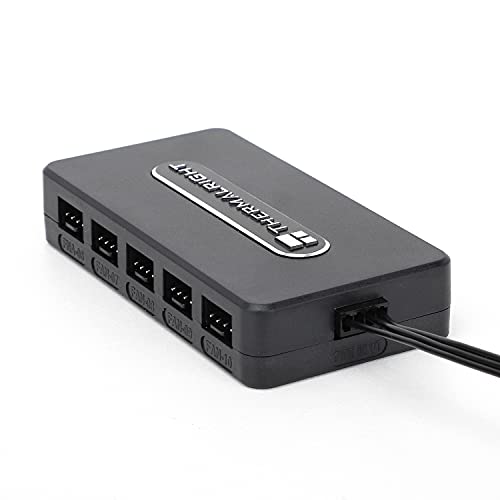
The Thermalright Integrated Fan Hub reviewed here is the 10-port, 4-pin, 12V configuration with SATA power input. Its main attraction is straightforward: it provides a central connection point for a case with numerous fans. The important qualification is equally clear. Although the listing supports connecting up to ten fans, it says that speed reporting comes from only the fan connected to the red interface.
This is a specification-based assessment of the supplied retailer listing, not a hands-on installation or electrical test. The documented connections make the hub worth considering for a wiring-focused upgrade, but the evidence does not establish electrical load limits or the full motherboard connection arrangement. Those omissions matter more than the listing’s broad assurances about stability and safety.
Specifications that determine the installation
| Item | Listed specification |
|---|---|
| Product configuration | Thermalright Integrated Fan Hub, 10-port |
| Fan interface | 4-pin, 12V |
| Connection capacity | Up to ten fans |
| Power input | SATA power |
| Speed reporting | One fan, through the red interface |
| Mounting method | Built-in double-sided adhesive |
| Listed dimensions | 3.54 × 1.57 × 0.67 inches |
| Listed weight | 0.22 pounds |
No manufacturer model number is supplied, so the port count, fan connector type, voltage and power input identify this configuration. The listing’s unrelated catalog categories do not establish additional functions; this review treats it as the fan hub described in the product title and features.
Plan the power route before choosing a mounting spot
SATA power input is a central installation requirement. Before choosing this hub, confirm that your system has a suitable SATA power connection available and that it can reach the intended mounting position. The supplied evidence does not specify the power lead’s length, so a location that looks convenient beside the fans may still be awkward for the power cable.
The listed dimensions provide a starting point for checking space, but do not treat the hub’s footprint as the complete installation envelope. Allow room for the attached connectors and cable routing as well. The evidence gives no connector-clearance measurements or fan cable requirements, making a layout check more useful than assuming it will fit behind any particular case panel.
Thermalright describes an integrated double-sided adhesive mounting method. That offers a way to position the hub without relying on a listed screw-mount arrangement. However, the evidence does not specify adhesive replacement, removal behavior or surface preparation. Choose the location after checking reach and access, rather than attaching it first and discovering that the farthest fan cannot connect comfortably.
Check the control connection, not just the fan plugs
The title identifies 4-pin, 12V fan connections, and the speed-reporting explanation refers to motherboard PWM reading. It does not provide a complete wiring diagram, identify the motherboard-side cable or clearly describe the control signal distributed to each output. A four-pin connection alone is not enough evidence to promise individually adjustable fan speeds.
For purchase planning, treat this as a multi-fan connection hub rather than a documented multi-zone controller. If your goal is separate behavior for intake, exhaust and other fan groups, the supplied specifications do not establish that capability. Verify the control topology and motherboard connection requirements before buying it for that purpose.
Compatibility with three-pin fans is also unspecified. Likewise, nothing in the evidence establishes lighting control, software integration or temperature-sensor inputs. These are not confirmed defects; they are features you should not include in your buying assumptions. Match the hub to the documented fan interface, and seek further documentation for anything beyond it.
The red port determines what you can monitor
The most useful operational detail in the listing is its single-fan speed feedback. Only the fan attached to the red interface is recognized for speed reading. Select that connection deliberately: it determines which fan’s reported speed is available, not a combined reading of all connected fans.
The practical consequence is limited visibility. A speed reading from that port should not be interpreted as confirmation that every other connected fan is operating. If your upgrade is intended to provide individual fan diagnostics, this hub’s documented reporting arrangement does not meet that goal. For a simpler build where one reported speed is acceptable, the limitation may be less consequential.
Ten ports are not an electrical load rating
The listing advertises support for ten fans and claims stable output under high load. It supplies neither a per-port current limit nor a total current or wattage rating. Consequently, there is no evidence-based way here to approve a particular ten-fan combination solely from the available port count.
Before populating every output, obtain the hub’s electrical limits and compare them with the requirements of your selected fans. The seller’s general safety wording is not a substitute for those figures. If the installation is part of broader power troubleshooting, our power supply tester guide offers a related starting point, but it cannot establish this hub’s missing load ratings.
Frequently asked questions
Can this hub provide individual fan-speed control?
The article does not establish that it can provide individually adjustable fan speeds. The documented information describes a multi-fan connection hub with 4-pin, 12V fan connections and speed reporting from one fan through the red interface. If separate intake and exhaust behavior is important, verify the control topology and motherboard connection requirements before buying it for that purpose.
What should I verify before installing the hub inside a case?
Verify that a suitable SATA power connection can reach the intended mounting location, that the hub and attached connectors have enough space, and that every fan cable can connect comfortably. The listing gives dimensions and adhesive mounting, but it does not provide power-lead length, connector-clearance measurements or fan-cable requirements. Check the layout before attaching the hub.
Does the hub support three-pin fans?
Compatibility with three-pin fans is unspecified in the published listing information. The documented configuration is described as having 4-pin, 12V fan connections, so the article recommends matching the hub to that documented interface. Do not assume three-pin compatibility, lighting control, software integration or temperature-sensor inputs without obtaining further documentation.
What does the red interface do?
The red interface determines which connected fan supplies the available speed reading. Only the fan attached to that port is recognized for speed reporting, so the reading is not a combined measurement of all connected fans. It also should not be treated as confirmation that every other fan is operating. Select that connection deliberately when planning the installation.
Can I safely connect ten fans based only on the port count?
No, the port count alone does not establish that a particular ten-fan combination is electrically suitable. The listing provides neither a per-port current limit nor a total current or wattage rating, even though it advertises support for ten fans. Obtain the hub’s electrical limits and compare them with the requirements of the selected fans before populating every output.
Verdict: useful for consolidation, conditional for expansion
The Thermalright 10-port hub is a plausible wiring upgrade for a build needing multiple 4-pin, 12V fan connections, SATA power input and adhesive mounting. Its single-port speed feedback is clearly documented. Choose it only after confirming electrical capacity and the motherboard control connection; look for more complete controller documentation if independent adjustment or individual monitoring is the reason for upgrading.
Sources: Supplied Thermalright Integrated Fan Hub retailer listing.
Check the exact product and current offer on Amazon