
As an Amazon Associate we earn from qualifying purchases at no extra cost to you.


When esports players shop for monitors, they tend to make the same three mistakes. They buy the highest refresh rate number on the shelf without checking whether their PC can actually push that many frames. They chase refresh rate while ignoring response time, panel type, and motion clarity — the things that determine whether those frames actually look clean. And they overspend on specs they’ll never notice in-game while underspending on the fundamentals like stand ergonomics and pixel density. This guide fixes that. Refresh rate matters enormously in competitive play, but only when it’s matched to your hardware, your game, and your budget.
Our Top Picks
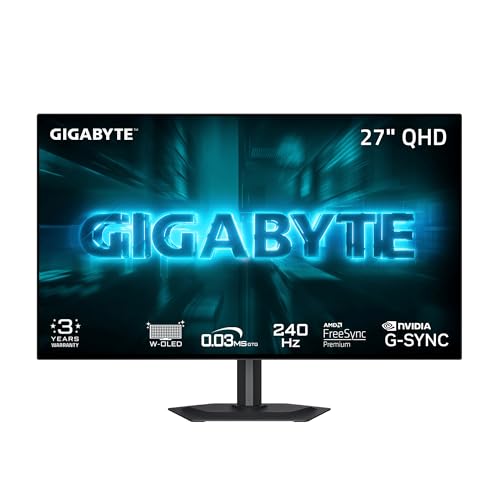 GIGABYTE GO27Q24G 27" W-OLED 240Hz QHD Gaming Monitor27" QHD7.38 x 23.8 x 20.73 inches16.5 poundsCheck on Amazon


Top 3 picks at a glance
Decide These 3 Things First
Before comparing panels, answer these questions honestly, because they’ll eliminate half the market immediately.
1. What frame rate can your PC actually deliver? A 480Hz monitor paired with a GPU that averages 180 FPS in your main title is money wasted. Check benchmarks for your exact GPU in the game you play most. If your rig sustains 200+ FPS in CS2, Valorant, or Rocket League at 1080p, high refresh rates pay off. If you’re hovering around 120–150 FPS, a well-tuned 240Hz panel is the smarter buy — spend the savings on the GPU instead.
2. What games do you play competitively? Tactical shooters and fighting games reward raw frame rates because they run at low graphical settings and benefit directly from reduced motion blur and lower input latency. Story-driven or graphically heavy titles cap out well below 200 FPS for most systems, so visual quality (resolution, contrast, color) matters more than raw Hz.
3. What’s your total budget, including the desk setup? A realistic entry point is $130–$200 for a capable 240Hz 1080p panel. Mid-tier QHD 240Hz OLEDs run $300–$450. The 480Hz flagship tier starts around $600–$750. Set your ceiling before browsing, or you’ll talk yourself into a monitor that outclasses your PC.
Resolution and Pixel Density: Why 24.5″ and 27″ Dominate
Esports professionals overwhelmingly use 24.5-inch or 27-inch panels, and the reason is simple: at typical seated distances of 24–32 inches, those sizes let you see the whole screen without moving your eyes or head. A 32-inch monitor forces you to scan for minimap and HUD information, which costs time.
Match resolution to size for a sharp image:
– 24–24.5″ at 1080p gives roughly 89–90 pixels per inch — the classic competitive setup.
– 27″ at 1080p drops to about 82 PPI, which most people find acceptable but not ideal; text is slightly soft up close.
– 27″ at 1440p (QHD) hits about 109 PPI — the sweet spot if your GPU can handle it.
A 27-inch 1080p curved panel like the Z-Edge (FHD, 300Hz/240Hz modes, around $170) makes sense if you sit close and want immersion, but know that curved screens at this size are a preference, not a performance feature. Curvature (typically 1500R–1800R at 27 inches) can slightly reduce edge distortion for some players and bothers others. If possible, see one in person before committing.
Panel Type and Response Time: Where Motion Clarity Comes From
Refresh rate is only half of motion quality. Response time — how fast a pixel changes color — determines whether high frame rates actually look clean.
– Fast IPS panels typically quote 1ms (GtG or similar), with real-world motion performance that’s very good. They’re affordable, bright (300–400 nits), and have no burn-in risk. The MSI MAG 274CF X24 (27″ FHD, 240Hz, 0.5ms rated, FreeSync Premium, around $130) is representative of this tier.
– W-OLED panels respond in roughly 0.03ms, producing the cleanest motion available at any refresh rate. A 240Hz OLED often looks smoother than a 360Hz IPS because of this. The GIGABYTE GO27Q24G (27″ QHD W-OLED, 240Hz, around $350) sits in this category, as does the ASUS ROG PG27AQDP (27″ 1440p, 480Hz OLED, $699) at the extreme top end.
– VA panels often quote low numbers but show smearing in dark transitions. For competitive play, generally avoid them despite tempting prices.
The tradeoff with OLED: brightness peaks around 250–300 nits for full-screen white content, and static HUD elements over thousands of hours carry some burn-in risk. Most current OLEDs include pixel-shift and pixel-refresh mitigations, and warranties increasingly cover burn-in — verify before buying.
Adaptive Sync and Input Latency
Your monitor and GPU should agree on frame timing. Look for:
– AMD FreeSync Premium or NVIDIA G-SYNC Compatible certification — both work on the same VESA Adaptive-Sync base for most modern monitors.
– A variable refresh range of at least 48–240Hz, so syncing holds even when frame rates dip.
– DisplayPort 1.4 at minimum for anything above 240Hz at 1080p; 480Hz-class panels rely on DisplayPort 1.4 with DSC or DisplayPort 2.1. HDMI 2.1 matters if you ever connect a console, but a VGA port on a 2026-era monitor is a legacy leftover — fine to have, never the reason to buy.
Real input latency differences between a decent 240Hz panel and a flagship are measured in single milliseconds; the visible difference comes from motion clarity, not lag. Don’t pay flagship prices for latency alone.
Ergonomics and Stand Quality
Competitive players sit in a fixed position for hours. Check these before checkout:
– Height adjustment range of at least 100mm (4 inches), plus tilt (typically -5° to +20°) and pivot for vertical play.
– VESA 100x100mm mounting — essential if you’ll use an arm. Several budget panels, including some MSI MAG models, ship with tilt-only stands that look fine on the spec sheet and frustrate you within a month. Budget $30–$60 for an arm if the stand is basic.
– Panel weight between 9 and 15 pounds (stand adds another 5–8 pounds) — any desk made for a PC setup handles this, but arms are rated per VESA weight, so check.
– Thin bezels (under 8mm) if you’ll ever run a dual-monitor competitive setup.
Price Tiers: What Your Money Actually Buys
– Budget ($120–$200): 24.5–27″ 1080p, 180–300Hz, fast IPS or basic VA, FreeSync Premium, typically tilt-only stands. Example tier: the MSI MAG 274CF X24 at around $130 or the Z-Edge curved 300Hz at around $170. This is all most CS2 and Valorant players genuinely need.
– Mid ($300–$450): 27″ QHD, 240Hz OLED or high-end IPS, better HDR, USB hubs, full ergonomic stands. The GIGABYTE GO27Q24G at around $350 is the archetype — you gain resolution and near-instant pixel response.
– Premium ($600–$800+): 480Hz-class OLED or 360Hz+ IPS, DisplayPort 2.1, best-in-class motion clarity, full warranty coverage including burn-in. The ASUS ROG PG27AQDP at $699 is the flagship example. Only worth it if your PC sustains 400+ FPS in your main title.
Spec Checklist
| Spec | Budget ($120–$200) | Mid ($300–$450) | Premium ($600–$800) |
|---|---|---|---|
| Resolution / Size | 1080p, 24.5–27″ | 1440p, 27″ | 1440p, 27″ |
| Refresh Rate | 180–300Hz | 240Hz | 360–480Hz |
| Panel | Fast IPS | W-OLED or quality IPS | OLED |
| Response Time (rated) | 0.5–1ms | 0.03ms (OLED) | 0.03ms (OLED) |
| Adaptive Sync | FreeSync Premium | FreeSync Premium / G-SYNC Compatible | G-SYNC Compatible / FreeSync Pro |
| Video Inputs | DP 1.4 + HDMI | DP 1.4 + HDMI 2.0 | DP 1.4 (DSC) or DP 2.1 + HDMI 2.1 |
| Stand | Tilt, often VESA-ready | Height/tilt/swivel/pivot | Full ergonomic + VESA 100 |
| Warranty | 1–3 years | 3 years typical | 3 years, OLED burn-in coverage common |
Red Flags
– Refresh rate advertised over HDMI only. Some budget panels hit 240Hz only through DisplayPort; check which input supports full rate before buying.
– “Overclockable” refresh rates listed as the headline spec. If 300Hz requires a non-standard mode that introduces frame skipping, you’re buying a 240Hz monitor with marketing.
– Rated response times without a transition type. “1ms” from a gray-to-gray spec tells you little; look for reviews of real motion performance rather than trusting the box.
– VA panels marketed as “1ms gaming.” Dark-scene smearing is the known weakness — a dealbreaker for shooters.
– Headphone “jack” listed without a mic input, or no USB ports at all in the mid tier, where both should be standard.
– Burn-in coverage excluded on any OLED — most major brands now include it, so refusal is a warning sign.
– Refurbished or open-box OLEDs without warranty transfer; used panels carry unknown accumulated pixel-wear hours.
FAQ
Is 240Hz enough for competitive gaming?
For the overwhelming majority of players, yes. 240Hz at 1080p or 1440p delivers clear motion, low perceived latency, and matches what most mid-range to high-end PCs can sustain frame-rate-wise. The jump from 60Hz to 240Hz is transformative; from 240Hz to 480Hz, it’s subtle and only meaningful for top-tier tactical players with hardware to match.
Does a higher refresh rate hurt my FPS performance?
No — the monitor doesn’t reduce your frame rate. But it raises the bar for your GPU: to benefit from 240Hz, you want your frame rate near 240 FPS, or at least above roughly 120 FPS with adaptive sync smoothing things out. If your PC can’t get close, higher Hz buys very little.
OLED or IPS for esports?
OLED wins on pixel response, contrast, and motion clarity; IPS wins on brightness, price, and zero burn-in concern. If you play varied content for long daily sessions and want maximum longevity per dollar, fast IPS is safer. If motion clarity is your top priority and you’re willing to run basic preventive settings, a 240Hz QHD OLED around $300–$450 is outstanding value.
Does monitor size affect my aim?
Indirectly, yes. Panels larger than 27 inches put crosshair-to-minimap distances farther apart, forcing more eye movement. That’s why 24.5″ 1080p remains the pro-standard choice — everything fits in your central vision. Bigger isn’t better for competitive play; sharper and faster is.









