
When building or upgrading a custom PC, it is easy to get swept up in the aesthetics of flashing RGB lights and aggressive frame designs. However, one of the most common mistakes builders make is treating all 120mm or 140mm fans as identical. Many buy high-airflow fans optimized for open, unrestricted spaces and mount them directly against dense liquid-cooling radiators, thick dust filters, or restrictive front mesh panels. This suffocates the intake, drives up hardware temperatures, and forces the fans to run at 100% capacity—creating an unbearable drone—just to pull a fraction of the air they should. To keep your system cool under load, you must understand how to choose the right case fans for static pressure.
Our Top Picks
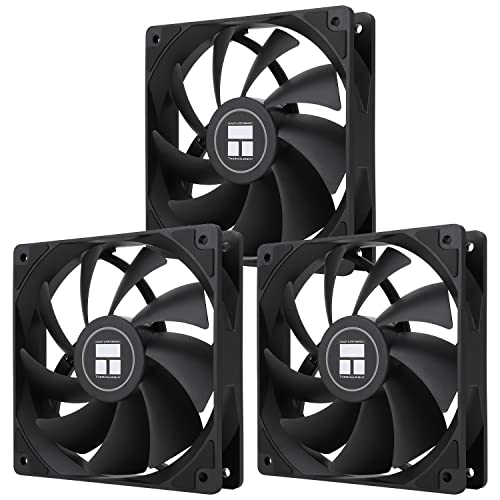


Top 3 picks at a glance


Decide These 3 Things First
Before diving into bearing types and fan curves, you must clarify three foundational aspects of your PC build. These decisions will narrow down your search and prevent you from overspending on features you do not need.
As an Amazon Associate we earn from qualifying purchases at no extra cost to you.


- Identify Your Restriction Points: Are you pushing air through a 240mm, 280mm, or 360mm liquid-cooling radiator? Or are you pulling fresh air through a fine nylon dust filter? If your fan faces an obstruction within 0.5 inches of its blades, you need a dedicated static pressure fan. If the path is entirely clear, a standard airflow fan is better.
- Determine Your Physical Clearance: Standard PC fans are 25mm thick. However, small form factor (SFF) cases or builds with thick radiators often run into clearance issues with motherboard VRM heatsinks or RAM sticks. Knowing whether you have the standard 25mm of clearance or need to drop to a slim 15mm profile is critical before purchasing.
- Establish Your Budget per Fan Slot: Case fans can range from budget-friendly multi-packs costing under $5 per fan to premium models that cost upwards of $35 for a single unit. Decide if you want to allocate your budget to a high-end 3-pack for a radiator or populate your entire chassis with a cost-effective 5-pack.
Fan Size and Thickness
The physical footprint of your static pressure fan directly dictates its performance ceiling and compatibility. Case fans primarily come in two standard diameters: 120mm and 140mm. In modern PC chassis designs heading into 2026, 140mm fans are increasingly favored because their larger surface area allows them to move more air at lower rotational speeds (RPM), reducing overall system noise. A typical 140mm static pressure fan can deliver the same static pressure at 1,200 RPM that a 120mm fan manages at 1,500 RPM.
Thickness is the next crucial metric. The industry standard is 25mm. Thicker fans (some specialty models reach 30mm) naturally generate more static pressure because their deeper blades can scoop and compress air more effectively. Conversely, if you are working in a compact Mini-ITX enclosure, you may have to opt for slim fans, which measure just 15mm in thickness (such as the ARCTIC P12 Slim). While slim fans are excellent space-savers, their reduced depth means they must spin faster to generate comparable static pressure, which can increase high-pitched motor whine.
Blade Design and Pitch
You can identify a static pressure fan instantly by looking at its blades. Airflow-optimized fans feature thin, widely spaced blades with a steep angle to move large volumes of air quickly through open spaces. Static pressure fans do the opposite: they feature wide, paddle-like blades with a very gentle pitch and minimal spacing between them. Some premium designs feature five to seven massive blades that almost entirely overlap when viewed from the front.
This overlapping design prevents air from slipping backward through the fan blades when it encounters resistance (like a radiator’s dense aluminum fins). Another critical element is the “tip clearance”—the physical gap between the outer edge of the fan blade and the inner wall of the frame. High-end static pressure fans reduce this gap to less than 1.0mm (and in some elite models, as low as 0.5mm). A tighter tip clearance prevents pressurized air from escaping around the sides, ensuring every cubic foot of air is forced forward through your components.
Bearing Construction and Lifespan
The bearing is the heart of the fan motor; it dictates how long the fan will run and what kind of noise profile it will develop over time. Because static pressure fans work harder against resistance, their bearings experience higher axial loads. There are three primary bearing classes you will encounter:
- Sleeve Bearings: The cheapest option, utilizing a lubricated sleeve around a spinning shaft. These are highly prone to drying out, especially when mounted horizontally (pushing air up or down). They typically have a lifespan of 30,000 hours and are best avoided for high-resistance applications.
- Ball Bearings (Single or Double): Highly durable and unaffected by mounting orientation. Double ball bearings can easily last 80,000 to 100,000 hours. However, they naturally emit a faint metallic clicking or humming noise, making them less ideal for ultra-quiet home office environments.
- Fluid Dynamic Bearings (FDB / S-FDB): The gold standard for modern PC fans. These use pressurized oil to keep the shaft centered, resulting in near-silent operation and incredible lifespans ranging from 120,000 to 150,000 hours. This category includes advanced variations like Thermalright’s S-FDB, offering premium longevity at highly competitive price points.
Performance Ratings and Specifications
When comparing fans, do not rely on marketing buzzwords. Look directly at the spec sheet for two key numbers: static pressure and airflow volume. Static pressure is measured in millimeters of water column (expressed as mmH2O), while airflow is measured in cubic feet per minute (CFM).
For a fan to successfully push air through a standard 25mm-thick radiator or a dense dust filter, look for a static pressure rating of at least 1.5 mmH2O. For extremely thick radiators (45mm to 60mm) or ultra-dense cooling fins, you should aim for fans that deliver 2.2 mmH2O to over 3.0 mmH2O. Airflow ratings for static pressure fans are typically lower than those of airflow fans, generally ranging between 50 and 70 CFM for a standard 120mm fan. Ensure these ratings are achieved at reasonable RPM limits; a fan that boasts 3.0 mmH2O of pressure but requires a screaming 3,000 RPM to get there will ruin your computing environment with noise.
Price Tiers and Value Packs
The market for static pressure fans is highly segmented, allowing you to choose between buying individual premium units or bulk packs that offer incredible value per slot. Understanding these ranges helps you allocate your budget correctly:
- Budget Tier ($5 to $12 per fan): In this category, brands like ARCTIC rule the market. You can purchase single pressure-optimized 120mm fans for around $7 to $9, or opt for a 5-pack (such as the ARCTIC P12 5-pack) for roughly $24, which drops the cost to under $5 per fan. These fans often feature basic fluid dynamic bearings and excellent pressure performance, though they may skip premium extras like braided cables or rubber dampening pads.
- Mid-Range Tier ($12 to $22 per fan): Here, you find options like the Thermalright TL-C12C X3 (often sold in 3-packs for around $12, offering incredible value). Fans in this tier introduce more robust S-FDB bearings, integrated rubber anti-vibration corners, and slightly sturdier frame plastics to prevent frame warping under high tension.
- Premium Tier ($25 to $45+ per fan): This tier is populated by high-end brands offering advanced engineering. These fans feature liquid-crystal polymer (LCP) blades that do not warp or stretch at high speeds, magnetic levitation bearings, modular daisy-chaining cables, and highly customizable PWM curves that allow the fan to run completely silent under low loads.
Cable Management and Installation Features
Installing multiple fans can quickly turn the backside of your PC case into a chaotic web of wires. To avoid this, pay close attention to the fan’s connector type and cable design. Look for fans that feature 4-pin PWM (Pulse Width Modulation) connectors rather than older 3-pin DC connectors. PWM allows your motherboard to precisely control the fan speed from 0% to 100% based on real-time component temperatures, keeping your system whisper-quiet when idling.
Additionally, look for daisy-chaining capabilities (often labeled as PST or PWM Sharing Technology by brands like ARCTIC). This feature allows you to plug one fan directly into the back of another, linking up to three or four fans together so they run off a single motherboard header. This eliminates the need for bulky fan hubs and keeps your cable runs clean. Finally, ensure the fan frame includes integrated rubber pads at the mounting corners. These pads absorb microscopic motor vibrations, preventing them from transferring to your metal case chassis and creating annoying rattling noises.
Power Consumption and Header Limits
An often-overlooked safety detail when installing multiple static pressure fans is the power draw. A standard motherboard fan header is typically rated to supply up to 1.0 Amp (A) of current at 12 Volts (V), which equates to 12 Watts of maximum power. While a single budget fan might only draw 0.08A to 0.15A at maximum speed, high-performance or RGB-lit static pressure fans can draw 0.25A to 0.35A each.
If you daisy-chain four high-performance fans onto a single header, their combined draw could exceed 1.0A, potentially damaging your motherboard’s internal circuitry. Always check the amperage rating on the back of the fan hub. For safe operation, keep the cumulative power draw of all daisy-chained fans on a single header under 0.8A to leave a comfortable safety margin.
Spec Checklist
| Specification | Budget Tier | Mid-Range Tier | Premium Tier |
|---|---|---|---|
| Static Pressure (mmH2O) | 1.2 to 1.8 mmH2O | 1.8 to 2.4 mmH2O | 2.5 to 4.0+ mmH2O |
| Noise Level (dB(A)) | 22 to 28 dB(A) | 18 to 24 dB(A) | 15 to 22 dB(A) |
| Bearing Type | Sleeve / Basic FDB | S-FDB / Rifle Bearing | Premium FDB / Magnetic Levitation |
| Average Lifespan | 30,000 to 50,000 hours | 80,000 to 100,000 hours | 120,000 to 150,000+ hours |
| Price per Fan | around $5 to around $10 | around $11 to around $22 | around $25 to around $45+ |
Red Flags
When shopping for static pressure fans, be on the lookout for these warning signs that indicate a product might not perform well in restrictive environments:
- Missing Static Pressure Specs: If a manufacturer lists the fan’s CFM (airflow) and RPM but completely omits the mmH2O rating, it is almost certainly a low-pressure airflow fan unsuitable for radiators or thick dust filters.
- Sleeve Bearings in Horizontal Mounts: Avoid cheap sleeve-bearing fans if you plan to mount them at the top of your case pushing air upward. Gravity will cause the lubricant to pool at one end, leading to premature bearing failure and grinding noises within months.
- Proprietary Non-Standard Connectors: Some budget RGB fans use proprietary 5-pin or 6-pin cables that only plug into a specific, cheap control box. This prevents you from controlling your fan curves directly through your motherboard’s BIOS or standard software.
- High Minimum RPM Limits: If a fan’s speed range is listed as 1,000 to 2,000 RPM, it will be audibly loud even when your PC is sitting completely idle. Look for fans with a wide PWM range starting at 200 to 500 RPM, or those with a “0dB mode” that stops the fan completely under light workloads.
FAQ
What is the difference between static pressure and airflow fans?
Airflow fans are designed to move a large volume of air through wide, open spaces with zero resistance (such as an unobstructed rear exhaust port). They feature thin, highly angled blades. Static pressure fans are designed to force air through highly restrictive obstacles like radiators, heatsinks, or tight dust filters. They feature wider, overlapping blades that prevent air from slipping backward under resistance.
Can I use static pressure fans as regular case exhaust fans?
Yes, you can absolutely use static pressure fans as unrestricted exhaust fans. While they might move slightly less air than a dedicated airflow fan at the same RPM, they will still work perfectly fine. However, using an airflow fan on a radiator or behind a dense dust filter is not recommended, as it will fail to push air through the obstruction, leading to poor thermal performance.
How do I know if a fan has high static pressure just by looking at it?
Look closely at the fan blades. An airflow fan will have seven to nine thin, highly curved blades with large gaps of empty space between them. A static pressure fan will have five to seven thick, wide, paddle-like blades that overlap so closely that you can barely see through the fan from front to back. The gap between the blade tips and the outer frame will also be extremely narrow.
Does fan thickness (e.g., 15mm vs 25mm) affect static pressure?
Yes, fan thickness has a massive impact on static pressure. A standard 25mm thick fan has deeper blades that can scoop and compress air much more effectively than a slim 15mm fan. While slim fans are necessary for tight, small-form-factor builds, they must spin at much higher RPMs to generate the same static pressure as a thicker fan, which inevitably results in more system noise.









