
Most first-time builders obsess over the CPU and GPU, then grab whatever case is cheapest and hope it works. That’s usually fine — PC cases are more forgiving than people fear — but the mistakes I see again and again cost real money: buying a case too small for the GPU they already ordered, discovering their motherboard is a different size than the case supports, or shipping a $150 tower back because they didn’t check the cooler height. Choosing the right case size isn’t complicated once you know which four measurements actually matter. This guide walks through them in the order you should check them, with real numbers, so your first build goes together without surprises.
Our Top Picks
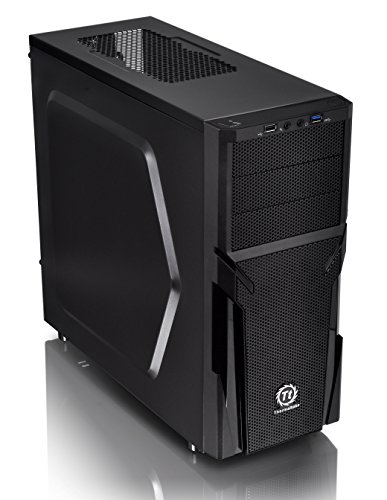 Thermaltake Versa H21 SPCC ATX Mid Tower ComputerH2118.7 x 8.2 x 16.9 inches9.3 poundsCheck on Amazon

Top 3 picks at a glance
Decide These 3 Things First
Before you even browse listings, answer these three questions. Everything else follows from them.
As an Amazon Associate we earn from qualifying purchases at no extra cost to you.



1. What motherboard size are you buying? Cases accept specific board formats. An ATX board (12.0 x 9.6 inches) needs an ATX or mid-tower case. A Micro-ATX board (9.6 x 9.6 inches) fits in almost anything, including compact Micro-ATX cases. Mini-ITX (6.7 x 6.7 inches) fits anywhere but is overkill flexibility — don’t buy a giant tower for a tiny board unless you have other reasons.
2. How long is your graphics card? This is the number one first-build failure. Modern GPUs routinely run 11 to 13 inches long, and some triple-fan models hit 13.5 inches. Check the case’s max GPU clearance and leave at least half an inch of breathing room for cables and airflow.
3. What CPU cooler are you using? Air towers range from about 5.9 inches tall for compact models to 6.5 inches or more for flagship dual-tower coolers. If the case lists a max CPU cooler height, your cooler must be under it — not equal to it. Liquid cooling changes the question: you need radiator mounting space (240mm or 360mm) instead of height clearance.
Size: The Four Form Factors, In Real Numbers
Case sizes cluster into four tiers, and the trade-off is always internal space versus desk footprint.
Mini-ITX cases run roughly 10 to 13 inches per side and 7 to 15 pounds. They’re excellent for living-room or travel builds but demand compact parts and patience with cable routing. Skip these for a first build unless space is truly critical.
Micro-ATX cases sit around 14 to 16 inches tall, 7 to 8 inches wide, and 14 to 15 inches deep, weighing 9 to 12 pounds. They support GPUs up to roughly 12 to 13 inches in compact layouts and cost the least. A budget pick like the Cooler Master Q300L (about $40) fits a Micro-ATX board, a mid-range GPU, and a 120mm rear fan in a footprint small enough for any desk.
Mid-tower ATX cases are the sweet spot and what most first-timers should buy. Typical dimensions run 17 to 19 inches tall, 8 to 9 inches wide, and 16 to 18 inches deep, weighing 13 to 18 pounds. You get full ATX board support, GPU clearance of 12.5 inches or more, and room for a 240mm radiator at the top or front. Examples span from the Thermaltake Versa H21 (~$50) up to wood-paneled options like the FOIFKIN M1 (~$80), which includes four pre-installed ARGB PWM fans and a USB Type-C front port.
Full towers exceed 21 inches tall and 25 pounds. You only need one for an E-ATX board, a 360mm+ radiator, or extreme GPU length. For a first build, they’re usually wasted money and hard-to-manage bulk.
Material: Steel, Tempered Glass, and Mesh
Nearly every case at every price uses SPCC (cold-rolled steel) for the frame, typically 0.5 to 0.8mm thick. Thicker panels flex less and resonate less, but panel thickness matters less than you’d think — construction quality matters more (next section).
The side panel is where materials diverge. Tempered glass (around 4mm thick) looks great and resists scratches; acrylic scratches if you breathe on it. If you’re on a tight budget, a transparent acrylic or smoked panel is perfectly acceptable — the Q300L’s transparent panel is part of why it’s a perennial starter pick.
Front panel material affects airflow more than looks. Solid steel or decorative fronts choke intake unless they have side vents; mesh or perforated fronts can double your intake airflow with the same fans. If your build will include a hot GPU (anything over roughly 250W), prioritize a mesh front. Wood-front cases like the walnut FOIFKIN M1 look premium but check for vented cutouts or mesh behind the wood before assuming airflow is fine.
Construction: Details That Separate Good From Cheap
At any price, inspect (or read closely about) these construction specifics:
Cable routing space: You want at least 0.6 to 1 inch of space behind the motherboard tray, plus 2 to 3 rubber-grommeted cutouts. Routing on a case with 0.4 inches of clearance and no grommets is genuinely miserable for a beginner.
Standoffs and motherboard mounting: Pre-installed standoffs save fumbling with tiny screws. Check that the case includes a standoff list matching your board size.
Dust filtration: Magnetic or slide-out filters on the front, top, and especially the bottom PSU intake. Removable bottom filters you can rinse in the sink will keep your system running cooler for years.
Panel retention: Tool-less thumbscrew or latch systems beat four Phillips screws every time you clean filters. Cheap cases use metal screws that strip — a real annoyance at 11 p.m. mid-build.
Fan mounting positions: A good budget case offers at least three fan mounts (front x2, rear x1). More flexibility — top mounts, bottom mounts — future-proofs upgrades.
Comfort and Performance: Airflow, Noise, and Clearance
Airflow: As a baseline, plan two 120mm or 140mm front intake fans and one rear exhaust. A case like the RAIDMAX X606 bundle (~$130) ships with three 140mm ARGB fans plus a 240mm liquid cooler, which covers intake and CPU cooling in one purchase — a reasonable shortcut if your budget lands there anyway. Cases with mesh fronts and 140mm fan support move more air at lower RPM, which directly lowers noise.
GPU and CPU clearance again: Restate your targets in writing before buying. A typical modern example: 12.7-inch max GPU clearance and 6.3-inch max cooler height handles the vast majority of mainstream parts. If you plan a 360mm radiator, confirm the case supports it at the top — some cases only fit 240mm or front-mount only.
PSU clearance: Most cases accept ATX power supplies up to about 6.7 to 7.9 inches long. Modular or semi-modular PSUs make routing dramatically easier in compact cases.
Noise: Without lab claims, the practical rules are: fans under about 1,200 RPM are usually quiet, rubber or silicone fan mounts reduce vibration hum, and solid side panels contain more noise than glass. If you want silence over style, prioritize fan control headers and a case with fewer, larger fans.
Price Tiers: What Each Dollar Buys
Budget ($35 to $60): Steel frame, one included fan (sometimes none), acrylic or thin glass panel, adequate but tight cable routing. The Q300L (~$40) and Versa H21 (~$50) live here. Perfectly buildable — expect to add a $10 to $20 fan later if temps bother you.
Mid-range ($60 to $100): Tempered glass, mesh fronts, 3 to 4 pre-installed ARGB fans, USB Type-C front panel, better filters and routing. The FOIFKIN M1 (~$80) is representative: four PWM ARGB fans included, 240mm radiator support, and a walnut front for looks.
Premium ($100 to $180): Bundles and high-airflow designs with 140mm ARGB fans, included liquid cooling, and integrated power supplies — like the RAIDMAX X606 bundle (~$130) pairing a mesh ATX case, three 140mm fans, a 240mm AIO, and a 750W 80+ Gold PCIe Gen 5 ATX 3.1 PSU sized for cards like an RTX 5080 or RX 9070. Buying case and PSU together is convenient, but verify the PSU brand reputation and warranty separately.
Warranty and Support
Case warranties typically run 1 to 5 years, with premium brands offering longer coverage on fans and included liquid coolers (AIOs often carry 3 to 6 years separately). Read whether the warranty covers the fans and included accessories, not just the chassis — replacement panels and fan warranties are where cheap brands cut corners. Also check whether replacement parts (side panels, filters, screws) are sold individually; a cracked glass panel shouldn’t total the case. Bundles add a wrinkle: the case, cooler, and PSU may carry different warranty terms, so confirm each component’s coverage before assuming one long guarantee applies.
Delivery and Assembly Notes
Cases ship in boxes 18 to 24 inches on a side and 15 to 25 pounds, so shipping damage is the most common complaint — inspect the glass panels and corners within the return window and photograph any damage immediately. For assembly, budget 2 to 4 hours for a first build, not counting OS installation. Set aside a table space at least 3 feet by 2 feet, keep the screw bag sorted (standoffs, 6-32, and M3 sizes all appear), and install the PSU, standoffs, and I/O shield before the motherboard. Pre-installed fans and pre-routed front-panel cables in mid-range and premium cases can shave 30 to 45 minutes off your build.
Spec Checklist
| Spec | Budget ($35–$60) | Mid ($60–$100) | Premium ($100–$180) |
|---|---|---|---|
| Board support | Micro-ATX | ATX / Micro-ATX | ATX / Micro-ATX / E-ATX |
| Typical dimensions | 15″ H x 7.5″ W x 14.5″ D | 18″ H x 8.5″ W x 17″ D | 19″ H x 9.5″ W x 18″ D |
| Max GPU clearance | 11.8–12.6″ | 12.6–13.5″ | 13.5″+ |
| Max cooler height | 6.1–6.3″ | 6.3–6.7″ | 6.7″+ |
| Radiator support | 120mm (sometimes 240mm front) | 240mm top or front | 240–360mm |
| Included fans | 0–1 | 3–4 ARGB PWM | 3x 140mm ARGB or AIO included |
| Side panel | Acrylic / basic glass | 4mm tempered glass | Tempered glass, tinted options |
| Front I/O | USB-A, HD audio | USB-A + Type-C | Type-C, fast-charge port |
| PSU included | No | No | Sometimes (e.g., 750W 80+ Gold ATX 3.1) |
| Warranty | 1 year | 2–3 years | 3–5 years |
Red Flags
Unlisted GPU or cooler clearance. If a listing doesn’t state max GPU length and CPU cooler height, assume they’re tight and look elsewhere or ask the seller directly.
Zero included fans. A case with no fans is cheaper only on paper — budget another $15 to $30 immediately.
Solid front panel with no side vents. On a hot build, this can throttle performance regardless of your fan count.
Less than 0.6 inches behind the motherboard tray. Cable routing will be painful, and side panels may bulge.
Acrylic panels described as “glass.” Read the material spec, not the marketing copy.
Bundled PSUs from unknown brands. A bad power supply can take your whole build down with it. If a bundle includes a PSU, confirm it’s 80 Plus certified (Gold or better preferred) and ATX 3.x compliant for modern GPUs.
No replaceable parts. If replacement glass panels, filters, or screws aren’t available, one accident means a full replacement.
FAQ
Does case size affect performance?
Indirectly, yes. A cramped case with poor airflow lets GPU and CPU temperatures climb, which can reduce boost clocks under sustained load. A mid-tower with a mesh front, two front intakes, and a rear exhaust keeps nearly any mainstream build comfortable. The case itself adds zero performance — it just decides whether your parts can breathe.
Can I put a Micro-ATX motherboard in an ATX case?
Yes, always. ATX cases accept smaller boards via the same standoffs — you just use fewer of them. The reverse is never true: an ATX board will not fit a Micro-ATX case. If you might upgrade to an ATX board later, buy the ATX-capable case now.
How do I know if my graphics card will fit?
Find your GPU’s length on the manufacturer’s spec page (measure including the cooler shroud and power connector overhang), then compare it to the case’s max GPU clearance. Add half an inch of margin. For example, a 12.5-inch card fits comfortably in a case with 13 inches of clearance but is a gamble in one with 12.3 inches.
Is a bigger case harder to build in?
No — bigger is easier. More room means easier cable routing, simpler cooler installation, and less swearing. The downsides of larger cases are desk space, weight (15 to 25 pounds empty), and slightly more money. For a nervous first-timer, a roomy mid-tower is genuinely the friendliest option; going into 2026, that remains the standard advice for a reason.









