
The best Roku TVs for most shoppers are the Roku Plus Series for balanced picture quality, the Roku Pro Series for serious movie watching and gaming, and the Roku Select Series for affordable bedrooms, guest rooms, and smaller living spaces.
As an Amazon Associate we earn from qualifying purchases at no extra cost to you.



Our Top Picks
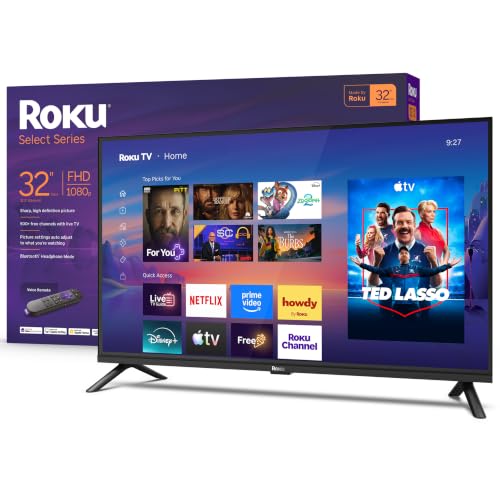 Roku 32-Inch Select Series Smart TV 2026-1080p Full32"7.1 x 28.3 x 18.4 inches7.7 poundsCheck on Amazon


Top 3 picks at a glance
Best Roku TVs at a glance
| Best for | Recommended line | Typical screen sizes | Picture technology | Typical market range |
|---|---|---|---|---|
| Lowest-cost everyday TV | Roku Select Series | 24–75 inches, depending on model | LED/LCD, usually 1080p or 4K | Usually $150–$500 |
| Best value for most rooms | Roku Plus Series | 55–75 inches | 4K QLED with local dimming | Usually $400–$800 |
| Best Roku picture quality | Roku Pro Series | 55–75 inches | 4K QLED, mini-LED local dimming | Usually $700–$1,300 |
| Simple bedroom or kitchen TV | Roku Select Series HD models | 24–43 inches | LED/LCD, often 720p or 1080p | Usually $100–$300 |
Exact sizes, prices, ports, and panel specifications vary by model and retailer, so check the product page before buying. The series names are more useful as a starting point than as a guarantee that every size has identical hardware.
Roku Select Series: best for a tight budget
The Roku Select Series is the sensible choice when keeping the purchase below about $500 matters more than maximum contrast or advanced gaming performance. It is particularly well suited to bedrooms, dorms, kitchens, playrooms, and secondary viewing areas.
Select models are available in smaller sizes and generally offer a straightforward LED/LCD picture, 4K resolution on larger versions, automatic brightness adjustment on some configurations, and the familiar Roku interface. The platform is easy to navigate, and the remote is less cluttered than many competing smart-TV systems.
What you gain and what you give up
- Good: low cost, simple setup, broad streaming-app support, and useful size options.
- Good: Roku voice remotes and private-listening features are available with compatible configurations.
- Limited: basic LED backlighting cannot match the black levels of an OLED or a good mini-LED television.
- Limited: most Select models are better for 60 Hz gaming than for 120 Hz console or PC gaming.
- Limited: viewing angles and HDR impact can be modest, especially on entry-level panels.
Choose a Select model if you mainly watch cable, YouTube, sitcoms, news, and standard streaming content. Avoid paying extra for a very large Select TV if the seating distance is close enough that its weaker contrast and backlight uniformity will be obvious.
Roku Plus Series: the best balance for most living rooms
The Roku Plus Series is the strongest all-around pick for shoppers who want a noticeably better picture without moving into premium-TV pricing. Its 4K QLED panel produces richer color than a basic LED model, while local dimming can improve shadow detail and make HDR highlights look more convincing.
Plus Series TVs are most compelling in the 55- to 75-inch range. They work well for streaming movies, sports, and console gaming, provided you do not require the fastest refresh rate or the most advanced HDMI features.
Why the Plus Series is the value sweet spot
- Color: quantum-dot technology expands color volume, particularly in bright HDR scenes.
- Contrast: local dimming can make letterbox bars and dark scenes look deeper than on an edge-lit budget TV.
- Resolution: 4K is useful at 55 inches and above, especially when sitting roughly 6–10 feet away.
- Gaming: low-latency game modes make it suitable for PlayStation 5, Xbox Series X, Xbox Series S, and PC gaming at 60 Hz.
- Value: it generally delivers more visible picture improvement per dollar than moving from one budget LED model to another.
The main caution is refresh rate. A 60 Hz panel can display 60 frames per second, but it cannot show a native 120 frames per second from a compatible console or gaming PC. If you play competitive shooters, racing games, or high-frame-rate PC titles, compare the exact model’s refresh rate and HDMI capabilities rather than assuming every 4K TV supports 4K at 120 Hz.
Roku Pro Series: best for picture quality and gaming flexibility
The Roku Pro Series is the premium choice in Roku’s own television lineup. It combines 4K QLED color with mini-LED backlighting and more sophisticated local dimming, producing brighter highlights and better control over dark areas than the Select or Plus families.
It is the best fit for a main living-room TV where you watch films at night, stream HDR shows, or want a large screen without leaving the Roku interface. Pro Series models also target more demanding gamers with features such as a higher refresh rate and gaming-oriented HDMI support, although the exact specification should be confirmed for the size you choose.
Who should pay for the Pro Series?
Buy the Pro Series when you will notice contrast differences every day: a dim or moderately lit room, frequent movie watching, HDR content, or a seating position close enough to reveal limitations in a cheaper panel. It is less compelling for a bright kitchen TV or a room where viewers sit far off-axis, because reflections and viewing angle can still affect the experience.
Mini-LED is not the same as OLED. A Pro Series LCD can become brighter and is less exposed to permanent image-retention concerns, but bright objects may still produce a halo around dark backgrounds. OLED usually provides more precise pixel-level black control, while the Roku Pro Series provides the convenience of Roku’s interface in a brighter LCD design.
Choose the right Roku TV for your room
| Viewing distance | Practical size range | Best Roku direction | Reason |
|---|---|---|---|
| 4–6 feet | 43–55 inches | Select 4K or Plus Series | Large enough for detail without overwhelming a small room |
| 6–8 feet | 55–65 inches | Plus Series | Good balance of 4K detail, price, and immersion |
| 8–10 feet | 65–75 inches | Plus or Pro Series | The larger screen makes 4K upgrades easier to see |
| 10 feet or more | 75 inches or larger | Pro Series if budget permits | Large screens benefit more from stronger brightness and processing |
A useful rule is to measure from your eyes to the screen, not from the sofa to the wall. Also measure the furniture width, doorways, and stand footprint. A 75-inch TV is approximately 65 inches wide, while a 55-inch model is approximately 48 inches wide, but bezels and feet differ between models.
Gaming features that matter
For casual console gaming, prioritize low input lag, a usable game mode, automatic low-latency mode, and at least one HDMI port that supports the console’s required signal. For competitive gaming, add refresh rate and variable refresh rate to the checklist.
- 60 Hz: adequate for most console games and inexpensive gaming setups.
- 120 Hz: preferable for high-frame-rate console modes and gaming PCs.
- VRR: helps reduce tearing when a console or PC cannot maintain a perfectly steady frame rate.
- ALLM: can switch the TV into its lower-latency game mode automatically.
- HDMI 2.1-class bandwidth: important when targeting 4K at 120 Hz, but the label alone is not enough; verify the actual supported resolution and refresh rate.
Here is the bandwidth logic behind the recommendation: 4K at 120 Hz carries twice as many frames per second as 4K at 60 Hz. Uncompressed 4K/120 video requires far more throughput than 4K/60, so a console connected to a limited HDMI port may fall back to 4K/60 or reduce color depth. If your system is a PlayStation 5, Xbox Series X, or modern gaming PC, connect it to the TV’s fastest HDMI input and enable the console’s 4K, HDR, and VRR checks before assuming the setup is working correctly.
Roku interface performance and setup tips
Roku’s main advantage is consistency. The home screen is less visually crowded than many manufacturer interfaces, apps are easy to rearrange, and search can find shows across multiple services. However, the TV’s processor, Wi-Fi signal, and installed apps still affect responsiveness.
Make a new Roku TV feel faster
- Use 5 GHz Wi-Fi when the router is nearby. It usually offers more speed and less congestion than 2.4 GHz, though walls reduce its range.
- Place the router in open space. Streaming 4K HDR can use roughly 15–25 Mbps in real-world service conditions, so a weak signal can cause buffering even when your internet plan is fast.
- Update the system. Roku TVs periodically check for software updates, but manually checking after setup can resolve app or performance problems sooner.
- Remove apps you no longer use. This will not transform the processor, but it simplifies the home screen and reduces background clutter.
- Use Game mode for consoles. It reduces image processing and therefore lowers input lag, at the cost of some picture-processing effects.
For a large household, calculate the connection margin rather than using the internet plan’s headline speed. Three simultaneous 4K streams at 20 Mbps each require about 60 Mbps before phones, downloads, and Wi-Fi overhead. A plan offering 100 Mbps may work, but a 200 Mbps or faster connection gives much more practical headroom.
Which Roku TV should you buy?
- Choose Roku Select for a bedroom, guest room, small apartment, or strict budget.
- Choose Roku Plus for the best combination of 4K detail, QLED color, local dimming, and reasonable cost.
- Choose Roku Pro for a main room, HDR movies, a larger screen, brighter highlights, and more serious gaming features.
- Look beyond Roku if you want OLED-level black levels, unusually wide viewing angles, or guaranteed 4K/120 gaming at the lowest possible price; another platform may offer a better panel even if its interface is less appealing.
For most buyers, the Roku Plus Series is the safest recommendation. It avoids the biggest compromises of entry-level TVs while remaining less expensive than premium mini-LED models. Spend more on the Pro Series when contrast, HDR brightness, screen size, and high-refresh gaming are central to how you use the TV.
Frequently asked questions
Are Roku TVs suitable for watching sports?
Yes, Roku TVs can work well for sports, especially the Plus and Pro Series models. The Plus Series is described as suitable for streaming sports, while the Pro Series offers stronger brightness and picture control for a main living-room setup. Consider the room’s lighting, viewing distance, and the exact model’s refresh rate before buying.
Is a Roku Select TV good for a bedroom?
Yes, the Roku Select Series is particularly well suited to bedrooms. Its lower cost, straightforward LED/LCD picture, simple setup, useful smaller sizes, and familiar Roku interface make it practical for secondary viewing areas. Select models are a sensible choice for cable, YouTube, news, sitcoms, and standard streaming content when advanced contrast and gaming features are not priorities.
What should I check before buying a specific Roku TV model?
Check the exact screen size, resolution, refresh rate, HDMI capabilities, viewing angle, and backlighting technology. Series names are only a starting point because sizes can have different hardware. Also confirm the number and type of HDMI inputs, supported gaming signals, stand footprint, and furniture width before buying, since specifications vary by model and retailer.
Can Roku TVs connect to modern game consoles?
Yes, Roku TVs can connect to modern game consoles, but the supported gaming features depend on the model. For casual gaming, look for low input lag, Game mode, automatic low-latency mode, and a suitable HDMI input. For a PlayStation 5 or Xbox Series X, also verify the exact support for 4K, HDR, VRR, and high refresh rates.
Does a Roku TV need fast internet for streaming?
A Roku TV needs a stable connection for reliable streaming, particularly with 4K HDR content. Streaming can use roughly 15–25 Mbps in real-world service conditions. A weak Wi-Fi signal can cause buffering even with a fast internet plan. Using 5 GHz Wi-Fi near the router can help, while multiple simultaneous streams require additional capacity and Wi-Fi overhead.







