
Reliability is the hardest word in laptop shopping because no spec sheet prints it. A touch screen adds two extra things that can wear out, the digitizer layer and the hinge on convertibles, so “reliable” here really means three questions: does the brand have a track record with business and education customers, does the hardware leave enough headroom that it will not choke after a year of updates, and does the seller stand behind the unit with a clear return or warranty path. This guide ranks touch screen laptops on those signals using only what each listing states.
It is written for buyers who would rather pay a little more attention now than replace a laptop in eighteen months: parents buying for a student, small offices equipping a front desk, and anyone who lets the laptop live in a backpack. In 2026 the reliable end of the market is mostly established names with ordinary, proven processors rather than exotic specs, and that is exactly what you will see below.
Our Top Picks
 Dell 2027 Portable 11-inch IPS Touchscreen Convertible Laptop14.17 x 9.2 x 0.7 inches4 PoundsCheck on Amazon
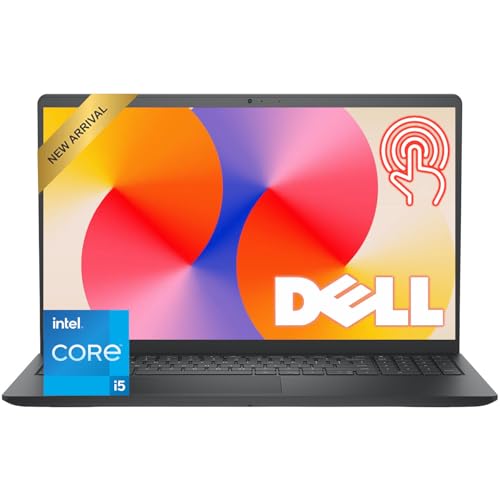 Dell 15.6" FHD Touchscreen Laptop8GB RAM | 512GB PCIe SSD14.11 x 9.28 x 0.75 inches3.65 PoundsCheck on Amazon
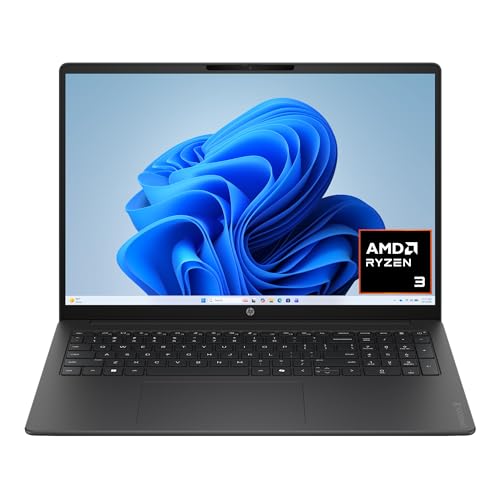


Top 3 picks at a glance
Quick Picks
As an Amazon Associate we earn from qualifying purchases at no extra cost to you.





| Product | Best for | Key spec from the title |
|---|---|---|
| Dell 15.6-inch Touchscreen (i5-1334U) | All-round office and study machine | 13th Gen Core i5-1334U, 8GB RAM, 512GB PCIe SSD |
| HP OmniBook 3 16 | Larger sharp display for daily work | 16-inch 2K touchscreen, 512GB SSD, Windows 11 Home |
| HP 15.6-inch Ryzen 3 7320U | Straightforward family laptop | HD touchscreen, 8GB RAM, 256GB SSD |
| Lenovo Flagship Chromebook 14 | Simple web-based tasks | 14-inch FHD touchscreen, MediaTek Kompanio 520, Wi-Fi 6 |
| Lenovo ThinkPad 11e Yoga Gen 6 (renewed) | Rugged-minded small convertible | 11.6-inch touchscreen, Core m3-8100Y, Windows 11 |
| Lenovo 11-inch Convertible | Compact carry with ports | 11-inch HD IPS, 8GB DDR5, 128GB SSD, HDMI |
How to Choose
Look for proven platforms, not peak numbers
A processor that has been in thousands of business laptops has had its drivers, firmware, and battery behavior sorted out. Core i5 and Ryzen 3 chips from the last few generations fit that description. Be wary of listings that lead with a long string of marketing terms and bury the actual processor name. If you cannot find the exact model number in the title, you cannot look up its reliability record, and that alone is a reason to move on. Established names that sell through business and education channels, such as Dell, HP, and Lenovo, also tend to publish driver updates for years, which matters more for longevity than any single spec.
Memory and storage headroom
Many early failures are really slowdowns that feel like failures. For Windows, 8GB of RAM is the floor and an SSD of at least 256GB keeps update installs from filling the drive. For a Chromebook, 4GB is workable but leaves little room for multitasking, and 64GB of eMMC fills quickly if you save files locally. Treat anything smaller as a short-lifespan purchase. Also remember that an SSD in the listing means a quicker wake from sleep and fewer stalls under load, both of which reduce the frustration that makes people think a laptop is failing.
Renewed and business-line models
Business-line laptops are designed for heavier handling, with sturdier hinges and replaceable parts. A renewed unit from such a line can be a smart value if the listing describes the condition and return window, but a renewed machine with an unclear battery condition is a gamble. Check what the seller promises about the battery and the screen specifically, because those wear first. A battery that already holds a fraction of its original charge turns a bargain into a laptop that must stay plugged in, which defeats much of the point of a portable touch device.
Ports, build and what to ignore
An HDMI port and a webcam stated in the title tell you the maker did not strip the basics. Ignore colors and cosmetic finish names, and ignore inflated year labels in product titles; they describe the listing, not the hardware. Budget models cut corners on hinge firmness, display brightness, and keyboard flex, none of which show on a spec sheet, so the brand and the form factor are your best guides. When two listings look similar, favor the one that names the processor, memory type, and storage type clearly, since transparent listings usually come from sellers who expect to stand behind the product.
The 6 Best Options
Dell 15.6-inch Touchscreen (i5-1334U)
A 15.6-inch FHD touchscreen laptop with a 13th Gen Intel Core i5-1334U, 8GB of RAM, a 512GB PCIe SSD, Wi-Fi 6, a 1080p webcam, and HDMI. It fits office workers and students who need a dependable daily machine.
- Strength: a mainstream Core i5 and a large SSD give the system room to age gracefully.
- Strength: HDMI and a 1080p webcam cover meetings and external displays without adapters.
- Trade-off: 8GB of RAM is adequate but not generous for many years of heavy multitasking.
Skip it if you want a small, lightweight machine; a 15.6-inch body is made for the desk more than the commute. Buyers who need the full numeric keypad will see that as a plus, while frequent travelers will feel the extra size.
HP OmniBook 3 16
This 16-inch model has a 2K touchscreen, an AMD Ryzen 3 processor, 8GB of RAM, a 512GB SSD, Radeon 610M graphics, and Windows 11 Home. It suits people who spend long hours reading or working with documents and want a sharper display.
- Strength: the 2K panel gives more detail than a standard HD touchscreen.
- Strength: a 512GB SSD leaves ample space for updates and files.
- Trade-off: Ryzen 3 with integrated graphics is aimed at everyday tasks rather than demanding software.
Skip it if you need the laptop to fit tight spaces, since a 16-inch screen takes up a good deal of desk and bag room. It is also a poor match for anyone who wants a true tablet-style device.
HP 15.6-inch Ryzen 3 7320U
An HP 15.6-inch HD touchscreen laptop with a Ryzen 3 7320U, 8GB of RAM, a 256GB SSD, and AMD Radeon graphics under Windows 11 Home. It is the simple pick for a family computer.
- Strength: the 7320U is a recent, widely used low-power chip suited to everyday workloads.
- Strength: 8GB of RAM and an SSD meet the sensible floor for Windows.
- Trade-off: an HD display is less sharp than the FHD or 2K options, and 256GB fills over time.
Skip it if you want a high-resolution panel or plan to store a large photo and video library locally; a step up in storage and display costs little more at this tier.
Lenovo Flagship Chromebook 14
A 14-inch FHD touchscreen Chromebook with an 8-core MediaTek Kompanio 520, 4GB of RAM, 64GB of eMMC, and Wi-Fi 6. It is built for web apps, classroom tools, and streaming.
- Strength: the FHD display is a step up from the HD panels found on many budget laptops.
- Strength: Chrome OS is simple to maintain and lightweight on hardware.
- Trade-off: 4GB of RAM and 64GB of storage are tight for heavy tab use or local files.
Skip it if you rely on Windows-only programs or want lots of offline storage. Households that share one machine among several users with different software needs will also find Windows more flexible.
Lenovo ThinkPad 11e Yoga Gen 6 (renewed)
A renewed ThinkPad convertible with an 11.6-inch touchscreen, an Intel Core m3-8100Y, 4GB of RAM, and a 128GB SSD, running Windows 11. The ThinkPad line is associated with durable, classroom-oriented designs.
- Strength: the business-oriented ThinkPad family has a reputation for sturdy construction.
- Strength: the convertible 2-in-1 design gives a flexible tablet-like mode for note taking.
- Trade-off: renewed condition and 4GB of RAM mean you should confirm the return terms and expect modest speed.
Skip it if you want new-condition hardware with a full manufacturer warranty or need more than light tasks. Anyone who wants a large screen should also pass, as this is a compact 11.6-inch body.
Lenovo 11-inch Convertible
An 11-inch HD IPS convertible with an Intel N-series processor, 8GB of DDR5 memory, a 128GB SSD, HDMI, a webcam, and fast Wi-Fi. It is a compact option for travel and light study.
- Strength: DDR5 memory and an SSD at this size help it feel responsive for basic work.
- Strength: an HDMI port is rare on a laptop this small.
- Trade-off: the small HD screen and entry-level processor limit comfort for long work sessions.
Skip it if you plan to type for hours or work with several windows open at once; the compact keyboard and screen suit short sessions better.
Which One Fits Your Situation
You need one dependable laptop for years
The Dell 15.6-inch Touchscreen with the Core i5 and 512GB SSD has the most headroom on the list. It is the safest long-term pick for general work, and the webcam and HDMI port mean it can serve in a home office as well as a classroom.
You want a sharper screen without moving to a premium tier
The HP OmniBook 3 16 offers a 2K touchscreen and a large SSD at an approachable tier, which suits reading-heavy study and documents. Pair it with an external mouse for long sessions and the larger body feels closer to a desktop replacement.
You are buying for a younger student or a shared family device
The Lenovo Flagship Chromebook 14 is easy to maintain and works well with web-based schoolwork, while the HP 15.6-inch Ryzen 3 is the better choice if Windows apps are required.
You want a tough little second laptop
The ThinkPad 11e Yoga Gen 6 brings a business-line heritage in a small convertible, and the Lenovo 11-inch Convertible adds HDMI and newer memory if you prefer a new unit.
Common Mistakes
- Treating a long feature list as proof of reliability instead of checking the exact processor model and brand.
- Buying a Windows laptop with less than 8GB of RAM and blaming the hardware when it slows down.
- Accepting a renewed unit without reading what the seller says about battery and return terms.
- Paying extra for color or cosmetic names while ignoring storage type and size.
- Ignoring the form factor: convertibles add a hinge that deserves more care than a clamshell, so avoid forcing it past its stop or carrying the device by the screen.
Related guides
- Windows Macos Linux Gaming Performance Comparison Strengths Weaknesses
- Desktop Operating Systems Gaming Performance Strengths Weaknesses
- 5G Home Internet Wifi Modem Settings Low Latency Gaming
Frequently Asked Questions
Do touch screens make a laptop less reliable?
Not inherently. A touch layer adds one more component, but mainstream brands have shipped touch panels for years and the technology is mature. Treat the screen as a part to protect with a sleeve and careful cleaning rather than as a red flag.
Is a renewed laptop a reasonable choice?
It can be, especially from a business line such as ThinkPad. The risk sits in battery wear, so look for a seller that states battery condition and offers a clear return window.
How much storage should a reliable laptop have?
For Windows, 256GB is the lower end and 512GB is more comfortable once updates and apps accumulate. Chromebooks can work with less if you save files online.
Should I worry about eMMC storage?
eMMC is slower and usually small. It works for a Chromebook used for browsing, but a Windows machine feels better and ages better with an SSD.









