
An HDMI port on a touch screen laptop solves a very specific problem: you want to push the picture to a TV, projector, or desktop monitor without hunting for a dongle in the bottom of your bag. Teachers plugging into a classroom display, salespeople presenting in a client’s conference room, and students who park their laptop next to a second monitor in a dorm all feel the difference. Thin modern laptops have dropped the full-size port in favor of USB-C, so finding one that keeps HDMI and also offers a touch screen narrows the field quickly.
This guide covers five laptops whose titles explicitly list HDMI, from a compact convertible to a 15.6-inch workhorse, plus the trade-offs each one carries. Because the same keyword also pulls in portable touch monitors, which are accessories rather than laptops, those are left out. Everything here is judged on the printed listing, so verify the port count and HDMI version on the manufacturer’s page, especially if you plan to drive a 4K display in 2026.
Our Top Picks
 DELL 13th Generation Business Inspiron 15 3530 Laptop16GB RAM | 1TB SSD14.11 x 9.25 x 0.75 inches3.64 PoundsCheck on Amazon
 Dell 2027 Portable 11-inch IPS Touchscreen Convertible Laptop14.17 x 9.2 x 0.7 inches4 PoundsCheck on Amazon

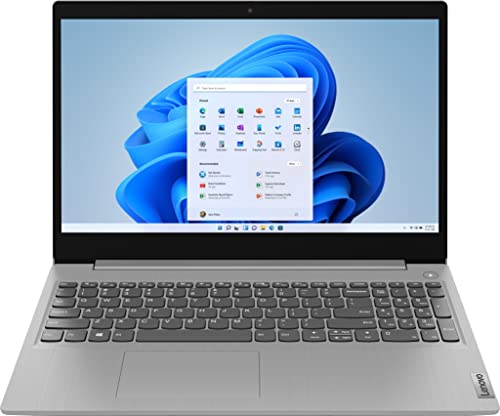
Top 3 picks at a glance
Quick Picks
As an Amazon Associate we earn from qualifying purchases at no extra cost to you.



| Product | Best for | Key spec from the title |
|---|---|---|
| Dell Inspiron 15 3530 (Core i7-1355U) | Desk-centered work with an external monitor | 15.6-inch FHD touchscreen, i7-1355U, 16GB RAM, 1TB SSD, HDMI |
| Lenovo 11-inch Convertible | Small presentations on the road | 11-inch HD IPS touchscreen, 8GB DDR5, 128GB SSD, HDMI |
| Lenovo IdeaPad 3 15.6-inch | Budget home and study use | 15.6-inch HD touchscreen, Core i3-1115G4, 8GB RAM, 256GB NVMe SSD |
| HP Stream 14 | Light web tasks at the lowest tier | 14-inch HD touchscreen, Athlon 3050U, 4GB RAM, 64GB eMMC |
| Dell Latitude 5410 (renewed) | Business-grade presenting | 14-inch FHD touchscreen, Core i7-10610U, 16GB RAM, 512GB SSD |
How to Choose
Check what the port actually does
A listing that says HDMI tells you the port exists, not which version it uses. HDMI 1.4 handles 1080p well and 4K at a low refresh rate, while HDMI 2.0 and later handles 4K at 60Hz. If you plan to connect a high-resolution monitor or a TV, confirm the version on the maker’s spec page. Also note whether the port is full-size or micro, since a micro port needs a special cable. Port placement matters as well: an HDMI socket on the back edge keeps the cable out of the way on a desk, while one on the side can tangle with a mouse hand. Cheap cables can also flicker at higher resolutions, so keep a decent one in the bag.
Match the processor to your use
Driving an external display adds load, especially when you extend rather than mirror the desktop. A Core i5 or i7 handles dual-screen work smoothly, while an i3 or Athlon chip is fine for presentations and browsing but will struggle if you open many windows across two screens. Integrated graphics on all of these laptops are adequate for office work and video, not for gaming at high resolution. If your goal is simply to mirror slides, even the entry-level chips manage it without trouble, so spend on processing only when you will extend the desktop and work across both screens.
Memory and storage
Aim for 8GB of RAM at minimum when you plan to use two displays, and 16GB if you run spreadsheets, video calls, and browsers together. Storage should be an SSD; eMMC, as in the 64GB budget option, is slow and small. A 256GB drive is workable, and 512GB or more is better if you save presentations, recordings, and course files. Presentations that embed video can grow large, so leave headroom rather than filling the drive on day one.
Touch behavior and ports beyond HDMI
Touch matters most on convertibles, where tablet mode lets you walk around a room while presenting. For everything else, it is a convenience for scrolling and tapping. Look at the remaining ports too: extra USB-A saves you from adapters, and USB-C with display output gives you a second route to a monitor. Ignore year labels in titles and bundled software extras, since neither changes how well the machine drives a screen. Budget models also tend to cut corners on display brightness, which becomes obvious in a bright classroom or boardroom, so favor Full HD IPS panels where the title states them.
The 5 Best Options
Dell Inspiron 15 3530 (Core i7-1355U)
A 15.6-inch FHD touchscreen laptop with a 13th Gen Intel Core i7-1355U, 16GB of RAM, a 1TB SSD, a webcam, HDMI, and Wi-Fi 6. It is the most capable option on this list for people who pair a laptop with an external monitor every day.
- Strength: the Core i7 and 16GB of RAM handle two-screen multitasking with room to spare.
- Strength: a 1TB SSD gives plenty of space for files and presentation material.
- Trade-off: the 15.6-inch body is larger and heavier than the compact convertibles, so it favors desks over commutes.
Skip it if you want a tablet-style convertible or the lightest possible carry. Buyers who only need to mirror slides to a projector may also find this far more machine than they require. It is aimed at someone who expects to keep the laptop docked at a desk for hours at a stretch.
Lenovo 11-inch Convertible
An 11-inch HD IPS convertible with an Intel N-series processor, 8GB of DDR5 memory, a 128GB SSD, a webcam, HDMI, and fast Wi-Fi. It fits presenters, teachers, and travelers who want the smallest machine that still has a real video output.
- Strength: HDMI on an 11-inch convertible removes the need for an adapter when plugging into a projector.
- Strength: 8GB of DDR5 and an SSD keep basic tasks responsive.
- Trade-off: the small HD display and entry-level chip are not suited to long work sessions or heavy multitasking.
Skip it if you plan to drive a large external monitor all day or run demanding software. A bigger laptop will serve a desk setup better. Its modest storage also leaves little space for large recordings or video files.
Lenovo IdeaPad 3 15.6-inch
A 15.6-inch HD touchscreen laptop with an 11th Gen Intel Core i3-1115G4, 8GB of DDR4 RAM, a 256GB PCIe NVMe SSD, a webcam, HDMI, and Wi-Fi 5. It is an inexpensive way to get a touch screen and a video port together.
- Strength: an NVMe SSD and 8GB of RAM give snappier startup than eMMC-based budget laptops.
- Strength: a 15.6-inch screen with HDMI suits home study and a second-monitor setup.
- Trade-off: the processor is an older generation, and Wi-Fi 5 is slower than the Wi-Fi 6 on newer machines.
Skip it if you want the latest platform or a sharper Full HD panel. Anyone planning a long ownership period should lean toward a newer chip. Because the Wi-Fi standard is also older, the connection may feel slower on crowded networks.
HP Stream 14
A 14-inch HD touchscreen laptop with an AMD Athlon 3050U, 4GB of DDR4, 64GB of eMMC storage, Bluetooth, a webcam, HDMI, and a one-year Office 365 subscription. It sits at the budget end of the list for light web and document work.
- Strength: it combines touch, HDMI, and bundled Office access at a very low tier.
- Strength: a 14-inch body is easy to carry and set up.
- Trade-off: 4GB of RAM and 64GB of eMMC are the tightest specs here and fill up quickly with updates.
Skip it if you plan to multitask, run two screens, or store many files locally. The listing names Windows 10 Home, so also consider how long that operating system will receive support before you commit.
Dell Latitude 5410 (renewed)
A renewed 14-inch FHD touchscreen business laptop with an Intel Core i7-10610U, 16GB of DDR4 RAM, a 512GB SSD, HDMI, and Windows 11 Pro. The Latitude series is a staple of corporate fleets.
- Strength: a Core i7, 16GB of RAM, and an FHD touchscreen are strong specs for presentations and dual-screen work.
- Strength: the business-line design suits regular travel and meeting-room use.
- Trade-off: renewed condition means battery wear is possible, and the processor is several generations old.
Skip it if you require new-condition hardware with a full manufacturer warranty. Always read the seller’s grading and return terms before you buy, and ask how the battery is rated, because a worn cell limits how long you can present away from an outlet.
Which One Fits Your Situation
You connect to an external monitor daily
The Dell Inspiron 15 3530 is the strongest match, with a Core i7, 16GB of RAM, and a 1TB SSD that handle extended desktops comfortably.
You present while traveling
The Lenovo 11-inch Convertible is the lightest option with a native HDMI port, while the renewed Dell Latitude 5410 gives a full-size FHD screen and a business pedigree for meeting rooms.
You need a cheap touch laptop with a video output
The Lenovo IdeaPad 3 offers an NVMe SSD and 8GB of RAM at a modest tier. The HP Stream 14 costs less still, but its 4GB of RAM and eMMC storage suit only the lightest use.
You teach or train and move between rooms
Pick the Lenovo 11-inch Convertible if you value a light device and a built-in HDMI output, since tablet mode lets you walk around while presenting. If you need a bigger screen for reading notes, the Dell Latitude 5410 fills that role at the cost of extra weight.
Common Mistakes
- Assuming HDMI means 4K at 60Hz without confirming the port version.
- Buying 4GB of RAM and then trying to run two displays, which forces constant slowdowns whenever a second window opens.
- Counting a portable touch monitor as a laptop when it has no computer inside.
- Overlooking the cable: a micro or mini port needs a different cable than a full-size one.
- Accepting a renewed unit without checking battery condition and return terms, then discovering the cell no longer lasts a full meeting.
Related guides
- Windows Macos Linux Gaming Performance Comparison Strengths Weaknesses
- Desktop Operating Systems Gaming Performance Strengths Weaknesses
- 5G Home Internet Wifi Modem Settings Low Latency Gaming
Frequently Asked Questions
Can I use USB-C instead of HDMI?
Often yes, if the USB-C port supports video output, but a native HDMI port is simpler and avoids adapters. Check that your laptop’s USB-C port advertises display support before relying on it. Some USB-C ports handle only data and charging, which would leave you without a video route.
Will a touch screen laptop show its touch input on an external display?
No. The external monitor shows the desktop, but touch input still happens on the laptop screen unless the monitor itself supports touch and is connected with the required cable.
How much RAM do I need for two screens?
Eight gigabytes works for light tasks, and 16GB is better for heavier multitasking. Extending the desktop uses more memory than mirroring it, and every extra open window adds to the load, so lean toward 16GB if you will keep two full workspaces going.
Is a renewed laptop a good idea for presenting?
It can be, particularly from a business line. Confirm the screen and battery condition, since both affect how reliably it performs on stage or in a conference room. A business-line unit also tends to offer a sturdier hinge, which helps when you open and close the lid in many different rooms.









