
A student laptop has a narrower job than most buyers admit: open a browser with a dozen tabs, run a word processor, join a video lecture, and survive a backpack. Nobody writing essays in a library needs a graphics card, yet plenty of shoppers overspend on one. This guide for 2026 sorts six budget-minded machines by what the listed specs actually deliver for coursework, so you can match a laptop to a major rather than to a marketing banner.
It is written for high school and college students, and for parents buying on a deadline before a semester starts. Every pick below sits at the entry end of the market, which means none of them will feel fast under pressure and all of them reward sensible habits like closing unused tabs, so the real decision is where to accept compromises: memory, storage, screen size, or battery. A freshman who mostly types and reads can live with a smaller drive, while a student juggling spreadsheets and video calls should protect the memory figure first. Engineering and design majors who need heavy software should look at a different class of machine entirely.
Our Top Picks
 HP 14” Laptop Ultra-Portable Computer 2026 Student Business4GB RAM + 628GB Storage12.76 x 8.86 x 0.71 Inches3.24 poundsCheck on Amazon


Top 3 picks at a glance
Quick Picks
As an Amazon Associate we earn from qualifying purchases at no extra cost to you.


| Product | Best for | Key spec taken from the product title |
|---|---|---|
| Windows 11 Pro 15.6-inch Pentium laptop | Balanced all-rounder | 8GB RAM, 256GB SSD, 6H battery |
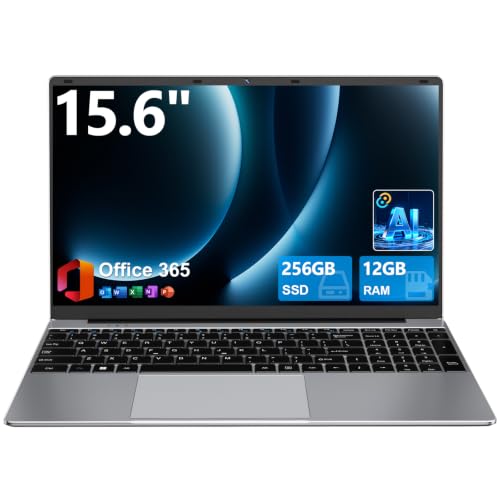
| DRKAKO 15.6-inch FHD IPS | Multitasking on a tight budget | 12GB RAM, 256GB SSD, J4105 quad-core |
| HP 14-inch Ultra-Portable (Copilot AI) | Cloud-first note takers | 4GB RAM, 128GB UFS plus 500GB external |
| TRHRO 15.6-inch | Port variety and faster wireless | Pentium Gold 6500Y, USB-C, WiFi 5, BT 5.2 |
| HP 14-inch Ultra-Light (Celeron N4500) | Carrying between classes | 12-hour battery claim, 64GB eMMC plus SD card |
| ASUS Vivobook Go 15.6 (L510KA) | Brand-name warranty comfort | Dual-core N4500, 4GB RAM, 128GB SSD |
How to Choose
Memory and storage come first
Modern browsers and document editors eat memory quickly. For a Windows laptop, 8GB of RAM is a sensible floor and 12GB gives real breathing room; 4GB machines work only if you live in one or two tabs. For storage, a 128GB SSD fills fast once updates and a few apps land, so look for 256GB where you can. Be careful with eMMC or UFS storage and external cards, which are slower and less forgiving than a true SSD.
Screen size and panel type
A 14-inch screen suits a student who walks across campus; 15.6 inches is easier on the eyes for long writing sessions at a desk. Look for a Full HD (1920×1080) resolution and an IPS panel, which keeps colors and text readable from an angle in a lecture hall. A basic panel that cannot hold contrast is a common place where budget models save money, and a washed-out screen is tiring after hours of reading. If you can, compare viewing angles in photos of the actual model before you commit.
Battery and ports
Treat any listed battery hours as a marketing ceiling, not a promise, and aim for a laptop that claims at least 8 hours so a full class day is plausible. Count ports too: one USB-C, two USB-A, and an HDMI output cover projectors and flash drives. Wireless matters as dorm and campus networks age, so WiFi 5 is the baseline and newer is a bonus. A webcam and microphone that are merely adequate are fine for lectures, but plan on a cheap headset if you record presentations.
What to ignore, and where corners get cut
Ignore stickers about AI assistants and cloud storage bundles; they do not make a slow processor faster. Ignore comparisons to older chips unless you know the baseline. Budget machines usually cut corners on the processor class, the keyboard feel, the webcam, and the hinge. An included Office subscription is useful, but check how long it lasts and whether you already get one free through your school.
The 6 Best Options
Windows 11 Pro 15.6-inch Pentium Laptop
This is the most balanced of the group on paper: 8GB of RAM, a 256GB SSD, and a 15.6-inch screen with Windows 11 Pro. Look for it if you want a laptop for papers, research, and streaming without hunting for extras.
- The listing pairs 8GB RAM with a 256GB SSD, a workable base for coursework.
- It lists Mini HDMI plus a camera and microphone for presentations and video calls.
- Trade-off: the Intel Pentium processor is entry level, so heavy multitasking will slow it down.
It also gives you a Pro edition of Windows, which some students like for built-in disk encryption options. Skip it if you plan to run video editing or programming tools alongside many browser tabs.
DRKAKO 15.6-inch FHD IPS Student Laptop
DRKAKO leads with memory: 12GB of RAM and a 256GB SSD behind a Full HD IPS 15.6-inch screen. That memory figure is the most generous in this roundup apart from the TRHRO, which makes it appealing for students who keep many tabs open.
- 12GB RAM and 256GB SSD give more headroom than most budget laptops.
- The 180-degree lay-flat hinge helps with group study and shared screens.
- Trade-off: the J4105 quad-core chip is an older, low-power design, so expect modest speed.
Judge the AI assistant label as a convenience feature, not a performance upgrade. Skip it if you need the newest wireless standard, since the listing names WiFi 5.
HP 14-inch Ultra-Portable Student Laptop
This HP stresses a student and business pitch with Copilot AI, MS Office, and a total of 628GB of storage that combines 128GB of UFS with a 500GB external drive. It suits someone who keeps files off the laptop and carries a drive.
- The 14-inch format is easier to slip into a bag between classes.
- The extra 500GB external storage is a handy place for lecture recordings.
- Trade-off: only 4GB of RAM, which limits heavy browsing and multitasking.
The title also mentions an Intel four-core processor, which is a step up from dual-core chips for everyday multitasking. Skip it if you want one tidy internal drive, because most of that capacity sits outside the laptop.
TRHRO 15.6-inch Pentium Gold Laptop
TRHRO packs a Pentium Gold 6500Y, 12GB of RAM, and a Full HD IPS screen, then adds USB-C, USB 3.2, WiFi 5, and Bluetooth 5.2. The listing claims it outperforms the N4020, a comparison worth treating cautiously.
- 12GB of memory gives it more breathing room than a 4GB model.
- USB-C and USB 3.2 make connecting drives and monitors straightforward.
- Trade-off: just 128GB of SSD storage, so cloud storage or an external drive becomes part of the plan.
Students who mostly work in cloud documents will feel this limit less than those who download datasets or media. Skip it if you store large project files locally.
HP 14-inch Ultra-Light Laptop (Celeron N4500)
Built around portability, this HP lists a 14-inch screen, a 12-hour battery claim, and one year of Office 365. Storage is 64GB of eMMC plus a 64GB SD card, so it is best viewed as a light-duty companion.
- The long battery claim suits a student who rarely finds an outlet.
- Including a year of Office 365 covers essays and spreadsheets from day one.
- Trade-off: 4GB of RAM and small eMMC storage leave little room to grow.
Think of it as a second device for reading, writing, and class notes rather than a one-machine solution. Skip it if you install many programs or keep a large photo or video library.
ASUS Vivobook Go 15.6 (L510KA)
The Vivobook Go is the name-brand option, with a thin and portable body, an Intel dual-core N4500, 4GB of RAM, and a 128GB SSD running Windows 11. It makes sense when brand support matters more than raw memory.
- The listing highlights a slim, portable build for carrying to study sessions.
- A real SSD is quicker to start up than eMMC storage.
- Trade-off: 4GB of RAM is the weak point for heavy multitasking.
Because the model number is printed in the title, it is easy to compare warranty and support details before ordering. Skip it if you want more than light browsing and document work.
Which One Fits Your Situation
You write papers and keep many tabs open
Choose the DRKAKO. Its 12GB of RAM and 256GB SSD give the most room for research tabs, and the Full HD IPS screen is comfortable for long sessions. It is the pick for a literature or history major who lives in documents and browsers.
You walk across a big campus all day
Choose the HP 14-inch Ultra-Light with the Celeron N4500. The 14-inch size and the 12-hour battery claim favor portability, provided you accept the small storage. Keep schoolwork in a cloud folder and the limited drive stops being a daily irritation.
You want a solid default with a recognized name
Choose the ASUS Vivobook Go. A thin build, a true SSD, and a familiar brand are reassuring when a laptop must last a full degree. Pair it with a cloud backup or a small external drive and the 128GB SSD stays manageable.
You connect to monitors and drives often
Choose the TRHRO. USB-C, USB 3.2, and Bluetooth 5.2 make it flexible for a dorm desk setup, and 12GB of RAM helps. It also suits a student who shares a desk monitor with a roommate during exam weeks.
Common Mistakes
- Buying 4GB of RAM because the screen looks nice; memory limits daily speed more than screen size does.
- Counting external storage as if it were built in; a 500GB add-on drive can be left at home.
- Trusting vague battery claims without checking real class-day needs.
- Paying extra for AI branding instead of a larger SSD or more RAM, since a label on the lid adds nothing to speed.
- Ignoring your school’s software list, which may require a specific operating system or app; check it before you order, not after the first assignment.
Frequently Asked Questions
How much RAM does a student laptop need?
Aim for at least 8GB, with 12GB or more if you run many browser tabs and a video call together. A 4GB model can work for light note taking but may feel slow.
Is a Chromebook better than these Windows laptops?
It depends on your coursework. If your school requires Windows software, these machines are the safer choice; if everything lives in a browser, a Chromebook can suit a tighter budget.
Do I need a touchscreen or a backlit keyboard?
Neither is essential for most majors. Spend first on memory, storage, and a decent display, then consider extras if the budget allows. A backlit keyboard matters mostly for students who study in dim dorm rooms or night lectures.
Should I rely on the included Office subscription?
Treat it as a bonus rather than a reason to buy, because several of these listings advertise Office access and the term of each offer differs. Many schools already provide free access, so check before you count it as value. A subscription that expires after one year also means a renewal decision in your second year.









