Shopping for a 4K TV that can actually keep up with modern gaming is trickier than it sounds. Console and PC gamers alike demand specific features—high refresh rates, low input lag, variable refresh rate support, and HDMI 2.1 bandwidth—that many TVs still handle poorly despite looking gorgeous in a store demo. This guide breaks down what actually matters when you pick a TV for gaming, then walks through several strong options across different budgets and panel technologies.
As an Amazon Associate we earn from qualifying purchases at no extra cost to you.


Our Top Picks


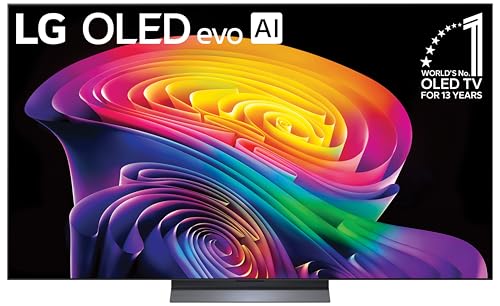

Top 3 picks at a glance
What to Look For in a Gaming TV
Before you shortlist specific models, here are the criteria that separate a genuinely great gaming TV from one that just happens to have a 4K panel. Prioritize these over raw screen size or smart platform features.
- HDMI 2.1 bandwidth: You want at least one port that supports 4K at 120Hz. If you are connecting a PS5, Xbox Series X, or a modern PC GPU, this is non-negotiable for full-fps gameplay.
- Variable Refresh Rate (VRR): Look for HDMI Forum VRR support, and ideally AMD FreeSync Premium Pro certification. NVIDIA G-Sync Compatible works well on many TVs too, but the experience can be less consistent than on dedicated gaming monitors.
- Input lag: This is the delay between pressing a button and seeing the action on screen. Anything under 15ms in game mode is excellent; under 20ms is acceptable. OLED panels tend to edge out LCD here, but recent LCD TVs have improved dramatically.
- Panel type and contrast: OLED gives you perfect blacks and near-instant pixel response, which is ideal for dark game scenes and fast motion. Mini-LED LCDs deliver higher peak brightness, which helps in sunlit rooms and makes HDR pop in certain games.
- Refresh rate ceiling: 120Hz is the standard for next-gen gaming. Some newer TVs push 144Hz, which benefits PC gamers who can consistently exceed 120fps at 4K.
- Game-mode features: An instant game remote shortcut, auto low-latency mode (ALLM), and a dedicated gaming hub that shows resolution and fps in real time all add quality-of-life polish.
LG OLED C Series
LG’s OLED C line has become the default recommendation for gamers who want the best picture quality with minimal compromises. The panel delivers per-pixel lighting, so black levels in horror games and space sims are unmatched. Response times are effectively instantaneous, which eliminates the motion smear you see on slower LCD panels during fast camera pans. The latest revisions include two HDMI 2.1 ports (and sometimes more depending on the exact model year), 120Hz native refresh, G-Sync and FreeSync support, and a Game Optimizer menu that puts all gaming toggles in one place. The main trade-off is brightness: in a very sun-drenched living room, the C series can look dimmer than a high-end Mini-LED. There is also a theoretical burn-in risk for static HUD elements, though LG’s pixel-refreshing features mitigate this well for typical play sessions.
- Perfect contrast and true blacks for atmospheric games
- Near-zero response time eliminates ghosting
- Strong VRR implementation with G-Sync and FreeSync
- Limited peak brightness in very bright rooms
- Slight burn-in risk with prolonged static content
You can check current price on Amazon to see which model year fits your budget.
Samsung Neo QLED QN90 Series
Samsung’s flagship Mini-LED line goes head-to-head with OLED on gaming features while delivering substantially more brightness. The QN90 series uses quantum-dot-enhanced backlight zones that let the TV crank out peak highlights well above what OLED can manage, which means HDR gaming in bright environments looks genuinely impressive. Input lag is consistently low, and Samsung’s Game Bar feature lets you overlay resolution, fps, and VRR status without leaving the game. The one thing Samsung has historically been slower to support is G-Sync compatibility—FreeSync works great, but if you are a strict NVIDIA user on PC, verify compatibility before buying. On consoles, the QN90 is an outstanding pairing with PS5 and Xbox Series X.
- Excellent peak brightness for HDR in lit rooms
- Low input lag and solid FreeSync support
- Game Bar overlay is genuinely useful
- NVIDIA G-Sync support can be inconsistent
- Mini-LED blooming on very dark scenes with bright objects
See current Amazon pricing here for available sizes.
Sony Bravia 9 Series
Sony’s top-tier Mini-LED offering leans heavily into processing rather than raw panel specs, and that philosophy shows up in gaming. Motion handling is among the best available on any TV, which means fast camera sweeps in racing games and FPS titles look smoother without the artificial interpolation artifacts that plague cheaper sets. Sony supports 4K at 120Hz with VRR, and the dedicated game mode keeps input lag competitive. Bravia’s ecosystem integration with PlayStation is a natural bonus if you already own a PS5—features like auto HDR tone mapping for PlayStation titles are genuinely helpful. The downside is price: this sits at the premium end of the Mini-LED category, and you are paying partly for Sony’s processing algorithms rather than a brighter panel.
- Best-in-class motion processing for smoothness
- Tight PS5 integration and auto HDR
- VRR support and low input lag
- Premium pricing relative to competitors
- Smart TV interface is not as snappy as Samsung’s
Hisense U8 Series
For gamers who want to spend less without giving up essential features, Hisense’s U8 line is hard to ignore. You get Mini-LED backlighting, 120Hz native refresh, HDMI 2.1 with full 4K120 VRR, FreeSync Premium Pro, and Dolby Vision Gaming support—all for a fraction of what Samsung or Sony charge. Input lag in game mode is respectable, and the picture quality punches well above its price. The compromises show up in the smart platform (Google TV can feel sluggish compared to Tizen or WebOS), motion processing is less refined than Sony’s, and build quality feels a tier below the premium brands. But for pure gaming value, it is tough to beat.
- Outstanding feature set for the price
- Full HDMI 2.1 bandwidth and VRR support
- Dolby Vision Gaming support
- Slower smart TV interface and less refined motion
- Build quality and panel uniformity lag behind premium sets
Browse Amazon listings for the U8 series to compare sizes and current deals.
Samsung S95 QD-OLED Series
Samsung’s QD-OLED line combines the organic emissive layer of OLED with quantum-dot color enhancement, resulting in richer color saturation and higher brightness than traditional WOLED panels. Gaming features mirror the C series: 144Hz on newer model years, VRR, low input lag, and an excellent game dashboard. The main advantage over LG’s C line is color volume and brightness—QD-OLED retains punchier HDR highlights. The disadvantages are cost (this is Samsung’s most expensive consumer TV tier) and the fact that Samsung still charges a premium for the brand without always delivering a proportionally better experience over LG’s OLEDs for pure gaming use.
- Wider color gamut and better brightness than standard OLED
- 144Hz support for high-fps PC gaming
- Excellent gaming dashboard and VRR implementation
- Expensive compared to competing OLED options
- Burn-in risk, same as any OLED
Check pricing on Amazon since older model years drop significantly once newer ones launch.
Frequently Asked Questions
Do I need HDMI 2.1 for gaming on a 4K TV?
If you want 4K at 120fps, yes. HDMI 2.0 is bandwidth-limited and can max out at 4K 60Hz with standard dynamic range or lower color depth. For PS5 and Xbox Series X, a TV without at least one HDMI 2.1 port will cap you at 60Hz or force you to drop to 1440p for 120fps. PC gamers with RTX 40-series cards can work around this using 1440p or 1080p at high refresh, but 4K120 requires the full 48Gbps bandwidth of HDMI 2.1.
Is OLED or Mini-LED better for gaming?
They excel at different things. OLED wins on contrast, response time, and viewing angles—ideal for dark-room gaming and single-player experiences where atmosphere matters. Mini-LED wins on peak brightness, which helps in daytime viewing and HDR games with lots of bright highlights. If your room has lots of windows, Mini-LED is often the more practical choice. If you mostly game at night, OLED is harder to beat on picture quality.
Will static HUD elements damage my OLED TV?
Prolonged exposure to static bright elements (score counters, health bars that never move) can cause differential aging on OLED panels, which manifests as faint ghost images. In practice, most modern OLEDs include pixel-shift routines, auto-dimming of static elements, and refresh cycles that prevent noticeable burn-in even with hours of daily use. Gaming is actually less risky than watching news channels with static tickers. Still, if you play games with permanently visible UI elements for eight hours a day, every single day, the risk is nonzero. Turning down brightness and using game modes that auto-dim static content helps.
Final Thoughts
There is no single best 4K gaming TV for everyone. LG’s OLED C series remains the safest recommendation for most gamers who want a balance of picture quality and gaming features. Samsung’s QN90 makes more sense if your room is bright and you want to avoid any burn-in concerns. Hisense’s U8 is the value champion that gives you 90% of the gaming experience at half the price. If budget is no concern and you want the absolute cutting edge, Samsung’s S95 QD-OLED pushes brightness and color further than traditional OLED while keeping the gaming chops intact. Match the TV to your room lighting, your console or PC hardware, and how you actually play—not just the spec sheet.