Our Top Picks

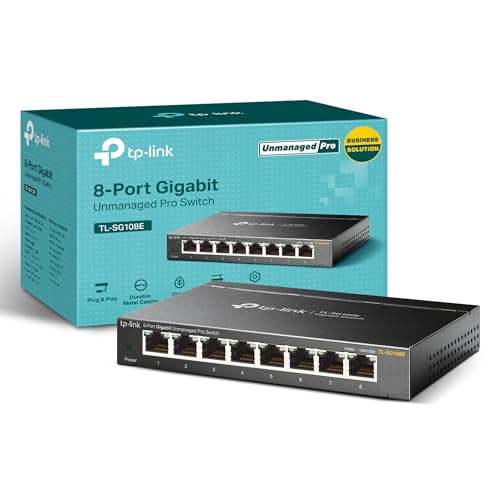


Top 3 picks at a glance
Best Managed Switches for Gaming and Home Networks
The best managed switches for most gaming rooms and home networks are an 8- or 16-port gigabit model with quiet or fanless operation, VLAN support, and a management interface you’ll actually use; choose a multigigabit model only if your access points, NAS, or internet connection can benefit from speeds above 1GbE.
A managed switch does not normally reduce gaming latency compared with a suitable unmanaged switch. Its value is control: separating guest and smart-home devices, prioritizing or limiting traffic where supported, monitoring links, and powering access points or cameras with Power over Ethernet (PoE). The right choice depends more on port speed, noise, PoE budget, and configuration complexity than on a “gaming” label.
As an Amazon Associate we earn from qualifying purchases at no extra cost to you.


Quick comparison
| Switch | Ports and speed | PoE | Noise and management | Best fit |
|---|---|---|---|---|
| TP-Link TL-SG108E | 8 × 1GbE | No | Fanless; web-based Easy Smart management | Budget gaming desk or small wired setup |
| TP-Link TL-SG1016PE | 16 × 1GbE | PoE+ on 8 ports; up to 150W total | Fan-cooled; web-based management | Small office or home network with several powered devices |
| TP-Link TL-SG2210MP | 8 × 1GbE plus 2 SFP slots | PoE+ on 8 ports; up to 150W total | Fan-cooled; Omada SDN management or standalone web interface | PoE access points and cameras in an Omada network |
| TP-Link TL-SG3210XHP-M2 | 8 × 2.5GbE plus 2 SFP+ slots | PoE+ on 8 ports; up to 240W total | Fan-cooled; Omada SDN management or standalone web interface | Multigigabit access points and faster local links |
| Ubiquiti UniFi Switch Lite 8 PoE | 8 × 1GbE | PoE on 4 ports; up to 52W total | Fanless; managed through UniFi Network | Quiet, compact setup already using UniFi |
Port counts, PoE budgets, and software features can vary by hardware revision and region. Check the manufacturer’s current specifications before buying, especially if the switch must power multiple devices. “Managed” also covers different levels of control: an Easy Smart model may offer VLANs and basic monitoring, while a controller-based switch can centralize configuration across a larger network.
Choose by network, not by gaming claims
For a gaming room: favor quiet operation and enough ports
An 8-port gigabit switch is usually sufficient for a console, gaming PC, TV, NAS, and an uplink to the router, with ports left for expansion. If you want a simple, inexpensive way to add VLANs and basic port controls, the fanless TL-SG108E is a practical class of switch to consider. It is not a full enterprise switch, but those extra controls can be useful without adding a loud fan to a desk or bedroom.
Keep the router in mind: the switch does not replace it. The router still handles internet access, DHCP, and typically the firewall between networks. If you create a guest or IoT VLAN, the router or a layer-3 gateway must also support and route that VLAN. A switch setting alone cannot isolate devices across the whole network.
For a home lab: look at uplinks and faster ports
Choose 16 or more ports if you expect to connect servers, a NAS, access points, test devices, and a second switch. A 10GbE SFP+ uplink can be valuable when several gigabit clients share traffic with a NAS, but it does not make an individual gigabit connection faster than 1Gbps. For faster endpoints, 2.5GbE access ports are more useful than a fast uplink alone.
Multigigabit switches tend to cost more and may need active cooling. Check whether the model’s fans are temperature-controlled, whether the switch will sit near people, and whether your network cards and cabling support the intended speed. Cat5e commonly supports 2.5GbE over typical home runs, but cable condition and length matter; verify the link negotiates at the expected rate rather than assuming the label guarantees it.
For a small office: count PoE devices before buying
PoE can power wireless access points, cameras, and VoIP phones over Ethernet, reducing the need for nearby power outlets. Count the powered devices and use their maximum stated draw, not an optimistic average. Also leave headroom: a switch’s total PoE budget is shared across ports, and a port’s PoE standard sets a separate per-device limit.
For example, suppose an office has four access points rated at 18W each and two cameras rated at 12W each. The calculated load is (4 × 18W) + (2 × 12W) = 96W. A 150W PoE budget leaves 54W of nominal headroom, while a 60W budget is insufficient. Check the devices’ actual PoE requirements and the switch’s per-port limits before deciding.
Settings that make a managed switch useful
- Separate trusted and untrusted devices. Create distinct VLANs for your main computers, IoT devices, and guests if your router supports them. For example, VLAN 10 for trusted devices, VLAN 20 for IoT, and VLAN 30 for guests. These numbers are examples, not special defaults.
- Set the router uplink as a trunk. The link between the switch and a VLAN-aware router must carry the required VLANs. Configure ordinary endpoint ports as access ports in their intended VLAN. A mismatch can leave devices without DHCP or internet access.
- Use QoS only for a defined problem. Prioritizing game traffic may help when a connection is congested, but it cannot fix an overloaded internet plan or poor Wi-Fi. Start with the router’s smart queue management if available; switch QoS generally affects traffic moving through the switch, not the internet bottleneck upstream.
- Enable loop protection carefully. Spanning Tree Protocol (STP) helps prevent a network loop if someone connects two switch ports together. Keep it enabled where supported, especially in a home lab, and avoid changing root-bridge settings unless you understand the topology.
- Update firmware and secure management. Change default credentials, use a dedicated management VLAN if your setup supports it, and keep firmware current. A managed switch adds a configuration interface that should not be left exposed to untrusted networks.
Which switch fits your situation?
| Your situation | What to prioritize | Shortlist direction |
|---|---|---|
| Quiet bedroom or gaming desk, up to 8 wired devices | Fanless design, 1GbE, VLAN basics | TL-SG108E or another fanless 8-port smart switch |
| Several access points or cameras | PoE+ port count, total wattage, per-port limits | TL-SG1016PE or TL-SG2210MP, sized to the power calculation |
| Multigigabit access points or a fast NAS | 2.5GbE endpoint ports and suitable uplinks | TL-SG3210XHP-M2 or a comparable multigigabit managed switch |
| Existing UniFi network and a small PoE footprint | UniFi Network integration and quiet operation | UniFi Switch Lite 8 PoE |
| Growing lab or office with several switches | Central management, VLAN consistency, expansion capacity | Controller-managed models in one ecosystem, such as Omada or UniFi |
What to check before purchase
First, add up the devices that need wired connections, then reserve at least one port for the router uplink and a few for growth. Next, confirm whether you need PoE, 2.5GbE, or faster uplinks; paying for these features is worthwhile only when endpoints can use them. Finally, consider where the switch will live. A fan-cooled unit may be appropriate in a closet or rack but distracting beside a console or microphone.
For a straightforward gaming setup, a quiet 8-port managed gigabit switch is usually the sensible starting point. For a home lab, choose based on port growth and NAS or server link speeds. For a small office, calculate PoE demand and decide whether centralized management will save enough time to justify its ecosystem. Those criteria are more useful than buying the largest or fastest switch on the shelf.
Related guides
- Best Premium Flight Simulator Cockpit Setups for Aviators: 4 Compared (2026)
- Best Network Cabinets for Home Labs and Offices: 4 Compared (2026)
- Gaming PC Setup Checklist for Beginners: Every Step From Box to First Game
- Best Fan Hub Controllers for Cable Management Setups: Compared and Ranked: 8 Compared (2026)