
Your new gaming rig is a work of art behind the glass panel—sleeved cables routed tight along the chassis, zero clutter blocking the airflow path. But there’s one cable nest threatening the whole aesthetic: a spider web of fan leads snaking from six case fans to scattered motherboard headers, plus ARGB pigtails taped to the frame. A clean build needs a fan hub controller, a small board that consolidates fan power and RGB signals into one or two tidy connections while keeping every fan speed and lighting zone under software control.
The catch is that hubs vary wildly. Some pass PWM signals perfectly; some convert everything to DC voltage and kill your fine-grained fan curves. Some carry 5V 3-pin ARGB only, which is fine unless you own legacy 12V RGB gear. We sorted through the most popular options and ranked eight of them for builders who care as much about cable discipline as cooling performance heading into 2026.
As an Amazon Associate we earn from qualifying purchases at no extra cost to you.



Our Top Picks
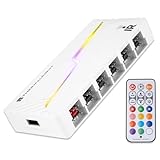
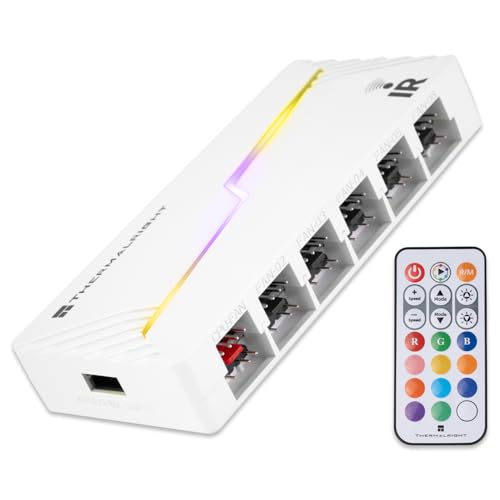
 Thermalright ARGB Fan HUB Controller Support 8 Groups5.51 x 0.63 x 2.52 Inches0.2 PoundsCheck on Amazon
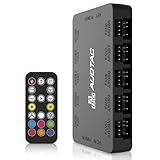
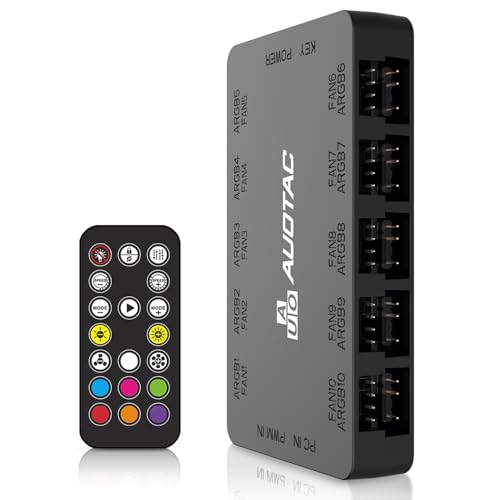 Auotac ARGB PWM Fan Hub with RF Remote3.95 x 2.25 x 0.65 inches3.95 x 2.25 x 0.65 Inches0 PoundsCheck on Amazon


Top 3 picks at a glance
Quick Picks
| Product | Best for | Price |
|---|---|---|
| Thermalright ARGB and Fan HUB X12 IR Black | Best overall for large builds | Check on Amazon |
| ASUS TUF Gaming ARGB PWM Fan Hub | Best premium brand integration | Check on Amazon |
| Thermalright ARGB Fan HUB Controller (8 Groups) | Best compact hub for mid-tower builds | Check on Amazon |
| Cable Matters 2-Pack 3-Way PWM Splitter | Best minimal splitter approach | Check on Amazon |
| Thermalright ARGB and Fan HUB X12 IR White | Best for white-themed builds | Check on Amazon |
| PlusRoc 12V DC PWM Fan Controller Hub | Best standalone DC control without RGB | Check on Amazon |
| Auotac ARGB PWM Fan Hub with RF Remote | Best remote-controlled option | Check on Amazon |
| 2-Pack 1-to-5 Way Fan Splitter Cables | Best budget bulk expansion | Check on Amazon |
How We Compared
We focused on products that solve two problems at once: consolidating cabling and preserving control. Every hub here was evaluated on fan capacity (how many headers it offers), power delivery (SATA direct input versus motherboard header draw), PWM signal integrity, and RGB compatibility. We gave extra weight to hubs with magnetic backing or adhesive mounts, since those are what let you tuck the board flat against the case floor or behind the motherboard tray—the difference between a hub that cleans up your build and one that just relocates the mess.
We also prioritized value. Most builders don’t need a $50 digital fan controller; they need reliable signal passthrough, adequate wattage headroom, and clean mounting. That’s why budget hubs from Thermalright sit alongside premium options from ASUS and remote-equipped units from Auotac—each earns its slot for a specific kind of build and budget. We deliberately excluded anything that lacked SATA power input for six or more fans, since daisy-chained header power is where cable management and electrical safety both fall apart.
The 8 Best Picks
1. Thermalright ARGB and Fan HUB X12 IR Black — Best Overall
This is the hub we’d install in our own build. It handles 12 groups of fans through 4-pin PWM headers, takes direct SATA power input so it isn’t starving your motherboard header, and includes a 3-pin ARGB controller side for lighting zones. The black PCB disappears against dark case floors, and magnetic suction mounting means you can slap it onto any steel surface and route one SATA cable and one motherboard sync lead back to it. For a nine-fan gaming build with three lighting strips, this single board replaces roughly a dozen individual cable runs.
- Supports 12 fan groups plus ARGB in one compact board
- SATA direct power input avoids overloading motherboard headers
- Does not support legacy 12V 4-pin RGB, so older RGB gear needs an adapter or replacement
Skip it if your fans use 12V 4-pin RGB or if you run four fans or fewer—a simple splitter will do the job cheaper.
2. ASUS TUF Gaming ARGB PWM Fan Hub — Best Premium Pick
If you’ve invested in an ASUS ecosystem build—TUF or ROG motherboard, Armoury Crate lighting sync—this hub keeps everything under one software roof with the fit and finish you’d expect at this price. It consolidates PWM fan control and ARGB into a single unit designed to bolt cleanly into ASUS cases and mount discretely in others. Build quality is a step above the budget boards here, with soldered connections that feel built to survive multiple rebuilds.
- Seamless integration with ASUS Armoury Crate software ecosystems
- Premium construction quality suited to repeated rebuilds
- Costs nearly three times the budget hubs for comparable core functionality
Skip it if you’re not in the ASUS ecosystem or you’re building on a strict budget—the Thermalright options deliver similar practical results for around $11.
3. Thermalright ARGB Fan HUB Controller (8 Groups) — Best Compact Option
Not every build needs 12 fan headers. If you’re running a mid-tower with six to eight fans, this 8-group version trims the size and cost while keeping the features that matter: 5V 3-pin ARGB support, SATA power input, and both strong adhesive paste and magnetic suction for mounting. It’s the right call for compact builds where a 12-port board would leave half its headers dangling unused behind your PSU shroud.
- Right-sized 8-port capacity for typical mid-tower configurations
- Two mounting methods (paste and magnetic) for flexible placement
- No 12V 4-pin RGB support, and less expansion headroom than the X12
Skip it if you plan to expand past eight fans or you’re building a full-tower with radiator fans plus case fans to spare.
4. Cable Matters 2-Pack 3-Way PWM Splitter — Best Minimalist Solution
Sometimes the answer isn’t a hub at all—it’s two well-made splitter cables. Each of these 12-inch (30 cm) 3-way splitters turns one motherboard PWM header into three fan connections, and the two-pack covers six fans off just two headers. True PWM passthrough means all fans on a splitter follow the same curve, which is exactly what you want for matched intake or exhaust pairs. It’s the cleanest possible solution: no extra board, no SATA cable, no RGB functions to configure.
- True 4-pin PWM passthrough with no external power needed
- Two-pack covers up to six fans for under $9 total
- No ARGB functionality and all fans on one splitter share a single speed curve
Skip it if you need per-fan control, run more than six fans, or want lighting integration in the same accessory.
5. Thermalright ARGB and Fan HUB X12 IR White — Best for White Builds
Identical in function to our top pick, this X12 variant ships in white for builders working on snow-themed rigs. Same 12 fan groups, same 3-pin ARGB controller, same SATA direct power input, same magnetic mounting. If you’ve spent real money on a white case, white fans, and white sleeved cables, a black PCB glowing through the gaps is the one detail that ruins the look. This solves that for the same around $11.
- Full 12-group capacity in a white PCB that matches light-themed builds
- Same SATA power input and magnetic mounting as the black version
- Same limitation: 12V 4-pin RGB is not supported
Skip it for dark-themed builds where the black version is equally capable, or if you only need a handful of fan ports.
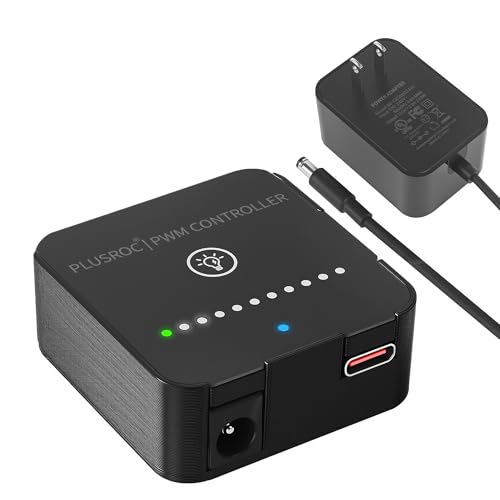
6. PlusRoc 12V DC PWM Fan Controller Hub — Best for Cooling-Only Builds
If your fans are non-RGB and you just need to power and control a stack of them cleanly, this 24-watt hub handles the job without paying for lighting circuitry you won’t use. It runs 12V DC fans with PWM control from a single consolidated board, delivering enough output wattage to drive a full case’s worth of cooling fans without stressing a motherboard header. It’s a practical pick for workstation-style gaming builds where lighting is handled elsewhere or skipped entirely.
- Dedicated 24W output handles a full multi-fan cooling array
- No RGB overhead you’re paying for and not using
- No ARGB support at all, so lit builds need a separate lighting solution
Skip it if you want fan and lighting control unified on one hub—look at the Thermalright X12 or the Auotac instead.
7. Auotac ARGB PWM Fan Hub with RF Remote — Best Remote Control
This hub powers up to ten case fans across 5V 3-pin ARGB and 12V 4-pin PWM connectors, drawing from dual SATA power inputs for stable delivery under load. The headline feature is the RF remote: you can change lighting modes and colors without opening software, which is great for builds used by family members or demo setups where you don’t want guests poking around your desktop. Magnetic suction mounting keeps the board flat and hidden.
- Handles ten fans with dual SATA inputs for stable power delivery
- RF remote controls lighting without software, and works through the case panel
- Remote-based control bypasses motherboard software sync, so lighting won’t follow in-game effects
Skip it if you’re deep into a unified RGB ecosystem (SignalRGB, Armoury Crate, iCUE) and want everything synchronized—use the remote-free hubs instead.
8. 2-Pack 1-to-5 Way Fan Splitter Cables — Best Ultra-Budget Expansion
At around $6 for two cables, each splitting one connection into five, this is the cheapest possible way to consolidate up to ten fan connections down to two leads. These are power/signal extension splitters rather than smart hubs—no RGB passthrough, no SATA input—so they’re best for small builds running DC or PWM fans where you simply want fewer cables visible. For a budget build where every dollar goes toward the GPU, this is a legitimate cable management upgrade.
- Ten fan connections consolidated for just around $6 total
- Simple plug-and-play with no mounting or software involved
- Splitting many fans across one header risks exceeding its power budget—check your fan specs first
Skip it if you run more than four or five fans total, or anything with addressable lighting; a powered hub is the safer tool.
Buying Guide
PWM Passthrough vs. DC Control
True PWM hubs repeat the 4-pin signal from your motherboard to each fan, letting your BIOS fan curves control individual headers precisely. DC-style hubs regulate fan speed by varying voltage, which works but gives you coarser control and can cause ticking noises at low speeds in some fans. All the hub-style picks here support 4-pin PWM connections; if fine-grained, quiet fan curves matter to you—and in a cable-managed showpiece build, they should—confirm PWM passthrough before buying.
Power Delivery and SATA Input
A single motherboard fan header is typically rated for about 1 amp (roughly 12 watts). Run six 0.2A fans through an unpowered splitter and you’re over the limit, which can throttle fans or damage the header. Hubs with direct SATA power input draw from your PSU’s ample 12V rail instead, safely supporting 8 to 12 fans. Any build with more than four fans should use a SATA-powered hub like the Thermalright X12 or Auotac, and reserve simple splitters for matched pairs on one curve.
RGB Compatibility: 5V 3-Pin vs. 12V 4-Pin
Modern addressable RGB runs on 5V 3-pin connectors; legacy RGB runs on 12V 4-pin. They are not interchangeable, and plugging a 5V fan into a 12V header will burn out its LEDs. Every hub controller on this list explicitly supports 5V 3-pin ARGB and not 12V 4-pin RGB, so check your fans and strips before ordering. If you’re mixing old and new gear, budget for a converter or replace the legacy components.
Our Verdict
For most cable-managed gaming builds, the Thermalright ARGB and Fan HUB X12 IR Black at around $11 is the clear winner: 12 fan groups, ARGB control, SATA power, and magnetic mounting for less than the cost of a fan splitter two-pack. White-build owners should grab the identical X12 IR White, and mid-tower builders can downsize to the 8-group version. Step up to the ASUS TUF hub at around $32 if you want ecosystem polish, or the Auotac at around $29 if remote control appeals. And if your needs are simple, the Cable Matters splitters at around $8 remain the most elegant minimal solution in cable management.
FAQ
Will a fan hub reduce my fan speed or performance?
A quality PWM hub with SATA power input passes the motherboard’s signal through unchanged, so fans run exactly as your BIOS curves dictate. Performance loss usually comes from overloading an unpowered splitter, not from using a proper hub.
Can I connect my CPU cooler fan to a hub?
You can, but we’d advise against it for the CPU header specifically. Keep the cooler on the motherboard’s dedicated CPU fan header so it gets the correct thermal curve and warnings; use the hub for case fans and radiator fans in parallel configurations.
How many fans can one hub safely run?
With SATA power input, hubs like the Thermalright X12 support 12 fan groups safely. Without external power, keep total draw under roughly 1 amp per motherboard header—typically three to four standard case fans.
Do I need a hub if my motherboard has enough headers?
Not necessarily, but a hub still helps cable management. Eight fans plugged directly into the motherboard means eight cables crossing behind your tray; a hub in the case floor reduces that to one SATA cable and one control lead, regardless of header count.
Related guides
- Best Gaming PC for Overwatch 2: Ten Prebuilts Matched to Your Monitor (2026)
- Best Gaming PC for Baldur’s Gate 3: Matching CPU, VRAM and Storage to the Game (2026)
- Best Gaming PC for Apex Legends: Which Listings Fit a High-Refresh Setup (2026)
- Best RTX 3060 Gaming PCs: Eight Prebuilt Listings Compared by CPU, RAM and Cooling (2026)









