The best RTX 3060 gaming PC in this set is the one whose title names the most parts you can check: the graphics card memory, the processor model, the RAM and storage, and ideally the power supply. Eight listings follow, from three small-brand makers, and they are not equals. Several are near-duplicates of each other, two are not really RTX 3060 machines at all (they use the Ti variant), and one pair sits at the top for sheer spec-per-listing. If you want a short answer, the STGAubron listing with the Ryzen 7 5700X and the 12GB card is the most complete mainstream pick, the 32GB Core i7 STGAubron listing is the budget-minded alternative, and the Olialia listings are worth a look only if you specifically want the Ti and accept 8GB of video memory.
Everything below comes from listing titles, which are seller claims. Verify each number on the product page.
Our Top Picks
Top picks at a glance

VIPRTECH Stryker 3.0 Gaming PC Ryzen 7, RTX 3060, 16GB/1TB SSD Arctic White | AMD Ryzen 7 4.1GHz Liquid Cooled, RTX 3060 12GB, 16GB DDR4 RAM, 1TB SSD, 700W PSU


As an Amazon Associate we earn from qualifying purchases. Product prices and availability are accurate as of the date/time indicated.

VIPRTECH Stryker 3.0 Gaming PC, Ryzen 7, RTX 3060 12GB, 16GB/1TB Onyx Black | AMD Ryzen 7 (4.4GHz Turbo), RTX 3060 12GB, 16GB DDR4 RAM, 1TB SSD, 700W PSU


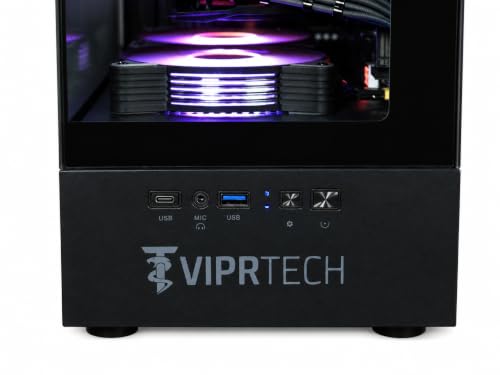

As an Amazon Associate we earn from qualifying purchases. Product prices and availability are accurate as of the date/time indicated.

STGAubron Gaming PC Desktop,R5 5500,RTX 3060 12G,16G DDR4,1T SSD | Gaming Computer Tower for Streaming,Video Editing,Home,School,R5 up to 4.2GHz,ARGB Fan,WiFi 6,BT 5.2,4K DP,HDMI,Win11 Home


As an Amazon Associate we earn from qualifying purchases. Product prices and availability are accurate as of the date/time indicated.

STGAubron Gaming PC Desktop,Core I7,RTX 3060 12G,32G RAM,1TB SSD | Gaming Computer Tower for Streaming,Video Editing,Home,School,I7 up to 3.9G,ARGB Fan,WiFi 6,BT 5.0,4K DP,HDMI,Win11 Home


As an Amazon Associate we earn from qualifying purchases. Product prices and availability are accurate as of the date/time indicated.

Olialia Gaming PC Prebuilt, RTX 3060 Ti, AMD Ryzen 5 5500, 16GB RAM | 512GB SSD, RGB lighting, WiFi 6, 600W Power, Win 11, Panoramic Tower Desktop for Gaming, Streaming, Everyday Use


As an Amazon Associate we earn from qualifying purchases. Product prices and availability are accurate as of the date/time indicated.

Olialia Gaming PC, RTX 3060 Ti 8GB, AMD Ryzen 5 5500, 16GB RAM, 512GB SSD | Prebuilt Gaming Desktop Computer (Beats RTX 5050 8GB), ARGB Lighting, 600W Power Supply, Ideal for Gaming, Streaming Setup
As an Amazon Associate we earn from qualifying purchases. Product prices and availability are accurate as of the date/time indicated.

STGAubron Gaming PC Desktop,R7 5700X,RTX 3060 12G,16G DDR4,1TB SSD | Gaming Computer Tower for Streaming,Video Editing,Home,School,R7 up to 4.6GHz,ARGB Fan,WiFi 6,4K DP,HDMI,Win11 Home,White


As an Amazon Associate we earn from qualifying purchases. Product prices and availability are accurate as of the date/time indicated.

Olialia Gaming PC, GeForce RTX 3060 Ti 8GB, Ryzen 5 5500 High Performance


As an Amazon Associate we earn from qualifying purchases. Product prices and availability are accurate as of the date/time indicated.
| Model | Key point from title | Price tier | Best for |
|---|---|---|---|
| VIPRTECH Stryker 3.0 (Arctic White) | Ryzen 7, RTX 3060 12GB, 16GB, 1TB, liquid cooled, 700W | Mid-range (price not captured, check listing) | Buyers who want liquid cooling and a bigger PSU |
| VIPRTECH Stryker 3.0 (Onyx Black) | Ryzen 7 with 4.4GHz turbo, RTX 3060 12GB, 16GB, 1TB, 700W | Mid-range (price not captured, check listing) | Same hardware class, black chassis |
| STGAubron Ryzen 5 5500 | R5 5500, RTX 3060 12G, 16GB, 1TB, WiFi 6, Win11 | Mid-range | Straightforward 1080p play |
| STGAubron Core i7 | Core i7, RTX 3060 12G, 32GB RAM, 1TB | Budget | Streaming and multitasking on a tighter budget |
| Olialia 3060 Ti, 16GB/512GB | RTX 3060 Ti, Ryzen 5 5500, 600W | Mid-range | Raw speed over VRAM, small storage accepted |
| Olialia 3060 Ti 8GB, 16GB/512GB | Same specs, rewritten title with a comparison claim | Mid-range | See near-duplicate note |
| STGAubron Ryzen 7 5700X | R7 5700X, RTX 3060 12G, 16GB, 1TB, white | Mid-range | Best-balanced CPU in the set |
| Olialia 3060 Ti, 32GB/1TB | 3060 Ti 8GB, Ryzen 5 5500, 32GB RAM, 1TB PCIe | Premium | Buyers who want the Ti with more RAM and storage |
What is changing in the RTX 3060 prebuilt category
The RTX 3060 belongs to an earlier graphics generation, which is exactly why it shows up so often in small-brand prebuilts. Retailers and system sellers still stock it, partly because the 12GB version offers a generous amount of video memory for an entry card and partly because older stock can be priced attractively. In practice that means you are buying a mature, well-understood class of GPU rather than the newest silicon.
That maturity cuts both ways. Drivers are settled and the card is well supported by most current games at 1080p, but newer releases increasingly lean on features and memory budgets aimed at newer cards. As a general pattern, expect to turn a few settings down in the most demanding titles and to rely on upscaling options where a game offers them. Whether that is acceptable depends on your tolerance for compromise, not on a fixed rule.
Another shift is the processor pairing. Many of these systems use older mainstream Ryzen chips, which are perfectly serviceable for gaming but sit on an older platform with DDR4 memory. That limits future upgrade paths compared with a current-platform board, though it also keeps the build cost down. Storage is trending toward 1TB as a baseline, and a 512GB drive fills up quickly once a handful of modern games are installed.
Cooling is a visible marketing point. Liquid cooling and long strings of ARGB fans appear in titles because they photograph well, but the practical value varies. Finally, you will notice titles that borrow comparisons to newer cards, such as one that claims to beat an entry-level current-generation card. Treat those as the seller’s framing; they are not a substitute for a published, like-for-like comparison.
How we picked these
We read each listing title and the published listing information, then grouped the systems by graphics card, processor, memory and storage. We kept every listing that names a 3060-class graphics card, and we flagged where the Ti variant or a missing detail changes the picture. Nobody on the team used or measured these units. The comparison rests on published specifications, manufacturer documentation and buyer reviews, and it cannot tell you how a particular unit sounds, runs or arrives. Price tiers are relative within this set only, and where a listing showed no price data we say so in the table.
The eight listings, one by one
VIPRTECH Stryker 3.0 in Arctic White
This listing leads with a liquid-cooled Ryzen 7 at 4.1GHz, a 12GB RTX 3060, 16GB of DDR4, a 1TB SSD and a 700W power supply. Of the eight, it is one of only two that name a PSU rating above 600W, and the only one to mention liquid cooling. The exact Ryzen 7 model is not stated in the title, which makes it harder to judge against the STGAubron Ryzen 7 5700X.
It suits someone who values a quieter-looking, white-themed build and likes the extra power-supply headroom for a later graphics upgrade. A realistic scenario: a student who games on weekends, edits clips occasionally and wants a tidy white tower for a desk setup.
Pros
- 12GB card plus a 700W supply named in the title
- 1TB SSD at a mid-range configuration
- Liquid cooling mentioned for the processor
Cons
- Ryzen 7 model number not given
- 16GB RAM is adequate rather than generous
Because the title leans on cooling and power, a sensible follow-up is how the case handles airflow around a radiator and how loud the pump and fans are under load. The listing text may say more than the title does, and buyer questions on the page are a useful place to look for owner-reported noise comments.
Check the listing: the radiator size, the motherboard model, the PSU brand and the warranty length. Question to ask before buying: which exact Ryzen 7 is inside, and is the pump covered separately?
VIPRTECH Stryker 3.0 in Onyx Black
Almost the same machine as the white version, listed with a black chassis and a “4.4GHz Turbo” claim instead of the 4.1GHz figure. Both titles describe a Ryzen 7, the 12GB RTX 3060, 16GB DDR4, a 1TB SSD and a 700W supply. The black listing does not mention liquid cooling in its title, so do not assume it has it.
These two are near-duplicates: same product name, same core hardware claims, different colors and slightly different clock wording. The different frequency numbers may be a base versus boost distinction or simply different copywriting, and the title does not settle it. Treat them as one product line and compare them directly on the listing pages instead of choosing by color alone.
Pros
- Same 12GB card and 700W supply as the white version
- Black styling blends into most setups
Cons
- No liquid-cooling mention in this title
- Processor model still unnamed
If you are choosing between the two, the practical difference may come down to what ships in the box and how each seller handles returns. Photos of the interior, when the listing provides them, are the quickest way to see whether the cooler and fans match what the other color shows.
Check the listing: whether the cooler matches the white version and what the turbo figure refers to. Question to ask: is anything besides the color different between the two Stryker listings?
STGAubron Ryzen 5 5500 with RTX 3060 12G
Here the title names the Ryzen 5 5500, the 12GB RTX 3060, 16GB DDR4, a 1TB SSD, WiFi 6, Bluetooth 5.2 and Windows 11 Home. It also lists ARGB fans and 4K-capable DisplayPort and HDMI outputs. The “4.2GHz” figure is described as “up to”, which reads as a boost clock.
It suits a player who mostly sticks to 1080p, streams a little and does not need many cores. A scenario: a household PC where homework and evening gaming share the same tower. The Ryzen 5 5500 is a six-core part, which is typically enough for gaming, though video editing will lean harder on the processor.
Pros
- Full spec set in the title, including wireless and OS
- 12GB graphics memory and 1TB storage
Cons
- Power supply rating not stated
- Marketing copy covers streaming, video editing, school and home, which is broad
Check the listing: the PSU wattage and brand, whether the board has a spare M.2 slot, and the return policy. Question to ask: what happens if the unit arrives with a hardware fault?
STGAubron Core i7 with RTX 3060 12G and 32GB RAM
This one pairs a “Core I7” at up to 3.9GHz with the 12GB RTX 3060, 32GB of RAM and a 1TB SSD, plus WiFi 6 and Bluetooth 5.0. The title does not say which Core i7 generation it is, and the 3.9GHz ceiling is low enough to suggest an older chip. That detail matters because older generations can bottleneck a modern graphics card in processor-heavy games.
Its attraction is memory: 32GB is double that of most rivals, which helps with browser-heavy multitasking, game capture and creative software. It suits a streamer or a student who runs a game, a chat client, a browser and a recording tool at once. Its price tier within this set is the lowest, which lines up with an older processor.
Pros
- 32GB RAM at the lowest price tier
- 12GB graphics memory and a 1TB SSD
Cons
- Core i7 generation and model unnamed
- Boost figure suggests an older processor
If your favorite games are processor-bound, such as large strategy or simulation titles, an older i7 can hold back the graphics card regardless of RAM. If they are mostly graphics-bound at 1080p, the processor matters less and the memory advantage becomes the selling point.
Check the listing: the exact i7 model, the motherboard and the PSU. Question to ask: is the extra RAM worth a weaker or older processor for the games you play?
Olialia RTX 3060 Ti with Ryzen 5 5500, 16GB and 512GB
This listing is not an RTX 3060 in the strict sense: the title says RTX 3060 Ti. It adds a Ryzen 5 5500, 16GB RAM, a 512GB SSD, WiFi 6, RGB lighting and a 600W power supply, in what it calls a “panoramic” tower. The title does not state the Ti’s video memory, though sibling Olialia listings give 8GB.
A Ti card is generally the faster of the two parts, so a shopper who plays competitive shooters at high refresh rates at 1080p might prefer it. The compromise is a 512GB drive and a smaller 600W supply, both of which constrain later upgrades. A scenario: a player with an existing external drive for old libraries who wants maximum frame rates in a few titles.
Pros
- Ti graphics card named in the title
- WiFi 6 and RGB included
Cons
- Only 512GB of storage
- Video memory not stated here
- 600W supply leaves less upgrade headroom
The “panoramic” tower style implies a glass-heavy case, which looks good but can run warmer than a mesh-front design if airflow is limited. The title does not describe the fan layout, so look at the photos on the page before assuming it is well ventilated.
Check the listing: the card’s VRAM, the PSU quality and whether a second drive slot is free. Question to ask: do I prefer speed or memory capacity for my main games?
Olialia RTX 3060 Ti 8GB with Ryzen 5 5500, 16GB and 512GB
This is a near-duplicate of the previous Olialia listing: same Ti card, same Ryzen 5 5500, same 16GB of RAM, same 512GB SSD, same 600W supply. The differences are in the copy. This one states the 8GB memory, mentions ARGB lighting and adds a parenthetical claiming it beats an RTX 5050 8GB.
That comparison is the seller’s marketing claim, with no benchmark or conditions attached. It may or may not hold for every game, and it does not change the base hardware. Because the two Olialia listings look identical on paper, the sensible approach is to open both product pages, compare what is actually shipped and pick whichever one gives the clearer warranty and return terms.
Pros
- Video memory is stated, which the first listing omits
- Same hardware as its twin, so there is little new to learn
Cons
- “Beats RTX 5050” is an unsupported claim
- Same small SSD and 600W supply
If you buy this version, keep the product page and order details so you can compare the received hardware with the description. A mismatch between two near-identical listings is easier to spot, and to dispute, when you recorded what each promised.
Check the listing: any differences from the twin, plus seller and warranty details. Question to ask: why do two seemingly identical systems exist under different titles?
STGAubron Ryzen 7 5700X with RTX 3060 12G
The most balanced mainstream configuration here on paper: a Ryzen 7 5700X (up to 4.6GHz), the 12GB RTX 3060, 16GB DDR4, a 1TB SSD, WiFi 6 and a white chassis. Of the eight, it is the only one to name an eight-core class processor explicitly, and it avoids the “unnamed model” problem that affects the Stryker and Core i7 listings.
It suits someone who plays modern 1080p titles, occasionally streams and wants processor headroom without paying for a high-end tower. A scenario: a gamer who edits short videos on weekends and wants the CPU to keep up. The Ti options may be faster in some games, but the 5700X listing gives more processor capacity and more video memory.
Pros
- Named eight-core class processor
- 12GB card, 1TB SSD, WiFi 6
- Clean title with no extraneous claims
Cons
- PSU wattage and cooler not named
- 16GB RAM may feel tight for heavy multitasking
In a set where several titles are padded with extras, this one earns its place mostly through restraint: the parts that matter to gaming are named and nothing in the title promises more than the hardware list does. That makes it easier to compare and easier to trust, even though it is still a seller claim.
Check the listing: power supply brand and rating, cooler type and warranty. Question to ask: does it ship with a stock cooler or an aftermarket one?
Olialia RTX 3060 Ti 8GB with Ryzen 5 5500, 32GB and 1TB
The most expensive listing in this set also carries the most generous memory and storage from Olialia: 32GB of RAM, a 1TB PCIe SSD, seven ARGB fans, WiFi 6 and a 600W supply with a Ryzen 5 5500 and the Ti card at 8GB. It is the same graphics and processor as the 512GB twin, so you are paying for RAM, storage and cooling fans, not for faster gaming silicon.
That framing is the key question: the processor and graphics card are identical to the cheaper listings, so the extra RAM adds little to frame rates in most games. It suits a buyer who will genuinely use 32GB, such as someone capturing gameplay, running virtual machines or keeping many browser tabs open. A pure 1080p gamer would be better served by one of the cheaper options.
Pros
- 32GB RAM and a 1TB PCIe SSD
- Ti card with a stated 8GB
Cons
- Highest price tier for the same CPU and GPU
- 600W supply limits future upgrades
Check the listing: RAM speed and kit layout, the PSU brand and what the seven fans do for airflow. Question to ask: would a cheaper listing plus a later RAM upgrade serve me better?
How to choose an RTX 3060 gaming PC
12GB versus 8GB of video memory
The base RTX 3060 is notable for shipping with 12GB of graphics memory, while the Ti variant is usually found with 8GB. More memory helps with high-resolution textures and with creative applications, while faster cores help with frame rates. If you play at 1080p and mostly esports titles, the Ti may be the faster pick. If you open large texture packs or edit video, 12GB is the safer bet. Our recommendation leans toward the 12GB models for general use, but that is a judgment, not a measurement.
Liquid-cooled versus air-cooled
Only one title here mentions liquid cooling. A liquid cooler can keep a processor temperature stable and look neat, but it adds a pump that can fail and a radiator that needs room and airflow. Air coolers have fewer failure points and are easy to replace. Ask the seller which cooler is fitted, how big the radiator is, and whether the cooling system is covered under the warranty. For a budget tower, a well-ventilated air-cooled build is a perfectly reasonable choice.
Power supplies: 600W versus 700W
Two titles name a 700W supply, while the Olialia listings name 600W. Wattage alone does not tell you quality: an unnamed 700W unit can be worse than a reputable 600W one. The practical benefit of 700W is room for a later graphics upgrade. Our guide to the running cost of a gaming PC explains how wattage relates to your electricity bill. If you ever open the case, follow the manufacturer’s instructions and unplug the system first; have a qualified technician handle any electrical work you are unsure about.
Used-generation value
These systems all pair a previous-generation GPU with an older mainstream Ryzen or Core processor. That can be good value if the price reflects it, but it also means shorter remaining relevance. How long a system stays satisfying depends on the games you play; see our overview of how long a gaming PC lasts for a component-by-component view. Avoid paying a current-generation premium for older hardware, and be wary of listings that borrow the language of newer cards without naming the parts.
1080p and 1440p expectations
For 1080p, an RTX 3060 class card is generally regarded as a comfortable fit, with room to raise settings in many titles. At 1440p, plan on medium or mixed settings in recent demanding games and on using upscaling features where available. These are general expectations, not measured frame rates for any specific listing here. Match your monitor resolution and refresh rate to the card before you commit, and remember that a monitor is a separate purchase with none of these listings including one.
Memory and storage sizing
Sixteen gigabytes of RAM is a workable floor for gaming today, but it leaves little room if you also run a browser, voice chat and a capture tool. Thirty-two gigabytes is comfortable and is sometimes cheaper to add later than to buy bundled. For storage, 512GB fills quickly once a few large games are installed, so a 1TB drive is the more practical baseline. Check that the board has a free slot if you plan to add a second drive.
Brand reputation and support
Small-brand prebuilts rarely publish detailed part lists. If brand comparison is on your mind, our write-up on how to compare Skytech and CyberPowerPC shows which questions apply to any system seller: warranty length, who handles repairs and whether parts are standard and replaceable.
A worked example: PSU headroom
These are assumptions, not measurements. Suppose the graphics card draws around 170W under a heavy gaming load, the processor around 105W, and everything else (board, drives, fans, memory) around 50W, for a combined peak near 325W. A 600W supply would then run at roughly 54 percent of its rating at peak, and a 700W supply at roughly 46 percent. Both are comfortable, and the larger unit’s main benefit is room if you later install a hungrier card. If the supply is an unnamed budget unit, the headroom may matter less than its build quality. Adjust the numbers for your own components.
| Spec concept | What to look for | Why it matters |
|---|---|---|
| Graphics memory | 12GB on the 3060, 8GB on the Ti | Texture headroom versus raw speed |
| Processor model | A named model rather than “Ryzen 7” or “Core i7” | Generation and core count decide longevity |
| RAM | 16GB minimum, 32GB for streaming | Multitasking and capture software |
| Storage | 1TB or more, with a free M.2 slot | Modern games take large installs |
| Power supply | Named brand and efficiency rating | Reliability and upgrade room |
| Cooling | Cooler type and warranty coverage | Noise, temperatures and failure risk |
| Warranty | Length, who services it, return window | Small-brand support varies widely |
If startup speed matters after you buy, our guide on speeding up startup on a Windows 11 gaming PC covers the basics.
Mistakes buyers make
Treating the Ti as the same thing. An RTX 3060 Ti is a different card with different memory. Make sure the card in the title matches the card you want.
Paying for RAM that your games will not use. The 32GB Olialia listing carries a price premium over its twin, but frame rates depend on the card and processor. Buy extra memory only for tasks that need it.
Believing comparison claims. A title that says it beats a newer card is advertising. Ask for the benchmark, the settings and the game list, or ignore the claim.
Ignoring the processor generation. A Core i7 or Ryzen 7 label tells you little without a model number. Look it up before you buy.
Skipping the PSU and warranty details. The cheapest corners in a prebuilt are often hidden: the supply, the motherboard and the cooler. Verify them or accept the risk.
Choosing by color. Two listings of the same product line in different colors may be almost identical. Compare hardware, not paint.
Forgetting the peripherals. None of these titles includes a monitor, keyboard or mouse, so budget for them separately.
Verdict by use case
Best balanced all-rounder: the STGAubron Ryzen 7 5700X listing, because its processor is named and it keeps the 12GB card. Budget and multitasking: the STGAubron Core i7 with 32GB, provided you confirm the processor generation. Straightforward 1080p: the STGAubron Ryzen 5 5500 listing. Extra power headroom or liquid cooling: the VIPRTECH Stryker pair, once you have confirmed the Ryzen 7 model and cooler. Ti buyers: any of the Olialia listings, with the 32GB version only for people who need the memory. If you are comparing against newer systems, our roundup of current-generation prebuilts shows what a bigger budget buys. Whichever you choose, confirm the exact configuration on the listing page and keep the order record, since near-duplicate titles make mix-ups easy.
Frequently asked questions
Is an RTX 3060 still enough for a gaming PC?
For 1080p play, an RTX 3060 class card is generally considered a capable entry point, and the 12GB version has more memory headroom than many newer entry cards. Expect to lower settings in the most demanding recent games, and treat 1440p as a settings-trimming exercise rather than a given. Whether it is enough for you depends on the games, the target frame rate and your monitor, so check the titles you actually play before buying.
Is the RTX 3060 Ti better than the RTX 3060 12GB?
The Ti is generally the faster card in raw rendering, but the standard model carries more video memory, 12GB versus 8GB. Which one suits you depends on the games: higher texture settings and some creative tools like more VRAM, while many esports and 1080p titles benefit from raw speed. In this roundup the Ti listings state 8GB, so the trade-off is real and worth weighing against your own library.
Does a liquid-cooled prebuilt matter in a budget PC?
Liquid cooling in a budget tower is mostly a noise and temperature feature for the processor, not a performance multiplier. A good air cooler can do the same job at lower complexity, and an all-in-one unit adds a pump and fans that can eventually fail. If a listing advertises it, check the radiator size, the warranty terms and whether the seller names the cooler brand.
Is a 600W or 700W power supply enough for an RTX 3060 system?
On paper, a 600W unit is usually sufficient for a single mid-range graphics card with a mainstream processor, and 700W adds extra headroom. The bigger risk is an unnamed or low-quality supply, which the title does not reveal. Look for the supply brand, an efficiency rating and the connectors it provides, and follow the manufacturer’s instructions if you ever open the case.
Should I worry that so many listings are near-duplicates?
Near-duplicate listings are common among small-brand prebuilts, where the same chassis appears with different colors, RAM sizes or processors under slightly different titles. They are not a problem by themselves, but they make comparison harder. Pick by the specific parts named in each title, confirm the exact configuration on the listing page, and avoid assuming that two similar titles ship identical hardware.
Is it better to buy a prebuilt or build an RTX 3060 PC myself?
Building usually gives you named, higher-quality parts and a clearer upgrade path, while a prebuilt saves time and arrives with Windows already set up. Small-brand prebuilts often hide the motherboard, power supply and cooler brands, which is where corners tend to be cut. If you value convenience, a prebuilt can still make sense, provided the listing names the parts you care about.
Related guides
- Best Gaming PC for Overwatch 2: Ten Prebuilts Matched to Your Monitor (2026)
- Best Gaming PC for Baldur’s Gate 3: Matching CPU, VRAM and Storage to the Game (2026)
- Best Gaming PC for Apex Legends: Which Listings Fit a High-Refresh Setup (2026)
- Best Ryzen Prebuilt Gaming Desktops: Ten Towers From Budget to High-End: 10 Compared (2026)