The best Skytech gaming PC for most people, judging by the published spec lines, is the King 95 with the Ryzen 7 7800X3D and RX 9070 XT, because it keeps the GPU tier high without paying for RTX 5080 parts. Skytech’s range runs from RTX 5060 entry towers to an RTX 5080 flagship, and the titles below show how steep that jump is. Prices move often, so we group the nine listings by tier rather than quote figures. If you only have a minute, read the table, then use the decoder further down for any other Skytech title you meet.
Our Top Picks
Top 3 picks at a glance
The nine listings side by side
As an Amazon Associate we earn from qualifying purchases at no extra cost to you.


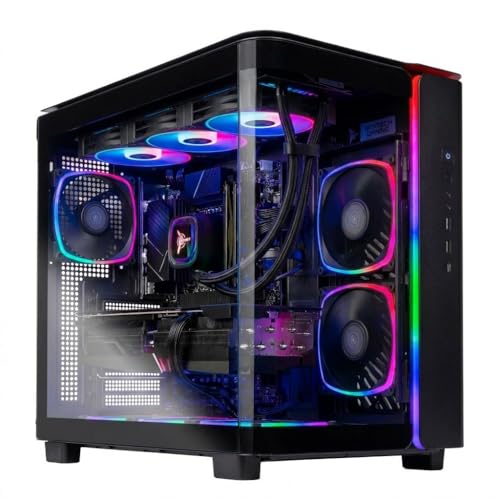


| Model | Key point from title | Price tier | Best for |
|---|---|---|---|
| Rampage (7700, 9070 XT) | 16GB DDR5 5200, 850W | Mid-range | RX 9070 XT entry |
| Aqua (Ultra 7 265K, 9070 XT) | 32GB DDR5 6000, 360 AIO | Mid-range | Intel with 9070 XT |
| King 95 (9800X3D, 5070 Ti) | 32GB, 2TB, 850W, 360 AIO | Premium | High-refresh 1440p |
| King 95 (9850X3D, 5080) | 32GB, 2TB, 850W, 360 AIO | Premium | RTX 5080 on AMD |
| Archangel 5 (14400F, 5060) | 16GB DDR5, 750W Gold | Budget | Entry Intel DDR5 |
| King 95 (7800X3D, 9070 XT) | 24GB DDR5, 850W, 360 AIO | Mid-range | Balanced pick |
| Crystal (5700, 5060) | 32GB DDR4, 650W Gold | Budget | Memory on a budget |
| Ryzen 5 8400F, 5060 | Short title, details missing | Budget | Minimal 1080p |
| Storm (5500, 5060 Ti 8GB) | 16GB DDR4, 650W Gold | Budget | GPU-first on DDR4 |
Nine Skytech configurations, one at a time
Skytech Gaming Rampage (Ryzen 7 7700, RX 9070 XT)
The Rampage pairs a Ryzen 7 7700 with an RX 9070 XT, 16GB of DDR5 listed at 5200, a 1TB NVMe SSD and an 850W Gold ATX 3 power supply. The GPU class is the strong point. Sixteen gigabytes of RAM is a workable floor rather than a generous amount, and 5200 is the lowest DDR5 speed figure among the DDR5 builds here. The title does not name a cooler, so check the listing.
Pros
- Same RX 9070 XT class GPU as the Aqua and King 95
- 850W ATX 3 PSU leaves headroom
Cons
- 16GB RAM, at the lowest DDR5 speed listed
- No cooler named in the title
Who it’s for: Shoppers who want an RX 9070 XT class card and plan to add memory later.
Skytech Gaming PC Aqua (Ultra 7 265K, RX 9070 XT)
The Aqua combines an Intel Ultra 7 265K with an RX 9070 XT, 32GB of DDR5 6000, a 1TB SSD, an 850W Gold ATX 3 PSU and a 360 ARGB AIO. The title has a stray double pipe and spells the GPU two ways (RX 9070 XT and AMD 9070XT), so read the listing to confirm the card. It sits in the same GPU class as the King 95 7800X3D but swaps the CPU brand.
Pros
- 32GB RAM and a 360 AIO named
- Same GPU tier as the Rampage with double the memory
Cons
- Title formatting is messy, so verify details
- Wi-Fi 6 rather than Wi-Fi 7
Who it’s for: Buyers who prefer an Intel platform with 9070 XT class graphics.
Skytech Gaming PC King 95 (Ryzen 7 9800X3D, RTX 5070 Ti)
This King 95 pairs a Ryzen 7 9800X3D with an RTX 5070 Ti, 32GB of DDR5 6000, a 2TB Gen4 NVMe SSD, an 850W Gold ATX 3 PSU, a 360 ARGB AIO and Wi-Fi 5. X3D chips are generally positioned at gamers. The 2TB drive is double the Aqua and Rampage, which saves an early storage upgrade, but Wi-Fi 5 is a dated spec at this tier.
Pros
- 2TB Gen4 SSD with 32GB DDR5 6000
- 360 AIO and ATX 3 PSU named
Cons
- Wi-Fi 5 only
- Premium tier cost
Who it’s for: High-refresh 1440p players who want a gaming-focused CPU and a large drive.
Skytech Gaming PC King 95 (Ryzen 7 9850X3D, RTX 5080)
The second King 95 steps up to a Ryzen 7 9850X3D and an RTX 5080, keeping 32GB of DDR5 6000, a 2TB SSD, an 850W Gold ATX 3 PSU, a 360 ARGB AIO and Wi-Fi 5. The title does not give the GPU’s VRAM. An 850W unit with an RTX 5080 class card is worth checking against the GPU maker’s recommendation.
Pros
- RTX 5080 class GPU, the premium tier of this lineup
- Same 2TB and 32GB base as the 5070 Ti King 95
Cons
- 850W PSU is the same as on the lower-GPU builds
- Wi-Fi 5 and no VRAM figure in the title
Who it’s for: Players targeting high settings at 1440p or above who prefer an AMD platform.
Skytech Gaming PC Archangel 5 (Core i5 14400F, RTX 5060)
The Archangel 5 pairs an Intel Core i5 14400F with an RTX 5060, 16GB of DDR5 6000, a 1TB NVMe SSD and a 750W Gold PSU. It is the only Intel i5 build here and the title does not name a cooler. The 750W figure is a reasonable start for this GPU class, though the title omits the ATX 3 wording used on pricier models.
Pros
- DDR5 memory platform at an entry tier
- 750W Gold PSU
Cons
- 16GB RAM and 1TB drive are minimums
- Cooler not named; no ATX 3 mention
Who it’s for: 1080p players who want DDR5 and an Intel CPU on a tight budget.
Skytech Gaming King 95 (Ryzen 7 7800X3D, RX 9070 XT)
This King 95 uses a Ryzen 7 7800X3D with an RX 9070 XT, 24GB of DDR5 6000, a 1TB Gen4 NVMe SSD, an 850W Gold ATX 3 PSU and a 360 ARGB AIO. The 24GB figure is unusual, so check how the sticks are arranged and whether a slot is free for expansion. On paper it is the balanced mid-range pick, pairing a gaming-focused CPU with a strong GPU class.
Pros
- X3D CPU with an RX 9070 XT class GPU
- 360 AIO and ATX 3 PSU named
Cons
- 24GB RAM layout needs confirming
- Only 1TB of storage
Who it’s for: Most buyers at the mid-range who want a gaming-first CPU without paying for RTX 5080 class graphics.
Skytech Gaming PC Crystal (Ryzen 7 5700, RTX 5060)
The Crystal uses a Ryzen 7 5700 with an RTX 5060, 32GB of DDR4 3200, a 1TB NVMe SSD and a 650W Gold PSU. DDR4 is an older platform, a choice that tends to hold the price down but narrows the upgrade path. The 32GB of RAM is double what the Archangel offers.
Pros
- 32GB RAM at an entry tier
- Gold-rated PSU named
Cons
- DDR4 platform, limited upgrade path
- 650W leaves less room for a bigger GPU later
Who it’s for: Budget buyers who value memory capacity over platform age.
Skytech Gaming PC Desktop (Ryzen 5 8400F, RTX 5060)
The shortest title in the set: Ryzen 5 8400F, RTX 5060, 16GB RAM and a 1TB SSD. It does not mention memory type, PSU wattage, cooler or operating system, so those answers have to come from the listing. Without them, a fair comparison with the Archangel or Crystal is not possible.
Pros
- RTX 5060 class GPU at an entry tier
- Simple spec line
Cons
- PSU, RAM type, cooler and OS not named
- Hard to compare until the full listing is read
Who it’s for: Shoppers who will read the full listing and want a minimal 1080p tower.
Skytech Gaming PC Storm (Ryzen 5 5500, RTX 5060 Ti 8GB)
The Storm uses a Ryzen 5 5500, an RTX 5060 Ti with 8GB, 16GB of DDR4 3200, a 1TB NVMe SSD and a 650W Gold PSU. The title repeats the parts as “AMD 5500” and “NVIDIA 5060 Ti 8G”, so check that the listing agrees. The graphics step up from an RTX 5060 may be partly offset by the older CPU and DDR4 memory.
Pros
- RTX 5060 Ti class graphics
- NVMe SSD and Gold PSU named
Cons
- 8GB VRAM can limit newer texture-heavy games
- DDR4 platform with an entry-level CPU
Who it’s for: 1080p players who want the most GPU on a DDR4 budget.
How these were chosen
We picked nine Skytech listings that span the entry, mid-range and premium tiers, using each listing title and the maker’s published specifications. Where a title was short or oddly formatted, we say so rather than fill gaps from memory. Nobody on the team used or measured these units. Our basis is published specifications, manufacturer documentation and buyer reviews. Treat every claimed clock speed, wattage and Wi-Fi standard as a seller statement until you confirm it on the listing.
What to look for in a Skytech spec line
Skytech titles follow a loose pattern: CPU, GPU, RAM, SSD, operating system, memory type, PSU, cooler, Wi-Fi, then the series name. The decoder below turns that pattern into a checklist.
CPU and GPU: the first two fields
The GPU does most of the work in games, so judge tiers by it first. Here, the RTX 5060 and 5060 Ti sit lowest, the RX 9070 XT and RTX 5070 Ti in the middle, and the RTX 5080 on top. Within the same GPU, the CPU shapes how the tower feels in strategy games, simulation and streaming. A useful habit is to write the GPU name first on your shortlist and treat everything else as a tiebreaker.
RAM, storage and memory type
16GB is the minimum we would accept in a new build, and 32GB is safer if you keep a browser, chat app and game open together. A 1TB drive fills fast: if your average large game takes roughly 100GB (an assumption, check each title), ten of them already use the whole drive. DDR4 versus DDR5 matters for future upgrades more than for day one.
PSU, cooler and the fields titles leave out
Check the PSU wattage, its efficiency rating and whether it is ATX 3. A 360 or 420 AIO is a liquid cooler; titles with none named may use air. Wi-Fi 5 is fine for most players, though a wired connection is steadier. Titles also omit case, motherboard and PSU brand, so put those on your question list. Ask what the case fans and front-panel ports are, and whether the cooler is a standard size that can be swapped later.
Pre-order checklist for any Skytech tower
- Is the full listing consistent with the title (GPU name, VRAM, RAM type)?
- How many RAM slots are free, and how many M.2 slots are open?
- What are the warranty length and support route, and who handles returns?
- Does the PSU wattage match the GPU maker’s recommendation with room to spare?
- Does the case have room for a larger GPU later?
- What ships in the box, and what must you buy separately?
Where Skytech shoppers go wrong
The first mistake is paying for a CPU upgrade when the GPU is the limit; compare the GPU rung before anything else. The second is ignoring VRAM: the Storm’s 8GB can be a constraint in newer games at high texture settings. The third is treating 1TB as plenty, when a handful of large games will fill it. The fourth is overlooking DDR4 and DDR5, which shapes what you can add later. Finally, many buyers skip the warranty and support terms, which is the part you rely on if something fails in the first year. Another trap is chasing a quoted clock speed such as 5.5GHz without asking whether it is a boost figure under ideal conditions. Last, do not ignore the size of the tower: a large cooler and GPU need a case with enough airflow.
Which one to shortlist
Start with the King 95 7800X3D and RX 9070 XT as the balanced option, the King 95 with the RTX 5070 Ti if you want the larger drive, and the Archangel 5 or Crystal for a budget start. For other brands, see CyberPowerPC gaming PCs, the Skytech versus CyberPowerPC comparison, and our wider prebuilt roundup.
Questions people ask
Are Skytech gaming PCs good for the money?
That depends on the configuration. Skytech sells prebuilts from RTX 5060 class to RTX 5080 class, and value shifts with the tier. Compare each listing against the cost of the same parts priced separately, then add the convenience of a built, Windows-ready tower. Check the listing for the current price and warranty terms before you decide.
Which Skytech PC is best for 1440p gaming?
On paper, the RX 9070 XT and RTX 5070 Ti listings are the natural 1440p tier, with the RTX 5080 models above them. The RTX 5060 and 5060 Ti towers are better matched to 1080p. These are spec-sheet judgements, not frame-rate results, so match the GPU to the games and settings you actually play.
Can I upgrade a Skytech prebuilt later?
Usually yes, because prebuilts use standard parts, but limits vary. Check the listing for free memory slots, spare M.2 slots, PSU wattage and cooler type. The DDR4 configurations, Crystal and Storm, sit on an older memory platform, which can narrow the CPU and RAM upgrade path compared with the DDR5 builds.
Do Skytech gaming PCs come with Windows installed?
Most of these titles say Windows 11. The Ryzen 5 8400F listing has a short title that does not mention an operating system, so check the listing before assuming it is included. Also confirm what peripherals, if any, ship in the box, since these titles describe the tower only.
How much power supply headroom do I need?
A common planning rule is to keep the PSU rated well above the combined estimated draw of the CPU and GPU. Titles here list 650W, 750W, 850W and 1000W units, mostly marked Gold. Look up the GPU maker’s recommended PSU figure for your card and compare it with the wattage on the listing.
Related guides
- Windows Macos Linux Gaming Performance Comparison Strengths Weaknesses
- Desktop Operating Systems Gaming Performance Strengths Weaknesses
- 5G Home Internet Wifi Modem Settings Low Latency Gaming
Related guides
- Best Gaming PC for Overwatch 2: Ten Prebuilts Matched to Your Monitor (2026)
- Best Gaming PC for Baldur’s Gate 3: Matching CPU, VRAM and Storage to the Game (2026)
- Best Gaming PC for Apex Legends: Which Listings Fit a High-Refresh Setup (2026)
- Best RTX 3060 Gaming PCs: Eight Prebuilt Listings Compared by CPU, RAM and Cooling (2026)