The most sensible buy for a 1080p or 1440p player is the Skytech Crystal with a Ryzen 7 5700, RTX 5060 and 32GB of DDR4, since Overwatch 2 does not need a flagship to feel smooth. Competitive players who want very high frame rates should look at the Skytech Azure 3 with the Ryzen 7 9850X3D and RX 9070 XT, and the STORMCRAFT Phantom with an RTX 5080 is more PC than this game requires. The Volt X3, with its older GTX 1070, is the budget fallback.
Overwatch 2 is a different problem from the big, effects-heavy shooters. It scales down gracefully, so the question is less about whether a PC can run it and more about how many frames per second you can feed to a high-refresh monitor. This guide ranks ten listings from the Amazon catalogue, explains the numbers behind the choice, and gives a simple formula that links your display to the hardware tier you need.
Our Top Picks
Why this game changes the buying logic

Volt X3 V1.2 Gaming PC Desktop Computer – Ryzen 5 2600 3.9GHz, NVIDIA GTX 1070 8GB, 16GB DDR4 RAM, 512GB NVMe SSD, 4 ARGB Fans, Wireless WiFi + Bluetooth, Windows 11 Pro 64-Bit Activated (White)


As an Amazon Associate we earn from qualifying purchases. Product prices and availability are accurate as of the date/time indicated.

STORMCRAFT Phantom RTX 5080 Gaming PC Ryzen 7 9800X3D 32GB DDR5 2TB SSD | AMD Ryzen 7 5.2GHz,6000MHz RAM,B850 Chipset,850W PSU,360mm AIO,RGB Keyboard Mouse,WiFi BT HDMI AI Prebuilt Gaming Desktop


As an Amazon Associate we earn from qualifying purchases. Product prices and availability are accurate as of the date/time indicated.

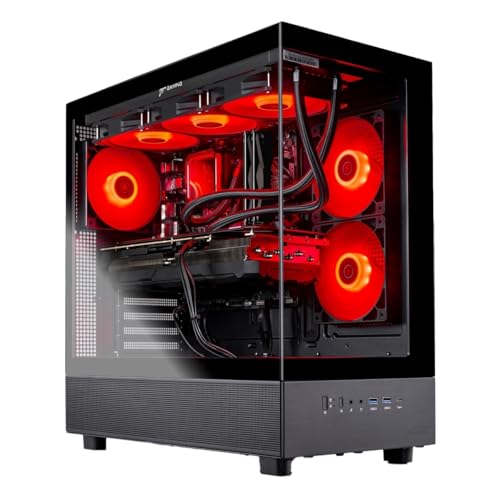
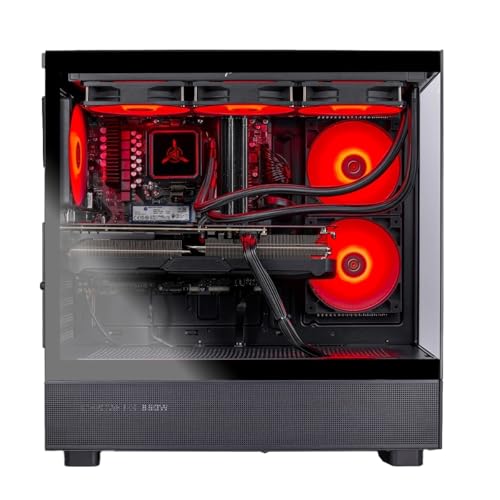
Skytech Gaming PC Desktop, Ryzen 7 9850X3D, RX 9070 XT, 32GB RAM, 2TB SSD | Windows 11, Gen4 NVMe SSD, DDR5 5600, 850W GOLD ATX 3 PSU, 360 ARGB AIO , Wi-Fi 5, Azure 3 Series




As an Amazon Associate we earn from qualifying purchases. Product prices and availability are accurate as of the date/time indicated.

Skytech Gaming PC Desktop, Ryzen 7 5700, RTX 5060, 32GB RAM, 1TB SSD | Windows 11, NVMe SSD, DDR4 3200, 650W GOLD PSU, Wi-Fi 5, Crystal Series


As an Amazon Associate we earn from qualifying purchases. Product prices and availability are accurate as of the date/time indicated.

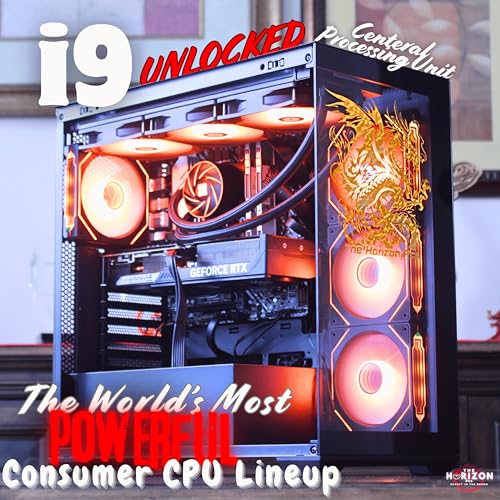
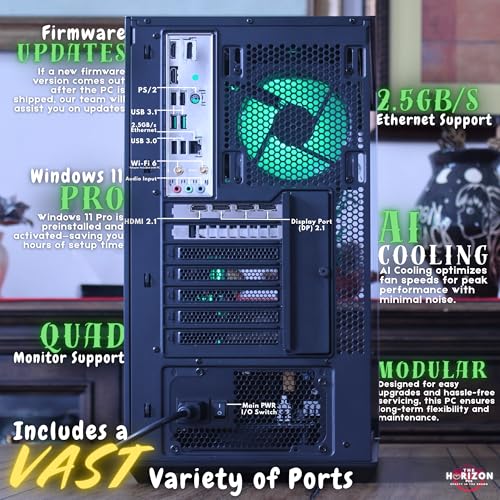
The Horizon Autherium Dragon RGB I9 RTX Gaming PC || 64GB RAM || 5TB Storage || Core I9 Upto 5.4Ghz || RTX 5070 OC || Windows 11 PRO || 360MM AIO || 2.4GB/s WiFi, VR, Gaming Ready Desktop Computer




As an Amazon Associate we earn from qualifying purchases. Product prices and availability are accurate as of the date/time indicated.

Skytech Gaming PC Desktop, Intel i5 14400F, RTX 5060 Ti 8GB, 32GB, 1TB | Windows 11, NVMe SSD, DDR4 3200 RAM, 750W GOLD PSU, Wi-Fi 5, Shadow 5 Series


As an Amazon Associate we earn from qualifying purchases. Product prices and availability are accurate as of the date/time indicated.
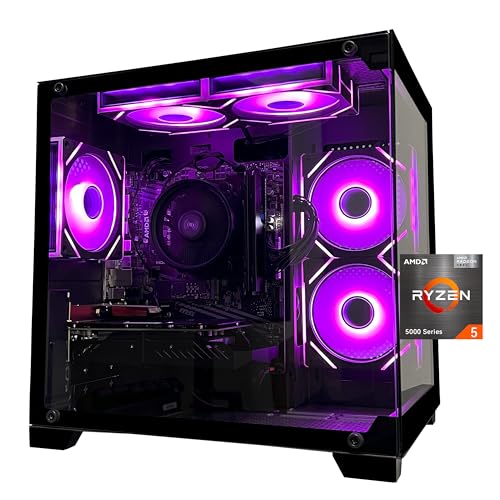
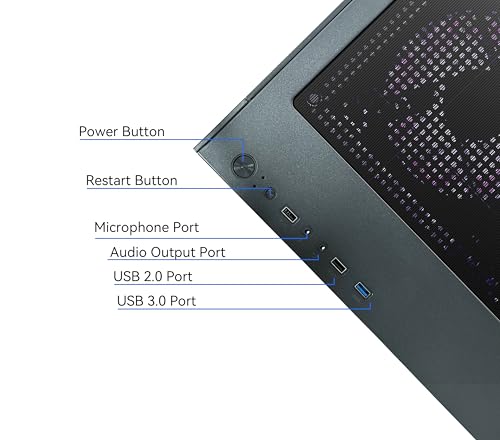
SKYESEV Prebuilt Gaming Desktop PC, AMD Ryzen 5 5600, GeForce RTX 3050 6GB,32GB DDR4 3200MHz RAM, 1TB NVMe SSD, ARGB Air Cooling, Wi-Fi,Tower Computer for Gaming, Streaming, Editing



As an Amazon Associate we earn from qualifying purchases. Product prices and availability are accurate as of the date/time indicated.

Skytech Gaming PC Desktop, Ryzen 5 5500, RTX 3050, 16GB RAM, 1TB SSD | Windows 11, NVMe SSD, DDR4 3200, 650W GOLD PSU, Wi-Fi 5, Nebula Series


As an Amazon Associate we earn from qualifying purchases. Product prices and availability are accurate as of the date/time indicated.

Skytech Gaming PC Storm, Ryzen 5, RTX 5060 Ti 8GB, 16GB RAM, 1TB SSD | Windows 11, AMD 5500, NVIDIA 5060 Ti 8G, NVMe SSD, DDR4 3200, 650W GOLD PSU, Wi-Fi 5, Desktop


As an Amazon Associate we earn from qualifying purchases. Product prices and availability are accurate as of the date/time indicated.

Skytech Gaming Azure 3 Gaming PC, Core i5 14400F, RTX 5060 Ti 8GB | Windows 11, NVMe SSD, DDR4 3200, 650W GOLD PSU, Wi-Fi 5, Azure 3 Series


As an Amazon Associate we earn from qualifying purchases. Product prices and availability are accurate as of the date/time indicated.
Many shooters are limited by the graphics card. A lightweight esports title like this one often runs into the processor and memory speed instead once frame rates climb past 200. That is why premium-looking graphics cards do not always translate into a better experience here, and why processor choice appears in competitive build discussions so often.
It also explains the price spread in the table below. A mid-range card and a decent six or eight core processor satisfy most players at 1080p. The expensive systems become meaningful only when you pair them with a 1440p or 4K display, want to record or stream at the same time, or use the PC for heavier games as well. This guide treats the game as the baseline and everything above that as optional.
Picks at a glance
| Listing | Key points from the title | Price tier | Best for |
|---|---|---|---|
| Skytech Crystal | Ryzen 7 5700, RTX 5060, 32GB DDR4 3200, 1TB, 650W gold | Mid-range | Best value for 1080p |
| Skytech Shadow 5 | Core i5 14400F, RTX 5060 Ti 8GB, 32GB DDR4 3200, 1TB, 750W gold | Upper-mid | 1440p at 165Hz |
| Skytech Azure 3 (i5) | Core i5 14400F, RTX 5060 Ti 8GB, DDR4 3200, 650W gold | Upper-mid | 1080p to 1440p, check RAM |
| Skytech Storm | Ryzen 5 5500, RTX 5060 Ti 8GB, 16GB, 1TB, 650W gold | Mid-range | 1080p high refresh |
| Skytech Azure 3 (X3D) | Ryzen 7 9850X3D, RX 9070 XT, 32GB DDR5 5600, 2TB, 850W gold ATX 3 | Premium | Very high refresh, 1440p |
| STORMCRAFT Phantom | Ryzen 7 9800X3D, RTX 5080, 32GB DDR5, 2TB, 850W, 360mm AIO | Premium (top) | Overkill for one game |
| Horizon Autherium Dragon | Core i9, RTX 5070 OC, 64GB RAM, 5TB, 360mm AIO | Premium | Gaming plus heavy work |
| SKYESEV Prebuilt | Ryzen 5 5600, RTX 3050 6GB, 32GB DDR4, 1TB, air cooling | Budget to mid | 1080p, light competitive |
| Skytech Nebula | Ryzen 5 5500, RTX 3050, 16GB, 1TB, 650W gold | Budget to mid | Entry 1080p |
| Volt X3 V1.2 | Ryzen 5 2600, GTX 1070 8GB, 16GB, 512GB | Budget | Tight budgets, older parts |
How the ten were selected
The list comes from Amazon prebuilt desktop listings and is judged against published specifications, manufacturer documentation and buyer reviews. Nobody on the team used or measured these units. Each title is treated as a seller claim, and anything missing is flagged for you to check on the listing page. Price tiers are relative, not exact, because prices move.
The ten listings, one by one
Skytech Gaming Crystal (Ryzen 7 5700, RTX 5060)
The title lists a Ryzen 7 5700, an RTX 5060, 32GB of DDR4 3200, a 1TB NVMe drive, a 650W gold-rated power supply and Wi-Fi 5. For a game that scales as well as this one, it is the comfortable middle: enough graphics power for high settings at 1080p, enough memory to leave voice chat and a browser open, and a named power supply. The platform is older, so the upgrade path is limited compared with a DDR5 board.
It suits players with a 144Hz or 165Hz 1080p monitor who want a straightforward, reasonably priced machine. A single question to ask the seller is whether the 32GB is two modules, since dual-channel memory helps frame rates at high refresh. It is also worth asking how much free space the case offers, because a second SSD is the most common upgrade after the first year of ownership.
- Pros: 32GB RAM; named 650W gold PSU; mid-range price tier.
- Pros: Good match for 1080p high-refresh monitors.
- Cons: DDR4 platform; Wi-Fi 5; 8GB VRAM class card.
- Ask before buying: two memory modules or one?
Skytech Gaming Shadow 5 (Core i5 14400F, RTX 5060 Ti 8GB)
This Shadow 5 uses an Intel Core i5 14400F, an RTX 5060 Ti with 8GB, 32GB of DDR4 3200, a 1TB drive and a 750W gold power supply. The 750W unit leaves more headroom than the 650W models around it, and the graphics card sits a step above the plain RTX 5060. It is a good fit for a 1440p, 165Hz monitor, where you want some margin for effects-heavy fights.
The 14400F has no integrated graphics, which is not an issue as long as the graphics card works. If you ever need to troubleshoot a dead card, you would have no fallback display output, so keep that in mind. For a 1440p player who wants a tidy, single-purchase system, the combination of a 750W unit and 32GB of memory makes this the easiest recommendation in the upper-mid group.
- Pros: 750W gold PSU; 32GB RAM; strong mid-to-upper graphics tier.
- Cons: DDR4 platform; no integrated graphics fallback.
- Ask before buying: which cooler is fitted and how loud is it?
Skytech Gaming Azure 3 (Core i5 14400F, RTX 5060 Ti 8GB)
The title for this listing is thin: Core i5 14400F, RTX 5060 Ti 8GB, NVMe SSD, DDR4 3200, a 650W gold PSU and Wi-Fi 5. Memory capacity and storage size are not stated, so check the listing before comparing it with the Shadow 5. The Azure 3 series name also appears on a very different Ryzen X3D system in this list, which can cause confusion, so confirm the exact model by its processor and graphics card.
If the RAM and drive match what you want, it offers the same processor and graphics card as the Shadow 5 with a smaller power supply. If they do not, the Shadow 5 is the clearer buy. Sellers sometimes update a listing without updating the title, so a quick message asking for the full parts list can save a return later.
- Pros: Upper-mid GPU tier; 650W gold PSU; NVMe storage.
- Cons: RAM and storage capacity missing from the title.
- Ask before buying: how much RAM and how large is the SSD?
Skytech Gaming PC Storm (Ryzen 5 5500, RTX 5060 Ti 8GB)
The title for this one is slightly muddled. It starts with “Ryzen 5, RTX 5060 Ti 8GB, 16GB RAM, 1TB SSD” and later names an AMD 5500 and an NVIDIA 5060 Ti 8G, together with a 650W gold power supply and Wi-Fi 5. The repetition suggests a Ryzen 5 5500, but the first half does not say so directly, so confirm it on the listing page. This is a pairing of a modest processor with a stronger graphics card.
That balance is worth a thought. For high refresh at 1080p, a six-core processor like the 5500 can start to limit frame rates before the graphics card does, so the card’s extra strength may go unused. It suits players focused on visual quality in other games as well as this one. If you mostly play Overwatch 2 at a high refresh rate, the Crystal or Shadow 5 likely makes better use of your money because of their processors.
- Pros: RTX 5060 Ti graphics; 650W gold PSU; 1TB SSD.
- Cons: 16GB RAM; modest processor for the GPU; messy title.
- Ask before buying: exact CPU model and RAM configuration.
Skytech Gaming Azure 3 (Ryzen 7 9850X3D, RX 9070 XT)
The top-of-range Azure 3 pairs a Ryzen 7 9850X3D with a Radeon RX 9070 XT, 32GB of DDR5 at 5600, a 2TB Gen4 NVMe drive, an 850W gold ATX 3 supply, a 360 ARGB liquid cooler and Wi-Fi 5. The cache-heavy processor is the headline for competitive play, where frame-time stability at very high frame rates is a goal. The memory speed is a notch below some rivals, though the difference is likely minor next to the processor and graphics card.
It suits players with a 1440p monitor at 240Hz or faster who want an engine that will not be the bottleneck. For anyone on 1080p at 144Hz, it is more than needed. The ATX 3 power supply is a useful detail for future card upgrades, and 2TB of storage means you can keep several large games installed without constant deleting.
- Pros: X3D processor; 2TB storage; 850W ATX 3 PSU; liquid cooling.
- Cons: Premium tier; Wi-Fi 5.
- Ask before buying: which motherboard is fitted?
STORMCRAFT Phantom (Ryzen 7 9800X3D, RTX 5080)
This listing includes a Ryzen 7 9800X3D, an RTX 5080, 32GB of DDR5, a 2TB SSD, a B850 chipset board, an 850W power supply and a 360mm AIO, plus an RGB keyboard and mouse according to the title. It also uses promotional wording such as “AI Prebuilt Gaming Desktop” and quotes a 5.2GHz clock, which is marketing language, not a promise of sustained speeds. The mix of a flagship GPU and a gaming-grade processor is excessive for Overwatch 2.
It makes sense only if you use the machine for other demanding games or a 4K display, and the bundled peripherals may save a little money on a first setup. Peripherals bundled with a prebuilt are often basic, so competitive players usually replace them anyway.
- Pros: Very high GPU tier; X3D processor; keyboard and mouse included per title.
- Cons: Highest tier and cost; promotional wording; 850W is the only PSU detail.
- Ask before buying: PSU rating and case airflow for the RTX 5080.
The Horizon Autherium Dragon (Core i9, RTX 5070 OC, 64GB)
The long title names a Core i9 “up to 5.4GHz”, an RTX 5070 OC, 64GB of RAM, 5TB of storage, Windows 11 Pro, a 360mm AIO and “2.4GB/s WiFi”. That wireless figure is odd, since network speeds are normally quoted in megabits or gigabits per second, so treat it as unreliable and check the Wi-Fi standard. The processor generation, memory type and power supply are missing, which makes careful comparison hard.
The large RAM and storage amounts suit people who edit video or run virtual machines as well as playing, not players of this one game. If you do buy it, ask the seller for photos of the interior to confirm the cooling and cable layout.
- Pros: 64GB RAM; 5TB storage; liquid cooling; Windows 11 Pro.
- Cons: Missing CPU generation and PSU details; vague Wi-Fi claim.
- Ask before buying: full parts list including motherboard and PSU.
SKYESEV Prebuilt Gaming Desktop (Ryzen 5 5600, RTX 3050 6GB)
The title names a Ryzen 5 5600, a GeForce RTX 3050 with 6GB, 32GB of DDR4 3200, a 1TB NVMe drive, ARGB air cooling and Wi-Fi, and describes the tower as suitable for gaming, streaming and editing. The RTX 3050 6GB is an entry-class card from an older generation, so the streaming and editing claims should be read as optimistic. For Overwatch 2 at 1080p on moderate settings, it is a reasonable starting point.
The 32GB of RAM is generous for the price tier, and the six-core processor is adequate. Ask for the power supply details, because the title does not give them. Air cooling also means fewer moving parts to fail than a liquid loop, which some buyers prefer.
- Pros: 32GB RAM; low price tier; air cooling is simple to maintain.
- Cons: 6GB graphics memory; PSU not stated; older-generation GPU.
- Ask before buying: PSU brand and wattage?
Skytech Gaming Nebula (Ryzen 5 5500, RTX 3050)
This listing gives a Ryzen 5 5500, an RTX 3050, 16GB of DDR4 3200, a 1TB drive and a 650W gold supply. It sits at the entry end of the Skytech range here. Compared with the SKYESEV, you get a named power supply, but half the memory. The graphics card is the same family, so both sit near the bottom of the dedicated-card tiers. Check whether it is the 6GB or 8GB version, because the title only says RTX 3050.
It fits a player on a modest 1080p monitor who does not need more than 60 to 144 frames per second and wants a named power supply at an entry-level price tier.
- Pros: Named 650W gold PSU; 1TB drive; lower price tier.
- Cons: 16GB RAM; entry GPU with little margin.
- Ask before buying: VRAM size of the RTX 3050 fitted.
Volt X3 V1.2 (Ryzen 5 2600, GTX 1070 8GB)
The budget option names a Ryzen 5 2600, a GTX 1070 8GB, 16GB of DDR4, a 512GB NVMe drive, four ARGB fans, Wi-Fi with Bluetooth and Windows 11 Pro. These are older-generation components, and the GTX 1070 generally lacks the newest upscaling features. For Overwatch 2, it can play at reduced settings, but any upgrade path is limited.
It is the last choice here unless budget is tight, and the unnamed power supply deserves a question. Older parts can still play this particular game at lowered settings, but you should not expect much beyond that.
- Pros: Lowest price tier; NVMe boot drive; Wi-Fi and Bluetooth.
- Cons: Older CPU and GPU; 512GB fills quickly; PSU not stated.
- Ask before buying: PSU details and warranty length.
Spec concepts that matter for this game
| Concept | What to look for | Why |
|---|---|---|
| Processor | Six cores or more; X3D for very high frame rates | High fps is often processor-limited |
| Graphics card | Mid-range for 1080p, upper-mid for 1440p | Resolution drives GPU load |
| RAM | 32GB in two modules; 16GB acceptable | Dual-channel helps frame times |
| Storage | 1TB NVMe or more | Game plus others fill small drives |
| Power supply | Named wattage and gold rating | Stability and upgrade room |
| Networking | Wired Ethernet if possible | Lower latency than Wi-Fi in online play |
Which listing for which player
| Player | Best fit | Reason |
|---|---|---|
| 1080p at 144Hz, value first | Crystal | Balanced parts with named PSU |
| 1440p at 165Hz | Shadow 5 | Stronger GPU and 750W supply |
| Competitive at 240Hz or more | Azure 3 (X3D) | Cache-heavy CPU and strong GPU |
| Plays many AAA titles too | STORMCRAFT Phantom | Flagship GPU |
| Works from home as well | Horizon Autherium Dragon | 64GB RAM and 5TB, after verification |
| Budget-minded, one game | SKYESEV or Nebula | Entry GPU, 1080p only |
Worked example: pixels per second
A simple way to compare monitors is to multiply resolution by refresh rate to get pixels per second. It does not predict frame rates, but it shows how much more a display asks of the hardware. For this example, assume the game runs at the monitor’s native resolution and refresh rate, with settings held constant.
| Monitor | Pixels per frame | Pixels per second (approx.) | Relative load vs 1080p 144Hz |
|---|---|---|---|
| 1920×1080 at 144Hz | 2,073,600 | 299 million | 1.0x |
| 1920×1080 at 240Hz | 2,073,600 | 498 million | 1.7x |
| 2560×1440 at 165Hz | 3,686,400 | 608 million | 2.0x |
| 2560×1440 at 240Hz | 3,686,400 | 885 million | 3.0x |
| 3840×2160 at 144Hz | 8,294,400 | 1,194 million | 4.0x |
Read it as a rough guide. Moving from 1080p at 144Hz to 1440p at 165Hz doubles the load, which is why the Shadow 5 and Azure 3 tiers appear above. A 4K display at 144Hz quadruples it, and that is where the RTX 5080 listing starts to make sense. Because the game scales well, you can lower effects to bring heavier displays within reach of a mid-range card.
Compatibility and setup checklist
- Use the graphics card’s display outputs, not the motherboard’s, and a cable rated for your refresh rate.
- Set the monitor’s refresh rate in Windows display settings after the first boot.
- Prefer wired Ethernet for online play where you can; Wi-Fi 5 is adequate but not ideal for latency-sensitive matches.
- Check the PSU wattage, ATX version and connector types before any later graphics card upgrade.
- Read the return window and the warranty terms, and see who handles service.
Mistakes buyers make
| Mistake | Fix |
|---|---|
| Buying a 360Hz monitor for a budget card | Pick the monitor and PC together |
| Paying flagship money for one esports title | Spend on the monitor and processor first |
| Trusting “AI” or clock-speed marketing | Read the spec fields, not the slogans |
| Skipping the power supply line | Ask for brand and wattage |
| Ignoring RAM modules | Ask whether it is dual-channel |
If you are shopping across price bands, our list of prebuilt gaming PCs in the upper-mid range and the beginner-friendly picks give more context. Those leaning toward AMD can browse Ryzen gaming PCs, and anyone comparing makers will find the Skytech versus CyberPowerPC guide useful.
Final thoughts
Pick the Crystal if your monitor is 1080p, the Shadow 5 for 1440p at 165Hz, and the X3D Azure 3 if you chase very high frame rates. The STORMCRAFT Phantom and Horizon Autherium Dragon are better suited to players with other priorities. The Volt X3 is a stopgap, and the RTX 3050 systems are acceptable only for modest 1080p play.
Frequently asked questions
Does Overwatch 2 need an expensive gaming PC?
Not usually. Overwatch 2 is built to run on a wide range of hardware, so a mid-range graphics card handles 1080p at high refresh rates for most players. Spending more makes sense if you use a 1440p or 4K monitor, want very high frame rates for competitive play, or use the machine for other demanding games. Check the developer’s current requirements, because they can change.
Is a high-end X3D processor worth it for Overwatch 2?
At high frame rates the processor often matters as much as the graphics card, and cache-heavy X3D chips are popular with competitive players for that reason. The benefit varies with settings and resolution, and it is largest when you chase frame rates well above 240. For a 144Hz or 165Hz display, a mid-range processor is usually plenty.
How much memory should the PC have?
Sixteen gigabytes is a workable minimum, but thirty-two gives breathing room if you run voice chat, a browser, streaming software or a second game launcher at the same time. Most listings here include 32GB, with the Nebula and the Storm at 16GB. Memory is easy to upgrade on most desktops, provided the board has a free slot.
Should I buy the RTX 3050 systems for this game?
The two RTX 3050 listings can handle lighter competitive settings at 1080p, since Overwatch 2 scales well, but they are the weakest graphics cards in the group and have little margin for 1440p or other newer titles. If you only play this game and have a 144Hz 1080p monitor, they are acceptable. If you plan to expand your library, a step up is wiser.
What monitor refresh rate should I pair with these PCs?
Match the monitor to the graphics tier. A mid-range system suits 1080p at 144Hz to 240Hz, an upper-mid system suits 1440p at 165Hz, and a high-end system is for 1440p at very high refresh or 4K. Buying a 360Hz panel for a budget card wastes the display, and a high-end card on a 60Hz screen wastes the card.
How much power will one of these PCs use?
It varies with the graphics card and the load. A mid-range system during play typically draws a few hundred watts, while high-end builds draw more, so monthly use depends on hours played and your electricity rate. Our guide to the cost of running a gaming PC shows how to estimate it with your own numbers.
Related guides
- Best Gaming PC for Baldur’s Gate 3: Matching CPU, VRAM and Storage to the Game (2026)
- Best Gaming PC for Apex Legends: Which Listings Fit a High-Refresh Setup (2026)
- Best RTX 3060 Gaming PCs: Eight Prebuilt Listings Compared by CPU, RAM and Cooling (2026)
- Best Ryzen Prebuilt Gaming Desktops: Ten Towers From Budget to High-End: 10 Compared (2026)