
A smartphone VR headset is a plastic or cardboard shell with two lenses that holds your own phone in front of your eyes, so the best one is the one that physically fits your phone and lets you adjust the lenses to your eyes. All eight listings below are this phone-in-a-viewer type, priced as low-cost gadgets, and none of them runs PC or Quest-style games. They suit 360 videos, 3D clips and simple Cardboard-style apps. Use this guide to match your phone size first, then decide whether you want a controller, a kids-oriented kit or a bare-bones foldable.
Our Top Picks
Top 3 picks at a glance
At a glance
As an Amazon Associate we earn from qualifying purchases at no extra cost to you.



- PUSABIYOU with controller – best for a headset that lists a controller in a very short title
- Sylpmoplar 3D VR Glasses – best for a stated 4.7 to 6.5 inch phone range
- Xiaokeis universal VR goggles – best for adjustable pupil distance on a generic design
- LVOERTUIG 3D VR Glasses – best for larger phones, stated up to 7 inches
- REALITEX kids kit with Android remote – best for beginners who want app links and a remote
- Topmaxions Google Cardboard – best for a cheap foldable you can replace
- Vornetil universal VR goggles – best as an alternative to the near-identical Xiaokeis listing
- Mryzzsf VR headset with controller – best for big phones with a stated controller
How the eight compare
| Model | Type | Key specs as stated in the title | Best for |
|---|---|---|---|
| PUSABIYOU VR Headset with Controller | Phone VR viewer | Controller mentioned; phone size: check the listing | Controller seekers |
| Sylpmoplar 3D VR Glasses | Phone VR viewer | iPhone and Android, 4.7 to 6.5 inch phones | Mid-size phones |
| Xiaokeis 3D VR Glasses | Phone VR viewer | 360 degree panorama, anti-blue-light claim, adjustable pupil distance; phone size: check the listing | Generic option |
| LVOERTUIG 3D VR Glasses | Phone VR viewer | 4.5 to 7 inch phones, adjustable pupil distance | Large phones |
| REALITEX 3D VR Headset for Kids | Phone VR kit | Android remote, 3D VR videos and apps links, iPhone and Android | Beginners |
| Topmaxions Google Cardboard | DIY cardboard viewer | Android and Apple, up to 6 inch | Cheap trial |
| Vornetil Universal VR Goggles | Phone VR viewer | 360 degree panorama, adjustable pupil distance; phone size: check the listing | Alternative generic option |
| Mryzzsf 3D VR Headset | Phone VR viewer | 5.0 to 7.0 inch phones, controller | Bigger phones with a controller |
The eight listings in detail
PUSABIYOU VR Headset with Controller
The title is short: a VR headset with a controller for a phone. It does not say how the controller connects, what phone sizes fit, or whether it works with iPhone, so the product page has to answer all three. A controller can make menus and simple games easier than gaze-only input, though the app needs to support it. Without a stated screen range, measure your phone against the listed dimensions first. It is one of the few listings that mentions a controller at all, which makes it a candidate for people who want input beyond head movement. Given how little the title says, read the questions and photos on the page, and treat it as a gamble on an unspecified build until you confirm the details.
Pros
- Controller named in the title
- Phone-based design avoids a PC or console
Cons
- No phone size range in the title
- Controller type and compatibility unclear
Who it’s for: Shoppers who want a controller and will confirm details on the page. Who should skip it: Anyone who needs a stated phone range before ordering.
Sylpmoplar 3D VR Glasses for iPhone and Android
This listing gives a clear range: phones from 4.7 to 6.5 inches, for both iPhone and Android. It targets mobile gaming and movies and promises an immersive experience, which is typical language for a viewer-style headset. Before you buy, remember that the range most likely refers to screen diagonal, and a phone with a thick case or large camera bump may not seat properly. Controls, focus adjustment and the strap are not described, so check the images and questions on the page. The stated range is the main reason to shortlist it: if your phone sits comfortably inside 4.7 to 6.5 inches, you have one fewer thing to worry about, and a clear range also makes returns easier to justify if the fit is wrong.
Pros
- Explicit 4.7 to 6.5 inch range
- Covers iPhone and Android
Cons
- No mention of controller or pupil adjustment
- Immersion claims are marketing language
Who it’s for: Owners of mainstream phones who want a plain viewer. Who should skip it: Owners of very large phones, which may exceed 6.5 inches.
Xiaokeis VR Headset 3D VR Glasses, Universal
The title stacks features: 360 degree panorama support, a large-screen claim, an anti-blue-light feature, adjustable pupil distance and an eye-protection claim, aimed at movies and games for kids and adults. Adjustable pupil distance is the useful bit, since it helps align the lenses to your eyes. The blue-light and eye-protection wording is a seller claim for a phone viewer; the screen is still the phone, and long sessions still tire eyes. The title does not give a phone size range, and it contains an odd spelling (“An-ti”), a small flag to read the page carefully. Because it is a universal design, expect a simple holder with a spring or clamp, and check whether the strap is elastic or fixed.
Pros
- Adjustable pupil distance is stated
- Marketed for both kids and adults
Cons
- No phone size range in the title
- Eye-protection claims are unverified
Who it’s for: Buyers who value lens adjustment and a low cost. Who should skip it: Those who need clear compatibility numbers.
LVOERTUIG 3D VR Glasses, for 4.5-7 inch Phones
LVOERTUIG’s title is almost word-for-word like the Xiaokeis and Vornetil titles, with panorama support, an anti-blue-light claim, adjustable pupil distance and a fatigue-prevention claim. The difference is that it states a 4.5 to 7 inch phone range, the widest in the group. That makes it the safest of the generic trio for large phones, though size limits depend on the whole phone body, not only the screen. Treat the three as likely variants of the same generic design and compare return terms, not branding. The title has an unusual hyphen in “Preven-t”, which is another reason to read the full product page. If you own a phone close to 7 inches, check the depth and thickness limits as well, since a wide range on paper can still hide a tight fit.
Pros
- Widest stated phone range, 4.5 to 7 inches
- Pupil distance adjustment named
Cons
- Near-identical to two other listings
- Fatigue-prevention claim is unproven
Who it’s for: People with larger phones who want the generic design. Who should skip it: Anyone looking for something clearly different from the other generics.
REALITEX 3D VR Headset for Kids with Android Remote
This is the most kit-like listing: a headset described as a beginner set for iPhone and Android, with an Android remote and links to 3D VR videos and apps. The links are a useful starting point, but check where they lead and whether the apps are free. The remote is described as an Android remote, so iPhone users may have fewer input options. The “for kids” label calls for a check of the maker’s age guidance and short sessions; VR headset makers commonly advise age limits and breaks (verify on the page). The kit is a simple way to start, but it is also a listing where the phrase “links” deserves a careful click, because apps from unknown publishers may carry ads or permissions you would rather avoid.
Pros
- Remote and content links included in the kit
- Targets beginners
Cons
- Remote is described for Android
- Age guidance and app quality need checking
Who it’s for: Families or first-timers who want a ready-to-use set. Who should skip it: Anyone who wants to run demanding games or avoid apps from unknown sources.
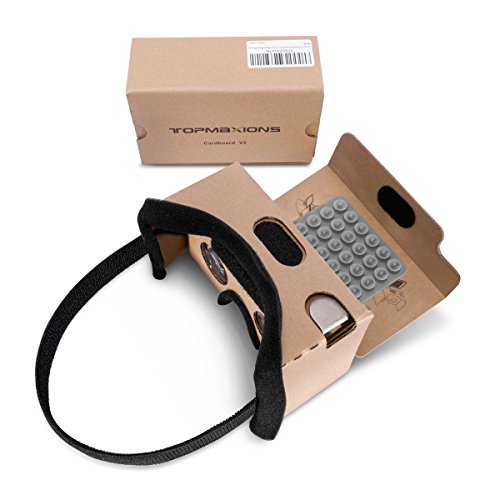
Google Cardboard, Topmaxions 3D VR DIY Headset
The oldest idea in phone VR: a fold-it-yourself cardboard viewer, labeled for Android and Apple phones up to 6 inches. The Cardboard design is open and simple, which is its strength; there is little to break and little to configure. The trade-offs are comfort and fit, since cardboard flexes and has no strap in the title. Assembly is described as easy, but check what is in the box. It is the lowest-commitment way to try phone VR, with a phone limit of 6 inches that excludes many current large phones. If your phone is bigger than that, the cardboard viewer is not an option. If it fits, the low cost makes it a sensible way to learn whether you enjoy phone VR before spending more on a sturdier plastic shell.
Pros
- Simple foldable design, low commitment
- Android and Apple stated
Cons
- Up to 6 inch limit excludes larger phones
- No head strap or padding in the title
Who it’s for: Curious buyers who want a cheap first try. Who should skip it: Anyone who wants comfort for long sessions.
Vornetil VR Headset, Universal 3D Virtual Reality Goggles
The Vornetil title mirrors Xiaokeis closely: 360 degree panorama support, a large-screen claim, anti-blue-light, adjustable pupil distance and eye protection, for movies and games as a gift. No phone range appears in the title. The wording is so close to the other generic listings that these are best considered variants or rebrands, and the details (strap, foam, lens size) should be compared on the pages. A practical approach is to open both pages, compare photos of the face foam and the phone holder, and pick whichever gives a clearer range and better return terms. If the price is similar, choose by stated phone range and return terms.
Pros
- Pupil distance adjustment stated
- Gift-oriented generic design
Cons
- No phone size range in the title
- Hard to tell from other generic listings
Who it’s for: Shoppers happy to pick between near-identical generics. Who should skip it: Buyers who need a clearly distinct product.
Mryzzsf 3D VR Headset, Virtual Reality Glasses Headset Helmets
This listing states compatibility with 5.0 to 7.0 inch phones and includes a controller, aimed at mobile games and movies. The “helmets” wording hints at a bulkier design, but the title gives no weight or strap details. The controller helps with games that support one, though compatibility is up to the app. A 5.0 to 7.0 inch range covers most current phones, which is its main selling point. Color is listed as black. Because the title calls it a helmet, check how the headset sits on the head, whether there is a top strap and whether the controller needs batteries or charging. Those small details decide whether it stays comfortable beyond a short session.
Pros
- 5.0 to 7.0 inch range covers many phones
- Controller included according to the title
Cons
- Controller connection and app support unclear
- Weight and strap details missing
Who it’s for: Large-phone owners who want a controller. Who should skip it: Those who want the lightest possible viewer.
How we picked these
We collected the phone-mounted VR headset listings in this category and compared what each title says about phone size, lens adjustment, controllers and included extras. Near-identical listings are flagged as likely variants. Our basis is published specifications, manufacturer documentation and buyer reviews. Nobody on the team used or measured these units. All numbers are seller claims from the titles, missing details are marked “check the listing”, and none of these headsets is a standalone or PC-connected unit.
What to look for in a smartphone VR headset
Phone fit: size, thickness and camera bump
The stated range, such as 4.7 to 6.5 inches, usually refers to the screen diagonal. What actually has to fit is the phone body: length, width, thickness and the camera bump. Remove thick cases before measuring. A phone that is too large may not close in the holder, and one that is too small can slip or sit off-center, which makes the image blurry and tiring.
Lenses, pupil distance and focus
Adjustable pupil distance lets you match the lenses to the gap between your eyes, which is the single biggest factor in a sharp image. Focus adjustment helps if you do not wear glasses. Check whether the viewer has room for glasses, as many low-cost units do not, and whether the lens spacing can move wide enough for your eyes; people with a wide or narrow gap between the eyes often find fixed designs blurry. Lens quality varies, and claims such as anti-blue-light are unverified marketing. Plastic lenses can scratch, so a storage pouch or cover is a small plus, and smudges make any image look soft. Distortion near the edges is common in low-cost viewers, and a title will never quantify it, so read buyer comments on image clarity.
Comfort, weight and heat
Your phone sits on your face, so weight and heat matter. Straps and foam padding spread pressure; a bare cardboard shell has none. A headset that rests only on your nose and forehead can leave marks, and one without a strap needs a hand to hold it. Check whether the face foam is removable or washable, since shared use gets sweaty. Phones warm up when they play video for long, so plan sessions with breaks, and expect battery drain to be quick when the screen runs at full brightness. A removable front cover or vent slots can help, but only if the listing shows them. Many makers advise breaks every so often, and short sessions are wise for new users.
Controllers and input
Without a controller, you rely on gaze or a screen tap, and some shells have a button that taps the screen through a lever or conductive pad. That is simple and needs no batteries, but it only works on phones and apps that respond to it. Bluetooth controllers or remotes, as on the PUSABIYOU, Mryzzsf and REALITEX listings, give more input, but only if the app supports them. The REALITEX remote is described for Android, so iPhone owners should check.
What content actually works
Phone viewers suit 360 degree videos, 3D clips and Cardboard-style apps, and a short demo is a good way to learn whether you tolerate the format before you invest in anything pricier. They do not run Quest or PC VR libraries, and phone tracking is limited compared with a dedicated headset. App availability changes over time, so check that the apps you want are still offered for your phone. Look at the kind of content you want: 360 travel videos need only a video player, while games need apps that support your input method.
Worked example: match your phone before you buy
| Step | What to do | Example |
|---|---|---|
| 1 | Remove the case and measure length, width and thickness | Body of 160 x 78 x 8 mm |
| 2 | Compare to the listing’s range and photos | Screen range of 4.7 to 6.5 inches may fit; 7 inch range listings suit larger bodies |
| 3 | Check the holder depth for camera bumps | Bumps can stop the phone sitting flat |
| 4 | Confirm pupil-distance adjustment | Needed for a sharp image |
| 5 | Check return terms | Fit is hard to judge from a title |
Mistakes buyers make
The most common mistake is expecting a Quest-style experience from a phone viewer. These headsets rely on your phone for display, tracking and processing, so they feel simpler. Another is trusting a stated inch range without measuring the phone body and case. Buyers also overlook pupil distance, then blame the phone screen for a blurry picture. Some assume that a lower-priced shell and a pricier one with a similar title differ in lens quality, when the title rarely proves it. Others buy several near-identical generic listings expecting different quality, when they are likely variants. Another trap is the gift label: a low-cost viewer bought for a child can end up unused if the phone does not fit or the content links do not work. Finally, kids’ sets deserve supervision and short sessions, and parents should check the maker’s age guidance and the content the linked apps provide.
Verdict
For large phones, the LVOERTUIG and Mryzzsf listings state the widest ranges. For a simple trial, the Topmaxions cardboard option is the lowest-commitment pick, and the REALITEX kit suits beginners who want a remote and content links. The Xiaokeis and Vornetil generics are interchangeable, so choose by stated range and return terms.
Related guides
- Windows Macos Linux Gaming Performance Comparison Strengths Weaknesses
- Desktop Operating Systems Gaming Performance Strengths Weaknesses
- 5G Home Internet Wifi Modem Settings Low Latency Gaming
Frequently asked questions
Can a smartphone VR headset play Quest or PC VR games?
No. These viewers hold your phone and rely on its screen and sensors, so they run phone apps, 360 videos and Cardboard-style content. Quest and PC VR libraries need a dedicated headset with its own tracking and software. Treat phone VR as a low-cost way to sample the idea, and if you later want those libraries, plan to buy a dedicated headset rather than hoping a phone shell can stretch that far.
How can you tell if a phone fits a VR headset?
Compare the listing’s stated range with your phone’s screen size, then measure the body length, width and thickness with the case removed. Check for camera bumps that stop the phone sitting flat. If a listing gives no range, look at the images or questions on the page, or choose one that states a range.
Is pupil distance adjustment important?
Yes. It lets you align the lenses with your eyes, which affects sharpness and comfort. Without it, the image can look blurry or cause eye strain even if the phone screen is sharp. Listings from Xiaokeis, LVOERTUIG and Vornetil mention it in the title, while others leave it for you to confirm.
Are these headsets suitable for kids?
Some listings mention kids, but you should read the maker’s age guidance and keep sessions short with regular breaks. Supervise the content and the apps linked in any kit, such as the REALITEX set. Eye-protection and anti-blue-light claims are marketing language and do not replace limiting screen time. Keep the phone cool, take regular breaks and stop if anyone feels dizzy or uncomfortable.
Is the Google Cardboard style viewer still worth trying?
It can be, as a very cheap way to see what phone VR feels like. The folded cardboard design is simple, but it lacks padding and a strap in the title, and the phone limit of 6 inches excludes many large phones. App support changes over time, so check that the apps you want still work on your phone. For many people the best use is 360 videos and short demos, not long game sessions.


