
A router can only enforce screen-time rules on devices that connect through it, so the best router for parental controls is the one whose app your household will actually open. Among the seven below, the two ASUS WiFi 7 models carry the longest feature lists in their titles, the TP-Link Archer AX55 is the balanced WiFi 6 option, and the Tenda AC6 and the renewed Archer AX10 are the budget entries. The Deco S4 mesh kits suit larger floor plans. One listing does not mention parental controls in its title, and we flag it where it appears.
Our Top Picks
 ASUS RT-AX3000S Dual Band WiFi 6 Extendable Router5.3L x 2.2W x 9.1H inch5.3 x 2.2 x 9.1 Inches0.9 poundsCheck on Amazon
 TP-Link Dual-Band AX3000 Wi-Fi 6 Wireless Gigabit InternetAX300012.99 x 9.45 x 2.87 inches1.66 poundsCheck on Amazon
Top 3 picks at a glance
Quick picks by household
As an Amazon Associate we earn from qualifying purchases at no extra cost to you.




- ASUS RT-BE58U – best for families wanting WiFi 7 and a dual-WAN port arrangement
- ASUS RT-BE55 – best for a WiFi 7 router sold with a stated 2,000 sq. ft. coverage figure
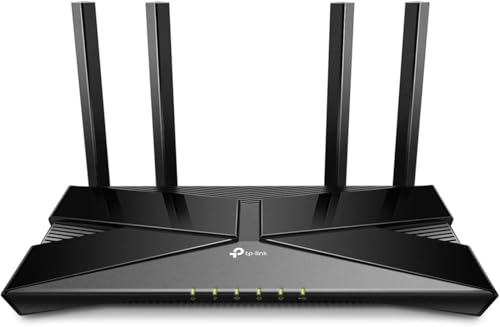
- TP-Link Archer AX55 – best all-round WiFi 6 pick with USB 3.0 and HomeShield
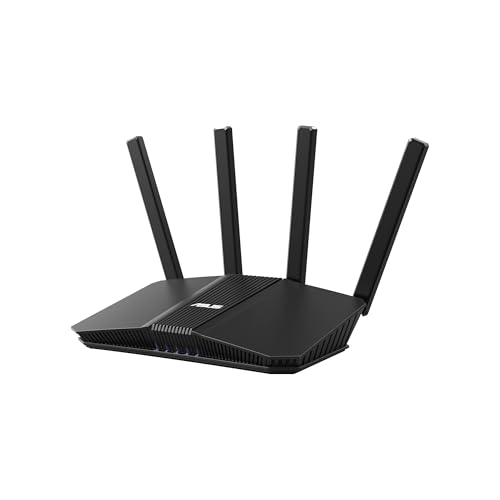
- ASUS RT-AX3000S – best for scheduling-focused controls on WiFi 6
- TP-Link Deco S4 (2-pack and 3-pack) – best for bigger homes that need mesh
- TP-Link Archer AX10 (renewed) – best for the lowest-cost WiFi 6 entry, if you accept a refurbished unit
- Tenda AC6 – best for a small apartment on a tight budget
Side-by-side comparison
| Model | Type | Key specs as stated in the title | Best for |
|---|---|---|---|
| ASUS RT-BE58U | Single router, WiFi 7 | 3.6 Gbps, dual-WAN, 2.5G port x1, 1G ports x4, VPN support | Feature-rich family network |
| ASUS RT-BE55 | Single router, WiFi 7 | 3.6 Gbps, 2,000 sq. ft., 2.5G port x1, 1G ports x4 | Mid-size home, WiFi 7 |
| TP-Link Archer AX55 | Single router, WiFi 6 | AX3000, EasyMesh, HomeShield, USB 3.0, gigabit | Balanced pick |
| ASUS RT-AX3000S | Single router, WiFi 6 | Dual band, parental control scheduling, built-in VPN, AiMesh | Schedules and expansion |
| TP-Link Deco S4 2-pack | Mesh, WiFi 5 | AC1900, up to 3,800 sq. ft., parental controls | Medium to large home |
| TP-Link Deco S4 3-pack | Mesh, WiFi 5 | AC1900, up to 5,500 sq. ft., gigabit ports (title does not mention parental controls) | Large home |
| TP-Link Archer AX10 (Renewed) | Single router, WiFi 6 | AX1500, beamforming, OFDMA, MU-MIMO | Budget, refurbished |
| Tenda AC6 | Single router, WiFi 5 | AC1200, 4 x 100 Mbps ports, guest WiFi, AP mode | Small space, low budget |
The seven picks, one at a time
ASUS RT-BE58U
This is the more feature-heavy of the two ASUS WiFi 7 listings. The title lists a 3.6 Gbps rating, dual-WAN, mesh and VPN compatibility, a triple-level network security suite, parental controls, one 2.5G port and four 1G ports. Dual-WAN means two internet connections can feed the router, which is useful for a backup line but irrelevant for many households. The 3.6 Gbps figure is a combined wireless label, not what one device will receive. Coverage is not stated in the title, so check the listing before assuming it fits a large home. The 2.5G port is worth noting if you plan to connect a multi-gig device or a network storage box, while the four 1G ports cover ordinary wired gear such as a console or desktop. Because the title also lists VPN support, the same router can double as a privacy tool, though that is a separate feature from the family controls.
Pros
- WiFi 7, a 2.5G port and four 1G ports are named in the title
- Parental controls and a security suite are both called out
- Mesh compatibility leaves room to expand later
Cons
- Priced as a premium option compared with the other picks
- Few families will use dual-WAN
Who it’s for: households with fast internet and many devices who want the longest feature list. Who should skip it: small apartments on a modest plan, where a cheaper router performs similarly in day-to-day use.
ASUS RT-BE55
Read next to the RT-BE58U, this listing reads as a near twin: WiFi 7, 3.6 Gbps, mesh and VPN support, the same triple-level security wording, parental controls, one 2.5G port and four 1G ports. The visible difference in the titles is a stated 2,000 sq. ft. coverage figure here, and no dual-WAN mention. If you do not need a second internet input, this is the simpler listing to shop. Coverage claims assume open layouts and the real result depends on walls and floors. Since the title mentions mesh compatibility, a second compatible unit is the usual fix if one corner of the house stays weak. As with every router here, the title says “parental controls included” without listing exact functions, so read the manufacturer page for time limits, filtering and reports.
Pros
- Coverage figure is given in the title, which helps with sizing
- Same WiFi 7 and port layout as its sibling
- Parental controls are explicitly included
Cons
- 2,000 sq. ft. is a ceiling in ideal conditions, not a promise
- WiFi 7 benefits only show up if your devices support it
Who it’s for: mid-size homes where the buyer wants WiFi 7 without paying for dual-WAN. Who should skip it: anyone with mostly older devices, who would see little gain over a WiFi 6 model.
TP-Link Archer AX55
The title describes a dual-band AX3000 WiFi 6 gigabit router with EasyMesh, VPN client and server support, HomeShield, OFDMA, MU-MIMO, USB 3.0 and a “secure by design” label. HomeShield is TP-Link’s family-and-security software; the title does not say which features are free and which might need a paid tier, so confirm that on the manufacturer’s page. AX3000 is a combined label across two bands. Port count and range are not in the title. The USB 3.0 port is a practical extra for sharing a drive across the family network. The “VPN clients and server” wording is a separate networking feature, so do not confuse it with the family controls.
Pros
- WiFi 6 with OFDMA and MU-MIMO, a sensible baseline for a busy home
- USB 3.0 port is listed for shared storage or a printer
- EasyMesh named in the title for future expansion
Cons
- Gigabit wired speeds only, per the title
- Deeper HomeShield features may depend on subscription status; check
Who it’s for: most families who want WiFi 6 with controls at a middle price. Who should skip it: buyers wanting multi-gig wired ports, which the title does not list.
ASUS RT-AX3000S
Here the title emphasizes “parental control scheduling,” which suggests time-window rules, along with Instant Guard, built-in VPN, an extendable design and AiMesh compatibility. It is a dual-band WiFi 6 router. The wording does not describe content filtering or per-device reports, so do not assume them. AiMesh lets you pair compatible ASUS routers into one network, a handy path if the first router leaves a dead zone. Port details are absent from the title, so do not assume gigabit or faster wired speeds without checking. The “Instant Guard” wording points to a built-in security feature, but its specifics are not in the title, so read the manufacturer page. Scheduling is the strongest hint about the controls here, which makes this listing a natural pick for homework-hour and bedtime rules.
Pros
- Scheduling is named directly in the parental-controls wording
- AiMesh support allows adding a second ASUS unit later
- Built-in VPN is mentioned
Cons
- No coverage or port count stated in the title
- Filtering depth is unclear from the title
Who it’s for: parents who mainly want bedtime and homework-hour schedules. Who should skip it: anyone needing a guaranteed multi-gig port.
TP-Link Deco S4 (2-pack and 3-pack listings)
Two listings, one product line: the same Deco S4 mesh system sold in a 2-pack (up to 3,800 sq. ft.) and a 3-pack (up to 5,500 sq. ft.). Both are AC1900, which is WiFi 5. Only the 2-pack title mentions parental controls; the 3-pack title does not, so confirm on that listing page before buying. The 3-pack title notes gigabit ports and Alexa support. Mesh nodes share one network name, which keeps a child’s tablet from clinging to a distant node. Because these are older AC1900 units, they make more sense for coverage than for peak speed. Placement matters: nodes work best roughly midway between rooms instead of at the edge of the dead zone.
Pros
- Coverage figures stated for both pack sizes
- Mesh suits multi-floor layouts
- Replaces both a router and an extender, per the titles
Cons
- WiFi 5 is the older standard
- 3-pack title omits parental controls
Who it’s for: larger or awkwardly shaped homes. Who should skip it: small homes, where a single WiFi 6 router costs less and performs better per device.
TP-Link Archer AX10 (Renewed)
The listing is a renewed unit of the TP-Link Archer AX10, titled as a WiFi 6 AX1500 dual-band router with beamforming, OFDMA, MU-MIMO, parental controls and Alexa support. AX1500 is a combined label, not a speed any single device will see. The renewed tag matters more than any spec: it means a previously owned or returned unit that has been refurbished, so check who did the work, the return window and whether any warranty is included. The title does not say what the parental controls cover. After delivery, reset the unit to factory defaults, update the firmware and set a new admin password before any family device connects. Since the title lists no ports or coverage figure, confirm those on the listing page as well.
Pros
- WiFi 6 features at the lowest tier in this group
- Parental controls named in the title
Cons
- Refurbished condition and uncertain warranty
- AX1500 is modest for crowded or large homes
Who it’s for: small homes where cost matters most and a refurbished unit is acceptable. Who should skip it: anyone who wants a full new-product warranty.
Tenda AC6
The title describes an AC1200 dual-band router with a smart app, four 100 Mbps Fast Ethernet ports, guest WiFi, access point mode, IPv6 and parental controls. The detail that matters: Fast Ethernet means wired ports top out at 100 Mbps, below gigabit. For a home on a modest internet plan that may be fine, but it can limit a faster plan on wired devices. WiFi 5 and AC1200 point to a small-home router. Access point mode means it can also serve as a basic wireless extension of another router, which is a clean way to add controls to a space without replacing the main network. Guest WiFi is a useful way to keep visitors separate from the family devices.
Pros
- Low-cost entry with an app and parental controls named
- Guest WiFi and access point mode listed
Cons
- 100 Mbps ports cap wired speed
- WiFi 5 only
Who it’s for: apartments and small homes with a slower internet plan. Who should skip it: gamers or anyone with a gigabit plan and wired devices.
How we picked these
We started with the listings supplied for this topic and kept those that name parental controls in the title, flagging the one that does not. Titles, not memory, are the source for every specification here, and we call out seller claims and refurbished condition. Two Deco S4 pack sizes are grouped as one product line. Nobody on the team used or measured these units. Our basis is published specifications, manufacturer documentation and buyer feedback, so verify details on the listing and the manufacturer’s page. We left out price figures because they change often, and we did not assign star ratings.
What to look for when parental controls are the priority
Understand what “parental controls” means on the box
The phrase covers a wide range. At the simple end you can pause the internet for a device or a profile. In the middle you can set daily time limits and bedtime schedules. At the advanced end you get category filtering, such as blocking adult content or social media, plus activity reports. Product titles seldom spell out which level you get, so open the manufacturer’s page and read the feature list for the exact model.
Profiles, devices and schedules
Good controls attach rules to a person, not a gadget. A profile that groups a child’s phone, tablet and console means one rule covers all three. Without profiles you must set rules device by device, and a new device slips through until you add it. Look for a way to see unrecognized devices and block new joiners by default. Check whether limits can differ by day, because school nights and weekends rarely share the same rules. Also confirm that a profile survives when a device reconnects with a new hardware address, a behavior modern phones sometimes use for privacy.
Filtering, and where it runs
Some filtering runs on the router, some relies on DNS-based services in the cloud, and some sits behind a subscription. Cloud filtering can cover categories that a local list misses. A subscription is not bad, but you should know about it before purchase. The titles here do not mention a paid tier, so check. Also ask whether filtering still works when a device uses a different DNS server, since some phones and browsers can be set to bypass the network default. A feature that quietly fails is worse than one that was never advertised.
App convenience and accounts
The best controls are the ones you will actually adjust. Check whether the app needs a cloud account, whether it runs on your phone’s operating system, and whether settings can be changed away from home. A clumsy app turns a strong feature set into a shrug. Ask who will manage it: if both parents want access, check that the app supports more than one admin and that notifications can be switched off, otherwise the alerts become noise and get ignored.
Coverage, mesh and ports
Controls only work if the child’s device sits on your network. A weak signal in a bedroom drives kids to mobile data. Match coverage to the floor plan: one router for compact homes, mesh for multiple floors. Gigabit ports matter if you have wired devices on a fast plan; the Tenda AC6 title lists 100 Mbps ports. A USB port, listed in the Archer AX55 title, helps if the family shares one drive. Finally, remember that WiFi 7 only helps when the phones and laptops in your house support it; otherwise WiFi 6 delivers most of the real benefit for less money.
Know the limits
Router controls do not reach devices on cellular data, and a VPN app or a changed DNS setting can sidestep them. Use them alongside device-level settings, and keep the conversation going at home. No router setting replaces judgment about age-appropriate content. A practical routine is to revisit the rules every few months as kids grow, because a limit that suits an eight-year-old will frustrate a fourteen-year-old.
A quick fit table
| Your situation | What to check on the listing | Likely fit from this list |
|---|---|---|
| Small apartment, tight budget | Gigabit vs 100 Mbps ports, warranty | Tenda AC6, renewed Archer AX10 |
| Two floors, several kids | Mesh support, profiles, signal on each floor | Deco S4, or ASUS with AiMesh |
| Fast plan, many devices | 2.5G or gigabit ports, WiFi generation | ASUS RT-BE58U, RT-BE55, Archer AX55 |
| Mostly bedtime schedules | Scheduling wording, app ease | ASUS RT-AX3000S |
If you are also planning a PC or console connection, our guide to WiFi adapters for a gaming PC covers the other end of the wireless link.
Mistakes buyers make with family routers
Assuming every “parental controls” label means the same thing. Compare feature lists, not just the phrase. Skipping the setup of device profiles. Controls that are never configured protect nobody. Overlooking cellular data. A router cannot limit a phone on mobile service. Buying by the biggest number. AX3000 or 3.6 Gbps labels combine all bands and say little about one device. Ignoring refurbished-unit caveats. Check the seller, the returns and the warranty. Forgetting the router password. If the child knows the admin login, the rules are only suggestions, so change the default and keep it private. Setting the rules once and never revisiting them. Kids grow, schools change their routines, and exam weeks need different schedules, so a quarterly check keeps the limits fair and believable.
Verdict
For most families, the TP-Link Archer AX55 offers the best balance of WiFi 6 and HomeShield-style controls. If you want WiFi 7 and a longer feature list, the ASUS RT-BE58U is the more capable listing and the RT-BE55 the simpler one. Choose the Deco S4 when floor area is the main problem, and treat the Tenda AC6 and the renewed Archer AX10 as budget choices with clear compromises.
Related guides
- Windows Macos Linux Gaming Performance Comparison Strengths Weaknesses
- Desktop Operating Systems Gaming Performance Strengths Weaknesses
- 5G Home Internet Wifi Modem Settings Low Latency Gaming
Frequently asked questions
Do parental controls work on every device in the house?
They apply to devices that connect through the router, whether by Wi-Fi or Ethernet. A phone that switches to cellular data, or a laptop on a different network, is outside the router’s reach. Rules are usually attached to a device or a profile, so a new gadget may need to be added before limits apply to it. Check how each app handles unknown devices joining the network.
Can a child get around router-level parental controls?
Sometimes. Common workarounds include switching to mobile data, using a VPN app, changing DNS settings on the device, or using a phone feature that randomizes the hardware address. Routers cannot see everything. Pair router rules with device-level settings on phones, tablets and consoles, and talk with older kids about why the limits exist instead of relying on technology alone.
Is a mesh system better than a single router for parental controls?
Not for the controls themselves, which come from the software, not the shape of the hardware. Mesh helps when one router cannot cover the house, because a child sitting in a dead-zone bedroom might otherwise hop onto a neighbor’s network or mobile data. If one router covers your home reliably, a single unit is simpler and usually cheaper.
Do I need a subscription for parental controls?
It depends on the brand and the feature. Some manufacturers include basic schedules and device pausing for free, while deeper content filtering or reports may sit behind a paid tier on certain product lines. None of these listing titles mention a subscription either way, so read the manufacturer’s page for your exact model before buying.
Is a renewed router a safe choice for a family network?
It can work, but it deserves extra checks. Confirm who refurbished it, how long the return window is, and whether a warranty is included. After it arrives, reset it to factory settings, update the firmware, and set a new admin password before connecting any family devices. If those checks feel like too much, buy new.


