
A 49-inch ultrawide gaming monitor is not a light purchase. Depending on the panel, you’re setting anywhere from 25 to 35 pounds of curved glass on your desk, and most single monitor arms on the market tap out at 20 or 25 pounds. If you’ve already felt that heart-sink moment of reading the weight limit on the box, you know the problem: the cheap arm you’d use for a 27-inch office display simply cannot hold a superwide panel steady. Every keystroke makes the screen wobble, the joint slowly sags overnight, and you spend half your session nudging the monitor back to center instead of playing.
The second problem is clearance. Ultrawides need serious arm reach and a sturdy clamp to sit at a usable height over a keyboard tray or desk shelf without tipping. And gamers have extra demands — cable routing for the DisplayPort 2.1 run, sometimes a USB passthrough for a headset dongle, and in a few cases even RGB lighting to match the battlestation. We sorted through the arms that genuinely support 34- to 49-inch panels, checked their weight ratings and VESA compatibility, and ranked the eight that are actually worth your money. Every price below is current as of early 2026, though arm prices fluctuate often, so treat them as ranges.
Our Top Picks
 WALI Heavy Duty Monitor Arm for 13-49 inch13" to 49"4.44 x 11.92 x 17.24 inches10.8 poundsCheck on Amazon

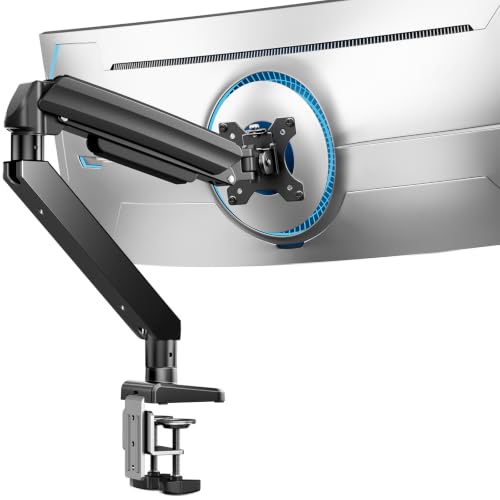
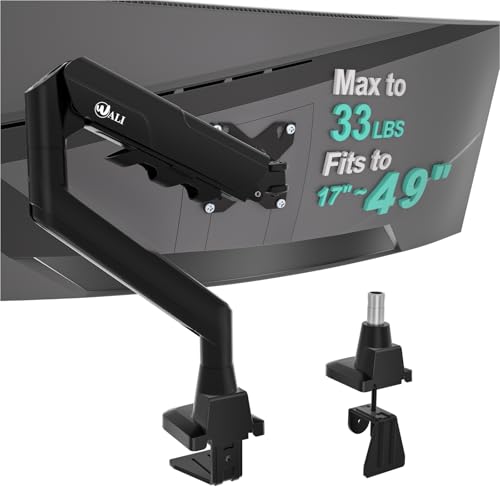


Top 3 picks at a glance
Quick Picks
| Product | Best for | Price |
|---|---|---|
| HUANUO TitanLift Heavy Duty Monitor Arm | Best overall for heavy 49″ ultrawides | Check on Amazon |
| ErGear Heavy Duty Monitor Arm | Best budget pick | Check on Amazon |
| WALI Ultrawide Single Monitor Arm | Best for lighter curved ultrawides | Check on Amazon |
| WALI Heavy Duty Monitor Arm | Best for 1000R curved screens | Check on Amazon |
| Ultrawide Monitor Arm (17-49″, Heavy Duty) | Best mid-range all-rounder | Check on Amazon |
| ARES WING Ultrawide Monitor Arm with RGB | Best for RGB battlestations | Check on Amazon |
| ARES WING Ultrawide Monitor Arm with USB A/C | Best for USB charging at the desk | Check on Amazon |
| VIVO Premium Aluminum Monitor Arm (STAND-V101G1) | Best pneumatic height adjustment | Check on Amazon |
How We Compared
We started with the hard spec that disqualifies most of the market: weight capacity. A 49-inch ultrawide commonly weighs 28 to 35 pounds with its stand removed, so anything rated under 30 pounds got cut unless it was clearly meant for lighter 34-inch panels. From there we required VESA compatibility up to 100x100mm — the standard spacing on nearly every gaming ultrawide — and checked whether each arm offers both a C-clamp and a grommet mount, since grommet mounting dramatically improves stability on thinner desks.
We also weighted build materials (aluminum spines hold tuning far better than hollow steel on heavy loads), gas-spring versus mechanical joint adjustment, cable management channels, and any extras like USB hubs or RGB that gamers specifically ask about. We did not invent torque measurements or fatigue-test results; the numbers cited here come from manufacturer specifications. Our rankings favor arms with higher weight headroom for 49-inch panels, with value picks ranked lower only because their safety margin is thinner.
The 8 Best Picks
1. HUANUO TitanLift Heavy Duty Monitor Arm — Best Overall
With a 44-pound capacity and support for screens up to 49 inches, the TitanLift has the highest safety margin in this roundup, which is exactly what you want when a $900+ ultrawide is hanging off your desk. The aluminum construction resists flex, the fully adjustable joints cover tilt, swivel, and rotation, and the dual C-clamp base spreads the load across two contact points. Max VESA is 100x100mm, which fits nearly every gaming superwide.
- Holds 44 lbs — enough headroom for the heaviest 49-inch panels
- Dual C-clamp base gives noticeably better wobble control
Con: at around $97 it’s one of the priciest options here, and there’s no grommet mount option.
As an Amazon Associate we earn from qualifying purchases at no extra cost to you.





Skip it if your monitor weighs under 25 pounds — you’ll be paying for capacity you don’t need.
2. ErGear Heavy Duty Monitor Arm — Best Budget Pick
At around $39, the ErGear is the cheapest arm here that still credibly handles a large ultrawide, rated for 13- to 49-inch screens up to 37.4 pounds. That rating comfortably covers most 34- and 38-inch gaming panels and even mid-weight 49s. You get full-motion adjustment, VESA 75×75 and 100×100 mounting, and the rare-at-this-price choice of a dual C-clamp or grommet install — the grommet route being the smarter one for heavier monitors.
- 37.4-lb capacity at a around $39 price is exceptional value
- Both C-clamp and grommet mounting included
Con: the 37.4-lb limit leaves less margin with a 35-pound 49-incher, so heavier panels may show arm sag over time.
Skip it if you own a max-weight 49-inch superwide — go for the HUANUO or VIVO instead.
3. WALI Ultrawide Single Monitor Arm — Best for Lighter Ultrawides
This WALI handles 17- to 49-inch curved screens up to 33 pounds, making it well matched to popular 34-inch ultrawide gaming monitors, which typically weigh 18 to 25 pounds without their stands. It’s the cheapest arm in the roundup at around $33, and WALI’s joint design offers the standard tilt, swivel, and rotation adjustments you need to line up a curved panel correctly at your seated position.
- 33-lb rating suits most 34-inch gaming ultrawides
- Lowest price in this roundup at around $33
Con: 33 pounds is cutting it close for a heavyweight 49-inch curved panel, where sag risk increases.
Skip it if your display is a 49-inch flagship — the capacity margin is too thin.
4. WALI Heavy Duty Monitor Arm — Best for 1000R Curved Screens
The steep 1000R curve on modern superwides shifts weight forward, which is harder on an arm than a flat panel of the same size. This WALI is built specifically for 13- to 49-inch 1000R curved screens and rated to 44 pounds — the same top capacity as our overall pick, at $40 less. If you own a aggressively curved Samsung Odyssey-class monitor, this is the specification you should be shopping for.
- 44-lb capacity rated specifically for 1000R curved panels
- Handles 49-inch screens with real headroom
Con: the fixed heavy-duty design is less refined than pricier arms — expect more effort during adjustment.
Skip it if you have a flat or gently curved 1800R monitor; a lighter-rated arm will serve you fine for less.
5. Ultrawide Monitor Arm (17-49″, Heavy Duty) — Best Mid-Range All-Rounder
This no-frills arm covers 17- to 49-inch flat and curved monitors and lands at around $39, matching the ErGear on price. It’s the right call if you want heavy-duty construction without paying for brand-name extras you won’t use, and it handles both flat ultrawides and curved panels thanks to its flat/curved-rated design. Adjustment covers the full range — height along the spine, tilt, swivel, and rotation for portrait use on smaller panels.
- Flat and curved screen compatibility in one arm
- Heavy-duty build at a mid-range around $39 price
Con: the published weight ceiling is more conservative than the 37-44 lb leaders, so verify your monitor’s weight before buying.
Skip it if you need documented 40+ pound capacity or USB/RGB extras.
6. ARES WING Ultrawide Monitor Arm with RGB — Best for RGB Setups
If your battlestation runs addressable RGB on everything else, a plain black arm sticks out. This ARES WING supports 17- to 49-inch screens and builds light strips into the arm itself, so the frame glows to match your keyboard and case fans. Beyond the lighting, you get the full-motion joints and desk clamp you’d expect, with enough capacity for mainstream gaming ultrawides.
- Integrated RGB matches a lit-up setup without extra light bars
- Covers the full 17-49 inch ultrawide range
Con: at around $82 you’re paying a premium for lighting over more load capacity.
Skip it if you don’t care about RGB — the same money buys more weight headroom elsewhere.
7. ARES WING Ultrawide Monitor Desk Arm with USB A/C — Best for USB Charging
The desk-clamp base on this ARES WING houses USB-A and USB-C ports, putting a charging point and peripheral connection right at the arm’s base — handy for a headset dongle, controller cable, or phone charger without fishing behind the desk. It fits 17- to 49-inch screens and costs around $79, $3 less than the RGB version.
- Built-in USB-A and USB-C ports at the clamp
- Full 17-49 inch ultrawide compatibility
Con: USB passthrough adds a cable to route and one more thing to fail long-term.
Skip it if your monitor or dock already provides USB ports on the desk.
8. VIVO Premium Aluminum Monitor Arm (STAND-V101G1) — Best Pneumatic Height
The VIVO STAND-V101G1 uses a pneumatic gas spring for height adjustment, so you can raise or lower a 33-pound, 49-inch ultrawide with one hand instead of loosening a collar screw. The aluminum build, up-to-100x100mm VESA support, and 33-lb rating make it a strong match for 34- to 45-inch gaming panels, and at around $99 it’s the most expensive arm here — you’re paying for the smoothest daily adjustment experience in the roundup.
- Pneumatic height adjustment that holds position with heavy panels
- Premium aluminum construction rated to 33 lbs and 49 inches
Con: 33 pounds is lower capacity than the HUANUO and WALI heavy-duty models, and it costs the most.
Skip it if you hang a max-weight 49-inch monitor — pick capacity over convenience.
Buying Guide
Weight Capacity Comes First
Check your monitor’s weight without its stand — you’ll find it in the spec sheet, and 49-inch gaming ultrawides typically run 28 to 35 pounds. Your arm’s rating should exceed that by 15-20% for long-term stability. A 44-pound-rated arm (HUANUO, WALI Heavy Duty) gives you that margin on any superwide; a 33-pound arm is fine for a 34-incher but risky on a heavy 49. Ignoring this is the number-one cause of sagging arms and, worst case, a monitor hitting the desk.
VESA Pattern and Mounting Method
Essentially every gaming ultrawide uses VESA 100x100mm, with some smaller panels on 75x75mm — all eight arms here cover at least 100×100. Then decide between C-clamp and grommet mounting. Clamps need a desk edge at least about an inch thick and a solid backing panel; grommet mounts use the cable hole in desks that have one, and generally hold heavier monitors more securely. Dual-clamp designs like the HUANUO spread force across two points and are worth seeking out for 49-inch screens.
Adjustment Type and Desk Extras
Gas-spring (pneumatic) arms like the VIVO adjust height with one hand and hold position automatically — worth the premium if you change positions often. Mechanical-joint arms cost less but require locking collars and can drift under heavy weight. Gamers should also consider cable routing channels (essential for a DisplayPort run that moves with the arm), USB-A/C passthrough for peripherals, and RGB if your setup calls for it — the ARES WING pair covers those last two.
Our Verdict
For most gamers with a 49-inch ultrawide, the HUANUO TitanLift is the safest buy: 44-pound capacity, aluminum construction, and a dual C-clamp base for around $97. If you want to spend half that, the ErGear at around $39 is the value champion, and the WALI Heavy Duty at around $59 is the smart pick for 1000R curved panels. Step up to the VIVO only if one-handed pneumatic height matters to you, and choose an ARES WING model if USB or RGB features would genuinely earn their keep at your desk.
FAQ
Can a monitor arm hold a 49-inch ultrawide?
Yes, if the arm’s weight rating exceeds your monitor’s weight. A 49-inch ultrawide usually weighs 28-35 pounds without its stand, so look for arms rated at least 37-44 pounds, like the HUANUO TitanLift (44 lbs) or WALI Heavy Duty (44 lbs).
Will a monitor arm fit my desk?
Check three things: desk edge thickness (most clamps handle roughly 1 to 3 inches), whether there’s a solid surface underneath for the clamp pad, and whether you’d rather use a grommet mount through an existing cable hole. Desks with shallow drawers or thin particleboard tops may need the grommet method.
Is VESA 100x100mm standard on ultrawide monitors?
Yes. Nearly all gaming ultrawides from 34 to 49 inches use VESA 100x100mm, and a few smaller panels use 75x75mm. Every arm in this roundup supports 100x100mm, and the ErGear also takes 75x75mm. Verify your monitor’s back panel spacing if it’s an older or unusual model.
Do monitor arms wobble with heavy ultrawide monitors?
Some wobble is unavoidable with any arm, but it’s minimized by choosing an arm with 15-20% capacity headroom, mounting with a grommet or dual clamp, and keeping the monitor close to the pole rather than fully extended. Aluminum arms like the HUANUO and VIVO flex less than budget steel designs under a 30-plus-pound load.
Related guides
- Best Gaming PC for Overwatch 2: Ten Prebuilts Matched to Your Monitor (2026)
- Best Gaming PC for Baldur’s Gate 3: Matching CPU, VRAM and Storage to the Game (2026)
- Best Gaming PC for Apex Legends: Which Listings Fit a High-Refresh Setup (2026)
- Best RTX 3060 Gaming PCs: Eight Prebuilt Listings Compared by CPU, RAM and Cooling (2026)









