
Walk into any home office or living room with a visible computer setup, and the case sitting on or under the desk has already made a choice for its owner: mesh front panel or solid front panel. It sounds like a spec-sheet footnote, but it shapes how hot your components run, how often you’re dusting, how loud the machine is, and whether the thing looks like furniture or equipment. The “case” in question usually means a PC case, but the same logic applies to speaker grilles, media cabinets, and radiator covers — anywhere you need airflow or sound to pass through a decorative face. This guide compares the two honestly, with real prices and real trade-offs, so you can pick once and stop thinking about it.
Our Top Picks



Top 3 picks at a glance
Quick Verdict
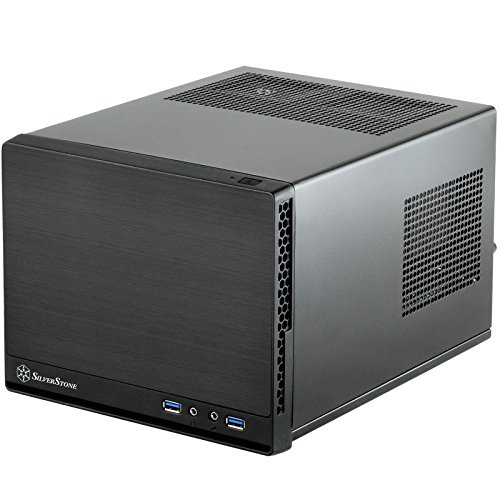
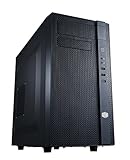
Choose a mesh front panel if your priority is cooling, quiet operation at low fan speeds, and an airy, contemporary look. Airflow-focused cases like the Cooler Master N200 (around $62) exist specifically because a fully meshed front lets fans breathe; you can often run fans 200–400 RPM slower for the same temperatures, which means less noise. Choose a solid front panel if your priority is dust control, a clean uninterrupted silhouette, and a compact or minimalist build. Something like the SilverStone SST-SG13B-Q (around $74) keeps dust and stray fingers out and reads as a simple black box on a shelf. If you want both, hybrid designs like the Fractal Design North (around $150) pair a solid walnut wood front with mesh side panels — solid where the eye lands, mesh where the air moves.
As an Amazon Associate we earn from qualifying purchases at no extra cost to you.


Side by Side
| Factor | Mesh Front Panel | Solid Front Panel Case |
|---|---|---|
| Thermal performance | Excellent; unobstructed intake airflow typically keeps GPU temps several degrees lower than restricted designs | Depends on side/top vents; front-restricted intakes often need higher fan speeds |
| Noise | Low — fans can run slower for the same cooling | Can be low if well-designed, but thin panels may resonate; fewer intake paths often mean faster fans |
| Dust buildup | Higher; mesh catches lint and pet hair and needs monthly cleaning | Lower; only vents and seams collect dust, so quarterly cleaning often suffices |
| Durability | Fine mesh can dent or bend; frames hold up well | Steel or aluminum panels resist dents and knocks; very durable |
| Price range | $60–$160 for full cases; retrofit decorative mesh panels run $30–$90 | $70–$180 for full cases, depending on size and materials |
| Space needed | Usually mid-tower or larger for good airflow (17–19 in. tall, 8–9 in. wide) | Compact options abound; some solid-panel Mini-ITX cases fit under 13 liters |
| Look | Airy, tech-forward, shows subtle hints of internals | Clean, opaque, reads as furniture or disappears entirely |
| Maintenance | Vacuum or rinse mesh filters every 4–8 weeks in dusty or pet-heavy homes | Wipe-down only; internal cleaning every 3–6 months |
| Resale value | Good while the aesthetic is current; torn mesh hurts value | Solid panels age well; dents and scratches are more visible |
| Best for | High-wattage builds, warm rooms, quiet home offices | Small spaces, homes with kids or pets, minimalist setups |
Where Mesh Front Panel Wins
Thermals. A mesh front offers open area that solid panels with small vent slots simply cannot match. If your system draws 300–500 watts under load — a mid-range gaming PC with a 150–250 watt GPU — unrestricted intake is the single biggest airflow upgrade you can make. Components running cooler also throttle less, so sustained performance is more consistent.
Noise at a given temperature. Because air enters freely, fans don’t have to spin as fast. In a home office where the PC sits 2 feet from your ears, that difference is genuinely noticeable during long sessions.
Flexibility. Mesh is also a retrofit option for furniture. Decorative metal mesh panels — for example, a two-pack of 11.8 x 23.6 in. sheets for around $85 — let you convert the solid doors of a media cabinet or sideboard into ventilated ones, hiding a router, console, or receiver that would otherwise overheat behind closed wood. Cut to size with tin snips, secured with a trim strip or channel, and you’ve got airflow plus a textured industrial look.
Weight. Mesh panels weigh ounces where solid steel panels weigh pounds, which matters if you move your setup often.
Where Solid Front Panel Case Wins
Dust and pet hair. A solid face blocks the lint, hair, and kitchen grease that mesh actively collects. In homes with shedding pets, a mesh front can look gray with hair within a month; a solid panel stays presentable with a quick wipe.
Kid and pet proofing. Solid panels mean no curious fingers poking fan blades, no crayon shoved through the mesh, no cat using the front as a scratching surface. If the PC lives on the floor of a family room, this alone can decide the purchase.
Clean aesthetics. A solid front is a flat, uninterrupted surface — nothing to catch the eye, nothing to show a cluttered cable situation behind it. It matches minimalist rooms, hides LED glow entirely, and pairs better with traditional decor. Wood-front designs like the Fractal North show how far a solid face can go toward looking like actual furniture.
Small-form-factor builds. Compact cases with solid panels can be surprisingly quiet and tidy on a bookshelf. The trade-off is that you should plan internal cooling carefully — undervolt the GPU, use a low-wattage build (roughly 65–150 watts total system draw), and position the case where side or rear vents aren’t blocked.
Longevity. Powder-coated steel doesn’t snag, fray, or dent as easily as fine mesh. A solid-panel case that lives a gentle life can look new a decade later.
Cost Over 5 Years
Upfront prices are close enough that the real differences show up in maintenance and electricity:
- Mesh route: A full mesh-front case runs $60–$155. Budget roughly $10–$20 over five years for replacement intake filters and compressed air. Better thermals can trim fan speeds slightly, saving maybe $2–$5 per year in electricity on a system used 4 hours a day — call it $10–$25 over five years.
- Solid route: A comparable solid-panel case runs $70–$155. Maintenance is minimal — a few microfiber cloths, under $10 total. Slightly higher fan speeds on thermally restricted builds might cost a few dollars more per year in power, but a well-planned compact build erases that gap.
Realistic five-year totals land within $30 of each other. The deciding factors are your room conditions and how much cleaning you’ll actually do, not the sticker price. If you’re retrofitting furniture instead of buying a case, decorative mesh panels at $85 for a pair are a one-time cost with essentially no upkeep beyond vacuuming.
Which One for Your Home
Small apartment
Space is the constraint, so a compact solid-panel case on a shelf or desk wins — something in the 12–15 liter range like the SilverStone SG13 keeps the footprint near 9 x 9 x 13 in. Keep total system wattage modest (a 65-watt CPU and a 75–120 watt GPU) so the restricted front doesn’t cause thermal problems. If you must run hotter components, choose a small mesh-front mATX case instead and accept the slightly larger footprint.
Family with kids or pets
Go solid, or hybrid. A solid front panel case survives sticky fingers, toy projectiles, and a cat’s climbing habits far better than exposed mesh. If cooling matters because you game in the living room, the Fractal Design North’s wood front with mesh sides is the practical compromise: nothing grabbable on the face, airflow from the side. Floor placement with pets also argues for solid — pet hair on mesh is a monthly chore.
Rental or frequently moved setup
Mesh-front, and favor lighter cases. Mesh tolerates the bumps of a move better than you’d expect (it flexes rather than dents sharply), and mesh-front budget cases like the Cooler Master N200 at around $62 keep the investment low in case of damage. Lighter weight — many mesh mid-towers sit at 12–16 pounds versus 20+ for heavier steel builds — makes apartment moves easier. Just bag the case in a trash bag or towel during transit so dust and moisture don’t get in.
Long-term home
Buy for the room, not just the box. If the computer will live in a dedicated office for 5–10 years, a quality mesh-front or hybrid case at the $130–$155 level pays off in comfort: quieter, cooler, and pleasant to look at daily. If it lives in a shared living space, prioritize a solid or wood front that matches your furniture, and ventilate the cabinet or media console it sits in — a retrofit with decorative mesh panels ($85 for two 11.8 x 23.6 in. sheets) is often the smartest single purchase. Design trends through 2026 keep favoring natural materials and visible airflow, so either path ages well aesthetically.
FAQ
Does a mesh front panel really make that much difference in temperature?
Yes, especially in higher-wattage systems. Unrestricted intake lets fans move more air at lower speeds, which typically means cooler components and less noise. The difference matters most above roughly 250 watts of system draw; for a low-power office PC, it’s marginal.
Are mesh front panels hard to keep clean?
In dusty rooms or homes with pets, expect to vacuum or rinse the front filter every 4–8 weeks. Most mesh filters pop off without tools and can be rinsed in the sink. Solid panels need only an occasional wipe, which is why they’re popular in family spaces.
Can I convert a solid front panel case to mesh?
Rarely on PC cases — front panels usually aren’t interchangeable. But for furniture, it’s easy: decorative metal mesh sheets cut to size can replace solid cabinet door inserts, turning a closed media cabinet into a ventilated one for routers, consoles, or AV receivers.
Which is better for a small Mini-ITX build?
Solid panels dominate the compact category because the smallest chassis rely on side vents and carefully channeled airflow. A solid-front Mini-ITX case works fine for builds under roughly 150 watts total. For hotter components, step up to a slightly larger mesh-front case rather than fighting thermals in a tiny box.
Related guides
- Best Gaming PC for Overwatch 2: Ten Prebuilts Matched to Your Monitor (2026)
- Best Gaming PC for Baldur’s Gate 3: Matching CPU, VRAM and Storage to the Game (2026)
- Best Gaming PC for Apex Legends: Which Listings Fit a High-Refresh Setup (2026)
- Best RTX 3060 Gaming PCs: Eight Prebuilt Listings Compared by CPU, RAM and Cooling (2026)









