
As an Amazon Associate we earn from qualifying purchases at no extra cost to you.



When you’re setting up a gaming desk, the monitor choice shapes everything: your aim, your comfort during long sessions, and how the whole setup looks in your space. The flat vs curved monitor for fps games debate comes down to more than specs sheets — it’s about how you play, where you play, and what your room demands. Competitive FPS players swear by flat panels for pixel-perfect aim, while immersive single-player fans and even some pros lean into the wraparound feel of a curve. Let’s break down what actually matters.
Our Top Picks
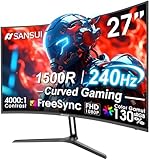
 SANSUI 27 Inch Curved 240Hz Gaming Monitor FHD27.017.66 x 24.13 x 17.84 inches7.26 PoundsCheck on Amazon


Top 3 picks at a glance
Quick Verdict
If your priority is raw competitive performance in titles like Counter-Strike 2, Valorant, or Apex Legends, a flat monitor is still the safer bet. Your eye tracks targets across a flat plane with zero distortion, and tournament play almost universally happens on flat panels. If you split your time between ranked grind and immersive shooters, racing games, or open-world titles — and you sit roughly 28 to 36 inches from the screen — a curved monitor adds a sense of depth and peripheral engagement that flat panels can’t match. Budget is also a factor: entry-level curved gaming monitors now start around $90, sometimes undercutting comparable flat panels.
Side by Side
| Factor | Flat Monitor | Curved Monitor |
|---|---|---|
| Comfort (long sessions) | Neutral, but eyes work harder at edges on ultra-wide | Reduces eye strain at 27″+ sizes when seated at proper distance |
| Aim consistency (FPS) | No distortion; hitboxes align pixel-perfect | Slight edge distortion can affect long-range flicks for some players |
| Price range | $100–$500 for quality 24–27″ 1080p–1440p panels | $90–$600; entry curved 240Hz panels near $136 |
| Durability | Comparable; flat glass is slightly less exposed at edges | Equal lifespan; curved panel edges marginally more vulnerable to knocks |
| Maintenance | Simple cleaning, any microfiber cloth | Same care, but curved surface needs gentler wiping to avoid streaking at edges |
| Space needed | Sits flush to wall; slimmest footprint | 1500R curve needs a desk at least 30″ deep for comfortable viewing |
| Look in a room | Clean, minimal, blends with any setup | Pronounced, tech-forward statement piece |
| Viewing angles for others | Second viewer sees the image accurately from the side | Image distorts heavily for anyone not seated center |
| Resale value | Broader buyer appeal; sells faster | Narrower market; niche appeal among gamers |
| Best for | Competitive FPS players, shared spaces, mixed use | Immersive solo play, racing/sim games, large-desk setups |
Where Flat Wins
Competitive accuracy is the headline. On a flat panel, every pixel sits on the same visual plane, so your muscle memory for flick shots, tracking, and crosshair placement transfers directly between your practice monitor and any tournament or LAN setup. Pro FPS circuits run flat panels almost exclusively, and if you ever compete, practicing on a curved screen means retraining your eye slightly.
Flat monitors also handle shared and multi-purpose rooms better. Because the image stays accurate from off-center angles, a friend watching you play from the couch or a roommate glancing over gets a true picture. They mount flush against a wall with standard VESA brackets, keeping the profile shallow — useful in a bedroom or dorm where desk depth is under 24 inches.
Pricing is friendlier at the high end, too. You can find 27-inch 1440p flat panels with 165Hz refresh rates and 1ms response times in the $180–$250 range, while equivalent curved options often cost $30–$60 more. For a second monitor on the side, flat is the obvious choice — a curved secondary screen looks odd and wastes the curve.
Where Curved Monitor for Fps Games Wins
Immersion is the real selling point. A 1500R curve — meaning the screen wraps to match a 1.5-meter radius circle — fills more of your peripheral vision, which genuinely helps in situational-awareness shooters like Battlefield or Hunt: Showdown. Footsteps and movement in your periphery feel more present, and many players report the game “pulls them in” in a way flat panels don’t.
Eye comfort matters over marathon sessions. When the screen edges sit slightly closer to your eyes than the center would on a large flat panel, your eyes don’t refocus as much scanning the corners. At 27 inches and above, this is a meaningful difference; at 24 inches and below, it’s negligible.
Modern curved gaming monitors pack serious specs for the money. A 27-inch 240Hz FHD curved panel with 1ms MPRT response, HDR support, AMD FreeSync, and 130% sRGB coverage runs about $136, and a 24-inch 160Hz curved model with the same 1500R curvature comes in under $90. At those prices, high refresh rates that were premium-tier two years ago are now entry-level — and by 2026, 240Hz curved panels are among the cheapest ways to get esports-grade refresh rates at all.
One honest note for purists: the horizontal distortion on curved screens is real, but it’s smaller than critics claim. At 1500R with a centered seating position, most players adapt within a week, and plenty of ranked grinders play curved without issue. It’s a preference, not a disqualifier.
Cost Over 5 Years
Purchase price is only part of the picture. Here’s a realistic five-year view:
- Flat, budget tier: $120–$180 upfront for a 24″ 165Hz panel. Five-year cost stays at the purchase price — these panels typically outlast their usefulness rather than failing. Add $0–$20 for a basic monitor arm or stand upgrade.
- Flat, competitive tier: $200–$300 for a 27″ 1440p 165Hz+. You may upgrade once mid-cycle as refresh rates climb, adding resale recovery of roughly 30–40% if you sell the old panel.
- Curved, budget tier: $90–$140 upfront (24″ 160Hz to 27″ 240Hz). Same lifespan expectations; power draw for FHD panels in this class runs a modest 25–40 watts, costing roughly $10–$15 per year at average U.S. electricity rates.
- Curved, immersive tier: $300–$600 for ultrawide 34″ models. Higher resale risk — curved ultrawides depreciate faster, often recouping only 20–30% after three years.
Either way, the monitor is rarely the expensive part of a five-year gaming setup. Factor in a $40–$80 desk mat, cable management, and possibly a new GPU, and the flat-vs-curved decision is a $50–$100 swing at most — so let comfort and playstyle decide, not price alone.
Which One for Your Home
Small Apartment or Dorm
Go flat. Desks in small spaces run 20–24 inches deep, and a 1500R curve really wants 30+ inches of viewing distance to look right. A flat 24-inch panel sits close to the wall, leaves room for a keyboard and notebooks, and doubles better for studying or streaming — the image stays accurate for a roommate watching from an angle. A $120–$150 flat 24″ 165Hz model does everything a small-space gamer needs.
Family with Kids or Pets
Flat wins on resilience. A curved panel’s protruding edges are exactly where a toy, a cat’s paw, or a backpack finds the screen during cleaning or play. Flat monitors mounted on a wall or pushed back on a high shelf present the smallest target. Also consider that a shared family computer benefits from flat’s wide viewing angles — everyone at the table sees the same image. If a curve is non-negotiable, the $90 24-inch curved tier is a low-stakes way to test the waters without risking a big investment.
Rental or Frequently Moved Setup
Flat, with one caveat. Flat panels are easier to box, ship, and remount — the standard rectangular shape fits any VESA arm and any desk. Curved monitors need wider boxes and are more prone to stress during moves. That said, if you game mostly at night in your own room and value immersion, a budget curved model under $140 is cheap enough that replacement risk doesn’t sting. Just keep the original packaging.
Long-Term Home
This is where curved earns its place. If you own your desk, control your room lighting, and game 10+ hours a week, a 27-inch 1500R curved panel at eye distance of 30 inches delivers the most satisfying everyday experience. Pair it with a mounted arm, keep it centered, and you’ll likely keep it five years or more. A $136 27″ 240Hz curved model covers both ranked play and immersive single-player, making it the rare monitor that serves both sides of this debate.
FAQ
Do pro FPS players use curved monitors?
Almost never. Tournament play uses flat panels, so most competitive players practice on flat screens to keep their aim consistent. Some streamers use curved for solo content, but ranked grinders chasing peak aim stick with flat.
Does a curved monitor hurt your aim in FPS games?
Not meaningfully for most players. The horizontal distortion exists, but at a 1500R curve with proper seating (centered, 28–36 inches away), it’s subtle. Expect a one-week adjustment period if you switch from flat.
Is 1080p enough on a 27-inch curved gaming monitor?
For FPS games, yes — especially at 240Hz. Competitive players often prefer 1080p at high refresh over 1440p at lower refresh, because frame rates and response matter more than sharpness for aim-heavy titles.
How far should I sit from a curved monitor?
For a 24-inch curved panel, 24–30 inches works fine. For 27-inch 1500R models, aim for 30–36 inches so the curve wraps naturally without the edges feeling too close.
Related guides
- Best Gaming PC for Overwatch 2: Ten Prebuilts Matched to Your Monitor (2026)
- Best Gaming PC for Baldur’s Gate 3: Matching CPU, VRAM and Storage to the Game (2026)
- Best Gaming PC for Apex Legends: Which Listings Fit a High-Refresh Setup (2026)
- Best RTX 3060 Gaming PCs: Eight Prebuilt Listings Compared by CPU, RAM and Cooling (2026)









