
As an Amazon Associate we earn from qualifying purchases at no extra cost to you.



Our Top Picks
 Mini Electric Screwdriver Set 140-IN-1: Small Electric ScrewdriverMini Electric Screwdriver Set9.45 x 5.7 x 1.57 inches1.56 poundsCheck on Amazon
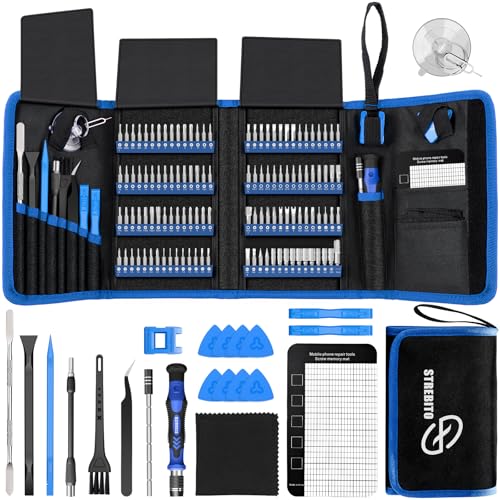 STREBITO Electronics Precision Screwdriver Sets 142-Piece with 1201428.66 x 5.51 x 1.57 inches1.8 PoundsCheck on Amazon


Top 3 picks at a glance
The Short Answer
For PC building, the screwdriver you’ll reach for 95% of the time is a **#2 Phillips (PH2)** with a 6 mm (0.24 inch) bit diameter and a shaft length of at least 100 mm (about 4 inches) so you can reach screws recessed inside a case. That single tool handles motherboard standoffs, motherboard mounting screws, power supply screws, case panels, and 2.5-inch drive trays.
A magnetized tip is practically mandatory — dropping an M.2 standoff screw into a finished build is a rite of passage nobody wants. Beyond the PH2, you’ll want a **#1 Phillips (PH1)** for M.2 SSDs and small fan screws, and a **T15 Torx** for some prebuilt systems and AIO cooler brackets. A full precision set under $30 covers all of it.
Standard Sizes
Here’s what the common screwdriver sizes actually measure, so you can match them to the screws in your components:
| Size / Type | Tip Width (inches) | Tip Width (cm) | Shaft Length (inches) | Handle Diameter (inches) | What It Fits in a PC Build |
|---|---|---|---|---|---|
| PH0 Phillips | 0.12 in | 0.30 cm | 2.0–2.4 in | 0.6–0.8 in | Some SSDs, small fan screws, laptop internals |
| PH1 Phillips | 0.15 in | 0.39 cm | 2.4–3.1 in | 0.8–1.0 in | M.2 SSD screws, 120 mm fan screws, some GPU brackets |
| PH2 Phillips | 0.24 in | 0.60 cm | 3.9–6.3 in | 1.0–1.4 in | Motherboard, PSU, case panels, drive cages, standoffs |
| T15 Torx | 0.18 in | 0.46 cm | 2.4–3.9 in | 0.8–1.0 in | Some OEM systems, AIO cooler brackets |
| PH000 Phillips | 0.08 in | 0.20 cm | 1.6–2.0 in | 0.6–0.8 in | Phones, controllers, not needed for standard PCs |
| Slot 1/8 in (3 mm) | 0.13 in | 0.32 cm | 2.0–3.1 in | 0.8–1.0 in | Rare case thumbscrew slots, older hardware |
Note the two shaft-length tiers: precision drivers (2–3 inch shafts) are for small, exposed screws like M.2 drives, while a standard PH2 with a 4–6 inch shaft is better for screws sunk into case corners where the handle would otherwise hit the chassis.
How to Measure Your Space
“Sizing” for a PC screwdriver means matching three things: the screw, the shaft, and the clearance around it.
- Identify the screw head. Phillips screws have a plus (+) pattern; Torx has a six-point star. Match the driver exactly — a PH1 in a PH2 screw will cam out and strip the head.
- Check the recess depth. If a screw sits more than 1 inch (2.5 cm) inside the case — common for PSU mounting and motherboard standoffs — you need a shaft of at least 4 inches (10 cm) plus handle depth.
- Measure the clearance above the screw. In tight spots like behind a front fan mount, you may only have 1.5 inches (3.8 cm) of vertical room. A slim-handle driver with a 0.8-inch (2 cm) diameter barrel fits where a chunky 1.4-inch handle won’t.
- Confirm magnetic strength. Hold a small screw against the tip; it should support the screw’s weight (a 6-32 case screw weighs about 0.06 oz / 1.7 g) without shaking loose.
- Test fit before torque. Seat the bit fully into the screw head. If it wobbles side to side more than roughly 2 degrees, drop down a size.
By Room or Use Case
First-Time Builders
One quality PH2 covers your entire first build: motherboard (usually 6–9 screws), power supply (4 screws, often 6-32 thread), case panels, and drive trays. Look for a driver with a rubberized handle around 1.2 inches (3 cm) in diameter and a magnetic 5 mm (0.2 inch) bit tip. Budget $10–20 for a dedicated PH2, or slightly more for a small set that includes the PH1 you’ll want for M.2 drives.
M.2 NVMe SSDs and Small Components
M.2 drives use a tiny Phillips or flathead screw, typically PH0 or PH000 depending on the motherboard. These screws measure roughly 0.13 inches (3.3 mm) across the head, and they’re easy to lose — the standoff alone weighs under a gram. A precision driver with a swivel cap on the handle lets you spin the screw with one finger, which is far faster than gripping the full handle for a screw that needs only 0.1–0.2 N·m of torque. Sets like the JOREST Small Precision Screwdriver Set (around $9) include the right bits plus a magnetic mat for catching tiny fasteners.
Frequent Builders and Repair Hobbyists
If you swap hardware regularly or also service consoles, phones, and laptops, a multi-bit kit is more economical than buying individual drivers. The STREBITO 142-Piece Precision Set (around $27) packs 120 bits — Phillips PH000 through PH2, Torx T2 through T20, plus pentalobe and triwing — into a case measuring roughly 9 x 6 x 2 inches (23 x 15 x 5 cm) and weighing about 2.4 lb (1.1 kg). Kits in this tier typically cost $25–40 and include tweezers, spudgers, and a magnetic pad.
Speed-Focused and High-Volume Users
An electric screwdriver saves real time if you build or service PCs weekly, since most of the work is repetitive panel and drive screws. Cordless precision models run on 3.6 V or smaller lithium cells and deliver torque in the 0.2–0.5 N·m range — deliberately low, because anything over about 0.6 N·m risks crushing plastic mounting points on motherboards. The 140-IN-1 Mini Electric Screwdriver Set (around $34) is representative: dozens of 4 mm bits, USB-C charging, and a weight around 0.6 lb (270 g). Use the manual PH2 for anything structural; let the electric driver do panels and fans.
Travel and LAN Party Kits
If the kit rides in a bag, weight and footprint matter more than bit count. A compact 25–60 bit set in the 5 x 3 x 1.5 inch (13 x 8 x 4 cm) range and under 12 oz (340 g) is the sweet spot. The JOREST 152-in-1 set (around $26) folds into a palm-sized case and covers PH, Torx, and hex, which also makes it a solid gift for someone who builds computers as a hobby.
Common Sizing Mistakes
- Using a PH2 on PH1 screws (or vice versa). The tip almost fits, which is exactly the problem. It cams out under torque and strips the head. M.2 screws are the most common casualty.
- Too-short shaft. A 2-inch precision driver can’t reach PSU screws recessed 3+ inches into a case. Keep one long-shaft (4+ inch) PH2 in the kit.
- Oversized handles in tight cases. Handles over 1.4 inches (3.5 cm) in diameter won’t fit between drive cages and fan mounts. Slim-profile drivers solve this.
- Skipping the magnet. Non-magnetic tips turn every screw into a retrieval operation. If your driver isn’t magnetized, a $5 magnetizer tool fixes any steel bit in seconds.
- Using electric drivers at full torque on motherboards. Anything above roughly 0.5 N·m on a standoff risks cracking PCB mounts. Always finish motherboard screws by hand.
- Buying precision-only kits. A case full of PH000 bits is useless for case screws. Make sure any kit includes at least PH1 and PH2.
FAQ
Do I really need more than one screwdriver to build a PC?
No. A single magnetized PH2 with a 4-inch (10 cm) shaft can complete an entire build from case opening to side panel. A PH1 for M.2 drives and a T15 Torx are nice-to-haves, not requirements.
Are electric screwdrivers safe for PC components?
Yes, if the driver’s torque is capped low. Precision electric drivers typically output 0.2–0.5 N·m, which is safe for panels and fans. For motherboard standoffs and any screw threading into plastic, snug it by hand to avoid over-torque damage.
What size are motherboard screws, exactly?
Motherboard standoffs use 6-32 UNC thread (0.138 inch / 3.5 mm major diameter) and the heads take a PH2 Phillips tip. M.2 screws are much smaller — roughly 0.13 inch (3.3 mm) head diameter — and use PH0 or PH000 depending on the board manufacturer.
How much should I spend on a PC building screwdriver set?
A solid single PH2 costs $8–15. Multi-bit precision kits run $10–35 depending on bit count and accessories; a 120+ piece kit around $27 covers PCs, consoles, and phones. Prices have stayed stable going into 2026, so there’s little advantage to waiting for a sale. For most buyers, a $25–30 kit plus nothing else is the best value — one purchase, every fastener covered.
Related guides
- Best Gaming PC for Overwatch 2: Ten Prebuilts Matched to Your Monitor (2026)
- Best Gaming PC for Baldur’s Gate 3: Matching CPU, VRAM and Storage to the Game (2026)
- Best Gaming PC for Apex Legends: Which Listings Fit a High-Refresh Setup (2026)
- Best RTX 3060 Gaming PCs: Eight Prebuilt Listings Compared by CPU, RAM and Cooling (2026)









