
Building a small-form-factor gaming PC used to mean paying a premium for the privilege of a tiny box. That’s changing fast. In 2026, mini-ITX boards now span from just under $100 to around $350, and the gap between the cheapest and most expensive options isn’t raw gaming performance — it’s power delivery, connectivity, and future-proofing. A Ryzen 7600 paired with a midrange GPU will game nearly identically on a $125 board and a $330 one. What you’re actually shopping for is how many M.2 slots you need, whether you want WiFi 7 or can live with WiFi 6E, and how much overhead you want if you ever drop in a 16-core CPU.
The problem for budget builders is that spec sheets don’t make these tradeoffs obvious. A board with DDR5 8200+ support but PCIe 4.0 only sits right beside a PCIe 5.0 board with slower memory ratings, and both can be “correct” depending on your GPU, storage plan, and case. We’ve ranked eight boards — six mini-ITX and two larger formats worth considering if your case allows — across AMD AM5, Intel LGA1851, and the older-but-cheaper AM4 and DDR4 platforms, so you can match a board to the build you’re actually planning rather than the one spec sheets imply.
Our Top Picks
 ASUS ROG Strix B850-I Gaming WiFi AMD AM5Mini-ITX | M.2x2 | WiFi 79 x 3.8 x 7.3 Inches2.3 PoundsCheck on Amazon
 ASUS ROG STRIX X870-I GAMING WIFI AMD AM5Mini ITX|M.2x2|WiFi711.5 x 9 x 4.5 inches3.92 poundsCheck on Amazon



Top 3 picks at a glance
 ASRock B650I Lightning WiFi AMD AM5 Mini-ITX Motherboard, Supports AMD Ryzen 9000/8000/7000...Check price
 ASUS ROG Strix B850-I Gaming WiFi AMD AM5 B850 Mini-ITX mITX Motherboard...Check price
Quick Picks
| Product | Best for | Price |
|---|
How We Compared
We focused on what actually matters for a budget small-form-factor gaming build: power delivery adequate for 65W to 105W-class CPUs (8+2+1 phases handles a Ryzen 7600 or 7700 fine; 10+2+1 stages give headroom for X3D and 16-core parts), memory speed support for DDR5 EXPO/XMP profiles, M.2 slot count, network connectivity (2.5G LAN and current WiFi standards), and rear I/O including modern USB-C options.
Price mattered heavily. Every pick here lands between around $99 and around $350, and we deliberately included last-generation AM4 boards for builders who can source a cheap Ryzen 5000 CPU. We excluded boards with known ITX-specific pain points — cramped M.2 placement under the GPU, single-fan headers on hot-running VRMs, or I/O shields that fight low-profile coolers. Where manufacturers publish AI-assisted tuning features (ASUS AI Overclocking, AI Cooling II, AI Networking II), we treated them as convenience extras, not decision drivers. We did not run our own sustained-load thermal charts; instead we weighed published specs, VRM topology, and real-world fitment in common ITX cases in the 10–20 liter range.
The 8 Best Picks
1. ASRock B650I Lightning WiFi — Best Overall Budget AM5
This is the sweet spot for a mainstream AM5 ITX build. The 8+2+1 power phase design comfortably runs Ryzen 7000/8000/9000 chips in the 65W–105W class, DDR5 support reaches 7200+ (OC) for EXPO kits, and you get PCIe 5.0 on the primary M.2 slot plus 2.5G LAN and WiFi 6E. At around $170, you’re getting every feature a budget gamer genuinely uses without paying for USB4 or WiFi 7 you may never notice.
- Pros: PCIe 5.0 M.2 and 2.5G LAN at a mid-tier price; solid 8+2+1 VRM for the CPU classes budget builders actually buy
- Cons: Single M.2 slot limits storage expansion in a platform where ITX already means compromises
Skip it if: you plan to run two NVMe drives or a flagship 16-core Ryzen — step up to a B850/X870 ITX board instead.
As an Amazon Associate we earn from qualifying purchases at no extra cost to you.



2. ASUS ROG Strix B850-I Gaming WiFi — Best Premium AM5 Feature Set
For builders who want headroom without jumping to flagship pricing, the B850-I brings 10+2+1 power stages, WiFi 7, two M.2 slots, PCIe 5.0 x16 graphics, and 20Gbps USB-C. AI Overclocking and AI Networking II handle tuning automatically, and Aura Sync ties lighting into the rest of a Strix build. At around $330 it’s a serious investment, but it’s the board you grow into rather than out of.
- Pros: 10+2+1 stages handle high-core Ryzen 9000 chips with ease; WiFi 7 and dual M.2 make it genuinely future-proof
- Cons: At around $330 it costs more than many budget GPUs, which is hard to justify for a 6-core gaming build
Skip it if: your CPU is a Ryzen 5 7600 and your storage plan is a single 1TB drive — the B650I Lightning does that job for $159 less.
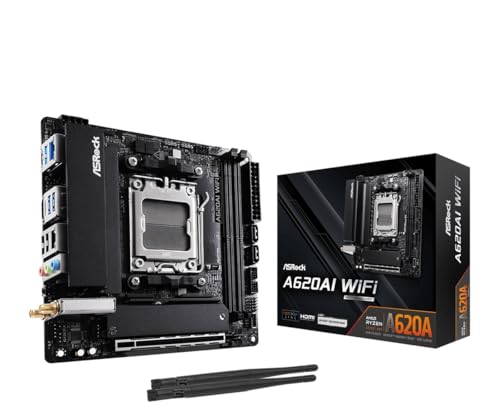
3. ASRock A620AI WiFi — Best Ultra-Budget AM5
The cheapest credible way onto the AM5 platform. For around $120 you get Ryzen 9000/8000/7000 support, DDR5 rated to 8200+ (OC) — actually higher on paper than boards costing twice as much — WiFi 6E, dual LAN, and an 8+2+1 power phase design. The tradeoff is PCIe 4.0 only, which is fine for current GPUs and most SSDs but leaves no PCIe 5.0 upgrade path. For a first ITX build around a Ryzen 7600, it’s excellent value.
- Pros: AM5 upgrade path and WiFi 6E at an ultra-budget price; dual LAN is rare anywhere near $125
- Cons: PCIe 4.0 only — no PCIe 5.0 GPU or SSD bandwidth for future hardware
Skip it if: you’re pairing a Ryzen 9000 X3D chip with a PCIe 5.0 SSD and want full bandwidth.
4. ASUS TUF Gaming B850I WiFi NEO — Best Midrange B850 Value
The TUF line sits between ASRock’s budget boards and ASUS’s ROG Strix tier, and at around $270 it delivers most of what matters: a B850 chipset with PCIe 5.0, two M.2 slots, WiFi 6E, 2.5Gb LAN, and dual USB-C. DIMM Fit technology eases the tight memory clearance that plagues ITX builds, AI Cooling II manages fan curves automatically, and the pre-mounted I/O shield is a small mercy in cramped cases. It’s the sensible B850 pick if around $330 feels steep.
- Pros: Two M.2 slots and PCIe 5.0 at a lower price than the Strix equivalent; pre-mounted I/O shield and DIMM Fit simplify tight ITX assembly
- Cons: WiFi 6E rather than WiFi 7 — a modest gap that matters only if you own WiFi 7 routing gear
Skip it if: you want the absolute lowest price on B850 features and can live with one M.2 slot on the ASRock B650I.
5. ASUS ROG Strix X870-I Gaming WiFi — Best Flagship / USB4
The top of this list on paper and in price. X870 brings USB4 native, WiFi 7, two M.2 slots, PCIe 5.0 throughout, and enthusiast tuning tools like Dynamic OC Switcher and Core Flex on 10+2+1 power stages. DDR5 AEMP profiles, Q-Release Slim for GPU removal in tight cases, and AI-assisted overclocking and networking round it out. At around $350 it’s roughly 3.5x the cheapest board here — a no-compromise pick for a no-compromise SFF build.
- Pros: Native USB4 and WiFi 7 make it the most connected board here; 10+2+1 stages and Dynamic OC Switcher suit 16-core Ryzen 9000 CPUs
- Cons: around $350 is difficult to reconcile with a “budget” build — the money is often better spent on the GPU
Skip it if: you’re actually on a budget. Even the around $170 B650I Lightning plays the same games at the same frame rates with a midrange CPU.
6. ASRock B860I WiFi — Best Intel LGA1851 Budget Board
Team Blue builders get a strong option at around $160. The B860I supports Intel Core Ultra chips on LGA1851, with DDR5 support up to 8933 MHz (OC) and up to 128GB capacity, PCIe 5.0, SATA 6Gb/s, M.2 storage, and WiFi 6E. Memory speed headroom is the standout — 8933 MHz is the highest DDR5 rating on this list — and PCIe 5.0 keeps the platform current. For a Core Ultra 5-class ITX build, it’s the obvious Intel answer.
- Pros: Highest DDR5 memory rating on this list at 8933 MHz (OC); PCIe 5.0 support at a sub-$160 price
- Cons: LGA1851 is a young socket, so long-term CPU upgrade options are less certain than AM5
Skip it if: upgrade-path longevity is your top priority — AM5’s promised support window is longer and better documented.
7. ASRock B550M-ITX/AC — Cheapest AM4 ITX
At around $99, this is the entry point for the truly frugal. It supports 3rd Gen Ryzen and future AM4 chips, which in practice means the used Ryzen 5000 market is your CPU source — where 5600 and 5700X3D chips are frequent bargains. You give up DDR5, PCIe 5.0, and modern WiFi, but a 5700X3D plus a midrange GPU still delivers strong 1080p and 1440p gaming in a tiny chassis. It’s the definition of maximum frames per dollar.
- Pros: Sub-$100 price leaves more budget for the GPU, which matters most for FPS; ITX size for the AM4 platform at the lowest cost available
- Cons: Dead-end platform — no upgrade path beyond AM4, and no DDR5 or WiFi 6E-class connectivity
Skip it if: you’re buying any CPU at retail new prices — AM5’s A620AI costs only $25 more and keeps a future open.
8. ASUS ROG Strix B550-F Gaming WiFi II — Best DDR4 AM4 (If It Fits)
Yes, it’s not ITX — it’s an ATX board, and we’re including it for one reason: if your case allows mATX/ATX territory, this around $170 board is arguably better value than any ITX option for an AM4 build. You get PCIe 4.0, WiFi 6E, 2.5Gb LAN, BIOS Flashback, HDMI 2.1, addressable Gen 2 RGB headers, and Aura Sync, with DDR4 memory keeping overall platform cost low. The Strix feature set at this price is hard to beat on any form factor.
- Pros: Full Strix connectivity — WiFi 6E, 2.5Gb LAN, BIOS Flashback — at the same price as a budget ITX board; DDR4 keeps total platform cost down
- Cons: ATX form factor defeats the purpose of a small-form-factor build; limited to 3rd Gen Ryzen AM4 CPUs
Skip it if: case size is the entire reason you’re building — obviously, this doesn’t fit the brief.
Buying Guide
Match the VRM to Your CPU, Not Your Aspirations
Power delivery determines which CPUs a board can run sustainably. An 8+2+1 power phase design (ASRock B650I Lightning, A620AI) is well matched to 65W–105W Ryzen chips like the 7600, 7700, or 9600X — the CPU classes most budget builds actually use. If you’re eyeing 12- or 16-core Ryzen 9000 parts or plan aggressive all-core loads, 10+2+1 stages (both ASUS ROG boards, the TUF B850I) give real thermal headroom. Don’t pay flagship VRM prices for a 6-core CPU that will never stress it — put that money toward the GPU.
Count Your M.2 Slots Before You Buy
ITX boards physically can’t offer four M.2 slots like their ATX siblings, so slot count is a genuine decision. Several picks here carry two M.2 slots (B850-I, TUF B850I, X870-I, B860I), while the budget ASRock B650I Lightning carries one. If your storage plan is a single 1TB or 2TB NVMe drive, one slot is fine and saves you $100–$160. If you keep a game library locally and expect to add a second drive later, two slots future-proofs the build. Also note the PCIe generation on the primary slot: PCIe 5.0 SSDs are still optional for gaming load times, but PCIe 4.0-only boards (A620AI, B550M-ITX) close that door entirely.
Connectivity: What’s Worth Paying For
WiFi 6E versus WiFi 7 matters only if your router supports it — if you’re on WiFi 6 or 6E gear, paying a premium for WiFi 7 boards buys nothing today. 2.5G LAN, by contrast, is worth having on every modern board, and the ASRock A620AI even includes dual LAN at around $120. USB4 (X870-I only) is genuinely useful for fast external storage and docking, but few budget builders need it. The bigger practical differentiators in an ITX build are things spec sheets undersell: pre-mounted I/O shields, DIMM Fit clearance, and Q-Release Slim GPU latches — small features that save real frustration in a case the size of a shoebox.
Our Verdict
For most people building a budget mini-ITX gaming PC, the ASRock B650I Lightning WiFi at around $170 is the right answer: PCIe 5.0 M.2, 2.5G LAN, WiFi 6E, DDR5 7200+ support, and adequate 8+2+1 power delivery for the CPUs budget builders actually buy. If every dollar counts, the ASRock A620AI WiFi at around $120 gets you onto the AM5 platform with dual LAN and WiFi 6E for $45 less, sacrificing only PCIe 5.0. On the other end, the ASRock B860I at around $160 is the pick for Intel builders, and the ASUS ROG Strix X870-I at around $350 is there for anyone whose “budget” has a generous interpretation. Spend what you save on the board toward the GPU — that’s where frames come from.
FAQ
Is mini-ITX worse for gaming performance than ATX?
No. Gaming frame rates are determined almost entirely by the GPU and, to a lesser extent, the CPU. A mini-ITX board with the same chipset and CPU delivers the same performance as an ATX equivalent. The differences are in expandability (fewer M.2 slots, two memory slots instead of four), thermals under sustained all-core workloads, and price per feature.
Can I use a Ryzen 9000 CPU on a budget A620 board?
Yes. The ASRock A620AI WiFi explicitly supports Ryzen 9000, 8000, and 7000 series processors. A 65W-class Ryzen 9000 chip is well within its 8+2+1 power phase design’s comfort zone. Check that the board’s BIOS is updated for the CPU generation you choose — many boards shipping now include support out of the box.
Is DDR5 required, or is DDR4 still fine in 2026?
DDR4 is still viable if you’re building AM4 on a budget — the B550 picks here use it and pair well with inexpensive Ryzen 5000 CPUs. For any new AM5 or Intel LGA1851 build, DDR5 is required; there’s no DDR4 option. The premium for DDR5 memory has shrunk enough that it shouldn’t push you off a modern platform if you’re buying new anyway.
How much should I spend on a motherboard for a budget gaming build?
A common rule of thumb is roughly 15–20% of your total build budget. On a $900 build, that means a $130–$180 board — which is exactly where our top picks sit. Going much above $200 on a budget build rarely improves gaming performance; that money delivers better frame rates in the GPU, where an extra $100–$150 moves you up a performance tier.
Related guides
- Best Gaming PC for Overwatch 2: Ten Prebuilts Matched to Your Monitor (2026)
- Best Gaming PC for Baldur’s Gate 3: Matching CPU, VRAM and Storage to the Game (2026)
- Best Gaming PC for Apex Legends: Which Listings Fit a High-Refresh Setup (2026)
- Best RTX 3060 Gaming PCs: Eight Prebuilt Listings Compared by CPU, RAM and Cooling (2026)









