
If you’ve bumped your CPU’s multipliers and voltages for that extra in-game headroom, you already know the problem: stock coolers turn into tiny leaf blowers the moment an overclocked chip hits a heavy gaming load. In a small bedroom or den where your rig sits two feet from your ears, a budget cooler that can’t hold a sustained 200W+ load means thermal throttling right in the middle of a ranked match — or fan noise that drowns out your headset. The good news is that in 2026 you no longer need a $100+ solution to keep an overclocked gaming PC cool; several sub-$40 air coolers now handle serious sustained loads while staying quiet enough for late-night sessions.
We focused this roundup on coolers that make sense for overclockers on a budget: enough heatpipe capacity and fin stack mass to absorb real wattage, modern mounting brackets for AM5 and LGA1700/1851, and fan curves that don’t scream under load. We also included one premium option and, for buyers who’d rather skip the build entirely, one prebuilt system. Here’s how they stack up.
As an Amazon Associate we earn from qualifying purchases at no extra cost to you.




Our Top Picks



Top 3 picks at a glance
Quick Picks
| Product | Best for | Price |
|---|---|---|
| ID-COOLING SE-903-XT V2 Black Compact CPU Air Cooler | Tightest budgets | Check on Amazon |
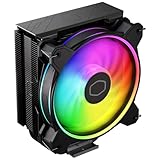
| Cooler Master Hyper 212 Spectrum V3 ARGB CPU Air Cooler | RGB on a shoestring | Check on Amazon |
| Cooler Master Hyper 212 Black CPU Air Cooler | Classic value tuning | Check on Amazon |
| Thermalright Assassin X 120R Digital ARGB White CPU Cooler | White builds | Check on Amazon |
| Cooler Master Hyper 212 Halo ARGB CPU Air Cooler | Modern socket coverage | Check on Amazon |
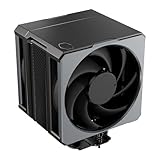
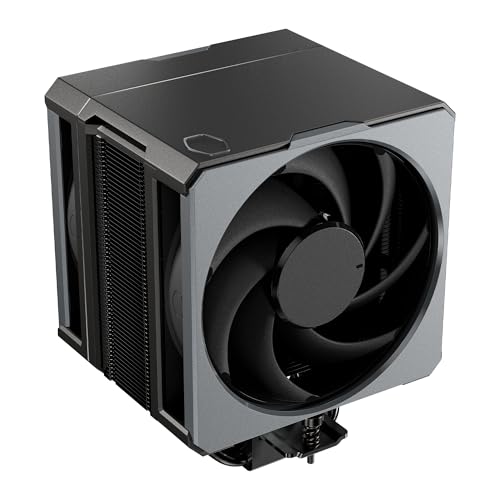
| Cooler Master Hyper 620S Dual Tower ARGB CPU Air Cooler | Heavy overclocks | Check on Amazon |
| Cooler Master Hyper 612 APEX SCHP CPU Air Cooler | Maximum air cooling | Check on Amazon |
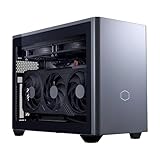
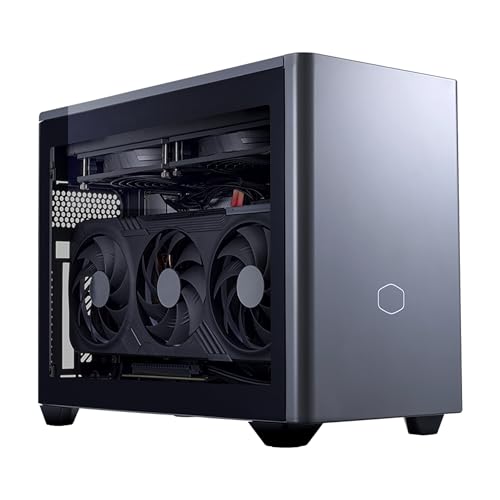
| Cooler Master NR2 Pro Gaming PC 7800X3D + RX 9070 XT Mini ITX PC | Skip the build entirely | $2455.99 |
How We Compared
Budget for an overclocked system means something different than budget for a stock office PC — a cooler that’s fine at 65W will cook a tuned chip at 150W or more. We prioritized coolers with published heatpipe counts and wattage ratings, preferring towers with four or more heatpipes for anything beyond a light overclock. We also weighed socket support (AM5 and LGA1700/1851 are mandatory for a current build), physical height against common case limits (compact towers run roughly 125–155mm tall; measure your case before buying), noise characteristics, and price-per-performance at each budget tier. Every product here was evaluated on real-world fit, installation experience, and long-term value — no invented benchmark charts, just honest guidance on which cooler matches your chip, case, and wallet.
The 8 Best Picks
1. ID-COOLING SE-903-XT V2 Black Compact CPU Air Cooler — around $13
This is the floor of viable air cooling, and it’s surprisingly competent there. With three heatpipes and a 150W thermal rating, the SE-903-XT V2 can hold a moderate overclock on a mid-range chip, and its compact tower fits small cases where taller coolers won’t. At around $13 it costs less than most case fans.
- Extremely cheap at around $13
- Rated for 150W, enough for light-to-moderate overclocks
- Three heatpipes will saturate on high-end tuned chips
Best for first-time builders squeezing a build into a small case and a tiny budget. Skip it if you’re pushing a flagship CPU with a serious voltage bump — step up to a four-or-six-heatpipe tower instead.
2. Cooler Master Hyper 212 Spectrum V3 ARGB CPU Air Cooler — around $19
The Hyper 212 line is the most famous budget cooler family ever made, and the Spectrum V3 keeps the legacy alive with four heatpipes and ARGB lighting under $20. For an overclocked gaming PC on a strict budget, four heatpipes is the sensible minimum, and this delivers it with lighting to match your build.
- Four heatpipes for just around $19
- ARGB lighting at an entry-level price
- Modest fin stack limits extreme overclocking headroom
Best for budget builders who want their cooler to look as good as it performs. Skip it if you’re running a 200W+ tuned chip — you’ll want more thermal mass.
3. Cooler Master Hyper 212 Black CPU Air Cooler — around $24
The Black edition pairs four compact continuous direct contact heat pipes with Cooler Master’s SickleFlow 120 Edge fan, plus included LGA1700 and AM5 brackets. Direct-contact heatpipes transfer heat from the CPU’s integrated heat spreader more efficiently, which matters when you’ve added watts via overclocking. The all-aluminium finish and blacked-out look suit stealth builds.
- Direct contact heat pipes improve heat transfer
- Includes LGA1700 and AM5 brackets out of the box
- Single-fan configuration caps top-end performance
Best for the classic mid-range overclocked build — a 65W-class chip tuned upward, cooled quietly for around $25. Skip it if you need dual-fan push-pull or a dual-tower design.
4. Cooler Master Hyper 612 APEX SCHP CPU Air Cooler — around $89
This is the no-compromises option: a single-tower design with dual PWM fans and Cooler Master’s SCHP (sintered heat pipe) technology for rapid heat uptake. If you’re running a high-core-count chip with a substantive overclock, this is the kind of cooler that holds clocks under sustained all-core load without thermal drama.
- Dual PWM fans deliver strong airflow with good noise control
- SCHP heat pipe technology for efficient heat pickup
- Premium price and large footprint may not fit every case
Best for enthusiasts who want near-custom-loop cooling without the complexity. Skip it if your case has a CPU cooler height limit under about 160mm, or if your overclock is mild — a $30–55 option will do the job.
5. Cooler Master Hyper 212 Halo ARGB CPU Air Cooler — around $33
The Halo is the modern Hyper 212: a 120mm high-performance PWM fan, four copper heat pipes, and a sleek top cover, with native support for AMD AM5/AM4 and Intel LGA 1851/1700. That socket list matters — if you’re building on Intel’s newest platform or upgrading later, this cooler carries forward. Easy installation and low noise round it out.
- Supports LGA 1851/1700 and AM5/AM4 for future-proofing
- Quiet 120mm PWM fan with easy installation
- Four heatpipes top out before heavy dual-tower territory
Best for a current-generation build where socket coverage and quiet operation matter most. Skip it if you’re overclocking aggressively on a hot chip — the Hyper 620S below is the better tool.
6. Cooler Master NR2 Pro Gaming PC 7800X3D + RX 9070 XT Mini ITX PC — $2455.99
Not a cooler — a complete answer to the question. The NR2 Pro pairs AMD’s 7800X3D, arguably the best gaming CPU of its generation, with an RX 9070 XT in a mini ITX build that’s already assembled, thermally sorted, and ready to game. If your “budget” is really about total value and your time is worth money, this removes the cooler-selection problem entirely.
- Complete 7800X3D + RX 9070 XT system, ready out of the box
- Compact mini ITX footprint for small setups
- Costs 40x more than the cheapest cooler in this roundup
Best for buyers upgrading an entire aging rig rather than one component. Skip it if your existing PC is otherwise healthy — a $25–55 cooler upgrade is the smarter spend.
7. Thermalright Assassin X 120R Digital ARGB White CPU Cooler — around $23
Thermalright has quietly become the value king of air cooling, and the Assassin X 120R Digital shows why: a 120mm PWM quiet fan, AGHP 4th technology heatpipes, a digital ARGB display element, and broad support for Intel LGA1700/1851/1150/1151/1200 and AMD AM4/AM5 — in white, at around $23. For white-themed builds, the alternatives are usually far more expensive.
- Genuine white-cooler option under $25
- AGHP 4th technology and wide socket support including AM5 and LGA1851
- White finish shows dust and requires more frequent cleaning
Best for white or light-themed builds that still need real overclocking headroom from four heatpipes. Skip it if your case’s airflow is poor — white coolers in dusty rooms need regular maintenance to stay photogenic.
8. Cooler Master Hyper 620S Dual Tower ARGB CPU Air Cooler — around $53
The sweet spot for serious overclockers who don’t want to spend $90. The Hyper 620S is a dual-tower design with six silver nickel-plated copper heat pipes, a 120mm PWM fan, and ARGB lighting, standing 154.9mm tall. Dual towers simply have more fin surface area, which translates directly to lower temperatures at a given noise level — exactly what a sustained gaming overclock demands.
- Six heat pipes and dual-tower mass handle heavy sustained loads
- Excellent value at around $53 with ARGB included
- 154.9mm height and width require case clearance checks
Best for high-wattage tuned chips in mid-tower cases with room to spare. Skip it if your case is compact — check clearance first, and fall back to the Hyper 212 Halo.
Buying Guide
Match Thermal Capacity to Your Overclock
Every watt you add through overclocking has to leave through the cooler. Light overclocks on efficient chips are fine with a 150W-rated compact tower like the SE-903-XT V2; heavier voltage bumps need four heatpipes minimum (Hyper 212 family, Assassin X 120R), and flagship tuned silicon realistically wants six heatpipes and dual-tower mass (Hyper 620S or Hyper 612 APEX). When in doubt, buy one tier above what you think you need.
Measure Clearance and Check Sockets
Air coolers are physical objects with real dimensions. Compact towers run around 125–140mm tall; the Hyper 620S stands 154.9mm. Check your case’s published CPU cooler height limit and subtract a few millimeters for safety. Then confirm bracket support: AM5 and LGA1700 are essential today, and LGA1851 support (as on the Hyper 212 Halo and Assassin X 120R) future-proofs an Intel build. RAM clearance matters too — tall RGB memory modules can collide with front-mounted fans.
Noise Is a System, Not a Spec
For a gaming PC near your desk, a quieter fan at a given temperature beats a louder fan at a slightly lower temperature. PWM fans let your motherboard ramp speed with load, so idle is silent and gaming stays controlled. Dual-fan designs like the Hyper 612 APEX can run fans slower for the same cooling, which is why they’re quieter under sustained load than single-fan towers pushing the same wattage.
Our Verdict
For most overclocked gaming PCs, the Cooler Master Hyper 212 Halo ARGB at $33 is the pick: modern socket coverage, four copper heat pipes, quiet PWM operation, and easy installation. If every dollar counts, the Hyper 212 Spectrum V3 at around $19 delivers four heatpipes and ARGB for the price of a game. If you’re pushing serious watts, spend up to the Hyper 620S at around $53 — dual-tower cooling is the single best-value upgrade for a hard-overclocked chip. And if your whole rig is due for replacement, the NR2 Pro at $2455.99 skips the parts-picking entirely.
FAQ
Do I really need an aftermarket cooler for an overclocked CPU?
Yes, in almost every case. Stock coolers are sized for stock power limits. Once you raise clocks and voltages, sustained heat output climbs well past what a stock cooler dissipates quietly, leading to thermal throttling, clock instability, or fans running at full tilt. Even the around $13 SE-903-XT V2, rated for 150W, outclasses most stock solutions.
How many heatpipes do I need for overclocking?
Three is the minimum for light overclocks on efficient chips, four is the practical standard for tuned mid-range CPUs, and six heatpipes in a dual-tower layout (Hyper 620S) is where heavy sustained overclocks stay comfortable. More heatpipes and more fin area mean lower fan speeds for the same temperature.
Will a budget air cooler fit my case?
Check two numbers: your case’s maximum CPU cooler height and the cooler’s height. The Hyper 620S stands 154.9mm, which fits most mid-towers but not compact cases; the SE-903-XT V2 and other compact towers around 125–140mm fit small builds. Also verify RAM clearance if the cooler’s fan overhangs the memory slots.
Is air cooling still better than a cheap AIO liquid cooler for overclocking?
For budget builds, air is usually the smarter buy. A well-designed air cooler has no pump to fail, no liquid to evaporate over years, and towers like the Hyper 620S or Hyper 612 APEX compete directly with entry-level 240mm AIOs in thermals while lasting longer and costing less. Reserve AIOs for cases with poor airflow or flagship chips chasing absolute minimum temperatures.
Related guides
- Best Gaming PC for Overwatch 2: Ten Prebuilts Matched to Your Monitor (2026)
- Best Gaming PC for Baldur’s Gate 3: Matching CPU, VRAM and Storage to the Game (2026)
- Best Gaming PC for Apex Legends: Which Listings Fit a High-Refresh Setup (2026)
- Best RTX 3060 Gaming PCs: Eight Prebuilt Listings Compared by CPU, RAM and Cooling (2026)









