
If you have ever tried to validate a new gaming rig on a cramped desk between a monitor, keyboard, and a tangle of power cables, you know benchmarking is not just about software. The room itself becomes part of the test. Poor airflow behind the desk, inconsistent power delivery from an overloaded outlet, and no space to swap components can turn a simple frame rate check into a frustrating afternoon.
That is why budget-conscious testers are rethinking what benchmarking setup actually means. Instead of chasing the most expensive tools, the smart approach pairs affordable, reliable software with hardware that makes testing faster, safer, and more repeatable. From prebuilt PCs that give you a stable baseline to tools that verify your power and test bench setup, these picks help you get trustworthy numbers without blowing your budget. In 2026, we focused on value, stability, and practical usefulness for home testing.
As an Amazon Associate we earn from qualifying purchases at no extra cost to you.





Our Top Picks



Top 3 picks at a glance
Quick Picks
| Product | Best for | Price |
|---|---|---|
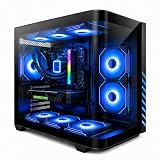
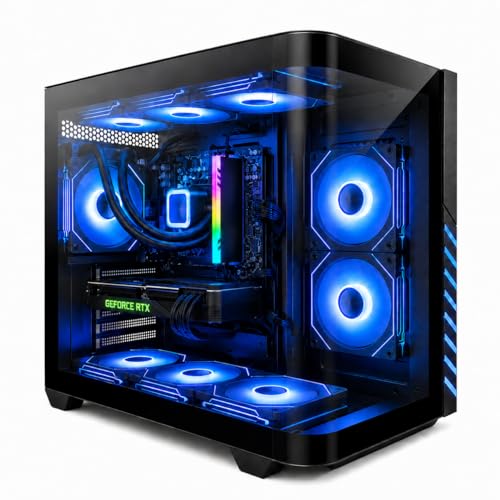
| KOTIN Prebuilt Gaming PC RTX 5070 12GB, Ryzen 7 9700X, 32GB DDR5, 1TB SSD | Best for High-End Baseline Testing | $2099.99 |
| KOTIN Gaming PC Desktop, Ryzen 7 8700F, RTX 5060 Ti 8GB, 16GB DDR5, 1TB SSD | Best Mid-Range Value Rig | $1399.99 |
| CyberPowerPC Gaming PC, Intel Core i5-14400F, GeForce RTX 5060 8GB | Best Intel-Based Test Platform | $1265 |
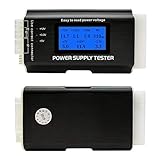
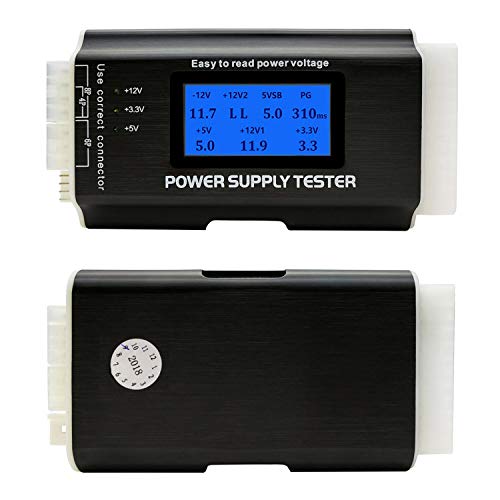
| Fuhengli Computer PC Power Supply Tester | Best Budget PSU Diagnostic Tool | Check on Amazon |
| KOTIN Gaming PC, Ryzen 7 9700X, RX 9070 XT 16GB, 32GB DDR5, 1TB SSD | Best for AMD GPU Benchmarking | $2399.99 |
| Gaming PC Desktop Liquid Cooled Ryzen 7 8700F RTX 4060 Ti 16GB DDR5 RAM | Best Liquid-Cooled Budget Tester | $1158.88 |
| AL01 Open Frame Computer case DIY PC Test Bench for ATX M-Board, 1Pc | Best Open Test Bench | Check on Amazon |
| Cunyuer Computer Power Supply Tester, 20/24 Pin Computer PC Power Supply Tester with LCD Display, for ATX, BTX, ITX, TFX | Best LCD Display PSU Tester | Check on Amazon |
How We Compared
We evaluated this lineup through the lens of a home tester who wants consistent, budget-friendly benchmarking results without a professional lab. Software alone cannot tell you if a crash is caused by a driver or a failing power rail, so we looked at the complete testing workflow. Our priority was stable, repeatable performance for running popular free benchmarks like 3DMark Demo, Cinebench, Unigine Superposition, and in-game benchmarks.
We prioritized systems that offer a clear performance tier for comparison, from entry 1080p to high-refresh 1440p, with modern DDR5 memory ranging from 16GB to 32GB and fast 1TB NVMe SSDs that keep load times from bottlenecking tests. We also included essential low-cost hardware tools that prevent bad data, specifically ATX power supply testers and an open-frame bench that improves thermal consistency and component access. Price was considered as a range relative to performance, with an emphasis on avoiding overspending for features that do not improve benchmark accuracy.
The 8 Best Picks
1. KOTIN Prebuilt Gaming PC RTX 5070 12GB, Ryzen 7 9700X, 32GB DDR5, 1TB SSD
This tower is for testers who need a powerful, stable baseline to push benchmarking software to its limits without building from scratch. With a Ryzen 7 9700X and RTX 5070 12GB paired with 32GB of DDR5, it handles 1440p high-refresh and 4K benchmarking runs smoothly, making it easy to spot genuine software differences rather than hardware bottlenecks. The 1TB SSD, typically in the 3,000 to 5,000 MB/s read range, ensures quick project loads and clean OS installs for before-and-after tests.
- Pro: Strong CPU-GPU balance reduces bottleneck variables during software comparisons
- Pro: 32GB DDR5 provides headroom for multitasking while logging benchmark data
- Con: At $2099.99, it exceeds a strict budget if you only need 1080p results
When to skip: Skip if your research focuses solely on entry-level or esports titles where a lower-tier GPU would give more relevant budget data.
2. KOTIN Gaming PC Desktop, Ryzen 7 8700F, RTX 5060 Ti 8GB, 16GB DDR5, 1TB SSD
Ideal for the mainstream tester who wants credible numbers for the most common gaming PC configuration. The Ryzen 7 8700F and RTX 5060 Ti 8GB combination sits right in the sweet spot for 1080p ultra and 1440p high settings, which is where most free benchmarking tools show their most useful scaling. With 16GB DDR5 and a 1TB SSD, this system boots test suites quickly and maintains stable frame time data without excess cost.
- Pro: Excellent price-to-performance ratio for validating budget benchmarking software
- Pro: Compact mid-tower footprint fits easily on a desk or secondary test table
- Con: 16GB RAM may limit heavy simultaneous workload testing
When to skip: Skip if you plan to benchmark memory-intensive creation workloads alongside gaming tests and need 32GB as a baseline.
3. CyberPowerPC Gaming PC, Intel Core i5-14400F, GeForce RTX 5060 8GB
Built for testers who want an Intel platform for cross-platform software comparisons. The Core i5-14400F, a 10-core processor with boost clocks around 5.0 GHz, paired with the RTX 5060 8GB, provides a reliable alternative to AMD-based rigs when checking how benchmarks scale across architectures. At $1265, it keeps costs in the mid-range while still delivering consistent 1080p and 1440p results. Standard ATX dimensions and typical system weight between 25 and 30 pounds make it easy to position for airflow during extended loop tests.
- Pro: Intel platform adds valuable data point for software scaling tests
- Pro: Lower price than comparable AMD 9700X builds while retaining 8GB VRAM
- Con: Integrated cooling and case airflow vary by configuration and may need monitoring
When to skip: Skip if you already own an Intel test system and need an AMD counterpart for direct GPU comparison.
4. Fuhengli Computer PC Power Supply Tester
This is for any budget tester who has ever blamed benchmarking software for a crash that was actually a power issue. For around $15, this compact tester checks ATX power supplies quickly by verifying voltage on 20/24-pin, 6-pin, and SATA connectors before you start a long benchmark loop. Measuring roughly 4.5 x 2.5 x 1 inches and weighing under 4 ounces, it fits in a drawer next to your USB drives and saves hours of troubleshooting.
- Pro: Instantly identifies PSU faults that corrupt benchmark stability
- Pro: Very low cost prevents wasted time on flawed test runs
- Con: Does not test under full load, so it is a pre-check rather than a full diagnostic
When to skip: Skip if you already own a multimeter or LCD-based tester and are comfortable reading manual voltage tolerances.
5. KOTIN Gaming PC, Ryzen 7 9700X, RX 9070 XT 16GB, 32GB DDR5, 1TB SSD
Designed for testers who need to benchmark across both major GPU ecosystems. While many budget rigs focus on NVIDIA, this $2399.99 system pairs the same Ryzen 7 9700X with the Radeon RX 9070 XT 16GB, giving you double the VRAM for testing high-resolution textures and future API performance. The 32GB DDR5 and 1TB SSD keep the platform identical to its RTX counterpart, so your benchmarking software results isolate GPU differences more cleanly.
- Pro: 16GB VRAM is ideal for testing 4K and ultra-texture presets
- Pro: Mirrored CPU and memory specs make AMD vs NVIDIA comparisons more accurate
- Con: Highest price in this roundup, best justified for dedicated comparison testing
When to skip: Skip if your audience or workflow is entirely NVIDIA-focused and you do not need cross-vendor data.
6. Gaming PC Desktop Liquid Cooled Ryzen 7 8700F RTX 4060 Ti 16GB DDR5 RAM
This system suits testers who run repeated benchmark loops and want thermal consistency on a budget. The Ryzen 7 8700F and RTX 4060 Ti remain strong for 1080p and 1440p testing, while the 240mm liquid cooler, typically rated for 200 to 250 watts of heat dissipation, helps keep CPU clocks steady during extended Cinebench or Blender runs. At $1158.88, it is the lowest-priced full tower here and includes 16GB DDR5, with wattage draw generally in the 450 to 600 watt range depending on load.
- Pro: Liquid cooling improves clock stability during long benchmark sessions
- Pro: Lowest tower price makes it a true budget baseline
- Con: RTX 4060 Ti tier is a step below the 5060 class for newer game benchmarks
When to skip: Skip if you prefer air cooling for simplicity or need the latest generation GPU for forward-looking tests.
7. AL01 Open Frame Computer case DIY PC Test Bench for ATX M-Board, 1Pc
This open-frame bench is for hands-on testers who swap GPUs, RAM, or coolers between benchmark runs. Designed for ATX motherboards with standard mounting points, the steel frame measures approximately 15 x 10 x 7 inches and keeps components exposed for better thermal observation and faster changes. At around $19, it eliminates the need to work inside a closed case and helps maintain consistent ambient airflow, which improves the repeatability of open-air thermal benchmarks.
- Pro: Open design speeds up hardware swaps and cable management during our research
- Pro: Improves airflow visibility and prevents heat buildup from enclosed cases
- Con: No dust filtering or protection, not ideal for permanent daily use
When to skip: Skip if your research space has pets or heavy dust and you need an enclosed case for long-term use.
8. Cunyuer Computer Power Supply Tester, 20/24 Pin Computer PC Power Supply Tester with LCD Display, for ATX, BTX, ITX, TFX
Perfect for beginners who want clear, immediate voltage readouts before trusting a benchmark score. For around $14, this tester supports 20/24-pin ATX, BTX, ITX, and TFX supplies and displays real-time voltages on an integrated LCD screen, so you can spot out-of-spec 12V, 5V, or 3.3V rails without interpreting LED blink codes. It weighs only a few ounces and draws power directly from the PSU under test, making it a quick first step before installing free benchmarking suites.
- Pro: LCD display makes voltage checks readable for new testers
- Pro: Broad compatibility covers most budget and office PSUs you might reuse
- Con: Like most budget testers, it does not simulate heavy gaming load
When to skip: Skip if you need detailed load testing or logging, which requires a more advanced, higher-cost unit.
Buying Guide
Matching Hardware to Your Benchmarking Goals
Budget benchmarking software itself is often free, so your spending should target the hardware that makes its data trustworthy. For 1080p testing, a system in the $1158.88 to $1399.99 range with an RTX 4060 Ti or 5060 class GPU is sufficient. For 1440p or cross-vendor comparisons, stepping up to the $2099.99 to $2399.99 tier with 32GB DDR5 and 12GB to 16GB VRAM gives you more headroom. Always ensure you have at least a 1TB NVMe SSD so storage does not throttle level loads and a power supply rated between 650 and 850 watts with 80 PLUS Bronze or better efficiency.
Stability Before Scores
A good benchmark result starts before you click run. Use a PSU tester in the around $14 to around $15 range to confirm voltages are within the standard plus or minus 5 percent tolerance, and consider an open test bench around $19 if you frequently swap parts. Keep ambient room temperature consistent, close background apps, and run each benchmark three times to average out variance. These low-cost habits improve data quality more than paying for premium software.
Cost Control and Upgrade Path
Think in price ranges rather than single models. Budget testers should allocate more to a balanced CPU and GPU pairing and less to aesthetics like RGB or oversized cases. Systems between $1265 and $1399.99 often deliver 85 to 90 percent of the practical testing utility of higher-priced rigs. Choose DDR5 platforms with four DIMM slots and an extra M.2 slot, so you can add 16GB of RAM or a second SSD later without replacing the entire system.
Our Verdict
For most home testers, the KOTIN Gaming PC Desktop with Ryzen 7 8700F and RTX 5060 Ti 8GB at $1399.99 hits the best balance of modern performance and budget control, making free benchmarking software shine without overbuying. If you need a stable high-end reference, the RTX 5070 build at $2099.99 is worth the stretch, while the RX 9070 XT system at $2399.99 is the pick for AMD-specific comparisons. Pair any tower with the Cunyuer LCD PSU Tester at around $14 and the AL01 Open Frame Bench at around $19 to create a repeatable, affordable testing station that delivers clean, comparable numbers run after run.
FAQ
Do I need to pay for benchmarking software to get accurate results?
No. Free options like Cinebench, 3DMark Basic Edition, Unigine Superposition Basic, and built-in game benchmarks provide reliable, comparable scores for home testing. Paid versions mainly add automation and detailed reporting, which are not required for budget validation. Focus on consistent test conditions instead.
How much power supply do I need for consistent benchmarking?
Most of the gaming PCs in this roundup run comfortably on a 650 to 750 watt unit, with higher-end builds benefiting from 750 to 850 watts. Use a budget PSU tester to verify the 12V rail stays near 12.0 volts before long sessions, and ensure your wall circuit is not shared with high-draw appliances that can cause voltage dips.
Is an open test bench better than a closed case for benchmarking?
An open bench improves access and airflow, which helps keep temperatures consistent and makes swapping components faster. It is ideal for short-term testing. A closed case is better for daily gaming and dust protection. Many budget testers use the open bench for validation and then move the final build to a case.
What is the most common mistake when testing gaming PCs on a budget?
Running benchmarks with background updates, browser tabs, or unbalanced power settings active. These introduce variance that looks like hardware differences. Always restart, set Windows to High Performance or Balanced, disable overlays, and run each test multiple times to get a stable average before comparing results.
Related guides
- Best Gaming PC for Overwatch 2: Ten Prebuilts Matched to Your Monitor (2026)
- Best Gaming PC for Baldur’s Gate 3: Matching CPU, VRAM and Storage to the Game (2026)
- Best Gaming PC for Apex Legends: Which Listings Fit a High-Refresh Setup (2026)
- Best RTX 3060 Gaming PCs: Eight Prebuilt Listings Compared by CPU, RAM and Cooling (2026)









