
Every gaming PC ships with thermal paste already applied. Whether it is a prebuilt tower, a boutique rig, or the cooler you unboxed alongside a new CPU, that gray stripe or dot of factory compound is doing its job from the moment you boot up. The real decision a buyer faces is not “paste or no paste” — it is whether the paste you already have is quietly costing you frames, or whether spending $8 and twenty minutes of your time delivers a meaningful drop in temperatures. The answer depends on your hardware, your room conditions, and how long you plan to keep the machine running in the corner of your living room or home office.
This guide compares stock thermal paste and aftermarket paste specifically from the perspective of gaming temperatures, long-term maintenance, and total cost of ownership. No lab benchmarks, no invented numbers — just a practical breakdown of where each option genuinely shines.
As an Amazon Associate we earn from qualifying purchases at no extra cost to you.


Our Top Picks


Top 3 picks at a glance
Quick Verdict
For most gamers, stock paste is good enough — until it is not. Factory compound keeps a modern CPU within safe thermal limits under typical gaming loads, especially in a case with decent airflow. Aftermarket paste becomes worth the switch in three situations: your CPU is running hot or thermal throttling, your build is more than two or three years old and the stock paste has dried out, or you are chasing every last bit of performance from a high-wattage processor in a warm room. A quality aftermarket compound like ARCTIC MX-7 costs between $7 and $9 for enough paste to repaste a rig several times over, making it one of the cheapest upgrades in PC building.
Side by Side
| Factor | Stock Thermal Paste | Aftermarket Paste for Gaming Temps |
|---|---|---|
| Comfort (setup) | Zero effort — pre-applied and ready out of the box | Requires removal of cooler, cleaning, and careful application; 20–40 minutes for a first-timer |
| Thermal performance | Adequate; typically adequate margin for mid-range CPUs at stock wattage | Potentially several degrees cooler under sustained load, depending on CPU and cooler |
| Durability | Often dries out in 2–3 years, especially in warm rooms | Premium compounds like MX-7 are formulated for long durability, often lasting 5+ years without cracking or pumping out |
| Price range | $0 — included with CPU or cooler | $7–$10 for a 4–8 gram tube; premium legacy compounds up to $15 per tube |
| Maintenance | None until degradation causes heat issues | Reapply every 3–5 years; keep isopropyl alcohol and a lint-free cloth on hand |
| Space needed | None — nothing extra to store | A single tube (about 1 inch wide, 3–4 inches long) in a desk drawer; a 4 g tube covers roughly 15–20 applications |
| Look | Invisible — sealed inside the build | Also invisible once installed; some compounds are available in white or colored formulas for visible builds with open coolers |
| Risk of error | None — factory application is consistent | Low but real: too much paste is messy, too little creates hot spots; modern pastes are non-conductive, so mistakes rarely damage hardware |
| Resale value | No effect | Minimal effect, though a freshly maintained, cool-running rig photographs and demos better to buyers |
| Best for | New prebuilts, first-time builders, anyone under warranty constraints | Hot-running CPUs, older builds showing thermal creep, high-wattage chips, warm-room gamers |
Where Stock Thermal Paste Wins
Warranty simplicity. Opening a prebuilt PC or lifting a stock cooler does not automatically void a warranty in most cases, but it does complicate support conversations. If your machine is under a one- or two-year service plan, leaving the factory paste alone removes any ambiguity.
Consistency. Factory application is machine-applied or carefully QC’d. There is no risk of air bubbles, uneven coverage, or over-application. For a mid-range CPU drawing 65–88 watts under gaming load — think mainstream six- and eight-core chips — stock compound keeps temperatures comfortably within spec in a case with two or more intake fans.
Zero cost and zero effort. The stock option requires no purchase, no isopropyl alcohol, no tube of paste aging in a drawer. For a family PC that games occasionally or a rig used mostly at 1080p with a mid-tier graphics card, the CPU rarely becomes the thermal bottleneck.
Fewer failure points for beginners. Repasting means detaching a cooler from a CPU socket. First-timers occasionally bend socket pins, disturb mounting pressure, or apply paste to the wrong surfaces. If the idea of that makes you nervous, stock paste’s “leave it alone” advantage is real.
Where Aftermarket Paste for Gaming Temps Wins
Sustained load headroom. Modern high-end CPUs can spike to 150–250 watts under all-core loads, and even in games, boost algorithms ride thermal limits aggressively. Better paste improves heat transfer from the processor’s heat spreader to the cooler, which can translate to lower sustained temperatures and, on some chips, slightly higher sustained boost clocks. Gains vary by system and are never guaranteed — but on a marginal build, better paste can be the difference between throttling and not throttling.
Longevity. Factory pastes vary widely in quality. Some are fine for years; others pump out or dry within 18–24 months, particularly in a warm room or a small case with a 120 mm cooler working hard. Long-durability compounds like ARCTIC MX-7 are engineered to resist drying and pump-out over years of thermal cycling. A single 8 g tube at around $8 covers roughly 25–30 applications — enough for this rig and every upgrade for the next decade.
Reviving older builds. If a three-year-old gaming PC that used to run cool now spikes into the 90s °C, degraded paste is one of the most common culprits, alongside dust. Cleaning and repasting with a quality compound is a standard refresh that often restores the machine’s original thermal behavior.
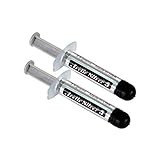
Cheap insurance during other upgrades. Paste is single-use. Any time you remove a cooler — to upgrade a CPU, swap a cooler, or deep-clean a radiator — you should replace the paste anyway. Having a $7 tube on hand turns a required purchase into a choice of the best option rather than whatever the local store stocks. Even a two-pack of a classic compound like Arctic Silver 5, around $29 for two 3.5 g tubes, works out to a reasonable per-application cost for enthusiasts who prefer its long track record.
Cost Over 5 Years
Stock paste: $0 upfront. But if the compound degrades by year two or three — common in warm rooms — a service visit can run $50–$100, or a DIY repaste requires buying paste anyway. Realistic five-year cost: $0–$100 depending on whether degradation happens and who fixes it.
Aftermarket paste, DIY: One 4 g tube of MX-7 at around $7 covers roughly 15–20 applications. Over five years you would realistically repaste once, maybe twice, using perhaps 1–2 grams total. Realistic five-year cost: $7–$10, plus $5–$10 for isopropyl alcohol and lint-free wipes you may already own. Even stepping up to a premium two-pack of Arctic Silver 5 at around $29, you would use only a fraction of it.
The math is not close. Aftermarket paste is one of the few PC upgrades where the consumable costs less than a pizza and the labor is free. The only scenario where stock paste wins on cost is a machine you never open for five years — and that assumes the stock compound holds up, which is a gamble in anything warmer than a climate-controlled office.
Which One for Your Home
Small Apartment
Compact living usually means a small case on or near a desk, with less airflow and more ambient heat — a gaming laptop or small-form-factor build in a 300-square-foot studio runs warmer than the same hardware in a spare room. Heat is your enemy, and degraded paste compounds the problem. A 4 g tube of ARCTIC MX-7 at around $7 is the right call: small enough to store in any drawer, enough for a laptop repaste now and again in three years, and long-durability formulas handle tight thermal environments well. Just verify your laptop or SFF cooler is user-serviceable before buying.
Family with Kids and Pets
Shared gaming PCs in living rooms and dens collect dust and hair fast, and fur-filled environments clog coolers, pushing temperatures up and paste degradation along. Choose aftermarket paste and bundle the repaste with your annual deep clean — isopropyl alcohol and wipes are already on your list. A single 8 g tube at around $8 lives in the same drawer as the cleaning supplies and covers every family machine, including an aging hand-me-down PC. Keep the tube out of reach of small children; while these pastes are non-conductive and low-toxicity, they are not snacks.
Rental
If you are renting and the gaming rig may move or get sold in a couple of years, stock paste is fine for now, but plan for one repaste before you sell. A rig that idles cool and quiet demos better, and a $7 tube of MX-7 is cheaper than the price cut a “runs hot” listing invites. Choose the 4 g size unless you maintain multiple machines — the 8 g tube is better value per gram, but the smaller tube suits a machine you will not keep long.
Long-Term Home
If this is the machine — the one you will upgrade, re-cool, and maintain for five to ten years — aftermarket paste is the obvious choice, and bulk is your friend. The 8 g tube of ARCTIC MX-7 at around $8 costs barely more than the 4 g and covers every future CPU swap, cooler upgrade, and maintenance cycle you will ever do. Pair it with a bottle of 90%+ isopropyl alcohol and a pack of lint-free cloths, and repasting becomes a routine 30-minute task every three to four years instead of a chore. Enthusiasts who enjoy tinkering may also appreciate a two-pack of Arctic Silver 5 as a secondary compound for lower-wattage secondary machines.
FAQ
Does aftermarket thermal paste really lower gaming temperatures?
It can, but results depend on your CPU, cooler, and how degraded the old paste was. Replacing dried-out stock paste with a quality compound often produces a noticeable improvement on older builds. Swapping fresh stock paste for aftermarket paste on a brand-new, well-cooled mid-range CPU usually yields modest gains. Either way, good paste never hurts — the question is whether the improvement justifies the effort.
How often should I replace thermal paste on a gaming PC?
Every three to five years for most desktops, or sooner if you notice temperatures climbing, fans ramping harder than they used to, or sudden thermal throttling. Laptops and small-form-factor builds in warm rooms may need it closer to the two-to-three-year mark. Any time you remove the cooler, apply fresh paste — reusing old compound leaves air gaps.
How much thermal paste do I actually need?
Very little. A rice-grain-sized dot or a small pea-sized amount in the center of the CPU heat spreader is standard; mounting pressure spreads it evenly. A 4 g tube provides roughly 15–20 applications, which is why even a single small tube lasts most builders many years.
Is aftermarket thermal paste safe for beginners?
Yes, with basic care. Choose a non-conductive, non-capacitive compound so a slight over-application cannot short anything — most modern pastes, including popular options like ARCTIC MX-7, are formulated this way. Watch a couple of application videos, use 90%+ isopropyl alcohol and a lint-free cloth to clean the old paste, and take your time reseating the cooler with even pressure. The main risks are impatience and cross-threaded mounting screws, not the paste itself.
Whether you are refreshing a battle-worn rig in 2026 or simply deciding whether to leave your new prebuilt alone, the stock-versus-aftermarket choice comes down to effort, environment, and how long you plan to keep the machine. For a few dollars and half an hour, aftermarket paste gives long-term gamers cheap peace of mind — and for everyone else, stock compound will happily hold the line until it cannot.
Related guides
- Best Gaming PC for Overwatch 2: Ten Prebuilts Matched to Your Monitor (2026)
- Best Gaming PC for Baldur’s Gate 3: Matching CPU, VRAM and Storage to the Game (2026)
- Best Gaming PC for Apex Legends: Which Listings Fit a High-Refresh Setup (2026)
- Best RTX 3060 Gaming PCs: Eight Prebuilt Listings Compared by CPU, RAM and Cooling (2026)









