
As an Amazon Associate we earn from qualifying purchases at no extra cost to you.


Our Top Picks

The Short Answer
Sometimes — but here’s the honest truth: overclocking your CPU is worth it for FPS only if your games are CPU-bound and you already have adequate cooling and a decent power supply. If you’re playing at 1080p with a top-tier graphics card, a 5–10% frame rate gain from a stable overclock can be noticeable. If you’re GPU-bound at 1440p or 4K, or running a budget chip on a stock cooler, you’ll likely gain almost nothing and may introduce crashes.
The one condition: check whether your games are actually limited by the processor first (open Task Manager’s performance tab while gaming — if CPU usage sits near 100% while GPU usage is 60–80%, you’re CPU-bound and overclocking could help; if the GPU is pegged at 99%, it won’t).
What You Actually Get
Real-world gains from a CPU overclock are modest, even when done well. Modern chips like AMD’s Ryzen 7 7700X boost themselves aggressively out of the box, leaving little headroom — typical stable overclocks yield 3–8% more frames in CPU-bound scenarios. Older unlocked Intel chips (like the i9-11900KF, which runs an unlocked multiplier) often have more room, sometimes 8–15% when paired with a strong 360mm liquid cooler.
Practical numbers: if you’re getting 100 FPS in a CPU-heavy title, a successful overclock might push you to 105–115 FPS. If you’re getting 200+ FPS at low settings, the percentage gain shrinks. Minimum frame rates (the 1% lows that cause stutter) often benefit slightly more than averages, which is where some gamers feel it’s worthwhile.
There’s also a cost side most articles gloss over. A quality 360mm all-in-one liquid cooler runs $100–$180, and you’ll want a solid 850W Gold-rated power supply (roughly $90–$130) to handle the extra draw safely. An overclocked CPU can pull 100–150W more than stock, adding heat and noise to your room.
The free routes matter too. Enabling XMP/EXPO for your RAM costs nothing and often delivers a bigger FPS bump than a CPU overclock — sometimes 10% or more in CPU-bound games, since memory speed and latency matter enormously to modern processors. Undervolting and PBO Curve Optimizer tweaks can also free up thermal headroom for better sustained boost clocks without traditional overclocking at all.
Pros
- Free performance if your hardware already supports it — unlocked chips need only time and patience, not money
- Typical gains of 5–10% in CPU-bound titles, with 1% lows sometimes improving more
- Better value from older platforms where a new CPU upgrade costs more than the gains justify
- Tuning experience that teaches you how your system actually works
- Undervolting variants can reduce heat and fan noise while maintaining or improving clocks
- Can extend the useful life of an aging system by a year or two before an upgrade feels necessary
Cons
- Gains are small in GPU-bound scenarios — at 1440p or 4K, expect 0–3%
- Requires an unlocked (K-series Intel or non-X-locked AMD) chip; locked CPUs can’t be overclocked meaningfully
- Added cooling costs: a capable air cooler ($50–$100) or 360mm AIO ($100–$180)
- Higher power draw and heat — an overclocked chip can add 100–150W of load
- Stability issues take hours of stress testing to resolve, and intermittent crashes can appear weeks later
- Potential warranty implications and, in extreme cases, reduced component lifespan
- Modern CPUs already boost near their limits, shrinking the remaining headroom every generation
Who Should Buy It
Tinkerers running high-refresh 1080p or 1440p monitors (144Hz and up) with a strong graphics card and a CPU-bound workload — competitive shooters and simulation titles like flight and racing sims are exactly where extra CPU headroom shows up. It’s also sensible for owners of older unlocked chips (an i9-11900KF system, for example) who want to squeeze out another year before upgrading, especially if they already own a 360mm liquid cooler. If you enjoy the process of tuning, stress testing, and benchmarking, the effort itself has value beyond the frames.
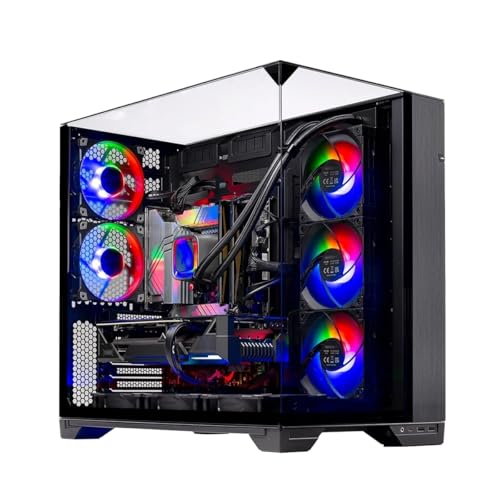
You don’t need to build from scratch to get a capable platform, either. A prebuilt like the Skytech Gaming O11 Vision — a Ryzen 7 7700X with an RTX 5070, 32GB of DDR5, a 360mm ARGB AIO, and an 850W Gold ATX 3.0 power supply at $1999.99 — arrives with the cooling and power overhead that makes light overclocking or undervolting viable on day one. The AVGPC Blizzard at $1499 pairs an unlocked i9-11900KF with an RTX 5060 Ti and a 360mm liquid cooler, and that older unlocked Intel chip is precisely the type with meaningful manual overclocking headroom.
Who Should Skip It
Skip it if you’re GPU-bound — anyone gaming at 4K, or at 1440p with ray tracing enabled, will see essentially no benefit because the graphics card is the bottleneck. Skip it if you’re on a locked CPU, a stock cooler, or a budget power supply under 650W. Skip it if stability matters more than frames: streamers mid-broadcast, competitive players who can’t tolerate a crash, or anyone who simply wants their PC to work. And if your budget is limited, that $100–$180 cooler budget is almost always better spent on a faster graphics card, which will return 20–40% more FPS rather than 5%.
Cheaper Alternatives
| Option | Cost | Trade-off |
|---|---|---|
| Enable XMP/EXPO for your RAM | Free | Bigger FPS gains than most CPU overclocks, but requires a BIOS visit and a stability check |
| Undervolt / PBO Curve Optimizer | Free | Lower temps and quieter fans; smaller FPS gains, and tuning still takes an evening |
| Upgrade your GPU instead | $250–$600 | 20–40% more FPS in most games, but only if your PSU (650W+ recommended) can handle it |
| Increase RAM from 16GB to 32GB | $60–$110 | Fixes stutter in modern open-world titles, but won’t raise peak frame rates |
| Upgrade to a 240Hz+ monitor later | $200–$400 | Doesn’t add FPS, but makes existing frame rates feel dramatically smoother |
FAQ
How much FPS does overclocking a CPU actually add?
In CPU-bound games — typically 1080p or high-refresh 1440p play — expect 5–10%, sometimes up to 15% on older unlocked chips. In GPU-bound scenarios at 4K or with ray tracing, gains are usually under 3% and often zero. Nobody can promise exact numbers because results depend entirely on your specific chip, cooling, and workload.
Does overclocking damage your CPU?
A conservative, well-tested overclock with adequate cooling is unlikely to shorten your CPU’s life meaningfully. The real risks are running too much voltage for too long, or using a cooler that can’t handle the extra 100–150W of heat. Modern chips also have built-in thermal protection that throttles or shuts down before permanent damage occurs in most cases.
Is overclocking still worth it in 2026, or do modern CPUs handle it automatically?
Modern processors boost themselves aggressively out of the box, which has shrunk manual overclocking gains to the point where free tweaks like XMP/EXPO memory profiles and undervolting usually deliver better returns. Traditional overclocking is now mostly worthwhile for older unlocked chips and enthusiasts who enjoy the process — not as a practical FPS upgrade path for new systems.
Do I need a special cooler and power supply to overclock?
Yes, realistically. Plan on a quality tower air cooler ($50–$100) or a 240mm–360mm liquid cooler ($80–$180), and a Gold-rated power supply with headroom — 750W–850W is a comfortable target for an overclocked gaming build. A stock cooler and a marginal 550W unit are the fastest routes to thermal throttling and crashes.
Related guides
- Best Gaming PC for Overwatch 2: Ten Prebuilts Matched to Your Monitor (2026)
- Best Gaming PC for Baldur’s Gate 3: Matching CPU, VRAM and Storage to the Game (2026)
- Best Gaming PC for Apex Legends: Which Listings Fit a High-Refresh Setup (2026)
- Best RTX 3060 Gaming PCs: Eight Prebuilt Listings Compared by CPU, RAM and Cooling (2026)









