
As an Amazon Associate we earn from qualifying purchases at no extra cost to you.

Our Top Picks
 CORSAIR Vengeance LPX DDR4 RAM 32GB2 count (pack of 1)5.32 x 0.28 x 1.32 Inches0 PoundsCheck on Amazon

The Short Answer
Yes — 32GB of RAM is worth it for future gaming, with one condition: you’re building or buying a system you plan to keep for at least three to four years. If you’re upgrading an older DDR3 or DDR4 machine that you plan to replace within a year or two, the money is better saved toward that next build. For most other gamers, 32GB has moved from “nice to have” to the sensible baseline, and 16GB is where the compromises start showing up.
What You Actually Get
Doubling from 16GB to 32GB doesn’t make games render faster or boost frame rates by themselves — RAM capacity is about headroom, not raw speed. What you get is room for modern games that routinely allocate 14–20GB on their own, plus your operating system (Windows 11 idles at 4–6GB), a browser with a dozen tabs (2–4GB), Discord, and a background launcher like Steam. On a 16GB system, that adds up fast, and once physical RAM fills, Windows spills over to your SSD. That’s when you feel it: stuttering when alt-tabbing, longer texture streaming delays, and hitching in open-world titles.
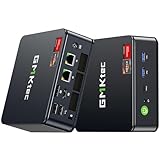
The second thing you get is longevity. Games are already shipping with recommended specs that assume 16GB as a floor, and that floor keeps rising. A 32GB kit — for example, a CORSAIR Vengeance LPX 32GB (2x16GB) DDR4 kit at 3200MHz, CL16, running at 1.35V with XMP/EXPO support — costs around $250 at the high end and considerably less during sales. Compare that to the roughly $560–$700 you’d spend on a whole entry gaming mini PC like the GMKtec M5 Ultra (Ryzen 7 7730U, 32GB RAM, 512GB SSD), and a RAM upgrade is one of the cheapest future-proofing moves per dollar in PC hardware.
It’s also worth noting what you *don’t* get. You won’t see higher average FPS in most games — benchmarks consistently show capacity changes little once you’re above the game’s needs. The benefit shows up in consistency: fewer stutters, smoother multitasking, and no “out of memory” crashes in memory-hungry titles and mods.
Pros
- Genuine future-proofing: 32GB comfortably covers games shipping in 2026 and beyond, which increasingly assume more than 16GB for high-texture settings and background processes.
- Smoother multitasking: Stream, browse, and run Discord alongside a game without Windows paging to your SSD.
- Better for mods and sim games: Heavily modded Skyrim, Cities: Skylines, and Microsoft Flight Simulator are notorious memory hogs.
- Useful outside gaming: Video editing, virtual machines, and heavy browser work all benefit — the same RAM serves your productivity.
- Low cost per year of usefulness: At roughly $60–$250 depending on speed and RGB, a kit that lasts four-plus years works out to pennies a day.
- Efficient dual-channel setup: A 2x16GB kit keeps dual-channel bandwidth; 1.35V XMP/EXPO kits run cool and stable at rated speeds.
Cons
- Minimal FPS gains today: If your only goal is higher frame rates right now, that money is better spent on a GPU upgrade.
- Dead-end platform risk: DDR4 kits won’t carry over to a future DDR5-only build, so the upgrade could be stranded if you switch platforms soon.
- Not the bottleneck in most rigs: If you’re gaming at 1080p on a midrange GPU, the graphics card — not RAM — is what’s limiting you.
- Small power draw: Each DIMM adds roughly 3–5W; negligible for desktops, but it matters in battery-powered mini PCs and laptops.
- Diminishing returns: Going beyond 32GB to 64GB benefits almost no current game.
Who Should Buy It
Buy 32GB if you’re building a new PC now, you keep systems for four or more years, you play modern open-world or simulation titles, you stream or record while gaming, or you do content creation on the same machine. It’s also the right call if you’re at 16GB and regularly see memory usage above 90% while gaming — check Task Manager’s Performance tab during a session. A system like the GMKtec M5 Ultra mini PC, which ships with 32GB already, shows how manufacturers now treat 32GB as the practical standard even in compact desktops.
Who Should Skip It
Skip it if you play mostly esports titles (Valorant, CS2, Rocket League) that rarely exceed 10GB of total system usage, if your current rig is due for full replacement within two years, or if a GPU or CPU upgrade would deliver far more noticeable gains for the same $100–$250. Also skip it if your motherboard tops out at DDR3 or older — a new platform is the prerequisite, not more capacity.
Cheaper Alternatives
| Option | Cost | Trade-off |
|---|---|---|
| Upgrade to 16GB (2x8GB) DDR4 3200MHz | $40–$70 | Fine for esports and 1080p gaming today, but likely the next bottleneck within two to three years. |
| Add 16GB to existing 8GB (mismatched pairing) | $35–$60 | Cheap capacity boost, but risks losing dual-channel bandwidth and XMP stability if timings differ. |
| Faster SSD or Windows page-file tuning | $0–$80 | Softens stutter from low RAM, but repeated paging wears the SSD and adds load-time lag — a workaround, not a fix. |
| Buy a prebuilt with 32GB included (e.g., compact gaming mini PCs) | $550–$700 | Solves the problem without DIY, but you’re paying for a full system and accepting integrated graphics limits on demanding titles. |
FAQ
Does 32GB RAM increase FPS?
Not meaningfully on its own. If you’re coming from 8GB or a starved 16GB setup, you may see fewer stutters and better 1% lows, but average frame rates are driven by your GPU and CPU. Above 16GB, capacity rarely changes FPS at all.
Is 32GB overkill for gaming in 2026?
No. It’s the new comfortable baseline. A handful of demanding titles plus Windows, a browser, and voice chat can push a 16GB system to its limit. 32GB removes that ceiling without being wasteful — 64GB would be overkill for gaming.
Should I get 2x16GB or 4x8GB for 32GB?
Get 2x16GB. Two sticks leave DIMM slots open for future expansion, put less strain on the memory controller (four sticks often can’t run rated XMP/EXPO speeds reliably), and cost about the same.
Is 32GB worth it on a laptop or mini PC?
Only if it’s upgradeable. Many laptops and mini PCs have soldered RAM, so you must buy the configuration you’ll need for the device’s whole life. If 32GB is a $50–$100 configuration bump at purchase, take it — you can’t add it later.
Related guides
- Best Gaming PC for Overwatch 2: Ten Prebuilts Matched to Your Monitor (2026)
- Best Gaming PC for Baldur’s Gate 3: Matching CPU, VRAM and Storage to the Game (2026)
- Best Gaming PC for Apex Legends: Which Listings Fit a High-Refresh Setup (2026)
- Best RTX 3060 Gaming PCs: Eight Prebuilt Listings Compared by CPU, RAM and Cooling (2026)









