
Our Top Picks
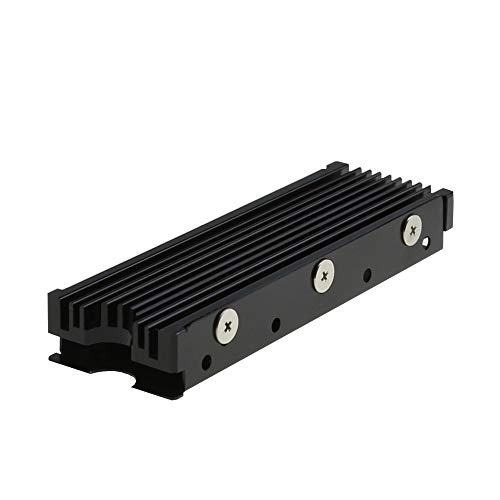 MHQJRH M.2 2280 SSD heatsink for PC /Double Side Heatsink(black)3 x 0.95 x 0.4 Inches0.1 poundsCheck on Amazon

The Short Answer
Yes, an NVMe heatsink is worth it for gaming if your SSD runs hot enough to throttle, but not worth it if your drive already stays cool. That one condition decides everything: if your SSD regularly exceeds 70 to 75 degrees Celsius under load, a heatsink prevents thermal throttling and keeps load times consistent. If it stays below that range thanks to good case airflow or a motherboard heatsink, you will see no difference in frames per second or game loading speed. For most gamers in 2026, a simple $7 to $25 heatsink is cheap insurance, not a performance upgrade.
Modern PCIe 4.0 drives, and especially PCIe 5.0 drives, draw more power and generate more heat than older PCIe 3.0 models. A gaming load does not stress an SSD continuously like a large file transfer does, but long installs, shader compilation, DirectStorage titles, and open-world streaming can push controller temperatures high enough to trigger built-in protection that slows the drive down. A heatsink raises the thermal headroom before that happens.
As an Amazon Associate we earn from qualifying purchases at no extra cost to you.

What You Actually Get
An M.2 NVMe SSD is a small stick, standardized as M.2 2280, which means 22 mm wide and 80 mm long, weighing about 7 to 10 grams without a heatsink. The heatsink is an aluminum or copper assembly that sits on top of it. A typical aftermarket model like the MHQJRH M.2 2280 SSD heatsink measures around 70 to 76 mm long, 22 to 24 mm wide, and 8 to 12 mm tall with fins, and weighs 25 to 45 grams. It includes a thermal pad, usually 0.5 to 1.0 mm thick, that bridges the gap between the drive’s controller and NAND chips and the metal.
What it does is passive heat dissipation. The pad conducts heat from the hottest component, usually the controller chip, into the aluminum fins, which then spread it into the airflow inside your case or console. It draws 0 watts itself and requires no power cable. Installation takes about five minutes: you remove any protective film, place the pad, clamp or screw the heatsink over the drive, and reinstall the M.2 screw.
Integrated options work the same way but come pre-installed. A drive like the fanxiang S660 PCIe 4.0 1TB NVMe M.2 SSD with Heatsink at around $170 includes a factory-fitted low-profile heatsink sized to fit a PS5 expansion slot and most desktop motherboards. These factory units are typically tuned for clearance, staying under 11.25 mm total height for PS5 compatibility, and use a graphite or silicone pad applied at the factory for even contact.
You do not get higher sequential read/write specs from a heatsink. A 5000 MB/s drive remains a 5000 MB/s drive. What you get is more consistent sustained performance. Without adequate cooling, a drive that is rated for 5000 MB/s might briefly hit that speed and then step down to 800 to 1500 MB/s once the controller overheats. With a heatsink and at least modest airflow, it is far more likely to stay at peak speeds for the full duration of a game install or large patch.
Tangible specs to check before buying: total z-height including the SSD, screw and clip type, and whether your motherboard already has an integrated M.2 shield. Double-stacking a motherboard heatsink on top of an aftermarket heatsink traps heat and should be avoided. Use one or the other, not both.
Pros
- Prevents thermal throttling during sustained loads: Most NVMe controllers begin to throttle between 70 and 85 degrees Celsius to protect NAND. A heatsink increases surface area and thermal mass, which delays or prevents that step-down during long game downloads, 50 to 100 GB installs, or when copying a Steam library.
- Very low cost for peace of mind: Standalone M.2 2280 heatsinks range from around $6 for a basic model like the MHQJRH up to $15 to $25 for larger finned or heatpipe versions. Compared to the $80 to $180 cost of a 1TB to 2TB PCIe 4.0 SSD, that is a 5 to 15 percent add-on that can extend consistent performance.
- Essential for PS5 and compact cases: Sony requires a heatsink for the PS5 M.2 expansion slot. In small form factor PCs and cases with limited airflow, there is often no direct breeze over the M.2 slot. A heatsink compensates for stagnant air where motherboard airflow is weakest.
- No noise, power, or software required: Unlike a fan, a heatsink adds no moving parts, no extra 1 to 3 watts of power draw, and no maintenance. Once installed, it works silently for the life of the drive.
- Can help drive longevity: NAND flash wears faster with heat and thermal cycling. While manufacturers rate drives for a wide operating range, typically 0 to 70 degrees Celsius ambient, keeping average operating temperatures lower reduces stress on the controller and solder joints over several years of heavy use.
- Easy to retrofit: You do not need to repurchase storage. If you already own a bare drive, you can add a heatsink later without cloning, reinstalling, or reformatting anything.
Cons
- Zero FPS gain in most gaming scenarios: Games load data in bursts, not continuously. If your SSD never throttles during play, a heatsink will not increase frame rates, reduce latency, or shorten load times by a measurable amount. It is thermal insurance, not a speed booster.
- Clearance and compatibility issues: Tall finned heatsinks can collide with GPU backplates, CPU coolers, or motherboard M.2 shields. Low-profile PS5-compatible coolers are safer for universal fit, but some high-performance double-sided heatsinks exceed 12 to 15 mm and will not fit under a graphics card.
- Can hurt temps if installed wrong: Forgetting to peel the plastic film off the thermal pad, using a pad that is too thick and creates poor contact, or stacking two heatsinks together can insulate the drive and make temperatures worse than bare.
- Redundant if your motherboard already cools well: Most mid-range and high-end motherboards from the last three years include a thick aluminum M.2 cover with a pre-applied thermal pad. Adding a second aftermarket heatsink is unnecessary and can void the clean contact of the integrated solution.
- Not a fix for poor case airflow: A heatsink still needs some air movement to shed heat. In a case with zero intake or exhaust flow, even a large heatsink will heat-soak. Addressing overall airflow of 30 to 60 CFM per fan matters more in that situation.
Who Should Buy It
Buy a heatsink if any of these describe your setup. First, you own a PCIe 4.0 or PCIe 5.0 NVMe drive that runs hot. Drives that advertise 5000 to 7400 MB/s or higher typically use controllers that draw 5.5 to 8.5 watts under load, compared to 3 to 5 watts for older PCIe 3.0 drives. Second, you game on a PS5. The expansion bay has limited ventilation and Sony explicitly mandates a heatsink; a factory-equipped model like the fanxiang S660 with its integrated heatsink is the simplest compliant path. Third, your SSD sits under a hot graphics card or in a secondary M.2 slot with no motherboard shield and your case sensors show drive temps above 68 to 72 degrees Celsius while gaming or installing.
You should also buy if you frequently move large files, record gameplay to the same NVMe drive, or play DirectStorage-enabled titles that stream assets directly from the SSD to the GPU. Those sustained read workloads are where throttling is most likely to appear as stutter-freeze or a sudden drop in install speed.
For these users, a around $6 to $20 aftermarket cooler is the most cost-effective option if you already own the drive, while a drive sold with a heatsink for $150 to $190 per TB simplifies installation and guarantees PS5 clearance.
Who Should Skip It
Skip the add-on if your motherboard already includes a solid M.2 heatsink and your SSD idles at 35 to 45 degrees Celsius and peaks under 65 degrees Celsius while gaming. Check with HWInfo, CrystalDiskInfo, or your BIOS; if you never cross the throttling threshold, you are already fine.
Also skip if you have a PCIe 3.0 drive used purely for a game library, or a secondary SATA M.2 drive. Those drives generate less heat, usually under 4.5 watts, and rarely throttle in a desktop with at least one intake and one exhaust fan.
Finally, skip tall aftermarket models if you have tight clearance. If the M.2 slot is directly under your GPU and you have less than 10 mm of space, either use the motherboard’s low-profile shield or choose a drive with a factory low-profile heatsink designed to stay under 11.25 mm.
Cheaper Alternatives
| Option | Cost | Trade-off |
|---|---|---|
| Use motherboard M.2 shield with included thermal pad | $0 if already included | Performance varies by board; thin shields with small pads cool less than large finned aftermarket units; must remove plastic film and ensure good contact |
| Improve case airflow (add 1x 120mm fan or re-route cables) | $10 to $25 per fan | Cools GPU, CPU, and SSD together; requires fan header and space; does not help PS5 expansion slot |
| Move NVMe to primary top slot nearer CPU | $0 | Top slot often has better shield and airflow, but may be occupied or share PCIe lanes with GPU on some boards |
| Buy SSD with factory heatsink instead of bare + aftermarket | $10 to $30 premium over bare drive | Guaranteed fit and warranty-friendly contact; less choice of heatsink size and cannot reuse cooler later |
| Standalone around $6 heatsink (e.g., MHQJRH M.2 2280) | around $6 to $12 | Cheapest dedicated fix; adds 8 to 12 mm height; quality depends on pad thickness and mounting pressure |
If you are on a tight budget, start with free fixes: confirm your motherboard shield is actually installed with its thermal pad making contact, and ensure your case has at least two fans moving air. Those alone often drop M.2 temps by 5 to 12 degrees Celsius. If temps remain high or you need PS5 compliance, the around $6 standalone heatsink is the next logical step before considering a new drive.
FAQ
Will a heatsink give me higher FPS or faster load times?
Not directly. Gaming frame rates are determined by CPU and GPU, not SSD temperature, as long as the SSD is not throttling. A heatsink prevents the drive from slowing down during long loads. You may notice more consistent install speeds and less chance of stutter when a game streams large open-world assets, but you should not expect a 5 to 10 FPS increase from cooling alone.
Do I need a heatsink for a PS5 SSD?
Yes. Sony requires a heatsink for any M.2 SSD installed in the PS5 expansion slot, and the total assembly must meet the size envelope of 110 mm long, 25 mm wide, and 11.25 mm tall. A drive sold with an integrated PS5-compatible heatsink, or a bare 2280 drive paired with a low-profile heatsink that meets those dimensions, is required for proper fit and thermal performance.
Can I install a heatsink myself without losing data?
Yes. You do not need to format the drive. Power down, unplug, remove the M.2 screw, lift the drive slightly, apply the thermal pad to the controller and NAND, seat the heatsink evenly, and reinstall the screw with light, even pressure. Do not overtighten. Keep the original warranty sticker intact where possible and avoid covering any diagnostic labels that your manufacturer requires for RMA.
Is a cheap $7 heatsink as good as a $25 one?
For most PCIe 4.0 gaming drives, the difference is small. Both use aluminum fins and a silicone pad to spread heat. More expensive models add more fin surface area, thicker base plates, or heatpipes, which can help by a few extra degrees under sustained 6 to 8 watt loads. For gaming bursts rather than continuous workstation writes, a basic correctly installed around $6 to $15 heatsink is usually sufficient.
Related guides
- Best Gaming PC for Overwatch 2: Ten Prebuilts Matched to Your Monitor (2026)
- Best Gaming PC for Baldur’s Gate 3: Matching CPU, VRAM and Storage to the Game (2026)
- Best Gaming PC for Apex Legends: Which Listings Fit a High-Refresh Setup (2026)
- Best RTX 3060 Gaming PCs: Eight Prebuilt Listings Compared by CPU, RAM and Cooling (2026)









