
A gaming PC built around an Intel Core i7 needs a motherboard that can do more than simply fit the processor. It has to support the LGA 1700 platform, provide sensible memory and storage expansion, and offer networking that suits the rest of the setup. For a desk-bound gaming room, practical details such as a front USB-C header, enough M.2 space for a growing game library, and reliable wired networking can matter as much as RGB lighting.
This roundup narrows the field to the best budget Z790 motherboards for i7 gaming, with options ranging from a low-cost renewed board to feature-heavy premium designs. Prices and availability can move quickly in 2026, so think of these picks as a value ranking based on the listed specifications, connectivity, expansion, and current price—not as a claim of identical fit for every case, cooler, or gaming setup.
As an Amazon Associate we earn from qualifying purchases at no extra cost to you.




Our Top Picks
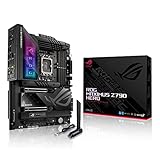
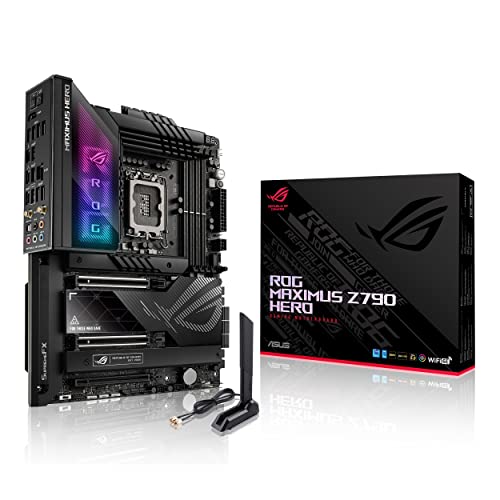 ASUS ROG Maximus Z790 Hero WiFi6E LGA 1700Z790 Hero|M.2 x5|WiFi 6E|12.2 x 4.5 x 14.6 inches9.3 PoundsCheck on Amazon
 ASUS Z790 MAX Gaming WIFI7 Intel Z790Z790 MAX|M.2 x3|WiFi 7|ATX10.8 x 13.4 x 2.8 inchesCheck on Amazon


Top 3 picks at a glance
Quick Picks
| Product | Best for | Price |
|---|---|---|
| INLAND i7-14700K with ASUS TUF Gaming Z790-Plus WiFi DDR5 bundle | Buyers who need both an i7 processor and motherboard | Check on Amazon |
| ASUS Z790-AYW WiFi W II | Balanced ATX builds with USB-C and WiFi 6 | Check on Amazon |
| ASUS ROG Maximus Z790 Hero WiFi 6E | High-end expansion and enthusiast features | Check on Amazon |
| ASUS Z790 GAMING WIFI7 | Lowest-priced new ASUS option here | Check on Amazon |
| ASUS Z790 MAX Gaming WIFI7 | WiFi 7 shoppers wanting 20Gbps Type-C | Check on Amazon |
| MSI Z790 GAMING PLUS WIFI-AMZ Renewed | Lowest upfront cost for 2.5Gbps LAN | Check on Amazon |
| MSI PRO Z790-A WiFi II | Storage-heavy i7 gaming builds | Check on Amazon |
| ASUS TUF Gaming Z790-Plus WiFi Renewed | Value seekers who want four M.2 slots | Check on Amazon |
How We Compared
We prioritized LGA 1700 compatibility for Intel Core 14th, 13th, and 12th Gen processors where stated, then compared the features that affect a gaming build over time: DDR5 support, PCIe 5.0, M.2 slot count, wired and wireless networking, USB-C connectivity, and power-delivery specifications. Value was judged against each listed price. Renewed models rank well when their feature set is unusually strong for the cost, but they are best for shoppers comfortable checking the seller’s condition details and included-accessory policy before ordering.
The 8 Best Picks
1. INLAND i7-14700K with ASUS TUF Gaming Z790-Plus WiFi DDR5 Bundle
This is the straightforward choice for someone starting an i7 gaming build from scratch rather than upgrading an existing system. At around $560, it combines an Intel i7-14700K 14th Gen 20-core processor with the ASUS TUF Gaming Z790-Plus WiFi DDR5 motherboard. The board brings PCIe 5.0, DDR5, WiFi 6, 2.5Gb LAN, four M.2 slots, and 16+1 DrMOS, creating a well-rounded platform without requiring separate processor and board shopping.
- Pro: Includes both the i7-14700K processor and motherboard in one purchase.
- Pro: Four M.2 slots and 2.5Gb LAN suit a game-heavy desktop.
- Con: It is a bundle price, not a low-cost motherboard-only option.
Skip it if you already own a compatible LGA 1700 processor or want the lowest possible motherboard cost.
2. ASUS Z790-AYW WiFi W II
The ASUS Z790-AYW WiFi W II is a balanced pick for an i7 gamer who wants an ATX board with current connectivity but does not need premium-tier extras. Its around $200 price includes DDR5 support, PCIe 5.0, three M.2 slots, WiFi 6, 2.5Gb LAN, HDMI, and USB 10Gbps Type-C connectivity. The listed 12+1 DrMOS power design is another meaningful specification for buyers comparing entry-level Z790 boards.
- Pro: 2.5Gb LAN and WiFi 6 provide flexible networking options.
- Pro: Three M.2 slots leave room beyond a single game drive.
- Con: It has fewer M.2 slots than several alternatives in this list.
Skip it if four M.2 slots are a must-have or if a renewed board better matches your budget.
3. ASUS ROG Maximus Z790 Hero WiFi 6E
The ASUS ROG Maximus Z790 Hero is the feature leader here, but it is not a conventional budget purchase at around $800. It is for i7 gamers building a highly expandable desk setup and willing to pay for premium connectivity. The specification list includes PCIe 5.0, DDR5, 20+1 power stages, 2.5Gb LAN, WiFi 6E, Bluetooth 5.2, five M.2 slots, and two Thunderbolt 4 ports. That is an exceptional collection of expansion features for users with multiple drives and peripherals.
- Pro: Five M.2 slots offer the most onboard storage expansion listed here.
- Pro: Includes two Thunderbolt 4 ports and 2.5Gb LAN.
- Con: Its price is far above the budget-focused options.
Skip it if value is the priority; less expensive Z790 boards cover mainstream i7 gaming needs.
4. ASUS Z790 GAMING WIFI7
At around $170, the ASUS Z790 GAMING WIFI7 is the least expensive new ASUS board in this roundup and a sensible starting point for a straightforward ATX gaming system. It supports DDR5 and PCIe 5.0, includes three M.2 slots, uses a 14+1 DrMOS design, and provides HDMI plus USB 3.2 Gen 2×2 Type-C. It also lists Thunderbolt support and a front USB 3.2 Gen 1 Type-C connection, useful when matching the board to a case with front-panel USB-C.
- Pro: A around $170 price keeps a new Z790 build accessible.
- Pro: Offers PCIe 5.0, DDR5, and three M.2 slots.
- Con: It lists Realtek 1Gb LAN rather than 2.5Gb LAN.
Skip it if faster wired networking is important for your home network or large local transfers.
5. ASUS Z790 MAX Gaming WIFI7
The ASUS Z790 MAX Gaming WIFI7 makes a strong case for shoppers who want WiFi 7 without moving to a much higher price bracket. For around $200, it pairs DDR5 and PCIe 5.0 support with three M.2 slots, a 14+1 DrMOS design, WiFi 7, USB 20Gbps Type-C, and Thunderbolt USB4 support. That combination gives a modern i7 gaming build useful peripheral connectivity while preserving room in the budget for graphics, storage, and cooling.
- Pro: WiFi 7 is included at a price below $200.
- Pro: USB 20Gbps Type-C supports faster compatible external devices.
- Con: Wired networking is listed as Realtek 1Gb LAN.
Skip it if 2.5Gb LAN is more valuable to you than WiFi 7 or faster Type-C connectivity.
6. MSI Z790 GAMING PLUS WIFI-AMZ Renewed
The renewed MSI Z790 GAMING PLUS WIFI-AMZ is a price-first pick for builders who still want the fundamentals for i7 gaming. At around $130, it supports Intel 14th, 13th, and 12th Gen processors on LGA 1700 and includes DDR5, PCIe 5.0, M.2 slots, 2.5Gbps LAN, Wi-Fi 6E, Bluetooth 5.3, and USB 3.2 Gen2. For a gaming system connected by Ethernet, its 2.5Gbps LAN is particularly compelling at this price.
- Pro: Lowest price among the boards listed with 2.5Gbps LAN.
- Pro: Wi-Fi 6E and Bluetooth 5.3 add useful wireless flexibility.
- Con: It is sold as renewed rather than new.
Skip it if you only want factory-new hardware or need a confirmed M.2 slot count before purchase.
7. MSI PRO Z790-A WiFi II
The MSI PRO Z790-A WiFi II is one of the clearest all-around values for an i7 gaming PC that will hold several SSDs. At around $190, it supports Intel Core 14th, 13th, and 12th Gen processors and offers DDR5 Memory Boost rated at 7800+MT/s/OC, PCIe 5.0 x16, four M.2 Gen4 slots, Wi-Fi 6E, and 2.5G LAN. Its listed 80A SPS VRM specification also distinguishes it from boards that provide less power-delivery detail.
- Pro: Four M.2 Gen4 slots suit large game libraries.
- Pro: Combines Wi-Fi 6E with 2.5G LAN for around $190.
- Con: It is a PRO-series design, which may not appeal to RGB-focused builders.
Skip it if you specifically want WiFi 7 or an ASUS Aura Sync-centered lighting ecosystem.
8. ASUS TUF Gaming Z790-Plus WiFi Renewed
The renewed ASUS TUF Gaming Z790-Plus WiFi is the standout value choice for buyers who want a notably complete feature list at around $110. It supports Intel 14th, 12th, and 13th Gen processors on LGA 1700 and includes PCIe 5.0, DDR5, four M.2 slots, 16+1 DrMOS, WiFi 6, 2.5Gb LAN, front USB 3.2 Gen 2 Type-C, USB4, and Aura RGB. This is a particularly capable platform for an i7 gaming system with multiple storage drives.
- Pro: Four M.2 slots and 2.5Gb LAN at the lowest listed price.
- Pro: 16+1 DrMOS and front USB-C are strong practical inclusions.
- Con: It is renewed.
Skip it if you require a new retail board or prefer WiFi 7 over WiFi 6.
Buying Guide
Match the Board to Your Processor and Memory
Every motherboard here uses the LGA 1700 socket, but always confirm the processor-generation support listed for the individual board. DDR5 is the memory standard across these picks, so it is important to budget for DDR5 memory rather than reusing DDR4. If you are buying a processor too, the INLAND package bundles an i7-14700K with a compatible ASUS TUF board for around $560.
Plan Storage Before You Fill the Case
A single M.2 SSD can work for a basic gaming library, but capacity needs often grow quickly. The ASUS Z790-AYW WiFi W II, ASUS Z790 GAMING WIFI7, and ASUS Z790 MAX Gaming WIFI7 list three M.2 slots. The MSI PRO Z790-A WiFi II and both TUF listings provide four, while the ROG Maximus Z790 Hero lists five. More slots can reduce the need to replace an existing drive later.
Choose Networking for the Room You Actually Use
If the PC will sit near a router or Ethernet jack, 2.5Gb LAN is worth prioritizing for a faster compatible wired network. The MSI Z790 GAMING PLUS WIFI-AMZ, MSI PRO Z790-A WiFi II, TUF Gaming Z790-Plus listings, Z790-AYW WiFi W II, and ROG Hero include 2.5Gb networking. The two ASUS WiFi 7 boards list Realtek 1Gb LAN, so they make more sense for wireless-first rooms or standard wired networks.
Our Verdict
For most shoppers, the MSI PRO Z790-A WiFi II is the best balance of price, four M.2 slots, 2.5G LAN, Wi-Fi 6E, and stated DDR5 capability at around $190. The renewed ASUS TUF Gaming Z790-Plus WiFi is the strongest pure bargain at around $110 if renewed hardware is acceptable. For a new, wireless-forward build, the ASUS Z790 MAX Gaming WIFI7 offers WiFi 7 and USB 20Gbps Type-C for around $200.
FAQ
Is Z790 a good chipset for i7 gaming?
Yes. The boards in this roundup are built around Intel’s LGA 1700 platform and pair i7-compatible support with DDR5 and PCIe 5.0. The best choice depends more on storage, networking, connectivity, and price than on gaming performance alone.
How many M.2 slots should a gaming motherboard have?
Three M.2 slots are sufficient for many builds, but four offers more flexibility for separate operating-system, game-library, and additional storage drives. Choose five only when you know you need extensive onboard SSD expansion.
Is a renewed Z790 motherboard worth considering?
It can be, especially when the feature set is strong for the price. The renewed ASUS TUF Gaming Z790-Plus WiFi costs around $110, while the renewed MSI Z790 GAMING PLUS WIFI-AMZ costs around $130. Review the seller’s condition and included-accessory details before buying.
Do I need WiFi 7 for an i7 gaming PC?
No. WiFi 6 and Wi-Fi 6E remain practical choices, especially if your network does not support WiFi 7. A stable Ethernet connection can be preferable for a fixed gaming desk, making 2.5Gb LAN an equally important specification for many buyers.
Related guides
- Best Gaming PC for Overwatch 2: Ten Prebuilts Matched to Your Monitor (2026)
- Best Gaming PC for Baldur’s Gate 3: Matching CPU, VRAM and Storage to the Game (2026)
- Best Gaming PC for Apex Legends: Which Listings Fit a High-Refresh Setup (2026)
- Best RTX 3060 Gaming PCs: Eight Prebuilt Listings Compared by CPU, RAM and Cooling (2026)









