
Setting up a high-performance workspace or quiet home office PC requires managing both system acoustics and heat generation. Intel’s LGA 1700 socket—spanning 12th, 13th, and 14th generation Core processors—introduces a unique challenge for desktop builders: the standard Independent Loading Mechanism (ILM) applies asymmetrical force across the center of the CPU package. Over time, this uneven tension warps the processor’s integrated heat spreader (IHS), leading to poor contact with your liquid cooler or air heatsink. The result is elevated thermal throttling and spinning cooling fans that disrupt a quiet working environment.
A corrective CPU contact frame replaces the stock retention latch with a full-coverage aluminum perimeter frame that distributes pressure evenly across all four edges. Whether you are assembling a custom workstation in 2026 or searching for the best budget contact frame for intel lga 1700 to optimize an existing desktop setup, securing uniform contact pressure keeps CPU temperatures in check without demanding a heavy financial investment. Below, we review eight top-rated, wallet-friendly corrective brackets evaluated for machining quality, installation ease, and fitment.
As an Amazon Associate we earn from qualifying purchases at no extra cost to you.




Our Top Picks
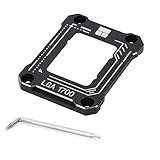
 Thermalright LGA1700-BCF Black V2 CPU Anti-Bend Fixer2.13 x 0.24 x 2.76 Inches0.2 poundsCheck on Amazon
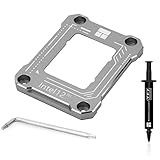
 Thermalright Intel 12th/13/14th Generation LGA1700 Anti-Bending Buckle02 x 2.76 x 0.24 Inches0.02 poundsCheck on Amazon
 Thermalright LGA1700-BCF Black 12/13/14 Generation Intel Anti-Bending Fastener2.13 x 2.76 x 0.24 inches0.02 PoundsCheck on Amazon


Top 3 picks at a glance
Quick Picks
| Product | Best for | Price |
|---|---|---|
| Thermalright LGA1700-BCF Black V2 CPU Anti-Bend Fixer | Best Overall Value | Check on Amazon |
| Thermalright LGA 1700 CPU Contact Frame | Best Standard Replacement | Check on Amazon |
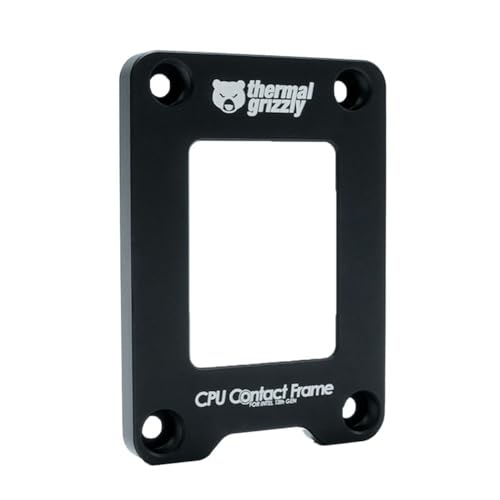
| Thermal Grizzly – CPU Contact Frame Intel 13th & 14th Generation | Best High-Precision Option | Check on Amazon |
| Thermalright Anti-Bending Buckle (Gray, 12/13/14th Gen) | Best Minimalist Gray Aesthetic | Check on Amazon |
| Thermalright LGA1700-BCF Black Fastener | Best Long-Term Stability | Check on Amazon |
| Thermalright Anti-Bending Buckle Stress Correction (Black) | Best Heavy-Duty Mounting | Check on Amazon |
| Jungle Leoaprd CPU Contact Frame Retrofit Kit | Best Third-Party Alternative | Check on Amazon |
| Thermalright Anti-Bending Buckle (Gray, 12/13th Gen) | Best Low-Profile Gray Frame | Check on Amazon |
How We Compared
Selecting the ideal contact frame requires analyzing manufacturing precision, material integrity, board clearance, and overall economic value. Because CPU contact frames interact directly with delicate LGA 1700 pin arrays—which feature 1,700 spring-loaded contact points—even microscopic manufacturing variations matter. We prioritized frames constructed from high-grade CNC-machined aluminum featuring anodized protective finishes and non-conductive underside insulation gaskets.
We evaluated each option based on installation safety, motherboard VRM clearance, included hardware tools (such as L-shaped Torx drivers), and price point relative to cooling efficiency gains. The ideal budget frame must eliminate central CPU deflection without over-pressuring socket corners or causing memory channel dropouts. Every model selected delivers consistent physical clamping force while remaining accessible to home office builders and custom system integrators alike.
The 8 Best Picks
Thermalright LGA1700-BCF Black V2 CPU Anti-Bend Fixer, Intel 12/13/14 Gen Anti-Bend Fixing Fixture, Intel CPU Corrective Fixing Bracket, LGA17XX Corrective CPU Bender, LGA1700 Full Fit Fixer
Designed for cost-conscious builders who want maximum heat spreader flattening at the absolute lowest entry point, this V2 fixer refines perimeter clearance to prevent interference with nearby motherboard capacitors. Machined from solid aluminum with a durable black finish, it fits cleanly over 12th, 13th, and 14th Generation Intel processors to neutralize package bowing.
- Pros: Unbeatable sub-$7 entry price; upgraded V2 profile improves component clearance around tight socket layouts.
- Pros: Full-coverage perimeter contact protects CPU heat spreaders from bending under heavy cooler mounting pressure.
- Con: Lacks explicit torque-stop markers on the screw holes.
When to skip: Skip if you prefer integrated depth stops to prevent potential over-tightening during installation.
Thermalright LGA 1700 CPU Contact Frame
This classic CPU contact frame provides a straightforward, robust replacement for Intel’s stock latching arm. Engineered to drop directly into standard LGA 1700 socket mounting holes, it establishes a flat contact plane so liquid cooling cold plates and air heatsinks sit perfectly flush against the processor lid.
- Pros: High manufacturing consistency across motherboard brands; sleek anodized black body matches dark PCB layouts.
- Pros: Effectively eliminates center-point bowing to promote uniform thermal paste distribution.
- Con: Does not include bundled thermal compound.
When to skip: Skip if you are seeking the absolute lowest price point available in the product line.
Thermal Grizzly – CPU Contact Frame Intel 13th & 14th Generation – for Optimized CPU Contact Pressure to Improve The Cooling Performance – Easy Install
Engineered in Germany for high-performance workstations and high-wattage desktop processors, this frame delivers extreme manufacturing tolerances. It features precise laser-etched alignment guides and stepped mounting points that dictate exact screw depth, minimizing the risk of uneven memory controller pressure.
- Pros: Industry-leading machining accuracy and engineered torque limits; laser-etched surface indicators simplify setup.
- Pros: Engineered specifically to prevent dual-channel RAM recognition issues caused by socket flex.
- Con: Higher price point at around $19 compared to sub-$10 alternatives.
When to skip: Skip if you are operating on a strict budget for a standard low-wattage office desktop build.
Thermalright Intel 12th/13/14th Generation LGA1700 Anti-Bending Buckle, Curved Pressure Plate, CPU Fixing Buckle, Fully Fitted and Fixed Without Trace Installation (Gray)
Tailored for lighter workstation aesthetics, this gray anti-bending buckle caters to silver or white motherboard setups. The curved internal pressure profile provides uniform downward force across the CPU substrate, ensuring seamless heat transfer to your cooler without leaving scratches on the processor substrate.
- Pros: Clean gray finish blends seamlessly with silver VRM heatsinks and light PCB themes; trace-free mounting pad design.
- Pros: Fully compatible across all 12th, 13th, and 14th Gen Intel desktop chips.
- Con: Color shade may contrast slightly with dark motherboard designs.
When to skip: Skip if your desktop computer build utilizes a purely stealth-black hardware theme.
Thermalright LGA1700-BCF Black 12/13/14 Generation Intel Anti-Bending Fastener, Bending Type Pressure Plate, CPU Contact Frame, Full-Fitting Fixed Non-arking Installation, Contact Frame lga 1700
This black anti-bending fastener focuses on long-term structural support for daily production systems running continuous CPU workloads. Its curved pressure plate geometry balances stress across all four mounting points, keeping the processor body perfectly level throughout years of thermal expansion and contraction cycles.
- Pros: Non-marking bottom buffer protects delicate motherboard traces surrounding the LGA 1700 socket; solid structural rigidity.
- Pros: Includes dedicated T8 driver bit for immediate out-of-the-box installation.
- Con: Screws require methodical crisscross tightening to seat evenly.
When to skip: Skip if you already own an upgraded V2 variant with revised outer edge clearances.
Thermalright Intel 12th/13th Generation LGA1700 Anti-Bending Buckle, Curved Pressure Plate,CPU Stress Bending Correction Fixer, Fully Fitted and Fixed Without Trace Installation (Black)
Built to handle heavy cooling hardware, this stress-correction frame secures tight seating for massive air towers and thick liquid cooling cold plates. The rigid frame structure absorbs mechanical stress from heavy heatsinks, preventing physical bending forces from transferring down into the motherboard socket pins.
- Pros: Rigid aluminum body prevents socket warping under heavy aftermarket heatsink loads; insulated rear pad prevents shorts.
- Pros: Reliable contact pressure optimization at an accessible around $7 price point.
- Con: Product branding highlights 12th/13th Gen explicitly, though socket dimensions fit 14th Gen.
When to skip: Skip if you insist on explicit 14th Gen labeling on the retail packaging.
Jungle Leoaprd CPU Contact Frame for LGA 1700 Retrofit Kit, All Aluminum1700 BCF Bracket Intel 12th/13th/14th Generation Anti-Bending Buckle
Offering a reliable third-party alternative to standard options, this all-aluminum retrofit kit delivers precise contact leveling for desktop rigs. The fully CNC-machined frame uses smooth chamfered edges and a lightweight profile that drops easily onto LGA 1700 sockets without obstructing nearby M.2 heatsinks.
- Pros: Smooth chamfered edges prevent accidental scratches during desktop installation; budget-friendly around $7 cost.
- Pros: Sturdy all-aluminum frame construction provides consistent perimeter support.
- Con: Included instruction documentation is brief.
When to skip: Skip if you prefer stickling strictly to primary cooling ecosystem manufacturers for brand matching.
Thermalright Intel 12th/13th Generation LGA1700 Anti-Bending Buckle, Curved Pressure Plate, CPU Fixing Buckle, Fully Fitted and Fixed Without Trace Installation (Gray)
This gray anti-bending buckle delivers solid value for system integrators who need reliable corrective tension without spending excess capital. Its low-profile design sits flush around the processor, ensuring wide compatibility with compact Mini-ITX motherboard layouts and tight workstation builds.
- Pros: Compact profile minimizes interference in small form factor (SFF) desktop cases; clean metallic finish.
- Pros: Consistent perimeter pressure distribution eliminates IHS hot spots.
- Con: Does not include secondary spare screws.
When to skip: Skip if you prefer standard black hardware or require 14th Gen specific installation diagrams.
Buying Guide
Socket Uniformity and Thermal Improvement
Intel’s factory ILM uses a two-point lever mechanism that presses down heavily across the exact middle of the processor package. Because the CPU substrate is long and rectangular, this central force causes the integrated heat spreader (IHS) to concave downward in the middle and bow upward on the edges. When you apply thermal paste and mount a flat CPU cooler, an uneven gap remains over the hottest section of the silicon. Installing a contact frame replaces two-point retention with four-point rim support, restoring a flat contact plane and ensuring optimal thermal paste spread across the entire heat spreader surface.
Material Quality and Underside Insulation
When selecting a contact frame, pay close attention to material composition and physical insulation. Look for anodized CNC-machined aluminum alloy structures, which resist physical flexing under high mounting loads. Equally important is the underside coating or insulation gasket. The frame rests close to delicate electrical traces and capacitors surrounding the CPU socket. High-quality frames feature an insulated rubber gasket or non-conductive tape on the bottom surface to prevent electrical shorting against the motherboard PCB.
Installation Safety and Screw Torque
Installing a corrective bracket requires removing the original motherboard ILM using a standard Torx driver. During installation, balance is critical: tighten screws in a star or diagonal crisscross pattern, turning each screw a quarter-turn at a time until they meet natural resistance. Excessive torque can tilt the processor, causing pins in the LGA 1700 socket to lose contact with the motherboard, which typically presents as undetected RAM slots or boot failure. Tightening incrementally ensures even pin engagement without damaging delicate socket pins.
Our Verdict
For most desktop users, the Thermalright LGA1700-BCF Black V2 represents the best overall balance of performance, component clearance, and price at just around $6. If you are building an enthusiast workstation or demand strict engineered depth tolerances to safeguard high-speed memory setups, the Thermal Grizzly CPU Contact Frame (around $19) stands out as a premium choice. Meanwhile, builders assembling silver or white-themed office PCs will find excellent thermal value in the gray Thermalright Anti-Bending Buckle (around $6).
FAQ
Why does the Intel LGA 1700 socket cause CPUs to bend?
The standard Intel Independent Loading Mechanism (ILM) clamps down on the CPU using a central two-point pressure latching system. Because the LGA 1700 package is elongated compared to older square sockets, this localized middle pressure bows the processor substrate downward, lifting the top and bottom edges and creating an uneven contact surface for CPU cold plates.
Will installing a contact frame void my motherboard or CPU warranty?
Removing the factory ILM requires unscrewing the stock retention mechanism, which can potentially complicate warranty claims with some motherboard manufacturers if physical damage occurs during installation. However, as long as you retain the original ILM bracket and do not damage the socket pins during the installation process, you can easily reinstall the stock mechanism if you ever need to send the board for repair.
How much thermal drop can I expect from a budget contact frame?
While results vary based on cooler design, thermal compound type, and processor wattage, users typically experience CPU temperature reductions ranging from 4°C to 10°C under full load. Correcting the heat spreader shape creates a micro-thin, uniform layer of thermal paste, allowing heat to transfer efficiently into your cooling heatsink.
Do I need special tools to install an LGA 1700 contact frame?
Most corrective contact frames include the necessary Torx L-wrench required to unscrew the motherboard’s original ILM frame. You will only need a basic clean cloth and isopropyl alcohol to wipe away old thermal paste before seating the new frame and securing the mounting screws in a balanced cross pattern.
Related guides
- Best Gaming PC for Overwatch 2: Ten Prebuilts Matched to Your Monitor (2026)
- Best Gaming PC for Baldur’s Gate 3: Matching CPU, VRAM and Storage to the Game (2026)
- Best Gaming PC for Apex Legends: Which Listings Fit a High-Refresh Setup (2026)
- Best RTX 3060 Gaming PCs: Eight Prebuilt Listings Compared by CPU, RAM and Cooling (2026)









