
The modern gaming room or home office is dominated by massive, immersive curved displays. Gamers and creators invest heavily in 49-inch super-ultrawide panels, only to find that their stock desktop stands eat up entire desks, lack proper height adjustment, and wobble under the slightest movement. Finding the best ultra wide monitor arm for heavy gaming screens is no longer a luxury; it is an absolute necessity to reclaim desk real estate, improve ergonomic posture, and protect an expensive piece of hardware.
The physical demands of heavy gaming screens require heavy-duty engineering. Standard monitor arms will sag, tilt downward under the leverage of an aggressive 1000R curve, or fail at the joint entirely. We compared and evaluated the market’s leading heavy-duty mounts, focusing on weight capacities up to 44 pounds, robust tilt locks, and desk stability. These selected mounts ensure your immersive, ultra-wide panel stays exactly where you position it, without any distracting sag or wobble.
As an Amazon Associate we earn from qualifying purchases at no extra cost to you.




Our Top Picks
 WALI Heavy Duty Monitor Arm for 13-49 inch13" to 49"4.44 x 11.92 x 17.24 inches10.8 poundsCheck on Amazon
 ULTRARM Heavy Duty Monitor Arm for Ultrawide MonitorsSingle Monitor Arm25 x 3 x 27 inches15.2 PoundsCheck on Amazon


Top 3 picks at a glance
Quick Picks
| Product | Best for | Price |
|---|---|---|
| ErGear Heavy Duty Monitor Arm | Best Budget Heavy-Duty Support | Check on Amazon |
| WALI Heavy Duty Monitor Arm (1000R Curved) | Best for Aggressive 1000R Curves | Check on Amazon |
| ULTRARM Heavy Duty Monitor Arm (MA20P-S) | Best Premium Pneumatic for 57″ Screens | Check on Amazon |
| WALI Ultrawide Single Monitor Arm | Best Entry-Level Midweight Support | Check on Amazon |
| ARES WING Ultrawide Monitor Arm with RGB | Best for RGB Gaming Aesthetics | Check on Amazon |
| VIVO Black Dual Ultrawide Desk Mount | Best Dual-Screen Mount for Massive Panels | Check on Amazon |
| ULTRARM Heavy Duty Monitor Arm (Modular) | Best for Customizable Modular Layouts | Check on Amazon |
| WALI Vertical Dual Monitor Mount | Best Space-Saving Stacked Layout | Check on Amazon |
How We Compared
To find the absolute best mounting systems, we evaluated products based on real-world structural demands. We analyzed weight capacity (focusing on the critical 30 to 50 lbs range), clamp design (dual C-clamp versus single grommet configurations), and tilt mechanism stability. Curved monitors throw their center of gravity forward, meaning standard tilt joints will droop even if the arm’s weight capacity is technically sufficient. We prioritized arms made from die-cast aluminum and heavy-duty steel, simulating intense gaming sessions to test for wobble and long-term sagging under load.
The 8 Best Picks
ErGear Heavy Duty Monitor Arm
The ErGear Heavy Duty Monitor Arm is designed for gamers seeking robust support without breaking the bank. It easily handles 13-49 inch ultrawide screens weighing up to 37.4 pounds, offering rock-solid support via a dual C-clamp setup or a grommet mount. The full-motion design allows you to tilt, swivel, and rotate your massive panel to find the perfect ergonomic angle.
- Pros: Exceptional dual-clamp desk stability; incredible value under $40.
- Con: Adjustment requires manual tension tuning with hex keys.
Skip this model if your display exceeds 37.4 pounds or requires frequent, tool-free height adjustments.
WALI Heavy Duty Monitor Arm (1000R Curved)
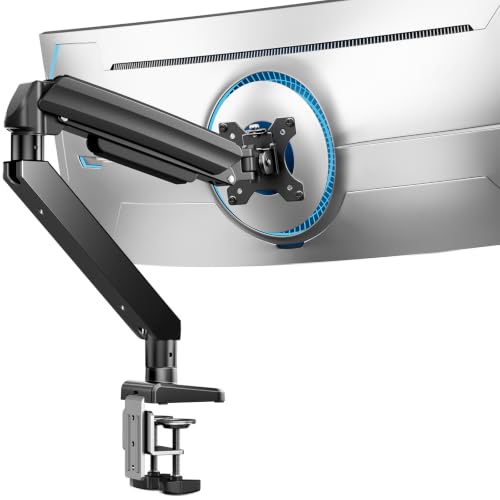
The WALI Heavy Duty Monitor Arm is engineered specifically for aggressive 1000R curved screens, which put extreme forward leverage on standard tilt joints. Supporting screens from 13 to 49 inches and up to 44 pounds, this mount keeps heavy curved panels perfectly level without any unwanted drooping or tilting.
- Pros: Specially reinforced tilt joint for 1000R curves; high 44-pound capacity.
- Con: Bulky mounting bracket occupies considerable space behind the desk.
Skip this model if you have a completely flat panel, as simpler and sleeker arms will suffice.
ULTRARM Heavy Duty Monitor Arm (MA20P-S)
The ULTRARM Heavy Duty Monitor Arm (MA20P-S) is a premium, high-performance desk stand built for massive screens up to 57 inches. It supports up to 44 pounds and features a pneumatic height-adjustable gas spring alongside modular extension arms. This allows for smooth, effortless vertical and horizontal adjustments.
- Pros: Ultra-smooth pneumatic height adjustment; modular design fits massive 57-inch displays.
- Con: High premium price point of around $160.
Skip this model if you are on a tight budget or using a smaller, lightweight 34-inch monitor.
WALI Ultrawide Single Monitor Arm
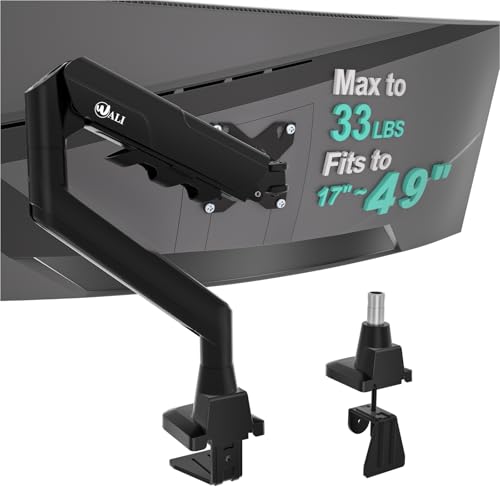
The WALI Ultrawide Single Monitor Arm is an entry-level solution designed for midweight 17-49 inch curved screens. Offering a maximum weight capacity of 33 pounds, this arm provides a remarkably stable setup for lighter ultrawides at an unbeatable price point of around $33.
- Pros: Highly affordable price for ultrawide compatibility; easy single-person desk installation.
- Con: Struggles and wobbles slightly near its maximum 33-pound weight limit.
Skip this model if your screen weighs more than 30 pounds or has an aggressive 1000R curve.
ARES WING Ultrawide Monitor Arm with RGB
The ARES WING Ultrawide Monitor Arm with RGB is perfect for esports enthusiasts who want integrated ambient lighting. Supporting screens from 17 to 49 inches, this sleek black arm adds vibrant RGB effects to the back of your desk, elevating your battle station’s overall aesthetic.
- Pros: Built-in customizable RGB lighting; modern, aggressive gaming aesthetic.
- Con: Cable management can get cluttered with the extra RGB power cords.
Skip this model if you prefer a clean, minimalist office setup without colorful ambient lighting.
VIVO Black Dual Ultrawide Desk Mount
The VIVO Black Dual Ultrawide Desk Mount (STAND-GT57T2) is built for heavy-duty multi-taskers, streamers, and simulation gamers who need to mount two massive displays. This heavy-duty dual-arm system supports screens up to 57 inches, keeping them securely mounted side-by-side or angled.
- Pros: Dual screen capability for massive 57-inch panels; heavy-duty steel construction.
- Con: Extremely heavy unit that requires a highly durable solid wood desk.
Skip this model if you only plan to run a single monitor setup, as this dual stand is massive.
ULTRARM Heavy Duty Monitor Arm (Modular)
The ULTRARM Heavy Duty Monitor Arm for Ultrawide Curved Monitors features an innovative modular design. This mount offers unparalleled customization, allowing you to alter the arm segments to fit tight desk spaces while easily holding heavy curved screens up to its rated weight capacity.
- Pros: Highly customizable modular segments; excellent clearance for deep desks.
- Con: Assembly is complex and takes longer than standard pre-assembled mounts.
Skip this model if you want a simple, quick, out-of-the-box installation experience.
WALI Vertical Dual Monitor Mount
The WALI Vertical Dual Monitor Mount is ideal for developers, content creators, and streamers who want to stack two 17-49 inch curved screens vertically. It supports up to 33 pounds per monitor, freeing up valuable horizontal desk space while keeping your displays aligned.
- Pros: Space-saving stacked vertical layout; robust, heavy-duty central pole.
- Con: Adjusting the height of the bottom monitor requires loosening the main collar.
Skip this model if you prefer a traditional side-by-side dual monitor layout.
Buying Guide
Weight Capacity and Center of Gravity
When searching for the best ultra wide monitor arm for heavy gaming screens, weight capacity is your most critical metric. However, it is not just about the static weight of the panel. Curved monitors (especially those with a deep 1000R curvature) shift the center of gravity forward, away from the mounting plate. This creates a leverage effect that multiplies the actual weight felt by the tilt joint. Always choose an arm that has a weight rating at least 5 to 10 pounds higher than your monitor’s net weight (excluding its original stand) to prevent sag.
Desk Material and Mounting Styles
Heavy-duty arms require a sturdy desk surface. Dual C-clamps distribute the weight of a massive 49-inch or 57-inch display across a wider surface area, reducing the risk of desk damage. Grommet mounts, which require drilling a hole through the desk, offer even greater structural stability. You should never mount a heavy ultrawide screen to a glass or hollow-core particle-board desk, as the concentrated clamping force can shatter or crush the surface. For manufactured wood desks, consider using a steel reinforcement plate to distribute the load.
Pneumatic Gas Springs vs. Mechanical Springs
Monitor arms utilize either pneumatic gas cylinders or mechanical coil springs to counteract the weight of your screen. Pneumatic arms, like the ULTRARM MA20P-S, offer fluid, effortless height adjustments, making them ideal if you regularly adjust your screen position. Mechanical spring arms are generally more cost-effective and highly durable over long periods, though adjusting their height requires more physical effort. For ultra-heavy setups, pneumatic joints are highly recommended to ensure smooth operation.
Our Verdict
For the ultimate combination of value and strength, the ErGear Heavy Duty Monitor Arm stands out as our top budget recommendation, offering rock-solid support for under $40. If you are mounting a premium, highly curved screen like the Samsung Odyssey G9, the reinforced tilt joint of the WALI Heavy Duty Monitor Arm (1000R Curved) is essential. For those seeking a premium, high-capacity mounting system for screens up to 57 inches, the ULTRARM Heavy Duty Monitor Arm (MA20P-S) delivers unmatched pneumatic smoothness.
As we look toward 2026, the trend of larger, heavier, and more aggressively curved panels shows no signs of slowing down. Investing in a high-capacity, heavy-duty steel mount is the best way to future-proof your gaming station and protect your premium display investment.
FAQ
Can a standard monitor arm hold a 49-inch ultrawide?
No, standard monitor arms are typically rated for screens up to 32 inches and under 20 pounds. Attempting to mount a 49-inch ultrawide on a standard arm will cause the tilt mechanism to fail immediately, resulting in your screen drooping face-down, and it may damage the arm or your desk.
What is the difference between pneumatic and mechanical spring arms?
Pneumatic arms use pressurized gas cylinders to provide smooth, weightless height adjustments with a simple touch. Mechanical spring arms utilize steel tension coils, which are incredibly durable and long-lasting but require manual tension adjustments via hex keys to change the height.
Will a heavy-duty arm damage my desk?
A heavy-duty arm can damage thin, hollow-core, or glass desks due to the concentrated clamping pressure of a heavy screen. To protect your desk, mount the arm to a solid wood or thick metal desk, or use a metal reinforcement plate to distribute the clamping force over a wider area.
Why does my curved monitor tilt downward on a heavy-duty arm?
This occurs because curved screens throw their center of gravity forward, putting extra leverage on the VESA tilt joint. To fix this, you must tighten the tilt tension bolt located directly behind the VESA plate using a hex wrench until the joint is stiff enough to hold the screen level.
Related guides
- Best Gaming PC for Overwatch 2: Ten Prebuilts Matched to Your Monitor (2026)
- Best Gaming PC for Baldur’s Gate 3: Matching CPU, VRAM and Storage to the Game (2026)
- Best Gaming PC for Apex Legends: Which Listings Fit a High-Refresh Setup (2026)
- Best RTX 3060 Gaming PCs: Eight Prebuilt Listings Compared by CPU, RAM and Cooling (2026)









