
Integrating a high-performance computer into a modern home presents a unique set of challenges. Whether you are setting up a sleek home office, a living room media center, or a dedicated gaming corner, you have to balance processing power with environmental comfort. A noisy, overheating computer can easily disrupt the peace of a quiet living space. When designing or upgrading your system, one of the most critical decisions revolves around selecting the right cooling technology: specifically, choosing between pwm vs dc pc case fans for airflow.
For the average homeowner, this choice is not merely about technical specifications; it is about how those specifications translate to daily comfort. Will your computer sound like a jet engine taking off while you are trying to watch a movie? Will it accumulate thick layers of dust that require constant cleaning? Or will it run quietly in the background, maintaining a healthy temperature without drawing excessive power? Understanding how these two fan types manage airflow, noise, and energy consumption is key to creating a harmonious home tech setup.
As an Amazon Associate we earn from qualifying purchases at no extra cost to you.


Our Top Picks


Top 3 picks at a glance
Quick Verdict
If you prioritize a whisper-quiet home environment and dynamic cooling, PWM (Pulse Width Modulation) fans are the superior choice. They offer precise speed control, allowing them to spin at ultra-low speeds when your computer is idle, keeping your living space completely silent. However, if you are building a budget-friendly system, setting up a dedicated home server that runs at a constant speed, or working with older hardware, DC (Direct Current) fans offer a simple, cost-effective, and highly reliable alternative.
Side by Side
To help you visualize how these two technologies stack up in a residential environment, here is a direct comparison of their key characteristics:
| Feature | PWM (Pulse Width Modulation) Fans | DC (Direct Current) Fans |
|---|---|---|
| Comfort (Acoustics) | Excellent. Can run as low as 300 RPM for near-silent operation. | Moderate. Higher minimum speeds (often 600+ RPM) can cause noticeable background hum. |
| Durability | High. Often paired with premium fluid dynamic bearings (up to 100,000 hours). | Moderate to High. Often uses sleeve or rifle bearings (30,000 to 50,000 hours). |
| Price Range | $12 to $35 per fan (Premium models can go higher). | $5 to $15 per fan (Highly budget-friendly). |
| Maintenance | Low. Lower average speeds pull in less household dust over time. | Moderate. Constant higher speeds pull in more dust, requiring regular cleaning. |
| Space Needed | Standard (typically 120mm x 25mm or 140mm x 25mm; requires 4-pin headers). | Standard (fits the same physical mounts; uses simpler 3-pin headers). |
| Look & Aesthetics | Sleek. Often features premium cable sleeving and integrated RGB options. | Basic. Often features simple exposed wires or basic plastic housing. |
| Resale & Future-Proofing | Excellent. The industry standard for all modern home and gaming systems. | Low. Increasingly relegated to legacy systems or basic budget builds. |
| Best For | Living room media PCs, quiet home offices, and high-end gaming rigs. | Constant-speed servers, budget office desktops, and DIY cooling cabinets. |
Where Pwm Wins
Pulse Width Modulation (PWM) technology is the gold standard for modern home PC builds, primarily because of its sophisticated method of speed control. Unlike traditional fans, a PWM fan receives a constant 12V power supply. Instead of altering the voltage to change the speed, a PWM fan uses a fourth wire to send a high-frequency control signal. This signal tells the fan’s internal motor to turn on and off rapidly—thousands of times per second. By adjusting the “duty cycle” (the ratio of on-time to off-time), the system can control the fan speed with incredible precision.
This design offers several distinct advantages for home users:
- Ultra-Low Minimum Speeds: Because the fan always has a 12V supply, it retains its startup torque even at incredibly low speeds. A high-quality PWM fan can spin reliably at just 300 RPM (rotations per minute). At this speed, the fan is virtually silent, making it perfect for a quiet bedroom or home library.
- Acoustic Smoothness: PWM fans adjust their speed seamlessly. You won’t hear the sudden, jarring revving noises that occur when a DC fan jumps from one voltage threshold to another. This smooth transition helps the computer blend into the background noise of your home.
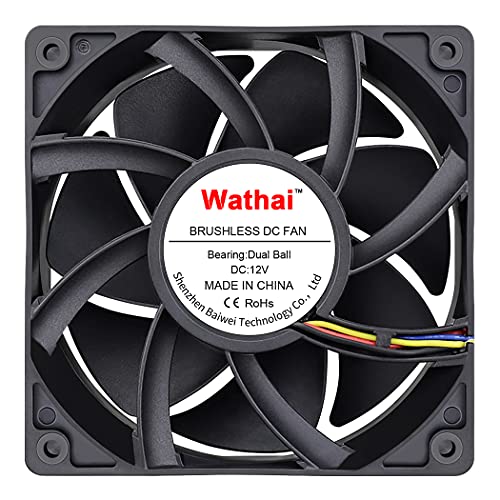
- Advanced Specialized Options: The market for PWM fans includes highly specialized designs. For example, if you are building a system for a humid basement, a garage workshop, or an outdoor entertainment area, you can find rugged options like the IP68 Waterproof 12V DC 4-Pin PWM Cooling Fan 120mm x 25mm 2 Pack (around $22). Conversely, if you need massive, industrial-grade airflow for a home server closet, deep-frame models like the Wathai 12038 120mm x 38mm PWM Computer PC Case Fan 12V 4pin 5300rpm 230CFM (around $22) can push a massive volume of air when required.
Where Dc Pc Case Fans for Airflow Wins
Direct Current (DC) fans, also known as 3-pin fans, control their speed by adjusting the voltage supplied to the motor. A standard PC fan runs at 12V at full speed. To slow it down, the motherboard or a manual controller reduces the voltage to 7V or 5V. While this technology is older, it remains highly effective and offers several clear benefits:
- Simplicity and Compatibility: DC fans are incredibly straightforward. They have three wires (ground, power, and a tachometer signal to report speed). They can plug into almost any motherboard header, old or new, without requiring complex software configurations.
- Cost-Efficiency: Because they lack the complex internal circuitry required to interpret a PWM signal, DC fans are much cheaper to manufacture. If you need to outfit a large home server rack or a multi-fan media cabinet, buying a pack of DC fans can save you a significant amount of money upfront.
- Excellent for Fixed-Speed Applications: If your computer or home media cabinet requires a constant, steady stream of air 24/7, you do not need dynamic speed control. A DC fan set to run continuously at a moderate, quiet voltage (such as 7V) will perform flawlessly for years.
- DIY Versatility: For home hobbyists building custom ventilation systems—such as cooling a closed AV cabinet, a smart home hub closet, or even a small indoor greenhouse—DC fans are incredibly easy to wire to external manual controllers. You can easily integrate them with simple dial switches, such as the BOJACK Low Voltage DC Motor Speed Controller PWM 1.8v 3v 5v 6v 12v 2A 30W Adjustable Driver Switch 1803BK 1803B (Pack of 2 Pcs) (around $6) for small desk setups, or heavy-duty manual systems like the Briidea 12V/24V 50A DC Motor Speed Controller with Handle Control (around $130) for larger, custom home ventilation projects.
Cost Over 5 Years
When planning a home office or home theater setup, it is wise to look at the total cost of ownership over a five-year horizon. This includes the initial purchase price, power consumption, and the physical durability of the fans.
Let’s look at a typical home scenario requiring four 120mm case fans:
1. Initial Purchase Price:
A set of four high-quality PWM fans will generally cost between $60 and $100. A set of four standard DC fans will run between $20 and $40. The upfront savings clearly favor the DC setup.
2. Power Consumption:
A standard 120mm PC fan draws very little power—typically between 1.2 Watts and 3.6 Watts at maximum speed.
If we assume the PC runs for 12 hours a day, 365 days a year, at an average electricity cost of around $0 per kWh:
- PWM Setup (Dynamic Speed): Because PWM fans spend most of their time spinning slowly (drawing around 1 Watt), the four fans will consume roughly 17.5 kWh over five years, costing about $2 in electricity.
- DC Setup (Constant Moderate Speed): If run at a constant 7V or 12V (drawing around 2.5 Watts), the four fans will consume roughly 43.8 kWh over five years, costing about $7 in electricity.
While the energy difference is negligible on your monthly utility bill, the real financial difference lies in the next category.
3. Durability and Replacement:
Because PWM fans can run at very low RPMs when the computer is idle, their bearings experience far less physical wear and tear. Premium PWM fans often utilize Fluid Dynamic Bearings (FDB) or Magnetic Levitation, which can easily last over 100,000 hours (more than 11 years of continuous use). Cheap DC fans often utilize sleeve bearings, which tend to dry out, become noisy, and fail after 30,000 hours (about 3 years of heavy use). Over a five-year period, you are much more likely to have to replace a noisy, failing DC fan, wiping out any initial purchase savings.
Which One for Your Home
Small Apartment or Studio
In a small apartment or studio, your living room, bedroom, and workspace often share the same air. Acoustic comfort is paramount. You do not want a constant, low-frequency hum interrupting your sleep or distracting you while reading. For this scenario, PWM fans are the clear winner. Their ability to drop down to near-silent speeds of 300 to 500 RPM ensures that your PC remains physically unobtrusive, allowing your small living space to feel peaceful and quiet.
Family with Kids and Pets
A busy family home is filled with movement, pet dander, and dust. Computers sitting on or near the floor act like miniature vacuum cleaners, pulling in hair and debris. If you use DC fans running at a constant high speed, they will rapidly pull dust through your system, clogging your filters and heatsinks. A PWM setup is ideal here because the fans will only ramp up to high speeds when absolutely necessary (such as during gaming or video editing). The rest of the time, they spin slowly, minimizing the rate at which dust and pet hair are pulled into the chassis.
Rental Property
If you are renting, you want a system that is highly portable, easy to maintain, and doesn’t require permanent modifications to your living space. If you are building a budget-friendly PC or setting up a simple home office desk, a set of affordable DC fans is incredibly practical. They are easy to install, require zero software setup on your temporary workspace, and provide reliable, straightforward airflow without a premium price tag.
Long-Term Home
If you own your home and are investing in a dedicated, high-end home office, a custom media room, or a smart home server closet, you should design your systems to last. As we look toward 2026 and the continued integration of smart home technology, system reliability and energy efficiency are key. For a long-term home, investing in premium PWM fans with fluid dynamic bearings is the best choice. They offer the longevity, whisper-quiet operation, and advanced control integration needed to keep your home tech running seamlessly for a decade.
FAQ
Can I plug a 3-pin DC fan into a 4-pin PWM header?
Yes, you can. Modern motherboards are designed with physical compatibility in mind. A 3-pin DC fan connector will slide perfectly onto a 4-pin PWM header (the plastic guide tab on the header prevents you from plugging it in backward). However, the fan will operate in DC mode. To control its speed, you must go into your computer’s BIOS settings and manually switch the fan header’s control mode from “PWM” to “DC” or “Voltage.”
Are PWM fans always quieter than DC fans?
Not necessarily. At 100% speed, a PWM fan and a DC fan of the same size and design will produce the exact same amount of noise. The acoustic advantage of PWM technology lies entirely in its ability to run at much lower minimum speeds. If your system is performing simple tasks like web browsing, a PWM fan can spin slowly and silently, whereas a DC fan may have to run at a higher speed just to keep its motor spinning without stalling.
What is the difference between static pressure and airflow fans?
Airflow fans are designed to push a high volume of air through wide, unobstructed spaces (like the open front or back of a PC case). Static pressure fans are designed to push air through tight restrictions, such as thick dust filters, water-cooling radiators, or dense CPU heatsinks. Both PWM and DC fans come in airflow and static pressure designs, so you should choose the blade shape based on where the fan will be placed in your system.
Can I use PC case fans to cool my home entertainment cabinet?
Yes, this is a very common and effective DIY project. Because home media cabinets are enclosed, game consoles and AV receivers can easily overheat. You can mount 120mm PC fans to the back of your wooden cabinet. For this application, DC fans are highly recommended because they can be easily connected to a simple 12V wall adapter and a manual speed controller, allowing you to set a constant, quiet speed that keeps your cabinet cool without needing a computer motherboard to control them.
Related guides
- Best Gaming PC for Overwatch 2: Ten Prebuilts Matched to Your Monitor (2026)
- Best Gaming PC for Baldur’s Gate 3: Matching CPU, VRAM and Storage to the Game (2026)
- Best Gaming PC for Apex Legends: Which Listings Fit a High-Refresh Setup (2026)
- Best RTX 3060 Gaming PCs: Eight Prebuilt Listings Compared by CPU, RAM and Cooling (2026)









