
Our Top Picks

The Short Answer
Whether a custom water cooling loop is “worth it” depends on a single condition: Are you willing to spend upwards of $500 and dozens of hours of labor solely for aesthetics, lower noise levels, and minor thermal headroom?
For 95% of PC users, gamers, and home office professionals, a custom loop is not worth it. Modern hardware runs exceptionally well on high-quality air coolers or All-In-One (AIO) liquid coolers that cost a fraction of the price and require zero maintenance. However, for the remaining 5%—enthusiasts who demand absolute silence, run heavily overclocked hardware pulling over 600 watts of power, or view their PC setup as a centerpiece of home decor—the custom loop represents the absolute pinnacle of PC building.
As an Amazon Associate we earn from qualifying purchases at no extra cost to you.

What You Actually Get
When you transition from standard cooling to a custom water loop, you are not just buying a PC part; you are building an open-loop hydraulic system inside your computer chassis. Unlike closed-loop AIO coolers, which are sealed at the factory, a custom loop requires you to select, mount, tube, and fill every individual component yourself.
A complete custom loop consists of several key elements:
- Water Blocks: Specialized copper or nickel-plated blocks that mount directly onto your CPU and GPU to transfer heat to the liquid.
- Pump and Reservoir: The pump (typically a D5 or DDC variant) circulates the fluid, while the reservoir stores excess liquid and allows air bubbles to escape.
- Radiators: Large metal heat exchangers (usually in 240mm, 360mm, or 480mm sizes) that dissipate heat into the air with the help of high-static-pressure fans.
- Fittings and Tubing: The connectors and pipes (either flexible soft tubing or rigid hardline acrylic/PETG) that route the fluid.
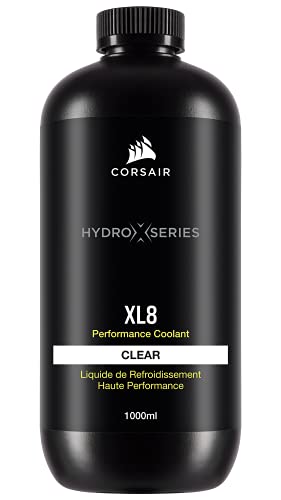
To make this complex process easier, manufacturers offer comprehensive bundles. For example, the CORSAIR XH505i RX 360 RGB Custom Cooling Kit (priced at around $520) acts as an all-in-one entry point. It includes an XC7 CPU water block, an XD6 pump/reservoir combo, three RX120 RGB fans, a 30mm-thick XR5 360mm radiator, and a system hub to coordinate lighting and fan speeds. To run a loop like this, you also need premium fluid, such as the CORSAIR Hydro X Series XL8 Performance Coolant (1L, Clear) for $24, which contains anti-corrosion and anti-bacterial inhibitors to keep the internal channels clean.
Physically, a custom loop adds serious bulk and weight to your system. A mid-tower PC that weighs 25 pounds on air cooling can easily balloon to 35 or 40 pounds once filled with liquid and heavy copper blocks. You also gain unmatched thermal capacity, allowing your system to absorb massive spikes in power usage without instantly ramping up fan speeds.
Pros
- Unmatched Thermal Performance: A custom loop keeps component temperatures incredibly low. While a high-end CPU might run at 80°C under load with an air cooler, a properly configured custom loop can keep those temperatures in the 50°C to 60°C range, even during extended workloads.
- Whisper-Quiet Operation: Because liquid transfers heat far more efficiently than air, your radiators can dissipate heat using larger surface areas. This means you can run 120mm or 140mm fans at low speeds (around 800 to 1,000 RPM) rather than forcing them to scream at 2,000+ RPM under load.
- GPU Temperature Drops: While CPU cooling improvements are impressive, the reduction in GPU temperatures is staggering. Stripping away a stock GPU shroud and installing a full-cover water block can lower graphics card temperatures by 20°C to 30°C, virtually eliminating thermal throttling.
- Stunning Visual Aesthetics: For home offices, creative studios, and gaming rooms where the desk setup is a design statement, a custom loop is unmatched. Fluid colors, hardline bends, and integrated RGB lighting turn a computer into a work of industrial art.
- Component Longevity and Headroom: Keeping silicon running at lower temperatures reduces thermal degradation over time. It also gives overclockers the voltage headroom needed to push hardware to its absolute limits.
Cons
- Extreme Cost: Price is the biggest barrier. A basic CPU-only custom loop starts at around $350. If you want to cool both your CPU and GPU using high-quality parts like the CORSAIR XH505i kit and additional GPU blocks, you can easily spend $700 to $1,200.
- High Risk of Catastrophic Failure: If an air cooler fan fails, your PC gets hot and shuts down. If a custom loop fitting leaks, conductive fluid can drip directly onto your motherboard, graphics card, or power supply, instantly destroying thousands of dollars of electronics.
- Intense Maintenance Requirements: Custom loops are not “set-and-forget” systems. You must drain, flush, and refill the loop with fresh coolant (like XL8 Performance Coolant) every 12 months to prevent algae growth, plasticizer fallout, and galvanic corrosion.
- Incredibly Time-Consuming: Plan to spend an entire weekend building your first loop. Measuring, cutting, bending tubes, leak testing for 24 hours, and cable managing the pump and fan controllers requires patience and precision.
- Poor Upgradability: Changing a CPU or GPU in a custom loop is a major chore. You must drain the entire system, disconnect the tubing, remove the water blocks, install the new hardware, re-bend or re-route the tubes, and refill the system.
Who Should Buy It
You should invest in a custom water cooling loop if you are a hardware enthusiast who views PC building as a primary hobby. If you love the process of planning, measuring, bending tubes, and tinkering with hardware as much as actually using the computer, you will find the experience incredibly rewarding.
It is also highly suited for professionals running multi-GPU workstations in home studios where noise pollution must be kept to an absolute minimum—such as audio engineers or video editors. As we head toward 2026, next-generation processors and graphics cards are projected to push power draws even higher, meaning those who demand maximum performance without loud fan noise will find custom loops increasingly attractive.
Who Should Skip It
If you are looking for a practical, cost-effective way to get more frames per second in your favorite games, skip the custom loop. The money spent on fittings, radiators, and pumps would be far better spent buying a faster graphics card or a higher-tier processor, which will yield a massive, tangible performance increase.
You should also skip custom cooling if you frequently travel with your PC, attend LAN parties, or relocate your home office. The immense weight and constant vibration of travel put dangerous stress on rigid tube fittings, greatly increasing the risk of a leak during transport.
Cheaper Alternatives
If you want the benefits of liquid cooling or quiet operation without the extreme cost and complexity of a custom loop, several excellent alternatives exist:
| Cooling Option | Average Cost Range | Trade-offs vs. Custom Loop |
|---|---|---|
| All-In-One (AIO) Liquid Cooler | $80 – $260 | Zero maintenance and easy installation, but you cannot expand the loop to include the GPU, and the pump cannot be repaired if it dies. |
| Dual-Tower Air Cooler | $40 – $110 | Virtually indestructible with zero leak risk, but takes up massive physical space over the motherboard and cannot match liquid thermal limits. |
| High-Airflow Case + Premium Fans | $120 – $250 | Significantly cheaper and improves overall system ambient temps, but does not provide the targeted, ultra-low silicon temperatures of liquid blocks. |
FAQ
Is water cooling safer than air cooling?
No. Air cooling is inherently safer because it uses no liquids. If an air cooler fails, the fan simply stops spinning, and the computer will safely throttle its speed or shut down to prevent damage. A custom water loop carries a constant, small risk of leaks, which can destroy components if fluid makes contact with live electrical circuits.
Can I use tap water in a custom cooling loop?
Absolutely not. Tap water contains minerals, chlorine, and impurities that will quickly cause corrosive buildup, clog the micro-channels of your copper water blocks, and ruin your pump. You must use distilled water mixed with specialized anti-corrosive concentrates, or pre-mixed performance coolants designed specifically for PC loops.
Do custom loops give you more FPS in games?
Directly, the performance gains are very small—usually around 2% to 5%. Modern CPUs and GPUs use automatic boosting algorithms that overclock themselves when temperatures are low. While a custom loop keeps temperatures low enough to sustain these maximum boost clocks indefinitely, it will not turn mid-tier hardware into high-tier hardware.
How long does a custom water cooling loop last?
The core physical components—such as the radiators and copper water blocks—can last for a decade or more if properly maintained. High-quality pumps are typically rated for 50,000 hours of continuous use (about 5 to 6 years of heavy daily use). The tubing and fluid are the only parts that require regular replacement to prevent staining and degradation.
Related guides
- Best Gaming PC for Overwatch 2: Ten Prebuilts Matched to Your Monitor (2026)
- Best Gaming PC for Baldur’s Gate 3: Matching CPU, VRAM and Storage to the Game (2026)
- Best Gaming PC for Apex Legends: Which Listings Fit a High-Refresh Setup (2026)
- Best RTX 3060 Gaming PCs: Eight Prebuilt Listings Compared by CPU, RAM and Cooling (2026)









