
The under 1500 dollars bracket is where gaming laptops stop being compromises and start being real machines. At this level, buyers can realistically expect a current-generation GeForce RTX 50-series or 40-series GPU, a high-wattage H-class processor, and a 144Hz or faster screen. The decision is no longer whether a laptop can play modern games, but which part of the build deserves the money: a stronger graphics chip, more memory, a sharper panel, or a thinner chassis.
This guide is written for players who want a single machine for gaming, school or work, and maybe a bit of video editing, without stepping into premium territory. Eight configurations are compared below, and the spread between them is wide: a laptop with an older RTX 3050 sits next to RTX 5060 models with faster processors and larger memory. Knowing how those parts trade off will help you decide in 2026 whether to buy the newest GPU you can afford or accept an older one for a better screen or more RAM.
Our Top Picks


Top 3 picks at a glance
Quick Picks
As an Amazon Associate we earn from qualifying purchases at no extra cost to you.




| Product | Best for | Key spec from the title |
|---|---|---|
| ASUS ROG Strix G16 (RTX 5060) | Balanced all-round performance | Core i7-14650HX, RTX 5060, 16GB DDR5, 1TB, 165Hz |
| Acer Nitro V 16S AI | Memory-hungry multitasking | Ryzen 7 260, RTX 5060, 32GB, 16-inch 180Hz |
| Acer Nitro V 15.6 | Entry-level modern gaming | Core i5-13420H, RTX 4050, 165Hz IPS |
| HP Victus 15 | Straightforward 1080p play | RTX 3050, Core i5-12500H, 512GB SSD |
| ASUS ROG Strix G16 (RTX 5050) | Newer GPU generation on a trim budget | RTX 5050, Core i5-14450HX, 16GB DDR5-5600 |
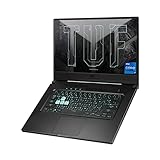
| ASUS TUF Dash 15 | Slim, portable gaming | RTX 3050 Ti, Core i7-11370H, 144Hz |
| ASUS TUF Gaming A15 | AMD-powered value | Ryzen 5 7535HS, RTX 3050, 16GB DDR5 |
| msi Katana 15 HX | Sharper screen with strong specs | 15.6-inch QHD 165Hz, i7-14650HX, RTX 5060, 1TB |
How to Choose
Rank the GPU first
The graphics chip sets your frame-rate ceiling. Within these listings, RTX 5060 sits above RTX 5050 and RTX 4050, which sit above the RTX 3050 family. For 1080p high settings, a 4050-class card is a sensible floor today, while a 5060 gives meaningful headroom for newer titles and features like DLSS. Be careful with older-generation cards on discounted listings; they save money up front but age sooner.
Match memory and storage to real use
Eight gigabytes of RAM is a bottleneck for modern games with browsers and chat apps open, so aim for 16GB as the standard and treat 32GB as a bonus for creators. For storage, 512GB fills quickly with large game installs, making 1TB a practical comfort. Also check whether memory is DDR5 versus DDR4, as DDR5 is the newer standard on the stronger configurations.
Screen refresh rate and resolution
A 144Hz panel is the minimum for smooth competitive play, and 165Hz or 180Hz adds a little more fluidity. A QHD display looks sharper than FHD, but it demands more from the GPU, so pair it with at least an RTX 5060. A 16:10 aspect ratio gives extra vertical space for work. Ignore marketing peak-brightness claims without a stated nit figure.
Processor class and where budget models cut corners
HX-series processors are the high-power class and suit laptops meant to sustain heavy loads, while H-class parts are slightly lower. Budget builds usually cut memory, storage, and display quality, not the GPU name. Check for Wi-Fi 6 or 6E, a good cooling design, and a keyboard you like, since these affect daily use more than a headline processor name.
The 8 Best Options
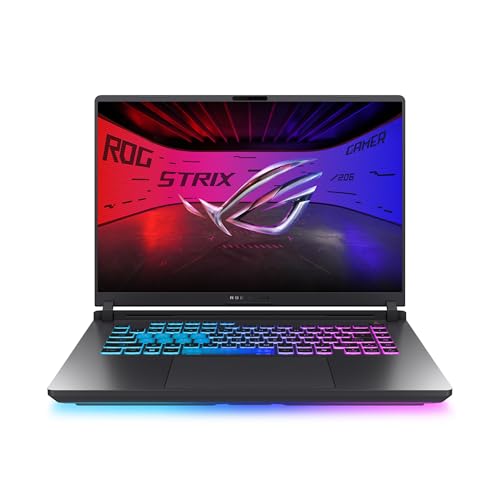
ASUS ROG Strix G16 (RTX 5060)
This configuration lists a 16-inch FHD+ 16:10 165Hz panel, an RTX 5060, a Core i7-14650HX, 16GB of DDR5, and 1TB of Gen 4 storage. It is the well-rounded pick for players who want strong 1080p-plus performance and enough storage without stepping outside the budget. The 3ms response figure and 16:10 shape also make it pleasant for documents and browsing when the game is closed, which matters for students.
- Strength: RTX 5060 paired with an HX-class Core i7 forms a capable gaming core.
- Strength: 1TB of Gen 4 storage handles a sizable game library.
- Trade-off: A 16-inch chassis is larger and heavier to carry than 14-inch machines.
Skip it if you want an ultra-portable laptop for commuting.
Acer Nitro V 16S AI
The listing highlights a Ryzen 7 260 processor, an RTX 5060 Laptop GPU rated at 572 AI TOPS, a 16-inch WUXGA IPS 180Hz display, and 32GB of memory. The generous memory suits players who also edit video or keep many applications open alongside games. It also pairs an AMD processor with NVIDIA graphics, a combination that keeps the system balanced for both play and background work, and the 16-inch screen gives plenty of room for timelines and spreadsheets.
- Strength: 32GB of memory is rare at this level and helps multitasking.
- Strength: The 180Hz panel is the fastest refresh rate in this group.
- Trade-off: The listing text does not make the storage capacity clear, so confirm it before buying.
Skip it if you only play a single game and do not need extra memory.
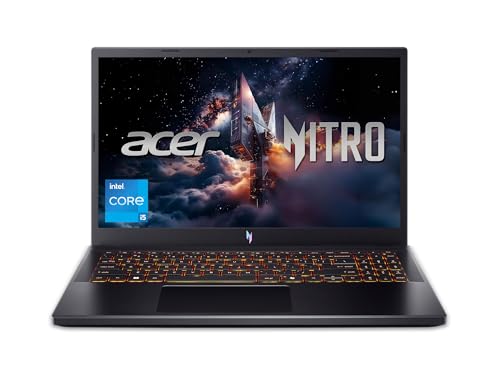
Acer Nitro V 15.6 (RTX 4050)
This model lists a Core i5-13420H, an RTX 4050 Laptop GPU, a 15.6-inch FHD IPS 165Hz display, 8GB of DDR5, and a 512GB drive. It is a cost-conscious way into current-gen NVIDIA graphics for competitive and esports titles at 1080p. Students who want one machine for classes and weekend matches will find the spec sheet familiar, and the 15.6-inch size keeps it a bit easier to move around than the 16-inch rivals.
- Strength: A 165Hz IPS panel is a smooth, bright option for fast shooters.
- Strength: The RTX 4050 handles 1080p at sensible settings.
- Trade-off: 8GB of memory is limiting and should be upgraded early.
Skip it if you plan on demanding open-world titles or content creation.
HP Victus 15
The HP lists an RTX 3050, a 12th Gen Core i5-12500H, 8GB of RAM, a 512GB SSD, a Full HD display, Windows 11 Home, and a backlit keyboard. It targets buyers who want an uncomplicated gaming laptop for esports titles and everyday tasks. Nothing on the sheet is exotic, which is the point: it is a known quantity for someone who values a plain, predictable configuration over the latest graphics generation.
- Strength: A familiar H-class processor with a dedicated RTX GPU is a dependable combination.
- Strength: The backlit keyboard suits late-night sessions.
- Trade-off: The RTX 3050 and 8GB of RAM are the oldest and thinnest specs in the group.
Skip it if you want strong performance in recent AAA titles.
ASUS ROG Strix G16 (RTX 5050)
This variant lists a 16-inch FHD+ 16:10 165Hz panel, an RTX 5050, a Core i5-14450HX, 16GB of DDR5-5600, and 512GB of storage. It brings the newest GPU generation and 16GB of fast memory at a lower tier than its RTX 5060 sibling. It shares the same 16-inch chassis and panel as the bigger model, so the choice between them comes down to how much graphics headroom you want against how much you want to save.
- Strength: Current-generation graphics with an HX processor.
- Strength: 16GB of DDR5-5600 is good for modern games and multitasking.
- Trade-off: 512GB of storage fills up quickly.
Skip it if you can stretch to the RTX 5060 model for more graphics headroom.
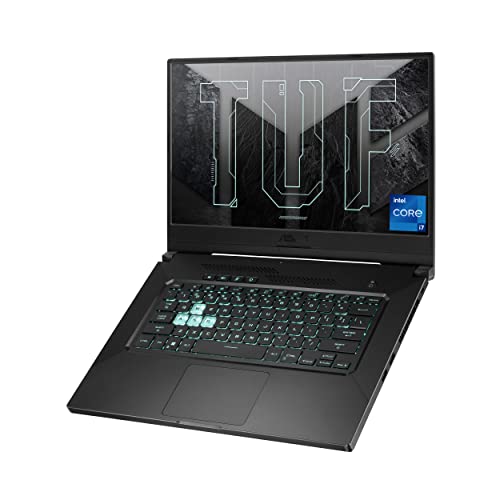
ASUS TUF Dash 15
This older model lists a 15.6-inch 144Hz FHD panel, an RTX 3050 Ti, a Core i7-11370H, 8GB of DDR4, a 512GB NVMe SSD, and Wi-Fi 6 in an ultra-slim body. Its appeal is portability rather than raw power. Treat it as a compact option for lighter or older titles and for people who move between desk and couch, and expect it to lag behind current-generation models when new games demand more.
- Strength: The ultra-slim design is easier to carry than bulkier gaming rigs.
- Strength: A 144Hz screen and NVMe storage keep it responsive.
- Trade-off: The 11th Gen processor and DDR4 memory show their age against newer picks.
Skip it if future-proofing is a priority.
ASUS TUF Gaming A15
The listing shows a 15.6-inch FHD 16:9 144Hz display, a Ryzen 5 7535HS, an RTX 3050, 16GB of DDR5, and 512GB of PCIe storage. The 16GB of DDR5 is its standout, and the AMD processor is a modern part. Players who prefer an all-AMD processor with NVIDIA graphics, and who value memory over the newest GPU badge, will find it a sensible, steady choice for 1080p play.
- Strength: 16GB of DDR5 at a modest tier is a practical advantage.
- Strength: The Ryzen 5 7535HS is a current-era processor.
- Trade-off: The RTX 3050 limits frame rates in newer games.
Skip it if graphics power matters more than memory.
msi Katana 15 HX
This one lists a 15.6-inch QHD 165Hz display, a Core i7-14650HX, an RTX 5060, 16GB of DDR5, a 1TB NVMe SSD, Wi-Fi 6E, and an RGB keyboard. It is the pick for players who want a sharper screen without dropping GPU tier. Pairing the same HX-class Core i7 and RTX 5060 as the ROG model with a QHD panel means the screen, not the silicon, is what separates the two, so choose by what you want to look at.
- Strength: QHD resolution at 165Hz is a noticeable visual step up.
- Strength: Wi-Fi 6E and 1TB of storage round out a strong package.
- Trade-off: QHD pushes the GPU harder, so frame rates will trail an equivalent FHD setup.
Skip it if you prefer maximum frame rates over image sharpness.
Which One Fits Your Situation
You want the best all-around balance
The ASUS ROG Strix G16 with RTX 5060 pairs a strong GPU, 16GB of memory, and 1TB of storage with a fast panel.
You game and create content
The Acer Nitro V 16S AI stands out with 32GB of memory and an RTX 5060, which helps with editing and streaming.
You want the cheapest respectable entry
The Acer Nitro V with RTX 4050 or the HP Victus 15 work for esports and older titles at 1080p.
You care about visual sharpness
The msi Katana 15 HX with a QHD 165Hz screen suits single-player and cinematic games.
Common Mistakes
- Choosing by processor name while ignoring the GPU, which drives gaming performance.
- Buying 8GB of RAM and planning to upgrade later without checking the upgrade path.
- Selecting a QHD screen on a lower-end GPU and then lowering settings anyway.
- Overlooking storage, where 512GB disappears quickly under modern game sizes.
- Assuming an older, slim laptop will stay competitive for several more years.
Related guides
- Windows Macos Linux Gaming Performance Comparison Strengths Weaknesses
- Desktop Operating Systems Gaming Performance Strengths Weaknesses
- 5G Home Internet Wifi Modem Settings Low Latency Gaming
Frequently Asked Questions
Is an RTX 5060 worth it over an RTX 4050?
If your budget allows, yes. The newer card offers more headroom for recent games and features. Pair it with at least 16GB of RAM to avoid wasting its potential.
Is 8GB of RAM enough for gaming?
It runs most games but leaves little room for background apps. 16GB is the sensible standard, and several listed models include it.
Does a higher refresh rate matter?
Only if your GPU can produce the frame rates to match. For competitive shooters, 144Hz and above makes motion smoother; for slower games it matters less.
Should I worry about battery life?
Gaming laptops drain quickly under load. Expect to plug in for serious play and treat battery as a convenience for lighter tasks.









