
A touch screen laptop under 200 dollars is a shopping category built on trade-offs, and the fastest way to get burned is to ignore them. At this ceiling, a touch panel competes for budget with memory, storage, and processor speed. Something has to give, and the listings show where: Chromebooks that trade Windows for a lightweight operating system, older low-power Intel chips in convertibles, renewed business machines, and a few newer Windows laptops that sit near or above the cap depending on the day. The real decision is which compromise you can live with.
This guide is for parents buying a first computer for a child, students who need a cheap second device for note-taking, and anyone who wants a couch-friendly screen to tap through recipes, email, and video. Looking ahead to 2026 deals, prices on these listings shift constantly, so treat each entry below as a spec-based shortlist and confirm the current listing against your 200-dollar ceiling. We judge only from what each title states.
Our Top Picks
 Tylvx 15.6" 2-in-1 Laptop/Tablet16GB+512SSD Laptop14.14 x 9.8 x 0.89 inches3.59 poundsCheck on Amazon
 Dell 2027 Portable 11-inch IPS Touchscreen Convertible Laptop14.17 x 9.2 x 0.7 inches4 PoundsCheck on Amazon



Top 3 picks at a glance
Quick Picks
As an Amazon Associate we earn from qualifying purchases at no extra cost to you.




| Product | Best for | Key spec from the title |
|---|---|---|
| Lenovo Chromebook 14″ Touch | Kids and schoolwork | 14″ FHD touch, 8-core MediaTek Kompanio 520, 4GB RAM, 64GB eMMC |
| Tylvx 15.6″ 2-in-1 | Big screen with a tablet fold | 360-degree flip FHD touch, Core m3-8100Y, 16GB RAM, 512GB SSD |
| Dell 11″ Convertible | Compact travel and notes | 11″ IPS touch, Pentium up to 3.3GHz, 8GB RAM, 128GB SSD |
| Lenovo ThinkPad 11e Yoga Gen 6 (Renewed) | Rugged-style classroom use | 11.6″ touch convertible, Core m3-8100Y, 4GB RAM, 128GB SSD |
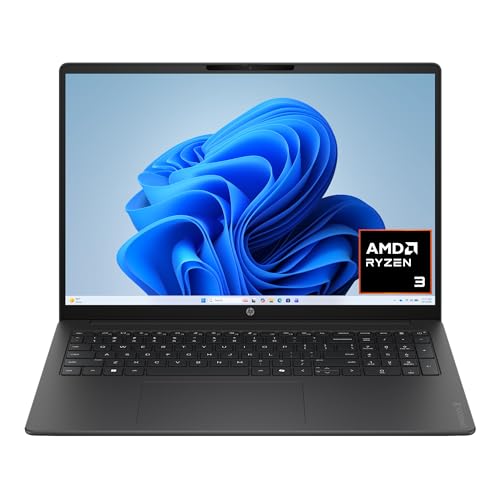
| HP 15.6″ Touch Laptop | Everyday Windows tasks | HD touch, Ryzen 3 7320U, 8GB RAM, 128GB SSD, Windows 11 in S Mode |
| HP OmniBook 3 16″ 2K Touch | Stretching the budget for a sharper screen | 2K touch, Ryzen 3 30, 8GB RAM, 512GB SSD |
How to Choose
Decide between Chrome OS and Windows
Chromebooks boot quickly, run on modest hardware, and suit web apps, streaming, and school platforms. Windows laptops run desktop programs but demand more memory. For this budget, 4GB of RAM on a Chromebook is workable; 4GB on Windows is a strain. If a title says “S Mode,” only Microsoft Store apps will install until you switch it out. Check which one your household actually needs before deciding.
Treat storage type as seriously as capacity
eMMC storage, listed on the Chromebooks, is slower than an SSD but fine for a browser-centered machine. A 64GB eMMC fills fast, so lean on cloud storage and an SD card if the machine has a slot. Where a listing offers an SSD of 128GB or 512GB, file opens and updates feel quicker and there is more room for local files.
Judge the touch panel and form factor
Convertibles that flip 360 degrees double as tablets, which is useful for reading, sketching, and watching a recipe video propped up in the kitchen. Look for FHD resolution rather than plain HD where possible, and an IPS panel for wider viewing angles. A stylus is not guaranteed by any of these titles. Screen size is a lifestyle choice: 11 inches travels well, 15.6 inches is better for movies and shared screens.
Be realistic about processors and condition
Core m3-8100Y and Pentium chips handle web, video, and documents, but multitasking pushes them. Ryzen 3 listings are newer and more capable. Renewed units, such as the ThinkPad 11e Yoga, can be a good value if the seller offers a clear return policy and battery information. Budget models cut corners on webcams, speakers, and battery life before anything else, so if video calls matter, look for a listing that mentions a webcam at all, and expect modest speakers regardless.
The 6 Best Options
Lenovo Chromebook 14″ Touchscreen
This is the classic low-cost classroom machine. The title lists a 14-inch FHD touchscreen, an 8-core MediaTek Kompanio 520 processor, 4GB of RAM, 64GB of eMMC storage, and Wi-Fi 6 in a slim, light body. It matches the budget ceiling better than most of the Windows entries. For a parent, the appeal is predictability: updates are handled automatically, the operating system is hard to clutter, and a cracked-screen scare is less painful on a machine designed for this tier. Kids who use online classrooms, document editors, and video lessons will rarely need more.
- Strength: an FHD touch screen on a Chromebook is a good fit for browsing and video.
- Strength: Wi-Fi 6 helps with crowded home networks.
- Trade-off: Chrome OS cannot run most desktop Windows programs.
Skip it if you need Windows software or a lot of local storage, or if your school uses Windows-only programs.
Tylvx 15.6″ 2-in-1 Laptop and Tablet
The Tylvx listing is a spec outlier for this budget: 16GB of RAM, a 512GB SSD, a 360-degree flip FHD touch screen, Windows 11, and a Core m3-8100Y processor up to 3.4GHz. The Deep Purple color is aimed at student buyers. It is the most generous on paper in memory and storage. Buyers should treat the spec sheet with some caution: an unfamiliar brand, a low-power processor, and a color-themed listing mean the value hinges on build quality and return terms, which are worth reading before checkout.
- Strength: 16GB of RAM and a 512GB SSD are rare at this tier.
- Strength: the 360-degree hinge supports tablet and tent modes.
- Trade-off: the m3-8100Y is a low-power chip, so heavy tasks will feel slow.
Skip it if you want a well-known brand with a long support record.
Dell 11″ IPS Touchscreen Convertible
Dell’s small convertible lists an 11-inch IPS touchscreen, an Intel Pentium processor up to 3.3GHz, 8GB of RAM, a 128GB SSD, and Wi-Fi 6. It is a compact choice for kids, travel, and light note-taking. Compared with the renewed ThinkPad below, it offers twice the memory, which is the more noticeable difference in daily Windows use. Compared with the Chromebooks, it opens the door to desktop programs that Chrome OS cannot run.
- Strength: 8GB of RAM and a 128GB SSD cover basic Windows needs.
- Strength: the IPS panel helps when the screen is tilted or shared.
- Trade-off: the small display is cramped for long reading sessions.
Skip it if you plan to watch movies on a bigger screen.
Lenovo ThinkPad 11e Yoga Gen 6 (Renewed)
This renewed ThinkPad is a convertible built with schools in mind. The title lists an 11.6-inch touchscreen, a Core m3-8100Y, Windows 11, 4GB of RAM, and a 128GB SSD. As a renewed product, condition and warranty come from the seller. The Yoga line is known for a flexible hinge, and a renewed business-grade unit can feel sturdier than a new bargain-bin laptop, but cosmetic wear and battery life vary, so read the grading description closely.
- Strength: a convertible ThinkPad frame suits shared and school use.
- Strength: a 128GB SSD is quicker than eMMC.
- Trade-off: 4GB of RAM on Windows 11 is a tight fit.
Skip it if you want a new unit with a full manufacturer warranty.
HP 15.6″ Laptop with HD Touchscreen
The HP uses a Ryzen 3 7320U with 8GB of RAM and a 128GB SSD, plus AMD Radeon graphics and Windows 11 Home in S Mode. It is the most traditional laptop of the group, with a bigger screen and a newer processor class. For a family that mostly browses, streams, and writes, it is a sensible default, provided someone is comfortable with the Microsoft Store limitation or willing to leave S Mode.
- Strength: Ryzen 3 7320U is a more modern processor than the m3 and Pentium options.
- Strength: the 15.6-inch touch display suits everyday use.
- Trade-off: HD resolution and S Mode limit sharpness and software choice.
Skip it if you need desktop apps outside the Microsoft Store and do not want to switch modes.
HP OmniBook 3 16″ 2K Touchscreen
The OmniBook 3 is the stretch pick. The title lists a 16-inch 2K touchscreen, Ryzen 3 30, 8GB of RAM, a 512GB SSD, Radeon 610M graphics, and Windows 11 Home. Of the six, it has the sharpest screen and the most modern platform, so it is the one most likely to sit above a 200-dollar cap. It is included because buyers hunting for a sharper panel often stretch slightly, and it shows what the next tier up looks like.
- Strength: a 2K touch display and 512GB SSD feel premium for the class.
- Strength: a newer Ryzen platform offers better longevity.
- Trade-off: it may not qualify for the budget cap at the time you shop.
Skip it if the 200-dollar limit is firm, since the other five options are likelier to fit inside it.
Which One Fits Your Situation
A child’s first computer for homework
The Lenovo Chromebook 14″ Touchscreen is simple, light, and well matched to browser-based school platforms. If your child’s school hands out software that only runs on Windows, move to the Dell or HP instead.
A student who wants storage and memory on a tiny budget
The Tylvx 15.6″ 2-in-1 gives the biggest numbers for RAM and SSD space, as long as brand support is not a priority.
A traveler who wants a pocket-sized Windows machine
The Dell 11″ IPS Touchscreen Convertible is compact and includes Windows-friendly memory and storage.
A household that wants a bigger, brighter laptop
The HP 15.6″ HD Touch Laptop uses a newer processor, and the OmniBook 3 16″ is the upgrade if you can go slightly over.
Common Mistakes
- Assuming touch screens at this ceiling come with fast processors, when most use low-power chips designed for light tasks.
- Ignoring S Mode and then being unable to install a needed program.
- Choosing 64GB of storage and expecting it to hold a whole library.
- Skipping the seller’s return policy on a renewed unit.
- Forgetting that the listing can move above or below the ceiling day to day.
Related guides
- Windows Macos Linux Gaming Performance Comparison Strengths Weaknesses
- Desktop Operating Systems Gaming Performance Strengths Weaknesses
- 5G Home Internet Wifi Modem Settings Low Latency Gaming
Frequently Asked Questions
Is a touch screen Chromebook a good choice for kids?
Yes, for schoolwork that runs in a browser. Touch makes it comfortable for younger children, and Chrome OS is easy to manage and keep updated. Parents can also control accounts and screen time from a central dashboard, which suits family use. Even so, a Chromebook is a school-and-web tool, so check that every app your household needs has a web or Android version before you buy.
What does Windows 11 in S Mode mean?
It restricts installs to the Microsoft Store for security and performance. You can switch out of S Mode for free, but the change is permanent. Decide before you switch, not after.
Is 4GB of RAM enough?
For a Chromebook, it is workable for basic tasks. For Windows 11, 8GB is a safer minimum. The Dell and both HP laptops meet that bar, while the ThinkPad does not.
Are renewed laptops safe to buy?
They can be, if the seller is reputable and offers a return window and warranty. Ask about battery health before purchase. A clear grading description and a replacement or refund option are the signs of a seller worth trusting.









