
Touch changes how a laptop gets used. Tapping a link, pinching a map, signing a PDF with a finger, or flipping the screen into tablet mode for a recipe or a lecture slide are things a trackpad does poorly. Under 800 dollars, the touchscreen category covers an unusually wide range, from tiny 10-inch convertibles to big 16-inch Windows machines with 2K panels and Chromebooks built for classrooms. The cap is generous enough to buy a capable machine, which makes it easy to waste money on a gimmick instead of the specs that decide daily comfort.
This guide is for students who annotate notes by touch, parents shopping for a family laptop that doubles as a tablet, and workers who sign documents and browse more than they compute. Seven distinct models are compared using only what their listings state, and a near-identical second Lenovo Chromebook was dropped to avoid duplication. As 2026 shopping goes, the useful questions are the operating system, how much memory the machine has, and whether the flip hinge and screen size suit how you will hold it.
Our Top Picks
 Tylvx 15.6" 2-in-1 Laptop/Tablet16GB+512SSD Laptop14.14 x 9.8 x 0.89 inches3.59 poundsCheck on Amazon
 Dell 2027 Portable 11-inch IPS Touchscreen Convertible Laptop14.17 x 9.2 x 0.7 inches4 PoundsCheck on Amazon



Top 3 picks at a glance
Quick Picks
As an Amazon Associate we earn from qualifying purchases at no extra cost to you.






| Product | Best for | Key spec from the title |
|---|---|---|
| Tylvx 15.6 2-in-1 | Big flip screen with generous memory | 15.6-inch FHD touch, 16GB RAM, 512GB SSD |
| Lenovo Flagship Chromebook 14 | Light touch-first web use | 14-inch FHD touch, 8-core Kompanio 520, 4GB RAM |
| HP OmniBook 3 16 | Large 2K touch display | 16-inch 2K touch, Ryzen 3, 8GB RAM, 512GB SSD |
| Dell 11-inch convertible | Compact tablet-style carry | 11-inch IPS touch, Pentium, 8GB RAM, 128GB SSD |
| HP 15.6 Touch | Everyday Windows on a standard screen | HD touch, Ryzen 3 7320U, 8GB RAM, 128GB SSD |
| Tunhail 10.1 2-in-1 | Pocketable flip device | 10.1-inch touch, 12GB RAM, 256GB SSD, backlit keyboard |
| Lenovo 300e Gen 2 Chromebook | Classroom-ready 11.6-inch touch | Celeron N4020, 4GB RAM, 32GB storage |
How to Choose
Choose the operating system and form factor together
A Chromebook suits web apps and school accounts and runs smoothly on modest hardware, while Windows handles desktop programs. A 360-degree flip hinge lets the screen fold into tablet or tent mode, which is handy for reading and note-taking; a standard clamshell touchscreen is steadier on a desk. Windows in S Mode limits installs to the Microsoft Store until you switch it off, which is free but cannot be undone. If the laptop will mostly sit on a desk, a regular clamshell is sturdier; if it will be passed around for reading and drawing, the flip hinge earns its keep.
Set memory and storage minimums
For Windows, 8GB of RAM is a comfortable floor and 4GB feels cramped, while 16GB suits heavy multitasking. For storage, 128GB fills quickly and 256GB to 512GB is much more livable. On Chromebooks, 4GB and 64GB are workable because the system is lean, but 32GB is tight. If a listing shows an eMMC drive, expect slower app launches than from an SSD.
Look at panel size, resolution, and brightness
Touch panels vary widely. Full HD or 2K resolution gives crisp text on 14 to 16-inch screens, while HD on a 15.6-inch panel looks soft. Small 10 to 11-inch screens are easy to carry but cramped for documents. Check for IPS, which gives better viewing angles when the screen is flat or folded, and ignore any panel that does not state a resolution at all.
Processor class and where cheap models cut corners
Modern Ryzen 3 chips handle everyday work with ease, while older Intel m3 and Celeron or Pentium parts struggle with many tabs. Budget touch laptops often save money on processors, battery size, and keyboard quality, and some skip stylus support entirely. If you plan to write with a pen, confirm that the listing mentions stylus compatibility rather than assuming it. Also look at weight and port selection, because a touch laptop gets carried and handled more than a typical desk machine, and a single USB-C port can become a daily annoyance.
The 7 Best Options
Tylvx 15.6 Inch 2-in-1
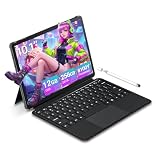
This flip model lists a 15.6-inch FHD touchscreen, an Intel Core m3-8100Y up to 3.4GHz, 16GB of RAM, a 512GB SSD, and Windows 11, in Deep Purple. The memory and storage are the highlights, giving students room that most rivals lack. The processor is an older low-power part, so expect everyday tasks rather than heavy work. A student who writes essays, watches lectures, and marks up PDFs by touch will get more from the memory and storage here than from a faster chip paired with less of each.
- Strength: 16GB of RAM and a 512GB SSD are generous for the tier.
- Strength: A large FHD flip screen suits reading and annotation.
- Trade-off: The Core m3 processor is dated and limits performance.
Skip it if you need strong processing power for creative software.
Lenovo Flagship Chromebook 14
The listing shows a 14-inch FHD touchscreen, an 8-core MediaTek Kompanio 520 processor, 4GB of RAM, 64GB of eMMC, and WiFi 6. It is a lean web machine for students and families that live inside the browser, and the slim body is easy to carry from class to class. Eight cores in the processor spec suggest smooth page loads and quick wake-ups, which suits a younger student who mostly lives in Google tools and streaming apps.
- Strength: FHD touch at 14 inches is a good match for browsing and video.
- Strength: WiFi 6 helps in busy homes and campuses.
- Trade-off: 4GB of RAM and 64GB of eMMC limit multitasking and storage.
Skip it if you need Windows software.
HP OmniBook 3 16
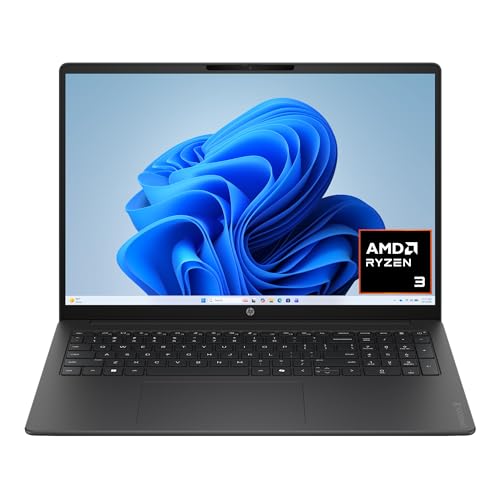
This one lists a 16-inch 2K touchscreen, an AMD Ryzen 3 processor, 8GB of RAM, a 512GB SSD, AMD Radeon 610M graphics, and Windows 11 Home. The big 2K panel and the generous SSD make it feel like a proper family computer rather than a stripped-down model. It is the kind of machine that sits on a kitchen counter for recipes, homework, and streaming, then moves to a desk for paperwork, with the large touch surface making shared use easier.
- Strength: A 2K display at 16 inches is sharp for documents and video.
- Strength: 512GB of SSD storage and 8GB of RAM are a solid base.
- Trade-off: A large body is less portable than 14-inch machines.
Skip it if you carry your laptop all day.
Dell 11-Inch Touchscreen Convertible
The listing describes an 11-inch IPS touchscreen convertible with an Intel Pentium processor up to 3.3GHz, 8GB of RAM, a 128GB SSD, and Wi-Fi 6. Its compact frame suits cramped trays and small bags, and it can flip into tablet use. Commuters, travelers, and anyone who reads on trains or planes will value the footprint, and the Wi-Fi 6 radio is a welcome modern touch on a compact device.
- Strength: IPS touch and convertible design add flexibility for a small device.
- Strength: 8GB of RAM is more than most small convertibles offer.
- Trade-off: The Pentium processor and small screen limit demanding work.
Skip it if you plan to type long documents all day.
HP 15.6 Inch Touch Laptop
This model lists a 15.6-inch HD touchscreen, an AMD Ryzen 3 7320U, 8GB of RAM, a 128GB SSD, Radeon graphics, and Windows 11 Home in S Mode, in Natural Silver. The Ryzen 3 7320U is among the newer processors in this group, giving it a snappier feel than the older Intel chips. It is a straightforward pick for office-style work, email, and web research on a standard-size screen, as long as you can live with the S Mode install limits and a modest drive.
- Strength: A newer Ryzen 3 processor suits everyday multitasking.
- Strength: 8GB of RAM and an SSD keep the experience smooth.
- Trade-off: The HD panel looks soft, and 128GB fills quickly.
Skip it if you want a sharper screen or more storage.
Tunhail 10.1 Inch 2-in-1
The Tunhail lists a 10.1-inch 360-degree flip touchscreen, 12GB of RAM, a 256GB SSD, an m3-8100Y processor up to 3.4GHz, and a backlit keyboard. It is the smallest, most portable pick, and the memory is notable for the size. It suits someone who wants a second device for e-books, video, and quick notes at the coffee shop, not a primary machine for long typing sessions.
- Strength: 12GB of RAM and a backlit keyboard on a tiny machine.
- Strength: Genuinely portable, close to tablet size.
- Trade-off: A 10.1-inch screen is cramped for office work.
Skip it if you need a comfortable typing or viewing area.
Lenovo 300e Gen 2 Chromebook
Built for students, this 11.6-inch touchscreen Chromebook lists a Celeron N4020 at 1.10GHz, 4GB of RAM, and 32GB of storage. It is the most basic entry here, aimed at classroom basics like web research and typing assignments. A school buying for a class set or a parent covering a first laptop for a young child will find the small size and touch input friendly, while anyone else should treat it as a starter machine.
- Strength: A student-oriented design with touch at a small, light size.
- Strength: Chrome OS keeps basic tasks quick on modest hardware.
- Trade-off: 32GB of storage and a Celeron N4020 are very limited.
Skip it if you want long-term performance or room for local files.
Which One Fits Your Situation
You want a family computer with a sharp screen
The HP OmniBook 3 16 offers a 2K touchscreen with 8GB of RAM and a 512GB SSD for shared use.
You annotate lectures and read a lot
The Tylvx 15.6 2-in-1 gives a large FHD flip screen with generous memory and storage.
You live in the browser and carry the laptop daily
The Lenovo Flagship Chromebook 14 is lightweight with an FHD touch panel.
You need a tablet-sized device
The Tunhail 10.1 or Dell 11-inch convertible fit small spaces, depending on whether you prefer more memory or a slightly larger screen.
Common Mistakes
- Paying for touch and then buying a screen too dim or low in resolution to enjoy it.
- Assuming every 2-in-1 supports a stylus without confirming it.
- Ignoring storage, where 32GB or 64GB disappears fast on Windows.
- Picking a tiny screen for work that needs side-by-side windows.
- Overlooking Windows S Mode limits before expecting to install familiar programs.
Related guides
- Windows Macos Linux Gaming Performance Comparison Strengths Weaknesses
- Desktop Operating Systems Gaming Performance Strengths Weaknesses
- 5G Home Internet Wifi Modem Settings Low Latency Gaming
Frequently Asked Questions
Does a touchscreen reduce battery life?
It can slightly, since the digitizer draws power, but brightness and processor load have a bigger effect. Check any battery estimate as a rough guide rather than a guarantee.
Is a Chromebook touchscreen as useful as a Windows one?
For tapping, scrolling, and Android-style apps, yes. For desktop software and pen-based drawing programs, Windows is more flexible. Choose by the programs you must run.
How much RAM do I need on a touch laptop?
For Windows, 8GB is a sensible minimum. For Chrome OS, 4GB works for light use, though more helps with many tabs.
Are 2-in-1 hinges durable?
Quality varies by model. Gentle handling and keeping the hinge free of strain extend its life, and checking warranty terms is wise on lesser-known brands.









