
Cutting the cord means giving up on over-the-air broadcasts unless you solve a single, stubborn problem: getting a reliable signal into your living room without an outdoor mast. TV antennas for indoor use promise exactly that — local channels, free, in HD, from a device you can tape to a wall or lay flat on a table. But the quality gap between the best and worst options in this category is enormous. A weak antenna produces pixelated footage, dropped subchannels, and a frustrating setup process that ends with you paying for streaming services again.
The eight products in this roundup were compared on published reception range, cable length, build quality, and aggregated owner feedback. What separates a worthwhile purchase from a dud comes down to a few factors: whether the antenna actually delivers a stable picture in your specific signal environment, how long the included coaxial cable is, and whether the design supports the newer ATSC 3.0 standard that an increasing number of broadcasters are rolling out. This guide ranks the options from most to least recommended for the typical 2026 buyer.
As an Amazon Associate we earn from qualifying purchases at no extra cost to you.






Our Top Picks



Top 3 picks at a glance
Quick Picks
| Product | Best for | Price |
|---|---|---|
| HIDB Indoor | Most buyers wanting a balanced indoor option | Check on Amazon |
| Smart TV Indoor Antenna | Those willing to pay more for a step up | Check on Amazon |
| DAANT Long Range | Weak-signal apartments on a budget | Check on Amazon |
| Smart TV Local Channels Antenna | Mid-range simplicity | Check on Amazon |
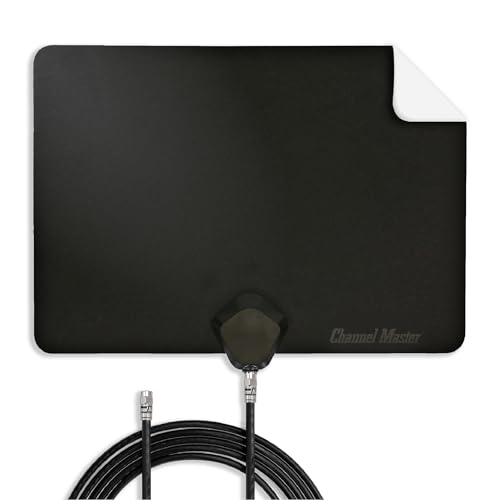
| Channel Master FLATenna | ATSC 3.0 future-proofing and signal reliability | $35 |
| 16.5ft Cable Antenna | Placement flexibility without an extender | Check on Amazon |
| HD Digital Antenna | Extreme budget testing of your signal | Check on Amazon |
| GE Outdoor HD | Rural or fringe-area reception | Check on Amazon |
How We Compared
Four criteria drive our ranking here. First, published reception range and whether the manufacturer gives a realistic number or an inflated one. Second, cable length and included accessories, since a short tether can force you into a worse signal position. Third, support for ATSC 3.0 (NextGen TV), which determines whether the antenna stays relevant as broadcasters upgrade. Fourth, the volume and consistency of owner feedback regarding long-term reliability versus day-one performance.
The 8 Best TV Antennas in 2026
HIDB Indoor
This is the default recommendation for most buyers who want a no-fuss indoor antenna with decent range. The flat-panel design mounts easily and blends into a room behind a TV stand. Owners consistently report stable reception on major networks within a reasonable distance from broadcast towers, and the price under twenty dollars makes it a low-risk entry point.
- Pro: Flat design hides behind furniture and mounts with minimal hardware.
- Pro: Consistent picture quality on VHF and UHF channels reported by owners.
- Con: Included cable is shorter than competitors at similar prices.
Skip it if you live far from any broadcast tower or need NextGen TV support out of the box.
Smart TV Indoor Antenna
Sitting between the budget flat panels and the premium Channel Master, this antenna targets buyers who found the cheapest options too marginal but do not want to pay for a name-brand outdoor-style unit. The design offers a slightly larger element array than the HIDB, which owners describe as helpful for stabilizing weaker subchannels.
- Pro: Larger antenna elements pull in marginal UHD signals more reliably.
- Pro: Reasonable cable length reduces placement compromise.
- Con: Price premium over comparable unbranded options without a major spec leap.
Skip it if you can find a similar panel at a lower price or if your signal environment is strong enough that a cheaper unit works fine.
DAANT Long Range
The “long range” claim here is qualified by owner reports: it genuinely helps in apartments where a broadcast tower sits fifteen to twenty-five miles away, but it does not overcome thick concrete or metal siding. The amplifier is the main differentiator at this price tier, and it makes the difference between a watchable picture and a frustrating slideshow for fringe users.
- Pro: Built-in amplifier extends usable range in weak-signal urban settings.
- Pro: Low price for an amplified indoor design.
- Con: Amplifier can overload and actually worsen reception in strong-signal areas.
Skip it if you live within ten miles of towers; you will get a better picture from a passive antenna.
Smart TV Local Channels Antenna
This antenna occupies the same niche as the HIDB but at a slightly higher price point. Owners describe the build quality as marginally sturdier, with a thicker cable jacket that resists kinks during installation. Reception performance is comparable to the cheaper options in the same size class, so the premium is small and situational.
- Pro: Thicker, more durable cable jacket than similarly priced competitors.
- Pro: Simple two-piece design with no external amplifier to manage.
- Con: No meaningful reception advantage over options costing less.
Skip it if the HIDB or the five-dollar option covers your needs; the price gap does not match a performance gap.
Channel Master FLATenna
Channel Master has a decades-long reputation in broadcast reception, and this flat panel carries that credibility. It explicitly supports ATSC 3.0 (NextGen TV), making it the safest buy if your local stations are transitioning to the new standard. The twelve-foot coaxial cable is generous enough to reach a TV mounted well away from a window.
- Pro: Certified NextGen TV support future-proofs the purchase.
- Pro: Brand reputation for signal reliability backed by real RF engineering.
- Con: Highest price in this indoor roundup, roughly double the budget options.
Skip it only if your budget is absolute or your signal environment is strong enough that a five-dollar antenna delivers identical picture quality.
16.5ft Cable Antenna
The standout feature here is cable length. Sixteen and a half feet lets you position the antenna at the optimal signal point — typically near a window facing the towers — without worrying about reaching the back of your TV or running an extender. For buyers whose wall outlets and TV placement do not align with the best signal spot, this is a practical, affordable solution.
- Pro: Longest included cable in this group without needing an extension.
- Pro: Low price makes placement flexibility nearly free.
- Con: Unbranded product with limited documentation on amplifier behavior.
Skip it if your TV already sits near a window with good line-of-sight to towers; the cable advantage becomes irrelevant.
HD Digital Antenna
At under six dollars, this is the least expensive way to find out whether over-the-air reception will work in your home before investing more. It functions as a diagnostic tool as much as a finished product. Owners in strong-signal zip codes report perfectly adequate HD on major networks, which is remarkable for the price.
- Pro: Lowest cost to test whether OTA channels are viable in your area.
- Pro: Surprisingly usable picture on strong signals for the price.
- Con: Flimsy build and short cable make long-term daily use less pleasant.
Skip it if you already know your signal is weak; you will likely need a better unit and this purchase becomes a wasted trip.
GE Outdoor HD
When indoor solutions fail — rural properties, hilly terrain, distances beyond thirty miles — an outdoor antenna is the honest answer. The GE unit covers the fringe-reception scenario with a design meant for attic or rooftop mounting. It is not subtle, and installation requires more effort, but for users who genuinely cannot get a stable indoor picture it is the only option on this list that will deliver.
- Pro: Outdoor design reaches signals far beyond indoor antenna capability.
- Pro: Established brand with accessible mounting hardware included.
- Con: Installation is a project, not a plug-and-play experience.
Skip it if an indoor antenna with an amplifier already gives you all the channels you watch; you are adding labor for no perceptible gain.
Buying Guide
Range and Amplification
Published “range” numbers on cheap TV antennas are marketing figures, not measurements. What matters is your distance from the nearest broadcast tower and whether a physical obstruction sits between them. Within fifteen miles with clear line-of-sight, any passive antenna on this list works. Between fifteen and thirty miles, an amplified unit like the DAANT helps. Beyond thirty miles, no indoor antenna will consistently deliver a picture and you need the GE Outdoor.
Cable Length and Placement
The best signal in your home is almost never at the exact spot your TV sits. It is usually higher up, near a window, facing the towers. A short cable forces you to compromise. Antennas with sixteen-plus feet of coaxial cable give you the freedom to position the element array where it performs and run the line to your TV. If your chosen antenna has a short cable, factor in the cost and signal loss of a quality extension.
ATSC 3.0 Support
NextGen TV is a broadcast standard replacing ATSC 1.0 in major US markets. An antenna that supports it can receive the newer signal format, which enables better picture quality and data services. Most passive antennas do not care about the standard — the physical element picks up the same frequencies. The difference is whether a built-in tuner or firmware handles it. The Channel Master FLATenna is the only option here that explicitly advertises this support.
Our Verdict
The top pick for most buyers is the Channel Master FLATenna. The combination of certified NextGen TV support, generous cable length, and a brand with real RF engineering heritage justifies the premium for anyone planning to use an antenna daily rather than as a temporary experiment. For a budget pick, the HD Digital Antenna at under six dollars is the smartest first step: it costs less than a streaming month and tells you immediately whether over-the-air TV is viable in your home. The condition under which another product wins outright is fringe reception — if you live more than twenty-five miles from towers or behind terrain obstacles, the GE Outdoor HD is the only option here that will realistically deliver a stable picture, and paying for it saves you from months of frustration.
FAQ
Do indoor TV antennas actually work?
Yes, reliably so for viewers within roughly fifteen miles of broadcast towers with a clear line of sight to a window facing that direction. The limitation is physical: walls, distance, and terrain attenuate the signal regardless of what the box claims.
Can I use an indoor antenna with a smart TV that has a built-in tuner?
Exactly — a coaxial cable from the antenna plugs directly into the TV’s antenna input, and the TV scans for channels. No converter box or streaming device is needed, which is why these are labeled “for Smart TV.”
Will an expensive antenna get me more channels than a cheap one?
Not inherently. Channel count is determined by your location and the towers broadcasting there. A better antenna improves signal stability on channels already available, reducing pixelation and dropouts, but it will not unlock channels your location cannot receive at all.
Do I need an amplifier?
An amplifier helps when you are far from towers and the signal is weak, but it can worsen reception when the signal is already strong by overloading the tuner. In many cases a passive antenna with a long cable positioned well performs better than a cheap amplified one in a poor location.
Related guides
- Best Gaming PC for Overwatch 2: Ten Prebuilts Matched to Your Monitor (2026)
- Best Gaming PC for Baldur’s Gate 3: Matching CPU, VRAM and Storage to the Game (2026)
- Best Gaming PC for Apex Legends: Which Listings Fit a High-Refresh Setup (2026)
- Best RTX 3060 Gaming PCs: Eight Prebuilt Listings Compared by CPU, RAM and Cooling (2026)









