
Choosing the right pen drive sounds simple until you realize how many options flood the market. Gamers, students, and professionals all need reliable portable storage to carry save files, mods, documents, or media between machines. A bad choice means slow transfers, corrupted data, or a drive that physically breaks after a few weeks in your pocket. Our editorial team compared published specifications, current retail prices, and aggregated owner feedback across dozens of listings to narrow down the field. We focused on what actually matters when you plug one of these devices into your laptop or desktop.
What separates a good pen drive from a frustrating one comes down to interface speed, build quality, and connector compatibility. A budget model might offer plenty of gigabytes for very little money, but if it relies on an older interface standard, moving large game patches becomes an exercise in patience. Conversely, paying a premium only makes sense if you genuinely need dual connectors or faster read speeds. By cross-referencing manufacturer specs with real-world user complaints and praise, we identified which drives deliver genuine value and which ones cut corners where it hurts most.
As an Amazon Associate we earn from qualifying purchases at no extra cost to you.





Our Top Picks




Top 3 picks at a glance
Quick Picks
| Product | Best for | Price |
|---|---|---|
| Lexar D40E 128GB | Dual-interface versatility | Check on Amazon |
| SANDISK 64GB Ultra Flair | Everyday reliability | Check on Amazon |
| SANDISK Cruzer Blade 64GB | Basic affordable storage | Check on Amazon |
| 2 Pack 64GB Swivel Drives | Multi-device sharing | Check on Amazon |
| SIMMAX 32GB Purple | Color-coded organization | Check on Amazon |
| SANDISK 128GB Ultra Flair | High-capacity performance | Check on Amazon |
| ENUODA 128GB Swivel | Budget high-capacity needs | Check on Amazon |
| Aiibe 32GB Black | Tightest budgets | Check on Amazon |
How We Compared
When evaluating portable storage, four criteria consistently determine whether a purchase satisfies or disappoints. First, the interface generation dictates transfer speeds; newer standards move gigabytes significantly faster than legacy protocols. Second, physical construction matters immensely for items tossed into backpacks alongside heavy gaming laptops—metal housings and swivel caps generally outlast cheap plastic shells. Third, capacity must align with your actual file sizes, as overbuying wastes money while underbuying forces constant file management. Finally, price per gigabyte reveals true value, especially when comparing models with identical storage tiers but different connector technologies. We weighed these factors against published specifications and owner reviews to build this list.
The 8 Best Pen Drive in 2026
Lexar D40E 128GB Dual USB 3.2 Gen 1 Type-C
This champagne silver drive targets users who constantly switch between modern laptops with Type-C ports and older desktops with standard Type-A connections. Owner feedback frequently praises its convenience, eliminating the need for dongles during LAN parties or office presentations. The metal casing also earns consistent marks for surviving daily commutes without cosmetic damage.
- Pro: Dual Type-C and Type-A connectors offer excellent device compatibility.
- Pro: Metal housing provides superior physical protection compared to plastic alternatives.
- Con: Commands the highest price on this list.
Skip this if you exclusively use older computers lacking Type-C ports, as you would be paying for hardware you cannot utilize.
SANDISK 64GB Ultra Flair USB 3.0
The Ultra Flair remains a staple recommendation for gamers and students needing dependable everyday storage. Published specifications highlight its USB 3.0 interface, which handles large game saves and media files much faster than older generations. Owners routinely mention the brushed metal exterior as a major plus, noting it resists scratches better than glossy plastic competitors.
- Pro: Metal casing offers robust durability for pocket carry.
- Pro: USB 3.0 interface ensures reasonably fast file transfers.
- Con: Lacks a Type-C connector for newer ultra-thin laptops.
Skip this if you require more than 64GB for storing entire game installations or massive video projects.
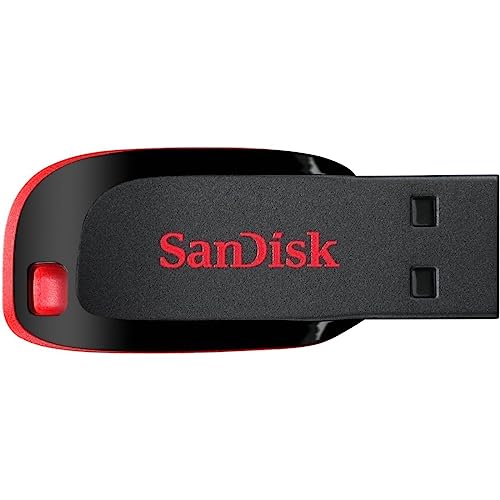
SANDISK Cruzer Blade 64GB USB 2.0
Designed for basic storage tasks, the Cruzer Blade appeals to users who just need to move small documents or configuration files between machines. It is incredibly lightweight and compact, making it easy to leave plugged into a laptop without snagging. However, owner reviews consistently remind buyers that the older interface standard means transferring large folders requires significant patience.
- Pro: Extremely low-profile design prevents accidental bumps.
- Pro: Very affordable entry point for trusted brand reliability.
- Con: USB 2.0 interface results in noticeably slower transfer speeds.
Skip this if you regularly move multi-gigabyte game mods or high-resolution textures, as the bottleneck will frustrate you quickly.
2 Pack 64GB USB Flash Drive Swivel Design
Buying a two-pack makes perfect sense for players who share mods with friends or need separate drives for work and personal gaming setups. The swivel design protects the connector without requiring a tiny cap that inevitably gets lost. Users appreciate having identical capacities across both units, simplifying backup routines and file organization.
- Pro: Two drives provide immediate redundancy or sharing capability.
- Pro: Swivel mechanism protects the connector without loose parts.
- Con: Limited to USB 2.0 speeds on both included units.
Skip this bundle if you only need a single drive, as buying two slower units costs more than purchasing one faster alternative.
SIMMAX 32GB Memory Stick USB 2.0 (Purple)
Color-coding your storage is surprisingly practical for streamers or tournament players managing multiple boot configurations. This purple drive stands out visually in a crowded bag, preventing mix-ups during events. Owner feedback highlights the swivel thumb drive design as reliable, keeping the connector safe during transport without adding bulk to the overall footprint.
- Pro: Distinctive color aids in quick visual identification.
- Pro: Swivel design eliminates the risk of losing a protective cap.
- Con: Lower capacity limits usefulness for larger game files.
Skip this if you prioritize transfer speed over visual organization, since the older interface standard keeps performance strictly basic.
SANDISK 128GB Ultra Flair USB 3.0
For users who loved the smaller Ultra Flair but constantly ran out of space, this 128GB version solves that exact problem. It maintains the same durable metal chassis and faster interface while doubling the available room for game libraries and media. Reviews frequently cite this specific capacity as the sweet spot between affordability and usable space for power users.
- Pro: Generous capacity handles multiple large game installations easily.
- Pro: Retains the rugged metal build quality of the smaller model.
- Con: Costs noticeably more than the 64GB variant.
Skip this if your storage needs rarely exceed a few gigabytes, as the extra capacity represents unnecessary spending for light users.
ENUODA 128GB Swivel Design USB 2.0
This drive targets buyers who absolutely need maximum storage capacity but refuse to pay premium prices. Offering 128GB at a fraction of the cost of faster alternatives, it serves well as a cold storage archive for older games or completed projects. Owners note the swivel mechanism works smoothly, though some mention the plastic body feels less substantial than metal competitors.
- Pro: Exceptional price-to-capacity ratio for bulk storage needs.
- Pro: Swivel design offers convenient capless protection.
- Con: USB 2.0 speeds make writing large amounts of data tedious.
Skip this if you actively play games directly from the drive, as the slower interface will cause stuttering and long load times.
Aiibe 32GB USB Flash Drive USB 2.0 Black
As the most affordable option in our comparison, this black memory stick serves purely functional purposes. It is ideal for carrying a few essential configuration files, text documents, or lightweight utilities. Owner feedback suggests treating it as a disposable utility drive rather than a primary storage solution, given its modest specifications and basic construction.
- Pro: Lowest price point makes it accessible for any budget.
- Pro: Compact black design blends in unobtrusively.
- Con: Minimal capacity and older interface limit practical applications.
Skip this if you need to store anything beyond basic documents, as 32GB fills up almost immediately with modern gaming assets.
Buying Guide
Interface Generation and Speed
The interface standard printed on the packaging dictates how fast your files move. Newer generations like USB 3.0 and USB 3.2 Gen 1 offer substantially higher bandwidth than legacy USB 2.0 connections. If you frequently transfer game patches, recorded gameplay footage, or large mod packs, prioritizing a newer interface prevents agonizing wait times. Always verify which ports your computer actually has before purchasing, as plugging a fast drive into an older port simply defaults to the slower speed.
Connector Type and Compatibility
Modern ultrabooks and gaming handhelds increasingly rely solely on Type-C ports, leaving traditional rectangular Type-A ports behind. If your primary machine lacks Type-A, a standard flash drive becomes useless without an adapter. Dual-interface drives solve this by featuring both connector types on a single unit, allowing seamless transitions between your gaming rig, a friend’s older desktop, and your modern laptop. Check your device specifications carefully before committing to a single-connector model.
Build Quality and Portability
A pen drive lives a rough life bouncing around inside pockets, backpacks, and gear bags alongside heavy peripherals. Metal housings generally withstand impacts and crushing forces far better than hollow plastic shells. Additionally, consider how the connector is protected when not in use. Retractable sliders, swivel mechanisms, and attached caps all serve the same purpose, but owners consistently report losing detached caps first. Choose a protective design that matches your carrying habits.
Our Verdict
After comparing specifications, pricing, and owner consensus, the Lexar D40E 128GB stands out as our top pick. Its dual Type-C and Type-A connectors ensure compatibility across virtually any machine you encounter, while the metal build guarantees longevity. For those watching their spending closely, the Aiibe 32GB USB Flash Drive serves as our budget pick, providing basic functionality at the absolute lowest price point on the market. However, if you specifically need massive storage without breaking the bank, the ENUODA 128GB wins outright, offering exceptional capacity per dollar despite its slower transfer speeds.
FAQ
Can I run PC games directly from a pen drive?
You can launch smaller indie titles or older games directly from portable storage, provided the drive uses a modern, faster interface. Attempting to run demanding modern games through an older interface will result in severe stuttering and extended loading screens. For best results, use the drive to transport installation files rather than running the game itself.
Why are some drives cheaper despite having the same capacity?
Price differences usually stem from the interface generation and build materials. Drives utilizing older connection standards cost significantly less to manufacture than those supporting newer, faster protocols. Additionally, plastic housings reduce production costs compared to metal enclosures, resulting in a lower retail price for equivalent storage space.
Do I need a Type-C pen drive if my computer only has Type-A ports?
No, a standard Type-A drive will function perfectly if your machine lacks newer ports. Purchasing a dual-interface drive is only necessary if you anticipate upgrading your computer soon or frequently share files with others who use modern laptops. Otherwise, you would be paying extra for a connector you cannot currently use.
How do I protect my data if I lose my flash drive?
Many manufacturers include basic encryption software that allows you to password-protect the contents of the drive. Enabling this feature ensures that anyone who finds your lost storage cannot access your personal files or saved passwords. Alternatively, you can manually encrypt sensitive folders using built-in operating system tools before transferring them.
Related guides
- Best Gaming PC for Overwatch 2: Ten Prebuilts Matched to Your Monitor (2026)
- Best Gaming PC for Baldur’s Gate 3: Matching CPU, VRAM and Storage to the Game (2026)
- Best Gaming PC for Apex Legends: Which Listings Fit a High-Refresh Setup (2026)
- Best RTX 3060 Gaming PCs: Eight Prebuilt Listings Compared by CPU, RAM and Cooling (2026)









