
Designing a high-performance home gaming environment is no longer just about buying the fastest graphics card or the most comfortable ergonomic desk chair. Today, how you deliver network data across your living space plays an equally critical role. When weighing ethernet vs wifi 6e for gaming, homeowners and renters face a direct trade-off between physical infrastructure and spatial aesthetics. On one hand, hardwiring your gaming PC or console requires running cables along baseboards, through closets, or behind drywall. On the other, going fully wireless keeps your home clean and clutter-free, but relies on radio waves penetrating walls, furniture, and building materials.
For years, serious gamers dismissed wireless connections entirely due to signal jitter, packet loss, and latency spikes. However, the introduction of Wi-Fi 6E changed this dynamic by unlocking the dedicated 6 GHz frequency spectrum. Understanding how these two technologies interact with your home’s layout, energy consumption, decor, and long-term utility will help you determine the right network setup for your floor plan.
As an Amazon Associate we earn from qualifying purchases at no extra cost to you.


Our Top Picks
 Jadaol Cat6/Cat6A Ethernet Cable 50FT Flat with Clips50ft3.5 x 3.5 x 0.4 Inches0.4 poundsCheck on Amazon
 TP-Link Tri-Band AXE5400 Wi-Fi 6E Gaming Router 6-StreamTri-Band Wi-Fi 6E AXE5400 Gaming12.01 x 10.47 x 5.75 inches2.23 poundsCheck on Amazon
 TP-Link AXE5400 Tri-Band WiFi 6E RouterWiFi 6E, Tri-Band AXE540012.91 x 10.43 x 4.72 inches1.5 poundsCheck on Amazon
Top 3 picks at a glance
Quick Verdict
If your primary goal is absolute connection stability, sub-millisecond local latency, and the lowest cost per gigabit, physical Ethernet remains undefeated. Running a physical network cable guarantees that wall density, household microwave usage, and neighborhood channel congestion will never interfere with your connection.
However, Wi-Fi 6E is the ideal solution for clean interior design and spatial flexibility. By utilizing the wide-open 6 GHz band, Wi-Fi 6E eliminates the traditional latency overhead of older 2.4 GHz and 5 GHz networks. If your desk or media console is located far from your gateway, or if you prefer a minimalist room aesthetic without exposed wires, Wi-Fi 6E delivers modern performance without compromising your home’s appearance.
Side by Side
| Feature | Ethernet Connection | Wi-Fi 6E Connection |
|---|---|---|
| Setup Comfort & Ease | Requires running physical lines or installing wall plates. | Plug-and-play broadcast; connects wirelessly in seconds. |
| Hardware Durability | High; heavy-duty braided cords resist physical wear and bends. | High; no cables to stretch, trip over, or fray over time. |
| Price Range | $7 – $40 for quality patch cables and adhesive mounting hardware. | $99 – $300+ for standard or gaming-focused 6E routers. |
| Maintenance & Upkeep | Zero software updates required; completely passive physical path. | Periodic router firmware updates and occasional reboots. |
| Space Needed | Requires cable routing space along floorboards or inside walls. | Minimal; requires only a small tabletop router footprint (~10 x 6 inches). |
| Visual Integration | Can create visual clutter unless hidden behind raceways or trim. | Sleek, cable-free appearance throughout living areas. |
| Impact on Resale Value | In-wall Cat6/Cat6A runs increase perceived tech-readiness for buyers. | No permanent structural value; equipment moves with you. |
| Best For | Competitive multiplayer gaming, stationary rigs, dense urban apartments. | Multi-room homes, open-concept living, rentals, minimalist interiors. |
Where Ethernet Wins
Ethernet delivers direct, physical point-to-point data transmission. When evaluating ethernet vs wifi 6e for gaming, copper patch cables completely bypass the physical obstacles that degrade radio signals. Solid masonry, interior drywall, mirror glass, and metallic furniture frames can reduce wireless signal strength, but a physical wire delivers consistent bandwidth regardless of room architecture.
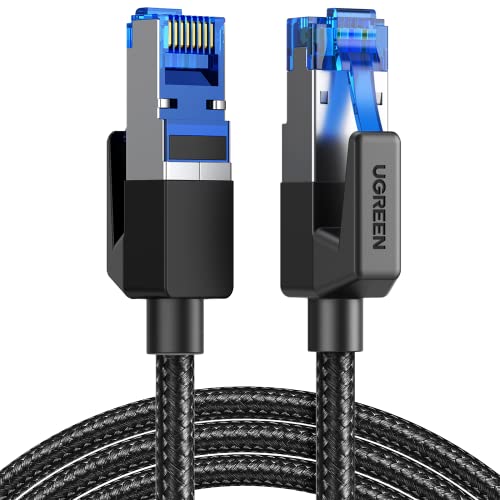
Physical lines eliminate packet retransmissions caused by radio frequency interference. In multi-family residential buildings, dozens of nearby networks flood the airwaves. A high-speed option like the UGREEN Cat 8 Ethernet Cable 6FT, which costs around $6, features double shielding (S/FTP) to isolate the data stream from ambient electromagnetic noise. For short desk-to-wall runs, these braided cables lie neatly behind furniture while delivering up to 40 Gbps transfer potential.
When the network source is rooms away, long-run cabling design becomes a factor. A flat profile cord, such as the Jadaol Cat6/Cat6A Ethernet Cable 50FT Flat with Clips for around $9, measures just 1.5mm thick by 6mm wide. This allows homeowners to tuck the wire directly into the gap between the baseboard and carpet, or secure it flush against door frames using clear mounting clips. The result is a rock-solid physical link with zero power consumption, minimal visual impact, and standard sub-1ms ping times to your home gateway.
Where Wifi 6e for Gaming Wins
Wi-Fi 6E excels in interior flexibility and visual presentation. Traditional wireless standards share crowded airwaves with smart TVs, smartphones, Bluetooth devices, and even kitchen appliances. Wi-Fi 6E expands into the 6 GHz frequency band, adding up to 1,200 MHz of clear spectrum. This gives compatible gaming PCs and consoles access to seven ultra-wide 160 MHz channels that operate free from legacy device traffic.
From a home décor perspective, Wi-Fi 6E eliminates the need to drill through floorboards or run ugly plastic cable raceways across hallways. A central broadcast hub, such as the TP-Link AXE5400 Tri-Band WiFi 6E Router (priced at $99), sits neatly on a bookshelf or media console while serving fast data to multiple rooms simultaneously. For households requiring active traffic prioritization for competitive play, dedicated units like the TP-Link Tri-Band AXE5400 Wi-Fi 6E Gaming Router Archer GXE75 (around $141) combine custom gaming ports with internal antenna arrays designed to reduce signal dead zones.
Wi-Fi 6E also offers seamless mobility. Laptops and handheld gaming consoles can be carried from a home office desk to a living room couch or outdoor patio without losing connection speed or needing to unhook tethered network lines.
Cost Over 5 Years
Evaluating long-term value requires looking beyond the initial purchase price to include energy consumption, hardware longevity, and maintenance requirements.
Ethernet Long-Term Breakdown:
- Upfront Equipment: $10 to $50 for high-grade copper cables, flat trim clips, or decorative wall plates.
- Energy Costs: $0 per year. Passive Ethernet cables draw zero electrical power. (Unmanaged network switches draw 2 to 5 watts, costing under $4 per year).
- Replacement Cycle: 10+ years. Solid copper cabling rarely fails unless physically cut or damaged.
- Total Estimated 5-Year Cost: $10 to $70.
Wi-Fi 6E Long-Term Breakdown:
- Upfront Equipment: $99 to $300 for a tri-band 6E router or mesh node set.
- Energy Costs: Modern Wi-Fi 6E routers pull between 12 and 22 watts of continuous power. At an average U.S. residential electricity rate of around $0 per kilowatt-hour, running a 15-watt router 24/7 costs approximately $21 per year ($105 over five years).
- Replacement Cycle: 3 to 5 years, driven by advancing wireless standards and aging internal power components.
- Total Estimated 5-Year Cost: $204 to $405+.
Which One for Your Home
Small Apartment
In tight residential floor plans under 800 square feet, Ethernet is often remarkably easy to implement. A single 15-foot or 25-foot flat cable run along a single baseboard can connect your gaming setup to the main router without crossing major walkways. However, if your router sits in an awkward entryway niche, a Wi-Fi 6E router comfortably covers the entire footprint, as high-frequency 6 GHz signals travel effortlessly across short, unobstructed distances.
Family with Kids and Pets
Exposed floor cables present clear tripping hazards and attract curious pets or toddlers who might pull or chew on wires. In busy households, running surface-level Ethernet across hallways or high-traffic living areas is impractical. A Wi-Fi 6E router keeps all high-speed infrastructure safely elevated on high shelving or media cabinets, keeping floorboards clear and child-safe.
Rental Property
Renters face strict limitations on structural modifications, meaning drilling through walls or removing baseboards to hide network cables is out of the question. While thin flat Ethernet cables secured with removable adhesive clips offer a temporary wired fix, Wi-Fi 6E is the most seamless alternative. It leaves zero marks on landlord-owned walls and transfers effortlessly to your next home when your lease expires.
Long-Term Single-Family Home
For homeowners planning for the long haul, hardwiring remains the ultimate home upgrade. Installing structured Cat6, Cat6A, or Cat8 wiring behind drywall—terminating at clean, wall-mounted RJ45 jack plates—adds functional value to your property. In 2026, buyers view built-in Ethernet wall ports in home offices and media centers as a premium structural feature, similar to built-in storage or recessed lighting.
FAQ
Does Wi-Fi 6E signal penetrate thick walls as well as older 5 GHz networks?
No. Higher radio frequencies have shorter wavelengths, which means 6 GHz signals attenuate faster when passing through solid materials like plaster, brick, concrete, or poured tile compared to 5 GHz or 2.4 GHz bands. Wi-Fi 6E delivers its maximum speed when the router and gaming system share an open line of sight or are separated by standard interior drywall.
Can structured Ethernet cables increase my home’s resale value?
Yes. Installing clean, wall-integrated network jacks in key rooms creates a modern “smart home” infrastructure. Home buyers and remote workers value dedicated in-wall network lines because they eliminate network dead zones and provide reliable access for home offices, streaming hubs, and gaming systems.
How much electricity does a Wi-Fi 6E gaming router draw per year?
A typical tri-band Wi-Fi 6E router operates continuously at 12 to 22 watts. Running a 15-watt router 24 hours a day consumes roughly 131 kilowatt-hours per year, which translates to about $20 to $30 annually depending on local power utility rates.
Is a Cat 8 Ethernet cable overkill for home gaming in 2026?
For standard internet speed packages (which usually top out between 300 Mbps and 2 to 5 Gbps), Cat 8 performance (rated up to 40 Gbps) exceeds standard requirements. However, short Cat 8 patch cords are inexpensive, heavily shielded against signal crosstalk, and fully backward-compatible with older hardware ports, making them a durable, future-proof choice for short desk connections.
Related guides
- Best Gaming PC for Overwatch 2: Ten Prebuilts Matched to Your Monitor (2026)
- Best Gaming PC for Baldur’s Gate 3: Matching CPU, VRAM and Storage to the Game (2026)
- Best Gaming PC for Apex Legends: Which Listings Fit a High-Refresh Setup (2026)
- Best RTX 3060 Gaming PCs: Eight Prebuilt Listings Compared by CPU, RAM and Cooling (2026)









