Our Top Picks

The Short Answer
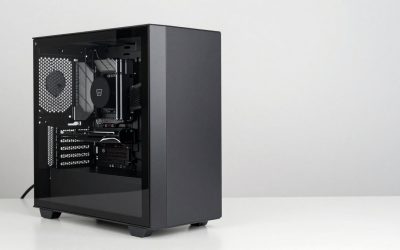
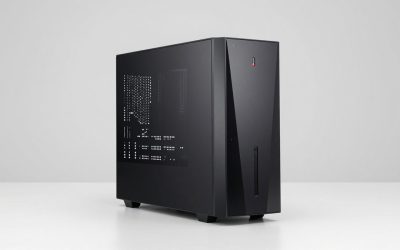
Determining whether premium sleeved PSU cables are worth the investment comes down to one primary factor: whether your computer sits in plain view with a glass side panel and you treat your workspace as an intentional interior design space. If clean line geometry, precise color matching, and immaculate cable routing inside your desktop chassis matter to you as much as the furniture finishes in your room, then yes, premium cables are worth the cost. However, if your PC tower sits underneath your desk or uses a solid metal side panel, spending extra money on custom power cabling provides zero functional, thermal, or performance benefit.
What You Actually Get
When you unpack standard power supply cables included with most modular power supplies, you typically find stiff, flat ribbon-style PVC cables or thick black rubber bundles wrapped in coarse, translucent plastic netting. They are functional, but they resist bending, create unsightly bulk around tight motherboard cutouts, and spring back into awkward curves.
As an Amazon Associate we earn from qualifying purchases at no extra cost to you.


Upgrading to individual premium sleeved cables changes both the tactile quality and the visual structure of your PC build. Instead of grouping all copper wires inside a single sheath, each conductor wire—usually 16 AWG or 18 AWG high-strand copper—is individually wrapped in a tightly woven jacket. The standard in high-end builds relies on triple-mesh paracord or high-density PET (polyethylene terephthalate) sleeving. Paracord offers a soft, matte fabric texture that drapes naturally without sheen, while PET plastic sleeving provides a slight structural rigidity and subtle gloss.
Beyond the fabric jacket, premium cable packages address cable train management directly. They include specialized, low-profile cable combs—small acrylic or aluminum brackets that snap across parallel wires to lock every individual strand into perfect, parallel alignment. Higher-end options also feature heat-shrinkless termination, meaning the sleeve disappears cleanly directly into the molded connector plug rather than ending in a bulky piece of black shrink tubing.
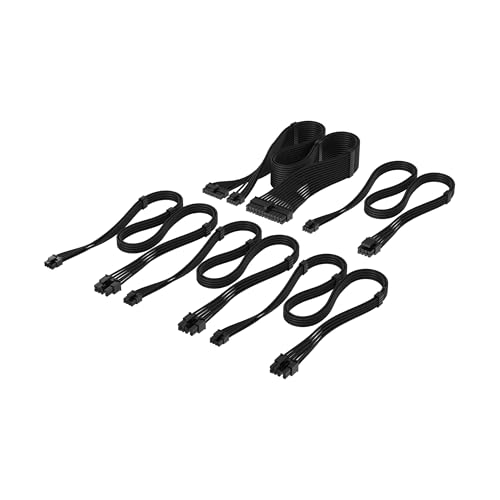
Manufacturers offer these cables either as full component sets or target-specific replacements. For instance, single high-draw cables like the Corsair Elite Premium Type 4 Individually Sleeved 2X 8-Pin to PCIe 12V-2×6 600W PSU Cable (priced around $19) deliver dedicated, clean power to modern graphics cards capable of up to 600 watts without requiring ugly adapter dongles. On the other hand, complete entry sets such as the Corsair Elite Premium Type 5 Individual Sleeved PSU Cable Starter Kit (around $49) replace the most visible interior power lines—the 24-pin ATX motherboard power, EPS CPU power, and PCIe display connections—with ultra-compact micro-fit connectors designed for modern PSU layouts.
Pros
- Refined Room and Desk Aesthetics: Soft-touch fabric sleeves remove the industrial clutter from your desktop background. They allow you to match internal cabling to your desk pad, wood finishes, or surrounding office palette.
- Superior Bending Flexibility: Individual triple-mesh paracord sleeves flex easily in tight spaces. With a tight bending radius, you can route wires through chassis grommets at crisp 90-degree angles without putting strain on motherboard headers.
- Elimination of Adapter Dongles: Modern graphics cards using high-power connectors often require unsightly splitters. Dedicated direct-replacement cables provide a single, clean lead straight from the power supply to the GPU.
- Integrated Cable Structure: Pre-installed low-profile cable combs hold 24-pin and 8-pin lines perfectly flat, turning what is normally a tangled mass of wire into clean architectural lines.
- Direct Connection Safety: Unlike extension cables that plug into stock wires, full replacement cables plug directly into the PSU board, eliminating extra resistance and failure points.
Cons
- High Price-to-Performance Ratio: At prices ranging from $19 for a single GPU lead to $100+ for complete custom cable kits, you are spending purely on appearance. They provide no increase in framerates or processing power.
- Strict Pinout Incompatibility Risks: Power supply pinouts are not standardized on the unit side. Plugging a Corsair Type 4 cable into a Corsair Type 5 unit—or a EVGA or Seasonic power supply—can permanently short-circuit your graphics card or motherboard.
- Time-Conserving Installation: Properly training individual cables, sliding low-profile combs into position, and balancing wire tension requires patience and extra setup time during a build.
- Nil Airflow Impact: While old tech lore claimed clean cables drastically lower internal temperatures, modern computer cases have far enough space that sleeved cables reduce temperatures by less than 1°C in realistic testing.
Who Should Buy It
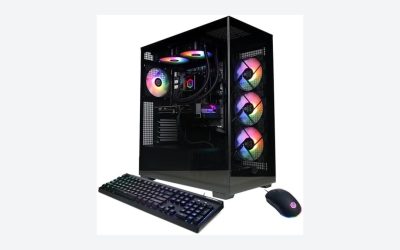
You should buy premium sleeved cables if you are building a showcase PC that lives on top of your desk. As clean desk aesthetics and interior architectural PC setups continue to evolve in 2026, the contrast between a messy interior and a sleek workspace has never been starker. If your computer features clear tempered glass, custom lighting, and coordinated hardware, factory rubber cables immediately look like an unfinished compromise.
Sleeved cables are also worth considering for Small Form Factor (SFF) builders. Fitting stiff, factory-issued 650mm long PVC cables inside a compact 11-liter or 15-liter desktop case can be frustrating. High-flex paracord cables bend effortlessly around power supply brackets, saving precious internal air space and making panel closure effortless.
Who Should Skip It
Skip these cables if you are building on a strict performance budget. Spending $50 to $100 on cosmetic wiring means taking $50 to $100 away from your graphics card, central processor, or storage capacity. A build with standard cables and a faster GPU will always deliver a better computing experience than a visually stunning PC with weaker internal hardware.
You should also skip them if your chassis uses solid metal side panels, mesh-only panels without interior lighting, or sits in a dedicated cabinet under the desk. If you cannot see the motherboard tray during daily use, premium cable jackets offer zero return on your investment.
Cheaper Alternatives
If you like the look of organized, patterned wires but hesitate to pay top dollar for direct-replacement power supply cables, several cost-effective alternatives exist across different price points:
| Option | Cost Range | Key Trade-off |
|---|---|---|
| Universally Sleeved Cable Extensions | $20 – $35 (Full Set) | Plugs onto the end of stock cables. Looks great from the front, but adds double the wire length and bulk to hide behind the back motherboard tray. |
| Snap-On Universal Cable Combs | $5 – $12 | Organizes your existing stock round wires into straight lines, but does not hide ugly wire insulation or stiff PVC texture. |
| Third-Party Custom DIY Kits | $15 – $30 (Raw Materials) | Requires manual crimping, stripping, and wire pinout mapping. Highly time-consuming with a steep learning curve. |
| Stock Modular Factory Cables | $0 (Included) | Zero extra expenditure, but stiff to route and offers a plain, industrial look. |
FAQ
Do premium sleeved cables improve PC performance or cooling?
No. Premium sleeved cables deliver the exact same electrical voltage and current efficiency as standard, properly rated factory power supply cables. Furthermore, modern computer cases provide ample open area, meaning individual wire sleeving does not measurably alter system airflow or cooling performance.
What is the difference between cable extensions and direct replacement PSU cables?
Cable extensions attach to the visible end of your existing factory PSU cables, acting as a decorative bridge. Direct replacement PSU cables plug straight into the power supply unit itself. Extensions are universal and cheaper, but create extra wiring bulk that must be stuffed into the back of the case. Direct replacements maintain stock wire length and reduce clutter.
Are premium PSU cables universal across all power supply brands?
No, direct replacement cables are never universal. While the component end (plugging into your GPU or motherboard) follows industry standards, the pin layout on the power supply side varies by brand, model, and generation. For example, Corsair Type 4 and Type 5 cables use different pin sizes and internal layouts. Always verify exact cable and power supply model compatibility before purchasing.
Is paracord or PET sleeving better for PC cables?
It depends on your desired texture and look. Paracord features a soft, matte fabric weave that drapes smoothly and has zero sheen, making it popular for minimalist or organic desk aesthetics. PET sleeving is made of plastic monofilaments; it is slightly stiffer, holds sharp structural bends longer, and offers a slight gloss under internal PC lighting.
Related guides
- Best Gaming PC for Overwatch 2: Ten Prebuilts Matched to Your Monitor (2026)
- Best Gaming PC for Baldur’s Gate 3: Matching CPU, VRAM and Storage to the Game (2026)
- Best Gaming PC for Apex Legends: Which Listings Fit a High-Refresh Setup (2026)
- Best RTX 3060 Gaming PCs: Eight Prebuilt Listings Compared by CPU, RAM and Cooling (2026)