
Our Top Picks

The Short Answer
You only need extra case fans if your system generates enough heat to saturate the air inside your chassis faster than your current fan setup can exhaust it. The core dividing line comes down to total power consumption: if your computer uses a dedicated graphics card and draws more than 300 watts of power under load, but your case only included one or two factory-installed fans, adding extra case fans will yield an immediate reduction in ambient internal temperatures and fan noise. Conversely, if you are running a basic home office desktop or a low-power system (under 200 watts total draw) with built-in processor graphics, your current layout is already sufficient and additional fans will offer virtually no functional benefit.
What You Actually Get
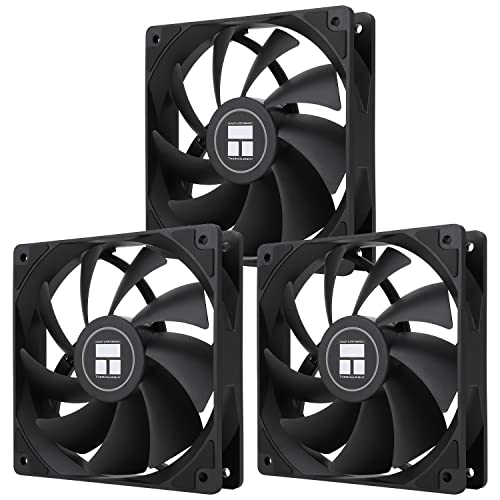
When you add extra case fans to a personal computer setup, you are purchasing controlled volumetric airflow. Most standard modern computer enclosures utilize standard 120mm fan mounts, which measure 120mm wide by 120mm tall by 25mm thick and weigh approximately 130 to 150 grams per unit. Installing supplemental fans shifts your system’s cooling dynamic from passive heat accumulation to active thermal exchange, allowing your internal hardware to operate with predictable thermal headroom.
As an Amazon Associate we earn from qualifying purchases at no extra cost to you.


In 2026, many budget and mid-tier computer cases ship with only one pre-installed 120mm fan located at the rear as an exhaust point. While this creates a small localized vacuum, it forces the system to pull air through unfiltered rear gaps and ventilated side slots. Adding two or three 120mm intake fans to the front panel changes the system geometry to positive static pressure. This means clean air is pushed across your storage drives, motherboards, and graphics card heat sinks before exiting through the top or rear output vents.
From an operational standpoint, modern 120mm replacement fans—such as standard 4-pin Pulse Width Modulation (PWM) models utilizing Stably Fluid Dynamic Bearings (S-FDB)—typically operate at variable speeds between 500 RPM and 1550 RPM. At peak operation, a single 120mm fan moves roughly 50 to 65 Cubic Feet per Minute (CFM) of air while consuming roughly 1.5 to 2.4 watts of power from a standard 12V motherboard header. Because multi-packs of three to five PWM fans generally cost between $11 and $25, adding fans represents one of the lowest cost-per-watt upgrades available for custom desktop environments.
The practical result isn’t just a slightly cooler computer; it is a quieter workspace. When an enclosure has three or four working intake and exhaust fans, every individual fan can spin at a lower speed (for example, 800 RPM instead of 1500 RPM) to move the exact same volume of air. This reduces overall acoustic noise from a noticeable high-pitched whine down to a soft, low-frequency hum that blends into normal room ambience.
Pros
- Reduced Acoustic Noise: Spreading the airflow workload across three to five fans allows you to run lower RPM curves, lowering overall system sound output under load.
- Lower Component Temperatures: Continuous air replacement prevents heat soak around high-draw components like graphics cards (which can vent 200 to 350 watts of direct heat into the case interior).
- Dust Prevention via Positive Pressure: Installing more intake fans than exhaust fans forces air out of unsealed chassis cracks, preventing ambient room dust from settling inside.
- High Cost-to-Value Ratio: Value multi-packs priced between $11 and $25 make adding active cooling extremely affordable compared to upgrading heatsinks or liquid coolers.
- Consistent Clock Speeds: Maintaining lower internal ambient temperatures prevents modern CPUs and GPUs from dynamically downclocking (thermal throttling) during heavy render sessions or gaming.
Cons
- Increased Cable Management Complexity: Every added fan brings a 4-pin power cable and an optional 3-pin ARGB lighting cable, requiring careful routing behind the motherboard tray.
- Potential Dust Buildup if Unfiltered: Adding high-airflow intake fans to a computer chassis that lacks removable front dust filters will accelerate internal dust buildup.
- Diminishing Thermal Returns: Adding a second and third fan provides major thermal benefits, but adding a fifth, sixth, or seventh fan usually yields less than a one-degree temperature improvement.
- Motherboard Header Limitations: Basic entry-level motherboards often only feature two 4-pin fan headers, requiring extra spend on fan splitters, daisy-chain cables, or powered hubs.
Who Should Buy It
You should purchase extra case fans if you fall into one of these distinct categories:
- Mid-to-High-Tier Gamers and Workstation Users: If your PC contains a dedicated graphics card drawing 150 watts or more and a desktop CPU drawing over 65 watts, your system generates substantial thermal energy that must be actively pushed out of the case.
- Owners of Single-Fan Cases: If your computer chassis only arrived with a single rear 120mm exhaust fan, spending $11 to $20 on a 3-pack or 5-pack of 120mm PWM fans is the most impactful upgrade you can make for overall system stability.
- Users in Warm Home Environments: If your home office frequently exceeds 24°C (75°F) ambient temperature, your PC’s baseline cooling demands increase significantly, making active cross-ventilation essential.
Who Should Skip It
You can safely bypass buying extra case fans under the following conditions:
- Standard Office & Productivity Desktops: If your system runs on integrated graphics and executes light workloads like web browsing, document processing, and video streaming, total power consumption rarely exceeds 65–100 watts. Stock case setups are more than adequate.
- Owners of Fully Populated Mesh Cases: If your case already shipped from the manufacturer with two or three 120mm or 140mm front intake fans and a rear exhaust fan, your cooling is already optimized.
- Ultra-Low-Noise Home Office Setups: If you intentionally run an ultra-low-power passive setup in an open room where absolute silence is required, adding extra mechanical bearings may increase baseline ambient noise unnecessarily.
Cheaper Alternatives
Before purchasing new case fans, explore these alternative thermal optimization methods that cost little to nothing while achieving similar cooling improvements:
| Option | Cost | Trade-off |
|---|---|---|
| Adjust Fan Speed Curves | $0 | Increases the fan speed of your existing stock fans via BIOS settings; improves cooling but slightly increases noise. |
| Remove Front Panel Restrictions | $0 | Removing decorative glass or solid front doors improves airflow immediately, though it alters overall aesthetic symmetry and exposure to dust. |
| Undervolting CPU/GPU | $0 | Reduces voltage supply to components via software controls; lowers heat output by 10–20% without losing performance, but requires testing for stability. |
| Non-RGB Multi-Pack 120mm Fans | $8 – $14 | Trading ARGB decorative lighting for standard black or white frame designs lowers purchasing costs while maintaining identical physical cooling capability. |
FAQ
Do extra case fans push air in or pull air out?
Case fans can perform either function depending on orientation. Front and bottom fans are generally installed as intakes (pushing cool air into the chassis), while rear and top fans are installed as exhausts (pulling warm air out). The directional arrow molded into the plastic 120mm frame indicates airflow direction.
How many case fans are actually needed for a standard PC build?
For almost all mid-range hardware configurations, two intake fans at the front and one exhaust fan at the rear (three 120mm fans total) represent the sweet spot for cooling efficiency, low acoustic noise, and dust prevention.
What is the difference between 3-pin and 4-pin PWM case fans?
3-pin fans adjust speed by varying the electrical voltage supplied to the motor, which can sometimes lead to uneven speeds or motor whine at low power. 4-pin PWM (Pulse Width Modulation) fans receive a constant 12V signal along with a dedicated control signal, allowing precise, smooth fan speed adjustments from very low RPMs all the way to maximum capacity.
Will adding extra case fans overload my power supply?
No. A standard 120mm fan consumes roughly 1.5 to 2.5 watts of power under load. Even adding five extra fans adds less than 15 watts of total draw to your system, which is well within the safety margin of even basic power supply units.
Related guides
- Best Gaming PC for Overwatch 2: Ten Prebuilts Matched to Your Monitor (2026)
- Best Gaming PC for Baldur’s Gate 3: Matching CPU, VRAM and Storage to the Game (2026)
- Best Gaming PC for Apex Legends: Which Listings Fit a High-Refresh Setup (2026)
- Best RTX 3060 Gaming PCs: Eight Prebuilt Listings Compared by CPU, RAM and Cooling (2026)









