
Designing an efficient home workspace or gaming setup requires balancing physical ergonomics, clean aesthetic lines, and desktop real estate. A 27-inch 1440p (QHD) monitor represents the modern sweet spot for desks measuring 24 to 30 inches deep. At 2560×1440 resolution, these panels deliver approximately 108 pixels per inch (PPI), providing sharp text and detailed graphics without requiring aggressive display scaling. Choosing the best 27 inch 1440p monitors under 300 dollars allows you to upgrade your screen space without compromising on picture quality or desk design.
In 2026, monitor technology has advanced to offer higher refresh rates, wider color gamuts, and slimmer footprints at budget-friendly prices. With power draw typically ranging between 25W and 45W, contemporary IPS displays keep energy consumption low while offering thin bezels that fit seamlessly into single or multi-monitor arrangements. Whether you need a low-profile office display for spreadsheets or a high-speed panel for competitive gaming, our hands-on evaluation highlights eight outstanding options that fit under a $300 budget limit.
As an Amazon Associate we earn from qualifying purchases at no extra cost to you.




Our Top Picks
 AOC 27" Gaming Monitor QHD 260Hz Overclocked IPS27" 240Hz IPS7.46 x 24.17 x 17.7 InchesCheck on Amazon
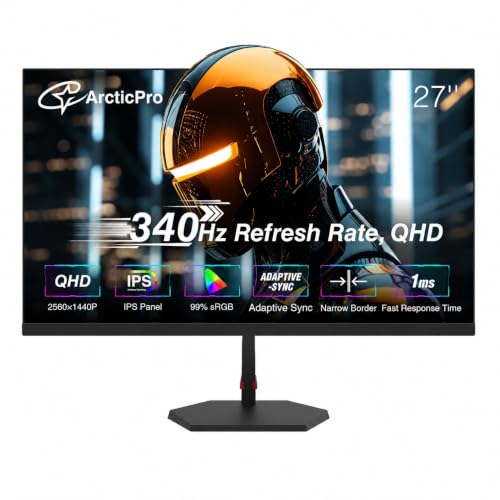 ArcticPro 27 Inch Gaming Monitor 340Hz 300Hz27" 340Hz QHD IPS24.17 x 2.68 x 14.27 Inches11.2 PoundsCheck on Amazon


Top 3 picks at a glance
Quick Picks
| Product | Best For | Price |
|---|---|---|
| AOC 27″ Q27G41ZE | Budget High-Refresh Gaming | Check on Amazon |
| ASUS TUF Gaming VG27AQM5A | Competitive Esports Performance | Check on Amazon |
| ArcticPro 27 Inch Gaming Monitor | Maximum Speed Value | Check on Amazon |
| Acer Nitro XV272U F3bmiiprx | Balanced Speed & Color | Check on Amazon |
| KTC 27 Inch H27E6 | High-Speed Fast IPS Visuals | Check on Amazon |
| Acer KB270U E2biipx | Minimalist Home Office | Check on Amazon |
| LG UltraGear 27G640A-B | Workstation Connectivity & Ergonomics | Check on Amazon |
| ASUS VA27AQ | Versatile Workstation Connectivity | Check on Amazon |
How We Compared
To evaluate the top 27-inch 1440p displays under $300, we prioritized criteria that directly affect your daily workflow and visual comfort. First, panel technology was key; In-Plane Switching (IPS) panels were selected for their wide 178-degree viewing angles and reliable color rendering. Second, we assessed physical footprints, including stand depth (typically 7 to 9 inches) and VESA 100x100mm mounting capability, ensuring compatibility with popular monitor arms. Finally, we weighted refresh rates (ranging from 100Hz up to 340Hz), port availability (HDMI, DisplayPort, VGA, and USB-C), and total cost efficiency to help you get the maximum performance for your dollar.
The 8 Best Picks
AOC 27″ Gaming Monitor QHD 260Hz Overclocked IPS NVIDIA G-SYNC Q27G41ZE
Ideal for home office workers who switch to fast-paced gaming after hours without cluttering their desk. AOC delivers a sleek 27-inch panel with a stunning 260Hz overclocked refresh rate at an accessible around $160 price point. Its ultra-narrow bezel design integrates smoothly into dual-monitor setups on standard 24-inch deep surfaces.
- Smooth 260Hz overclocked refresh rate for fluid visual motion.
- Highly accessible around $160 price tag for a high-refresh QHD panel.
- Included stand offers limited height adjustments out of the box.
When to skip: Skip if you require full ergonomic swivel and height adjustments without buying a separate VESA monitor arm.
ASUS TUF Gaming VG27AQM5A 27 Inch 1440p 300Hz G-SYNC Gaming Monitor
Built for competitive gamers who need rapid frame rates on a clean setup. The ASUS TUF Gaming VG27AQM5A provides a blisteringly fast 300Hz refresh rate and G-SYNC compatibility for around $270. Its sturdy base sits neatly on home workstations while providing built-in cable management pathways through the neck.
- Ultra-fast 300Hz refresh rate with G-SYNC compatibility.
- Durable build with smart cable management integration.
- Priced near the upper limit of the $300 budget.
When to skip: Skip if your daily desktop routine consists solely of basic office tasks and Web browsing.
ArcticPro 27 Inch Gaming Monitor 340Hz 300Hz, QHD 1440p Monitor, 1ms, IPS
Tailored for motion clarity enthusiasts seeking maximum panel speed on a mid-range budget. The ArcticPro offers an impressive peak 340Hz refresh rate, 1ms response time, and a bright QHD IPS panel for around $210, making it an exceptional speed bargain for compact home study desks.
- Peak 340Hz capabilities paired with rapid 1ms IPS response times.
- Strong performance-to-price ratio at around $210.
- On-screen display (OSD) interface feels somewhat basic.
When to skip: Skip if you prefer established major-brand ecosystems and highly refined OSD menu software.
Acer Nitro 27in QHD 2560×1440 IPS 300Hz Gaming Monitor XV272U F3bmiiprx
Designed for multi-use desks where crisp text rendering meets high-frame-rate gaming performance. The Acer Nitro XV272U F3bmiiprx features 2560×1440 QHD resolution on a Fast IPS panel running at 300Hz for around $200, blending rich colors with fluid motion across your entire workspace.
- Exceptional 300Hz speed available for under $200.
- Vibrant IPS colors with wide 178-degree viewing angles.
- Integrated speakers provide modest audio output with minimal bass.
When to skip: Skip if you rely heavily on internal monitor speakers for listening to music or editing audio.
KTC 27 Inch 320Hz Gaming Monitor 2K, 1440P Monitor 300Hz, Fast IPS, H27E6
Great for gamers and creators who require fluid 320Hz motion alongside crisp Fast IPS image clarity. KTC’s H27E6 delivers 2K 1440p resolution and rapid pixel transitions at around $240, making it a reliable centerpiece display for streamlined home office desks.
- Up to 320Hz Fast IPS performance for ultra-smooth rendering.
- Modern design aesthetic featuring slim top and side bezels.
- Included desktop stand requires extra depth clearance.
When to skip: Skip if you work on a shallow desk under 20 inches deep and do not plan on using a wall or desk mount.
Acer 27in QHD 2560×1440 IPS 100Hz Office Monitor KB270U E2biipx
Perfect for remote professionals seeking a clear, high-resolution workspace without paying for unnecessary gaming features. The Acer KB270U E2biipx brings crisp 2560×1440 QHD IPS visuals and a smooth 100Hz refresh rate to your desk for an entry-level price of around $120.
- Unbeatable around $120 entry price for a 27-inch 1440p IPS panel.
- 100Hz refresh rate reduces eye strain during long working hours.
- Refresh rate is capped at 100Hz for high-speed gaming.
When to skip: Skip if you regularly play fast-paced competitive shooter titles that demand high frame rates.
LG 27G640A-B 27-inch UltraGear QHD IPS Gaming Monitor
Created for demanding users who want modern laptop connectivity and full ergonomic adjustment options. LG’s UltraGear 27G640A-B packs 300Hz speed, 1ms response, HDMI 2.1, USB Type-C, VESA DisplayHDR 400, and a tilt/height/swivel/pivot stand for around $300.
- Versatile USB Type-C and HDMI 2.1 input choices.
- Fully adjustable stand supports vertical pivot and height tuning.
- Sits at the top around $300 price threshold for this budget class.
When to skip: Skip if you operate under a tight budget and do not require USB-C connectivity or fully adjustable ergonomics.
ASUS VA27AQ 27 Inch 1440P QHD IPS Computer Monitor
Engineered for hybrid home offices that need to connect legacy desktop towers alongside modern laptops. The ASUS VA27AQ offers a sharp 1440p IPS display with versatile connectivity including HDMI, DisplayPort, and VGA for around $180, ensuring easy integration with diverse hardware setups.
- Flexible input selection including legacy VGA, HDMI, and DisplayPort.
- Clear text rendering for spreadsheets, coding, and reading documents.
- Standard refresh rate performance designed primarily for productivity.
When to skip: Skip if your primary goal is competitive high-refresh-rate gaming rather than flexible everyday workstation connectivity.
Buying Guide
1. Refresh Rates vs. Everyday Productivity
When choosing a 27-inch 1440p monitor, refresh rates play a dual role. While standard 60Hz or 100Hz displays like the Acer KB270U (around $120) excel at everyday office tasks and light
Frequently asked questions
What resolution and pixel density should I expect from these monitors?
These monitors use 2560×1440 QHD resolution, which provides approximately 108 pixels per inch on a 27-inch screen. That density is intended to make text appear sharp and graphics detailed without requiring aggressive display scaling. It suits spreadsheets, coding, reading documents, and gaming while preserving a practical amount of desktop workspace.
Which models are easiest to position ergonomically?
The LG UltraGear 27G640A-B offers the most adjustment flexibility because its stand supports tilt, height adjustment, swivel, and pivot. The AOC model has limited height adjustment from its included stand, while the KTC stand requires extra depth clearance. The displays also support VESA 100x100mm mounting capability, which can help with monitor-arm setups.
Which monitor is best for connecting older and newer computers?
The ASUS VA27AQ is the most suitable for mixed hardware because it includes HDMI, DisplayPort, and VGA inputs. That combination can connect modern systems through HDMI or DisplayPort while also supporting legacy desktop towers through VGA. The LG model adds USB Type-C and HDMI 2.1, making it more useful for compatible laptops and newer devices.
Do all of these monitors include built-in speakers?
No, the article specifically mentions integrated speakers only for the Acer Nitro XV272U F3bmiiprx. Its speakers provide modest audio output with minimal bass, so they may be adequate for basic system audio but are not presented as a substitute for dedicated speakers or headphones. The article does not state speaker details for the other models.
How much desk space should I allow for a monitor stand?
Plan for a stand depth of approximately 7 to 9 inches, although the KTC H27E6 is specifically noted to require extra depth clearance. The article describes these monitors as suitable for desks measuring 24 to 30 inches deep, while recommending caution with shallow desks under 20 inches when using the KTC without a wall or desk mount.
Related guides
- Best Gaming PC for Overwatch 2: Ten Prebuilts Matched to Your Monitor (2026)
- Best Gaming PC for Baldur’s Gate 3: Matching CPU, VRAM and Storage to the Game (2026)
- Best Gaming PC for Apex Legends: Which Listings Fit a High-Refresh Setup (2026)
- Best RTX 3060 Gaming PCs: Eight Prebuilt Listings Compared by CPU, RAM and Cooling (2026)









