
Heavy graphics cards are getting longer and heavier than ever, and if you are gaming in a standard mid-tower on a desk or in a compact home office, you have probably seen the slow droop at the far end of the card. That sag is not just cosmetic. Over time it stresses the PCIe slot, the solder points, and the rear bracket screws, and it can lead to a loose connection, rattling fans, or an uneven look behind your tempered glass side panel. In a living room or bedroom setup where the case is front and center, that slight tilt stands out even more.
A good anti-sag bracket solves the problem in minutes without tools or case modifications. The best options are height-adjustable to match your case clearance, stable enough to stay put during desk vibrations, and discreet enough to blend with a black build or RGB lighting. For this roundup in early 2026, we focused on affordable, widely available brackets and stands that support triple-slot and longer RTX 40-series and similar heavy cards, comparing fit range, base stability, and everyday ease of use for real gaming setups.
As an Amazon Associate we earn from qualifying purchases at no extra cost to you.

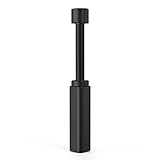
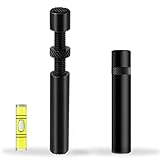


Our Top Picks
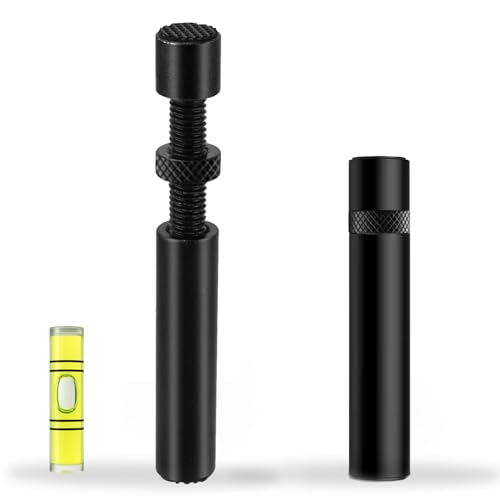 California JOS GPU Support Bracket Graphics Card BraceLarge6 x 4 x 0.6 Inches0.1 poundsCheck on Amazon


Top 3 picks at a glance
Quick Picks
| Product | Best for | Price |
|---|---|---|
| acer GPU Support Bracket, GPU Stand with Magnet Non-Slip Base,(L, 70-120mm) | Best Overall Magnetic Stability | Check on Amazon |
| Graphics Card GPU Brace Support, Video Card Sag Holder Bracket, GPU Stand (L, 74-120mm) | Best Simple Adjustable Stand | Check on Amazon |
| California JOS GPU Support Bracket Graphics Card Brace Anti-Sag Holder Height Adjustable Video Card Stand Large(1 PCAK, Black) | Best Budget Pick | Check on Amazon |
| Small Graphics Card GPU Brace Support, Video Card Sag Holder Bracket Adjustable Anti Mini GPU Sag Brace Aluminum Universal VGA Graphics Cards Holder | Best Mini Bracket for Compact Cases | Check on Amazon |
| GPU Support Bracket, Gpu Anti Sag Bracket, Graphics Card GPU Support, Video Card Sag Holder Bracket, GPU Stand, L(74mm-120mm) | Best Value L-Size Stand | Check on Amazon |
| TEAMOLA Tall GPU Support Bracket – Adjustable GPU Anti-Sag Stand GPU Mount | Best for Extra-Tall Clearance | Check on Amazon |
| JOYJOM GPU Support Bracket: Adjustable Aluminum Anti Sag GPU Bracket Video Graphics Card Support GPU Stand Holder GPU Support with Hidden Magnet and Anti-Slip Pad-19cm | Best Aluminum Build with Hidden Magnet | Check on Amazon |
| upHere Graphics Card GPU Support Bracket Aluminum Dual Brace Holder for Heavy GPUs with Adjustable Height (Black, 128mm / 5.04in ) | Best Dual-Brace for Heaviest Cards | Check on Amazon |
How We Compared
We started with compatibility and fit range, since case floor to GPU underside varies widely. Mid-towers typically need 70mm to 130mm of support height, while larger cases and vertical PSU shrouds can push that to 160mm or more. We prioritized brackets that offer tool-free telescoping adjustment and clear markings for the ranges listed, like 70-120mm, 74-120mm, and 128mm, so you can match your measured clearance without guesswork.
We also weighed stability and materials. A non-slip base and, where available, a magnetic base helps the stand stay planted on a steel PSU shroud during fan vibration or desk bumps. Aluminum construction generally holds up better than plastic for long-term load bearing under cards weighing 1.5 to 2.2 kg. Finally, we balanced price and practicality. All eight picks fall between around $3 and around $13, so we judged whether a higher price delivered meaningfully more height, a stronger base, or a more refined design for heavy gaming cards.
The 8 Best Picks
1. acer GPU Support Bracket, GPU Stand with Magnet Non-Slip Base,(L, 70-120mm)
This L-size acer stand is the most well-rounded option for most gamers. The 70-120mm telescoping range covers the majority of ATX mid-towers with a PSU shroud, and the combination of a magnet and non-slip base keeps it firmly planted without adhesives or screws. It is tall enough to support long triple-fan cards and provides a clean, low-profile look behind glass. If you want a set-and-forget solution that does not shift when you move your case for cleaning, this is where to start.
- Pro: Magnet plus non-slip base adds excellent stability on steel shrouds
- Pro: 70-120mm height range fits most standard gaming builds
- Con: L size may be short for extra-large full towers with high GPU mounting
When to skip: If your measured gap from shroud to GPU is over 120mm, choose a taller option like the TEAMOLA or the 19cm JOYJOM instead.
2. Graphics Card GPU Brace Support, Video Card Sag Holder Bracket, GPU Stand (L, 74-120mm)
A straightforward telescoping stand, this L-size brace focuses on simplicity and a secure fit. The 74-120mm adjustment window is ideal if you have already measured your clearance and know you sit in the 75mm to 115mm zone, which is common for ATX cases with a 25mm to 35mm gap above the shroud. Installation is as simple as extending the post, locking the height, and placing it near the sagging corner of the card. It has no extra bulk, so it stays out of the way of front intake airflow.
- Pro: Easy tool-free height adjustment within 74-120mm
- Pro: Compact footprint does not block airflow from bottom fans
- Con: No magnetic base, so placement matters more on smooth shrouds
When to skip: If your case has a non-magnetic aluminum shroud or you need anti-vibration anchoring, pick a magnetic model.
3. California JOS GPU Support Bracket Graphics Card Brace Anti-Sag Holder Height Adjustable Video Card Stand Large(1 PCAK, Black)
At around $3, the California JOS Large is the budget pick that still gets the fundamentals right. It is a height-adjustable single-post stand in black that disappears against most motherboards and shrouds, and the large base helps with balance under heavier cards. While it does not list a specific millimeter range on the package, it is sized as a Large single-post stand intended for standard ATX cases. For anyone who wants cheap insurance for the PCIe slot without spending more than a few dollars, it is hard to beat.
- Pro: Lowest price in the roundup at around $3
- Pro: Large base improves stability for its price class
- Con: No published height range, so you will need to test fit on arrival
When to skip: If you need a guaranteed fit for a tight or unusually tall clearance, choose a model with a stated 70-120mm or 74-120mm range.
4. Small Graphics Card GPU Brace Support, Video Card Sag Holder Bracket Adjustable Anti Mini GPU Sag Brace Aluminum Universal VGA Graphics Cards Holder
This mini aluminum brace is made for compact builds where a full-height stand will not fit. Micro-ATX and many Mini-ITX cases, plus some HTPC-style layouts, often have only 40mm to 70mm between the card and the shroud or case floor. The small, universal VGA holder uses an adjustable aluminum post to prop the card edge without crowding fans or cables. It is also a good secondary support if you already use a case bracket but want extra help at the far end of a long card.
- Pro: Aluminum build resists bending under long-term load
- Pro: Mini size fits compact and low-clearance cases
- Con: Too short for standard mid-towers needing 70mm or more
When to skip: If your clearance measures above 70mm, you will need an L-size 70-120mm or taller stand for proper contact.
5. GPU Support Bracket, Gpu Anti Sag Bracket, Graphics Card GPU Support, Video Card Sag Holder Bracket, GPU Stand, L(74mm-120mm)
This L-size stand hits the sweet spot between price and adjustability at around $5. The 74-120mm range mirrors other popular L stands, giving you about 46mm of usable adjustment to dial in firm contact without lifting the card too high. It is a universal, standalone post that works with most dual and triple-slot cards weighing up to about 2 kg, and the simple lock mechanism holds height without slipping. For budget-conscious builders who still want a defined fit range, it is a strong value.
- Pro: Clear 74-120mm range for predictable fitting
- Pro: Very competitive price at around $5
- Con: Basic design without magnetic anchoring
When to skip: If you regularly move your PC or have noticeable desk vibration, a magnetic base model will stay in place more reliably.
6. TEAMOLA Tall GPU Support Bracket – Adjustable GPU Anti-Sag Stand GPU Mount
When standard L stands top out too early, the TEAMOLA Tall bracket takes over. Priced at around $13, it is built for cases with higher GPU mounting, thick PSU shrouds, or raised motherboard trays where the gap can exceed 120mm. The tall telescoping post and wider stance provide firm vertical support for heavy 3.5-slot cards and longer 320mm to 360mm models that sag near the power connectors. It is also useful if you mount your GPU slightly higher to improve bottom intake airflow.
- Pro: Tall adjustable height covers clearances beyond typical L stands
- Pro: Sturdier stance for very heavy, long triple-fan cards
- Con: Highest price in this set at around $13
When to skip: If your gap is under 110mm, a standard 70-120mm stand will be cheaper and less obtrusive.
7. JOYJOM GPU Support Bracket: Adjustable Aluminum Anti Sag GPU Bracket Video Graphics Card Support GPU Stand Holder GPU Support with Hidden Magnet and Anti-Slip Pad-19cm
The JOYJOM stand blends a premium feel with practical anchoring. At around $7, you get an adjustable aluminum post with a hidden magnet and an anti-slip pad, plus a maximum height of 19cm (190mm) that comfortably handles taller cases and higher GPU positions. Aluminum keeps weight low while resisting compression, and the hidden magnet keeps the look clean while still gripping a steel shroud. It is a good middle ground if you want taller reach than 120mm without moving to the most expensive tier.
- Pro: 19cm max height covers both standard and tall builds
- Pro: Hidden magnet plus anti-slip pad for clean, stable placement
- Con: Taller post can look more visible in compact windowed cases
When to skip: If you prefer the smallest possible visual footprint and your clearance is under 120mm, a shorter L stand will be more discreet.
8. upHere Graphics Card GPU Support Bracket Aluminum Dual Brace Holder for Heavy GPUs with Adjustable Height (Black, 128mm / 5.04in )
For the heaviest cards, the upHere dual-brace design spreads the load across two contact points instead of one. At around $11, this aluminum holder adjusts to support wider, 2.5 to 3.5-slot coolers and cards that flex along a longer span. The fixed height reference of 128mm / 5.04in indicates its target range for mid-tower builds, and the adjustable mechanism lets you fine-tune contact pressure. If you run a flagship card with a large heatsink and notice flex near both the middle and the tail end, the dual brace adds reassuring, even support.
- Pro: Dual-brace spreads weight to reduce localized flex
- Pro: Aluminum construction for strength without excess weight
- Con: Larger footprint needs more clear space on the shroud
When to skip: If your PSU shroud is crowded with cables, drive cages, or bottom fans, measure for dual-post clearance first.
Buying Guide
How to Measure Your Clearance
Measure vertically from the top of your PSU shroud or case floor to the bottom edge of the graphics card at the corner farthest from the rear bracket, where sag is worst. Do it with the case upright and the card screwed into the rear slots. Most mid-towers fall between 70mm and 120mm, which is why so many L stands target 70-120mm or 74-120mm. If you measure 125mm to 190mm, look to a tall or 19cm option. Always leave 2mm to 3mm of adjustment headroom so you can make firm contact without jacking the card upward.
Stability, Materials, and Airflow
A stable base matters as much as height. Magnetic bases grip steel shrouds and resist sliding from fan vibration, while non-slip pads help on painted or textured surfaces. Aluminum posts handle continuous load better than thin plastic and are less likely to creep over months under a 1.8 kg card. Keep the post near the outer corner of the card and away from direct fan hubs so you do not restrict intake. If you use bottom intake fans, confirm the stand base does not sit on a fan grille or block a 120mm or 140mm fan.
Compatibility and When You Need More Than a Stand
Stand-style supports work with almost any case and GPU combination because they are universal and do not require a specific slot or motherboard header. They are ideal for triple-fan cards from 300mm to 360mm long and for builds where you do not want to install a case-mounted horizontal brace. If your card is exceptionally heavy or you have already noticed PCIe slot play, pair a stand with proper rear bracket screw tension and, if available, a motherboard with a reinforced PCIe slot. For vertical GPU mounts, use a stand only if your vertical kit leaves floor clearance for it.
Our Verdict
For most gaming PCs, the acer GPU Support Bracket with Magnet Non-Slip Base (L, 70-120mm) at around $8 is the safest all-around choice because it covers the common height window and stays put. Shoppers on a strict budget will be happy with the California JOS Large at around $3 or the around $5 L (74-120mm) stand, both of which deliver solid value. If your case is tall or your card is especially heavy, step up to the JOYJOM 19cm at around $7 for extra reach with a hidden magnet, or the upHere Aluminum Dual Brace at around $11 when you want load spread across two points.
FAQ
Do I need an anti-sag bracket for every heavy card?
Not every card strictly needs one, but cards over about 1.4 kg or longer than 310mm benefit from support. If you see even 1mm to 2mm of droop at the far end or the card wobbles when you gently tap the case, a bracket will reduce stress on the PCIe slot and keep the cooler level for better fan clearance.
What height anti-sag bracket should I buy?
Measure the gap as described above and match it to the bracket range. For 70-120mm or 74-120mm gaps, an L-size stand is correct. For gaps up to 128mm, the upHere reference at 128mm is a good anchor. For 130mm to 190mm, choose a tall option like TEAMOLA or the JOYJOM 19cm model so you are not maxing out the adjustment.
Will a magnetic base damage my components?
No, when used as designed on the steel PSU shroud, the small hidden or exposed magnets in these stands are not strong enough to affect your GPU, SSDs, or motherboard from a few centimeters away. Place the stand on the shroud, not on the motherboard or near exposed drive electronics, and use the non-slip pad for extra grip.
Can an anti-sag bracket affect temperatures or void my warranty?
A properly placed stand will not meaningfully change GPU temperatures if it does not block fans. Keep the contact point on the cooler shroud or frame near the sagging corner, not over a fan hub. Freestanding supports like these do not modify the card or case and do not void warranties, since they are non-invasive and removable.
Related guides
- Best Gaming PC for Overwatch 2: Ten Prebuilts Matched to Your Monitor (2026)
- Best Gaming PC for Baldur’s Gate 3: Matching CPU, VRAM and Storage to the Game (2026)
- Best Gaming PC for Apex Legends: Which Listings Fit a High-Refresh Setup (2026)
- Best RTX 3060 Gaming PCs: Eight Prebuilt Listings Compared by CPU, RAM and Cooling (2026)









