
When setting up a quiet, high-performance desktop workstation or custom gaming PC inside your home workspace, managing fan noise and thermal dissipation is essential. Modern Intel processors utilizing LGA 1700 sockets—spanning 12th, 13th, and 14th Gen chips—as well as newer LGA 1851 platforms suffer from a known mechanical issue: uneven pressure from standard independent loading mechanisms (ILM). Over time, the factory lever forces the center of the CPU downward, flexing the integrated heat spreader (IHS) and creating surface gaps between the chip and cooler cold plate.
Installing a dedicated contact frame solves this mechanical flaw by replacing the stock socket latch with a rigid pressure plate that distributes force evenly across all four edges of the CPU package. As desktop hardware demands continue into 2026, optimizing acoustic comfort and CPU temperatures without overspending comes down to smart component selection. We analyzed the top contact frames on the market—ranging in price from around $5 to around $24—to help you identify the best budget contact frame for Intel CPUs in your desk build.
As an Amazon Associate we earn from qualifying purchases at no extra cost to you.


Our Top Picks
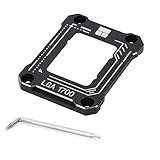
 Thermalright LGA1700-BCF Black 12/13/14 Generation Intel Anti-Bending Fastener2.13 x 2.76 x 0.24 inches0.02 PoundsCheck on Amazon


Top 3 picks at a glance
Quick Picks
| Product | Best For | Price |
|---|---|---|
| Thermalright LGA1700-BCF Black 12/13/14 Generation Intel Anti-Bending Fastener | Best Overall Value | Check on Amazon |
| Thermal Grizzly CPU Contact Frame Intel 1851 V1 | Best for Intel Core Ultra LGA1851 | Check on Amazon |
| Thermalright Intel 12th/13th Generation LGA1700 Curved Pressure Plate (Black) | Best for Standard LGA 1700 Builds | Check on Amazon |
| Thermalright LGA 1700 CPU Contact Frame | Best Minimalist Design | Check on Amazon |
| Thermal Grizzly CPU Contact Frame Intel 1700 LT | Best Premium Engineering on a Budget | Check on Amazon |
| Jungle Leoaprd CPU Contact Frame for LGA 1700 Retrofit Kit | Best Heavy-Duty All-Aluminum Frame | Check on Amazon |
| Thermalright Intel 12th/13th Generation LGA1700 Anti-Bending Buckle (around $5) | Best Ultra-Budget Pick | Check on Amazon |
| AVERZELLA Anti-Bending Contact Frame Retrofit Kit (Silvery) | Best Complete Starter Kit | Check on Amazon |
How We Compared
We selected and ranked these contact frames based on structural rigidity, socket compatibility, manufacturing precision, included installation accessories, and overall price-to-performance value. Each frame was evaluated on its ability to sit flush against the motherboard without contacting sensitive PCB traces or surface-mount capacitors. We prioritized frames constructed from CNC-machined aluminum with anodized non-conductive finishes. Our evaluation covers products priced across a tight budget spectrum (around $5 to around $24), ensuring options exist for both standard LGA 1700 socket motherboards and current LGA 1851 platforms. Furthermore, we checked included hardware like mounting screws, Torx or hex keys, and bundled thermal compounds (such as 2g packs with 5.15 W/mK conductivity ratings) to ensure easy out-of-box installation.
The 8 Best Picks
1. Thermalright LGA1700-BCF Black 12/13/14 Generation Intel Anti-Bending Fastener
Designed for desktop builders using Intel 12th, 13th, or 14th Generation processors, this full-fitting fixed contact frame replaces the stock latch mechanism to prevent mechanical bending. Crafted from lightweight aluminum with a non-marking anodized finish, it provides uniform perimeter clamping across LGA 1700 CPU sockets. It is ideal for system builders looking for maximum structural stability at an ultra-low price point of around $7.
- Full-fitting fixed design eliminates non-uniform pressure points on the IHS
- Affordable around $7 price tag provides exceptional cooling optimization value
- Lacks bundled thermal paste, requiring you to purchase compound separately
When to skip: Skip this model if you are assembling a system on the newer Intel LGA 1851 socket platform.
2. Thermal Grizzly – CPU Contact Frame Intel 1851 V1
Engineered specifically for Intel Core Ultra Series desktop CPUs utilizing LGA1851 sockets, this Thermal Grizzly frame is built for enthusiast systems requiring precision torque alignment. At around $24, it sits at the high end of the budget spectrum, but offers custom engineering designed to handle the specific layout and pin densities of the LGA 1851 architecture. It is built for builders upgrading to the latest Intel Core Ultra desktop hardware.
- Tailored alignment profile specifically for Intel Core Ultra LGA1851 sockets
- Precision-engineered contact edges optimize cooler contact pressure
- Higher price of around $24 compared to standard LGA 1700 brackets
When to skip: Skip this if you are running 12th, 13th, or 14th Gen Intel CPUs on an LGA 1700 motherboard, as the mounting pattern will not fit.
3. Thermalright Intel 12th/13th Generation LGA1700 Anti-Bending Buckle (Curved Pressure Plate)
Featuring a contoured, curved pressure plate, this around $7 Thermalright stress bending correction fixer is designed to contour perfectly along the perimeter of Intel 12th and 13th Gen chips. The custom curve ensures smooth pressure redistribution without leaving traces or scratches on the motherboard socket assembly. It is best suited for PC builders replacing an older bowed latch on an existing LGA 1700 system.
- Curved pressure plate design contours precisely along CPU housing
- Trace-free installation protects motherboard surface coatings
- Documentation is minimal for first-time hardware builders
When to skip: Skip if you prefer a flat profile frame or need included thermal compound for immediate installation.
4. Thermalright LGA 1700 CPU Contact Frame
This straightforward around $7 variant from Thermalright offers a clean, understated aesthetic for stealthy blacked-out PC builds. Formed from CNC aluminum, it delivers exact dimensional tolerances for LGA 1700 motherboards, securing the processor flat against the socket pins to promote optimum thermal transfer to air or liquid coolers. It is tailor-made for builders who want a simple, reliable anti-bending bracket without excess frills.
- Clean minimalist look integrates seamlessly into dark motherboards
- Durable CNC aluminum structure prevents flexing under heavy cooler mounting force
- Does not include additional thermal grease or specialized mounting tools
When to skip: Skip if you are looking for a complete retrofit kit that includes thermal grease in the box.
5. Thermal Grizzly CPU Contact Frame Intel 1700 LT
The LT version of Thermal Grizzly’s Intel 1700 Contact Frame brings high-end German thermal engineering down to an accessible around $8 price point. Designed for LGA 1700 sockets, this frame optimizes contact pressure across Intel 12th, 13th, and 14th Gen CPUs while maintaining strict non-conductive safety clearances around socket capacitors. It is ideal for performance-oriented builders seeking brand-name precision on a tight budget.
- Engineered profile provides optimized contact pressure for lower thermal resistance
- Excellent structural quality from a recognized thermal performance brand at just around $8
- Requires cautious step-by-step torquing during installation to ensure even seating
When to skip: Skip if you are building an Intel Core Ultra system on the LGA 1851 socket.
6. Jungle Leoaprd CPU Contact Frame for LGA 1700 Retrofit Kit
Constructed completely from machined aluminum, the Jungle Leoaprd Retrofit Kit is an all-aluminum BCF bracket tailored for Intel 12th, 13th, and 14th Gen processors. Selling for around $7, this frame acts as a heavy-duty stress relief plate that secures the CPU along all four sides to stop socket warp. It is designed for system builders looking for an alternative all-metal anti-bending solution.
- Solid all-aluminum construction offers high torsional rigidity
- Direct replacement fit for LGA 1700 motherboard sockets
- Brand recognition is lower compared to established thermal accessory manufacturers
When to skip: Skip if you prefer sticking strictly to established cooling brands with extensive community installation guides.
7. Thermalright Intel 12th/13th Generation LGA1700 Anti-Bending Buckle (around $5)
Priced at just around $5, this variant is the absolute lowest-cost entry on our list, delivering essential CPU stress bending correction without breaking the bank. It incorporates Thermalright’s non-marking installation geometry and curved pressure plate physics to maintain flat CPU contact under heavy AIO or air cooler mounting pressure. It is best for ultra-budget home office PC builds where every dollar counts.
- Lowest price point on the market at only around $5
- Effective stress correction preserves heat spreader flatness
- Basic packaging without extra accessories or compound
When to skip: Skip if you want a complete installation package that includes high-performance thermal paste.
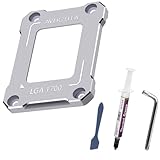
8. AVERZELLA Anti-Bending Contact Frame Retrofit Kit
The AVERZELLA Retrofit Kit is a comprehensive around $8 bundle featuring a CNC aluminum CPU buckle for LGA 1700 motherboards in a sleek silvery finish. Unlike standalone frames, this kit includes a 2g syringe of CPU thermal paste rated at 5.15 W/mK thermal conductivity along with mounting hardware. It is perfect for first-time builders who need all mounting tools and paste included in one box.
- Complete kit includes 2g of 5.15 W/mK thermal compound and mounting hardware
- Distinct silvery CNC aluminum finish adds contrast to custom desktop motherboards
- Silver color may clash with all-black stealth motherboard aesthetics
When to skip: Skip if you already own high-grade thermal paste and prefer a blacked-out frame aesthetic.
Buying Guide
Socket Compatibility: LGA 1700 vs. LGA 1851
The most crucial factor when selecting a contact frame is matching the specific socket generation of your motherboard. Intel 12th, 13th, and 14th Generation desktop CPUs utilize the LGA 1700 socket, which shares identical outer dimensions across motherboards. However, Intel Core Ultra Series processors transition to the LGA 1851 socket. While similar in overall footprint, LGA 1851 features localized pin changes and altered height tolerances. Installing an LGA 1700 frame on an LGA 1851 socket (or vice versa) can prevent proper socket contact or damage motherboard pins. Always verify your motherboard socket specs before purchasing.
Material Construction and Anodized Insulation
Budget contact frames are primarily manufactured from 6061 CNC-machined aluminum alloy. Because aluminum is electrically conductive, high-quality contact frames feature an anodized surface coating or insulated contact pads on the underside. This electrical isolation prevents short circuits if the frame sits near sensitive surface-mount devices (SMDs) surrounding the CPU socket. Look for frames advertised with non-marking, trace-free, or fully insulated mounting points to ensure complete safety for your motherboard components.
Bundled Accessories and Thermal Compound Specs
While standalone contact frames cost between around $5 and around $7, kits like the AVERZELLA at around $8 include supplementary thermal interface materials. Pay attention to included thermal grease specifications: standard bundled pastes offer conductivities around 5.15 W/mK, which is suitable for standard office and mid-range desktop builds. If you purchase a standalone frame, remember to factor in the separate cost of high-grade thermal compound (typically 8.5 W/mK to 14.2 W/mK) for your installation.
Our Verdict
For the vast majority of Intel 12th, 13th, and 14th Gen desktop builds, the Thermalright LGA1700-BCF Black (around $7) remains the standard recommendation, delivering proven alignment and structural rigidity at an unbeatable price. Builders looking for an all-in-one starter kit complete with thermal paste will find the AVERZELLA Anti-Bending Contact Frame Retrofit Kit (around $8) an exceptional value. Finally, if you are building on the newer Intel Core Ultra desktop platform, the Thermal Grizzly CPU Contact Frame Intel 1851 V1 (around $24) provides the exact geometry needed for optimal CPU mounting force.
FAQ
What is an Intel CPU contact frame and why do I need one?
An Intel CPU contact frame is an aftermarket metal bracket that replaces the standard lever-operated latching mechanism (ILM) on modern motherboards. Stock latches apply heavy center-focused pressure that can physically bend the CPU integrated heat spreader (IHS). A contact frame secures the CPU uniformly along all edges, keeping the surface flat so your cooler cold plate makes full contact across the chip.
Will installing a contact frame void my motherboard or CPU warranty?
Replacing the factory ILM requires unbolting four original socket screws using a Torx driver. While removing the factory latch does not automatically break software warranties, motherboard manufacturers may deny hardware RMAs if physical pin damage or trace scratches occur during user installation. Retain your original factory latch mechanism and original screws in case you ever need to restore the motherboard to its stock configuration for service.
Do budget contact frames work as effectively as expensive models?
Yes. Budget frames priced under $10 perform identically to expensive enthusiast frames because both rely on precise CNC-machined aluminum tolerances to hold the CPU flat. The small price variance between a around $5 frame and a around $24 model is primarily driven by brand licensing, specialized socket support (such as LGA 1851 design), included thermal paste bundles, or localized hardware distribution costs.
How tightly should I torque the screws on a contact frame?
When installing a contact frame, tighten the screws in a star pattern (criss-cross) gradually, applying equal turns to each corner. Screws should be tightened until you meet firm mechanical resistance—finger-tight using the short end of an L-shaped wrench is sufficient. Over-tightening can deform the motherboard PCB or cause memory channel detection issues, while under-tightening will lead to uneven thermal contact.
Related guides
- Best Gaming PC for Overwatch 2: Ten Prebuilts Matched to Your Monitor (2026)
- Best Gaming PC for Baldur’s Gate 3: Matching CPU, VRAM and Storage to the Game (2026)
- Best Gaming PC for Apex Legends: Which Listings Fit a High-Refresh Setup (2026)
- Best RTX 3060 Gaming PCs: Eight Prebuilt Listings Compared by CPU, RAM and Cooling (2026)









